Learning Objectives#
- Design and implement a two-tier hierarchical campus network featuring a multilayer distribution switch and Layer 2 access switches.
- Configure Switch Virtual Interfaces (SVIs) on a Cisco Catalyst 3560 to act as centralized Layer 3 default gateways for campus VLANs.
- Activate Cisco Express Forwarding (CEF) and hardware inter-VLAN routing using the global
ip routingcommand. - Configure IEEE 802.1Q trunking with explicit
dot1qencapsulation, custom Native VLAN 99, and pruned allowed VLAN lists. - Diagnose and remediate common campus distribution failures, including disabled IP routing, trunk pruning omissions, and access port VLAN mismatches.
Prerequisites#
- Completion of PTL-0009: VLAN Segmentation and Access Port Configuration.
- Completion of PTL-0018: Dynamic Trunking Protocol and Native VLAN Security.
- Completion of PTL-0019: Layer 3 Switch SVIs and Routed Ports.
- Familiarity with Catalyst switch CLI syntax, SVI autostate mechanics, and inter-VLAN routing principles.
Topology#
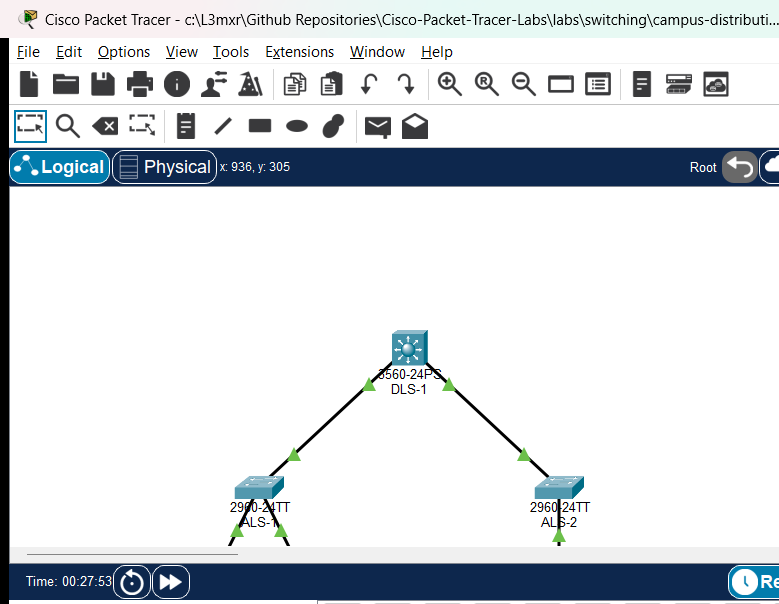
The campus network topology implements a classic two-tier hierarchical model. Multilayer distribution switch DLS-1 aggregates traffic from access switches ALS-1 (Faculty and Student lab workstations) and ALS-2 (Campus Application Server farm) across redundant 802.1Q Gigabit trunk uplinks.
                                  [ DLS-1: Catalyst 3560-24PS ]
                              (Multilayer Distribution Switch & Core SVI Gateways)
                                SVI 10: 192.168.10.1/24  |  SVI 20: 192.168.20.1/24
                                SVI 30: 192.168.30.1/24  |  SVI 99: 192.168.99.1/24
                                     (Gi0/1)                   (Gi0/2)
                                        |                         |
                                802.1Q Trunk Uplink       802.1Q Trunk Uplink
                              (VLANs 10,20,30,99 Native 99) (VLANs 10,20,30,99 Native 99)
                                        |                         |
                                     (Gi0/1)                   (Gi0/1)
                           [ ALS-1: Catalyst 2960 ]      [ ALS-2: Catalyst 2960 ]
                             (Building A Access)           (Server Farm Access)
                            (Fa0/1)        (Fa0/2)               (Fa0/1)
                               |              |                     |
                            VLAN 10        VLAN 20               VLAN 30
                               |              |                     |
                          [PC-Faculty]   [PC-Student]          [Campus-Srv]
                        192.168.10.10/24 192.168.20.10/24      192.168.30.10/24
Addressing Table#
| Device | Interface / Role | IP Address | Subnet Mask | Default Gateway | Description |
|---|---|---|---|---|---|
| DLS-1 | Vlan10 (SVI) | 192.168.10.1 | 255.255.255.0 | N/A | Faculty Department Gateway |
| DLS-1 | Vlan20 (SVI) | 192.168.20.1 | 255.255.255.0 | N/A | Student Department Gateway |
| DLS-1 | Vlan30 (SVI) | 192.168.30.1 | 255.255.255.0 | N/A | Server Farm Gateway |
| DLS-1 | Vlan99 (SVI) | 192.168.99.1 | 255.255.255.0 | N/A | Management SVI & Native VLAN Gateway |
| ALS-1 | Vlan99 (SVI) | 192.168.99.11 | 255.255.255.0 | 192.168.99.1 | Building A Switch Management |
| ALS-2 | Vlan99 (SVI) | 192.168.99.12 | 255.255.255.0 | 192.168.99.1 | Server Farm Switch Management |
| PC-Faculty | FastEthernet0 | 192.168.10.10 | 255.255.255.0 | 192.168.10.1 | Academic Faculty Client (VLAN 10) |
| PC-Student | FastEthernet0 | 192.168.20.10 | 255.255.255.0 | 192.168.20.1 | Student Lab Client (VLAN 20) — Faulted in starter |
| Campus-Srv | FastEthernet0 | 192.168.30.10 | 255.255.255.0 | 192.168.30.1 | Campus Application Server (VLAN 30) |
Lab Tasks#
- Audit Access Switch Port Configurations: Inspect access switchport configurations on
ALS-1. Verify thatFa0/1is assigned toVLAN 10and diagnose whyPC-Studentconnected toFa0/2cannot reach its default gateway (192.168.20.1). - Remediate Access Port VLAN Assignment: Reconfigure
ALS-1 Fa0/2as an access port inVLAN 20and verify local intra-VLAN gateway ping reachability. - Investigate Multilayer Switch Inter-VLAN Routing: Test ping reachability between
PC-Faculty(192.168.10.10) andPC-Student(192.168.20.10). Determine why inter-VLAN forwarding fails despite active SVIs onDLS-1. - Activate Hardware IP Routing on DLS-1: Execute
show ip routeonDLS-1to confirm routing status. Issue the globalip routingcommand to activate Layer 3 hardware routing and populate the IPv4 routing table. - Audit Distribution-to-Access Trunk Uplinks: Run
show interfaces trunkonDLS-1andALS-2. Diagnose why attempts to communicate withCampus-Srv(192.168.30.10) fail, and identify omitted VLANs in the trunk allowed list. - Remediate Trunk Allowed Lists: Update
ALS-2 Gi0/1trunk allowed list to includeVLAN 30using non-destructive syntax. - Verify Multi-VLAN Campus Reachability: Validate end-to-end connectivity across all campus user and server VLANs, confirming full routing convergence and management plane accessibility.
Configuration Walkthrough#
1. Diagnosing Fault 1: Access Port Misassignment on ALS-1#
In the starter state, test default gateway reachability from PC-Student:
PC> ping 192.168.20.1
Pinging 192.168.20.1 with 32 bytes of data:
Request timed out.
Request timed out.
Request timed out.
Request timed out.

Ping statistics for 192.168.20.1:
    Packets: Sent = 4, Received = 0, Lost = 4 (100% loss)
Inspect switchport assignments on ALS-1:
ALS-1# show vlan brief
VLAN Name                             Status    Ports
---- -------------------------------- --------- -------------------------------
1    default                          active    Fa0/2, Fa0/3, Fa0/4, Fa0/5...
10   Faculty                          active    Fa0/1
20   Students                         active
30   ServerFarm                       active
99   Management                       active
Notice that Fa0/2 is still assigned to the default VLAN 1 instead of VLAN 20! PC-Student is isolated in an unrouted broadcast domain.
Remediation:
ALS-1# configure terminal
ALS-1(config)# interface FastEthernet0/2
ALS-1(config-if)# switchport mode access
ALS-1(config-if)# switchport access vlan 20
ALS-1(config-if)# exit
ALS-1(config)# end
ALS-1# copy running-config startup-config
Verify that PC-Student can now reach its local SVI gateway:
PC> ping 192.168.20.1
Reply from 192.168.20.1: bytes=32 time<1ms TTL=255
2. Diagnosing Fault 2: Disabled Global IP Routing on DLS-1#
Now attempt an inter-VLAN ping from PC-Faculty (192.168.10.10) to PC-Student (192.168.20.10):
PC> ping 192.168.20.10
Pinging 192.168.20.10 with 32 bytes of data:
Request timed out.
Request timed out.
Request timed out.
Request timed out.
Both clients can ping their respective SVI gateways (192.168.10.1 and 192.168.20.1). However, cross-VLAN packets are dropped by DLS-1. Inspect the routing table on DLS-1:
DLS-1# show ip route
IP routing not enabled
Cisco Catalyst multilayer switches do not perform Layer 3 forwarding by default. When ip routing is disabled, the switch responds only to packets directed to its own SVI IP addresses and refuses to forward packets between different SVIs.
Remediation:
DLS-1# configure terminal
DLS-1(config)# ip routing
DLS-1(config)# end
DLS-1# copy running-config startup-config
Verify that the IPv4 routing table is now populated with connected SVI subnets:
DLS-1# show ip route
Codes: C - connected, S - static, R - RIP, M - mobile, B - BGP
       D - EIGRP, EX - EIGRP external, O - OSPF, IA - OSPF inter area

Gateway of last resort is not set

C    192.168.10.0/24 is directly connected, Vlan10
C    192.168.20.0/24 is directly connected, Vlan20
C    192.168.30.0/24 is directly connected, Vlan30
C    192.168.99.0/24 is directly connected, Vlan99
3. Diagnosing Fault 3: Trunk Allowed-List Omission on ALS-2#
With IP routing activated on DLS-1, test access from PC-Faculty to campus server Campus-Srv (192.168.30.10):
PC> ping 192.168.30.10
Pinging 192.168.30.10 with 32 bytes of data:
Request timed out.
Request timed out.
Request timed out.
Request timed out.
Inspect the 802.1Q trunk uplink on ALS-2:
ALS-2# show interfaces trunk
Port        Mode         Encapsulation  Status        Native vlan
Gig0/1      on           802.1q         trunking      99

Port        Vlans allowed on trunk
Gig0/1      10,20,99
Notice that Vlan 30 is missing from the allowed VLAN list on ALS-2 Gi0/1! Frames tagged for VLAN 30 transmitted by DLS-1 are blocked at the ingress of ALS-2.
Remediation:
ALS-2# configure terminal
ALS-2(config)# interface GigabitEthernet0/1
ALS-2(config-if)# switchport trunk allowed vlan add 30
ALS-2(config-if)# exit
ALS-2(config)# end
ALS-2# copy running-config startup-config
Verify the updated trunk allowed list:
ALS-2# show interfaces trunk
Port        Vlans allowed on trunk
Gig0/1      10,20,30,99
Verification#
1. Multilayer Switch Hardware Routing Verification#
Confirm on DLS-1 that all four departmental and management SVIs are active in the routing table:
DLS-1# show ip route connected
C    192.168.10.0/24 is directly connected, Vlan10
C    192.168.20.0/24 is directly connected, Vlan20
C    192.168.30.0/24 is directly connected, Vlan30
C    192.168.99.0/24 is directly connected, Vlan99
2. 802.1Q Trunk Uplink Consistency Audit#
Verify trunk encapsulation, native VLAN 99, and allowed VLAN lists across all switches:
DLS-1# show interfaces trunk
Port        Mode         Encapsulation  Status        Native vlan
Gig0/1      on           802.1q         trunking      99
Gig0/2      on           802.1q         trunking      99

Port        Vlans allowed on trunk
Gig0/1      10,20,30,99
Gig0/2      10,20,30,99
3. Intra-VLAN Default Gateway Reachability#
Test reachability from each endpoint to its respective local SVI gateway:
PC-Faculty> ping 192.168.10.1
Packets: Sent = 4, Received = 4, Lost = 0 (0% loss)

PC-Student> ping 192.168.20.1
Packets: Sent = 4, Received = 4, Lost = 0 (0% loss)

Campus-Srv> ping 192.168.30.1
Packets: Sent = 4, Received = 4, Lost = 0 (0% loss)
4. End-to-End Inter-VLAN Reachability#
Verify client-to-server data plane delivery across distribution SVIs:
PC-Faculty> ping 192.168.30.10
Pinging 192.168.30.10 with 32 bytes of data:
Reply from 192.168.30.10: bytes=32 time=1ms TTL=127
Reply from 192.168.30.10: bytes=32 time=1ms TTL=127
Reply from 192.168.30.10: bytes=32 time=1ms TTL=127
Reply from 192.168.30.10: bytes=32 time=1ms TTL=127

Ping statistics for 192.168.30.10:
    Packets: Sent = 4, Received = 4, Lost = 0 (0% loss)
Verify student client-to-server reachability:
PC-Student> ping 192.168.30.10
Pinging 192.168.30.10 with 32 bytes of data:
Reply from 192.168.30.10: bytes=32 time=1ms TTL=127
Reply from 192.168.30.10: bytes=32 time=1ms TTL=127
Reply from 192.168.30.10: bytes=32 time=1ms TTL=127
Reply from 192.168.30.10: bytes=32 time=1ms TTL=127

Ping statistics for 192.168.30.10:
    Packets: Sent = 4, Received = 4, Lost = 0 (0% loss)
Verify cross-department client-to-client reachability:
PC-Faculty> ping 192.168.20.10
Pinging 192.168.20.10 with 32 bytes of data:
Reply from 192.168.20.10: bytes=32 time=1ms TTL=127
Reply from 192.168.20.10: bytes=32 time=1ms TTL=127
Reply from 192.168.20.10: bytes=32 time=1ms TTL=127
Reply from 192.168.20.10: bytes=32 time=1ms TTL=127

Ping statistics for 192.168.20.10:
    Packets: Sent = 4, Received = 4, Lost = 0 (0% loss)
Notice that TTL is 127 (decremented once by DLS-1 hardware routing engine), confirming Layer 3 forwarding.
Verification Criteria Checklist#
| Test ID | Objective | Expected Output | Status |
|---|---|---|---|
| POS-01 | DLS-1 Hardware Routing & SVI Audit | Connected routes for 10.0, 20.0, 30.0, 99.0 present in routing table | PASS |
| POS-02 | Trunking & Native VLAN Consistency | 802.1Q trunks active on Gi0/1 and Gi0/2, Native 99, allowed 10,20,30,99 | PASS |
| POS-03 | Faculty Local Gateway Reachability | 0% packet loss (PC-Faculty -> DLS-1 Vlan10 192.168.10.1) | PASS |
| POS-04 | Student Local Gateway Reachability | 0% packet loss (PC-Student -> DLS-1 Vlan20 192.168.20.1) | PASS |
| POS-05 | Faculty to Server Inter-VLAN Ping | 0% packet loss (PC-Faculty -> Campus-Srv 192.168.30.10) | PASS |
| POS-06 | Student to Server Inter-VLAN Ping | 0% packet loss (PC-Student -> Campus-Srv 192.168.30.10) | PASS |
| POS-07 | Inter-VLAN Client-to-Client Ping | 0% packet loss (PC-Faculty -> PC-Student 192.168.20.10) | PASS |
Troubleshooting#
- Inter-VLAN Forwarding Fails While SVI Pings Succeed:
- Verify that global routing is enabled using
show ip route. If the switch outputsIP routing not enabled, enter global configuration mode and executeip routing. - Check SVI line protocol status with
show ip interface brief. An SVI will remain down if no physical ports associated with that VLAN are active (SVI autostate).
- Verify that global routing is enabled using
- Endpoint Receives "Request Timed Out" on Local Gateway:
- Check the access switchport assignment with
show mac address-tableandshow interfaces switchport. - Ensure the access port is explicitly assigned to the correct VLAN ID (
switchport access vlan <id>). - Verify physical cabling and speed/duplex negotiation.
- Check the access switchport assignment with
- Traffic Dropped on Specific VLAN Across Trunk:
- Run
show interfaces trunkon both ends of the inter-switch link. - Check the
Vlans allowed on trunkandVlans allowed and active in management domainsections. - If a VLAN was pruned, use
switchport trunk allowed vlan add <id>rather than replacing the list. - Verify that the Native VLAN matches on both switches to prevent STP inconsistencies and frame misdirection.
- Run
Key Takeaways#
- Hardware-Accelerated Routing: Multilayer switches route packets at Layer 3 using ASIC-based CEF hardware tables, achieving significantly higher throughput than traditional router-on-a-stick architectures.
- The
ip routingRequirement: Cisco Catalyst multilayer switches require the globalip routingcommand to activate Layer 3 packet processing. Without it, the switch behaves strictly as a Layer 2 device. - SVI Autostate Rules: An SVI transitions to the
up/upoperational state only when at least one access port or trunk carrying that VLAN is in the forwarding state. - Trunk Allowed-List Pruning: Explicitly pruning allowed VLANs enhances campus security and reduces broadcast radiation, but requires disciplined change management to avoid accidental service outages.
References#
- Cisco Catalyst 3560 Software Configuration Guide: Configuring Inter-VLAN Routing
- Cisco Technical Support: How to Configure Inter-VLAN Routing on Catalyst 3560/3750 Series Switches
- Cisco Validated Design: Campus Network for High Availability Design Guide
Files and Validation Status#
assets/starter.pkt: Initial topology with disabled IP routing on DLS-1, misassigned access port on ALS-1, and pruned VLAN 30 on ALS-2 trunk.assets/completed.pkt: Fully functional campus distribution and access design with active hardware routing and verified inter-VLAN forwarding.assets/topology.png: Visual network diagram illustrating distribution and access switch layout.assets/test_evidence.json: Automated test execution results captured via Packet Tracer MCP bridge.configs/DLS-1.txt: Baseline running configuration for Catalyst 3560 Distribution Switch.configs/ALS-1.txt: Baseline running configuration for Building A Access Switch.configs/ALS-2.txt: Baseline running configuration for Server Farm Access Switch.verification.md: Comprehensive verification matrix detailing positive, negative, and reload tests.