Learning Objectives#
- Analyze Cisco Dynamic Trunking Protocol (DTP) operational states and evaluate the security risks of unmanaged dynamic negotiation.
- Contrast the five switchport operational states:
access,trunk,dynamic auto,dynamic desirable, andnonegotiate. - Eliminate DTP frame spoofing and negotiation vulnerabilities by converting inter-switch links to unconditional trunks with
switchport nonegotiate. - Evaluate security vulnerabilities surrounding default VLAN 1 (such as double-tagging VLAN hopping) and isolate untagged traffic using a dedicated, unused Native VLAN 999.
- Diagnose native VLAN mismatches using Cisco Discovery Protocol (CDP) syslog alerts and Spanning Tree Protocol (PVST+) inconsistent port blocking states.
- Restrict forwarded broadcast and unicast traffic by implementing explicit allowed VLAN lists (
switchport trunk allowed vlan). - Verify intra-VLAN cross-switch reachability across hardened trunks while confirming strict Layer 2 isolation between distinct VLANs without a router.
Prerequisites#
- Completion of PTL-0009: VLAN Segmentation and Access Ports or equivalent understanding of IEEE 802.1Q frame tagging.
- Familiarity with Cisco IOS interface configuration and Layer 2 broadcast domain concepts.
- Basic understanding of Cisco Discovery Protocol (CDP) and Per-VLAN Spanning Tree Plus (PVST+).
Topology#
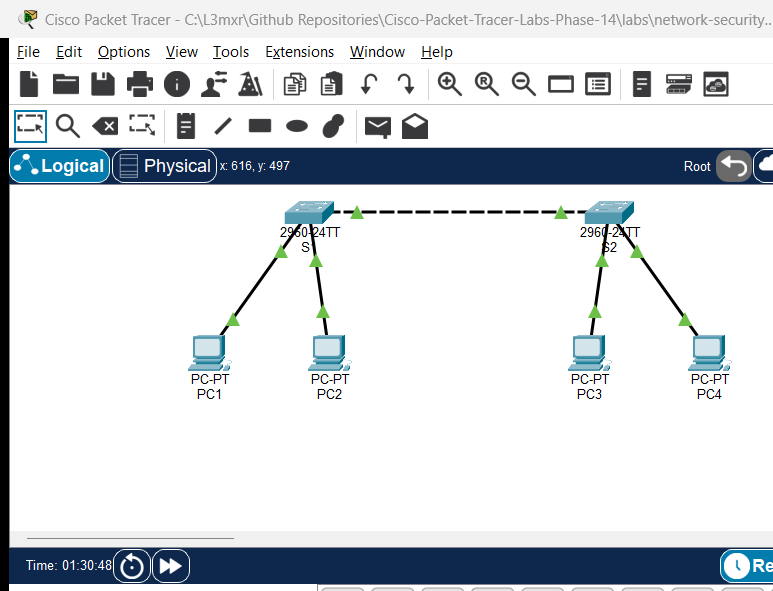
The topology consists of two Cisco Catalyst 2960-24TT Layer 2 switches (S1 and S2) connected via an inter-switch link on interface GigabitEthernet0/1. Each switch connects two workstations representing two separate departmental broadcast domains:
- VLAN 10 (Staff): Host
PC1onS1(Fa0/10) and hostPC3onS2(Fa0/10). - VLAN 20 (Management): Host
PC2onS1(Fa0/20) and hostPC4onS2(Fa0/20). - VLAN 999 (Native_Unused): Dedicated, unrouted VLAN assigned as the native VLAN across the
Gi0/1trunk link.
[PC1: 192.168.10.10] --- Fa0/10 [      ] Fa0/10 --- [PC3: 192.168.10.20]
  (VLAN 10 - Staff)             [  S1  ]              (VLAN 10 - Staff)
                                [      ] Gi0/1
                                   ||   ====== Inter-Switch Link
                                   ||   ====== (GigabitEthernet0/1)
[PC2: 192.168.20.10] --- Fa0/20 [      ] Gi0/1
  (VLAN 20 - Mgmt)              [  S2  ]
                                [      ] Fa0/20 --- [PC4: 192.168.20.20]
                                                      (VLAN 20 - Mgmt)
Addressing Table#
| Device | Interface | IP Address | Subnet Mask | VLAN | Default Gateway |
|---|---|---|---|---|---|
| S1 | Gi0/1 | Unnumbered (Trunk) | N/A | 10, 20, 999 (Native) | N/A |
| S1 | Fa0/10 | Unnumbered (Access) | N/A | 10 | N/A |
| S1 | Fa0/20 | Unnumbered (Access) | N/A | 20 | N/A |
| S2 | Gi0/1 | Unnumbered (Trunk) | N/A | 10, 20, 999 (Native) | N/A |
| S2 | Fa0/10 | Unnumbered (Access) | N/A | 10 | N/A |
| S2 | Fa0/20 | Unnumbered (Access) | N/A | 20 | N/A |
| PC1 | FastEthernet0 | 192.168.10.10 | 255.255.255.0 | 10 (Staff) | N/A |
| PC2 | FastEthernet0 | 192.168.20.10 | 255.255.255.0 | 20 (Management) | N/A |
| PC3 | FastEthernet0 | 192.168.10.20 | 255.255.255.0 | 10 (Staff) | N/A |
| PC4 | FastEthernet0 | 192.168.20.20 | 255.255.255.0 | 20 (Management) | N/A |
Lab Tasks#
- Verify Default DTP Negotiation (Experiment A - NEG-01):
- Connect S1 and S2 via
GigabitEthernet0/1in factory-default state (dynamic auto). - Verify with
show interfaces GigabitEthernet0/1 switchportthat administrative mode isdynamic autoand operational mode isstatic access. Confirm that twodynamic autoports do not negotiate a trunk.
- Connect S1 and S2 via
- Trigger Dynamic Trunk Negotiation (Experiment B - POS-01):
- Set S1
Gi0/1toswitchport mode dynamic desirable. - Observe that S1 transmits DTP frames, causing S2 (
dynamic auto) to transition its operational mode fromstatic accesstotrunk.
- Set S1
- Enforce Static 802.1Q Trunking & VLAN Pruning (Experiment C - POS-02 & POS-04):
- Convert both ends of the inter-switch link to permanent, unconditional trunks with
switchport mode trunk. - Restrict allowed VLANs to only necessary operational domains:
switchport trunk allowed vlan 10,20,999.
- Convert both ends of the inter-switch link to permanent, unconditional trunks with
- Demonstrate Native VLAN Mismatch Diagnostics (Experiment D - NEG-03):
- Configure S1
Gi0/1withswitchport trunk native vlan 999while leaving S2Gi0/1with default native VLAN 1. - Observe real-time CDP syslog warnings (
%CDP-4-NATIVE_VLAN_MISMATCH). - Observe Per-VLAN Spanning Tree Plus (PVST+) blocking the mismatched port (
%SPANTREE-2-BLOCK_PVID_LOCAL) to prevent inter-VLAN leaking.
- Configure S1
- Restore Native VLAN Consistency & Verify Reachability (Experiment E - POS-03, POS-05, NEG-02, NEG-04):
- Align S2
Gi0/1toswitchport trunk native vlan 999. - Verify intra-VLAN cross-switch communication (
PC1pingsPC3on VLAN 10;PC2pingsPC4on VLAN 20). - Confirm inter-VLAN isolation:
PC1cannot pingPC2orPC4without a Layer 3 routing device. - Temporarily remove VLAN 10 from the allowed list (
switchport trunk allowed vlan remove 10) to confirm traffic is immediately blocked (NEG-04), then restore it.
- Align S2
- Eliminate DTP Spoofing with
nonegotiate(Experiment F - POS-06):- Execute
switchport nonegotiateon bothGi0/1interfaces. - Verify that
Negotiation of Trunking: Offis reported, eliminating rogue DTP spoofing vulnerabilities while maintaining full operational trunking.
- Execute
Configuration Walkthrough#
Step 1: Baseline VLAN Creation & Access Port Allocation#
Configure VLANs 10, 20, and 999 on both switches and assign workstation access ports.
Switch S1#
S1# configure terminal
S1(config)# vlan 10
S1(config-vlan)# name Staff
S1(config-vlan)# vlan 20
S1(config-vlan)# name Management
S1(config-vlan)# vlan 999
S1(config-vlan)# name Native_Unused
S1(config-vlan)# exit

S1(config)# interface FastEthernet0/10
S1(config-if)# switchport mode access
S1(config-if)# switchport access vlan 10
S1(config-if)# no shutdown

S1(config)# interface FastEthernet0/20
S1(config-if)# switchport mode access
S1(config-if)# switchport access vlan 20
S1(config-if)# no shutdown
S1(config-if)# exit
Switch S2#
S2# configure terminal
S2(config)# vlan 10
S2(config-vlan)# name Staff
S2(config-vlan)# vlan 20
S2(config-vlan)# name Management
S2(config-vlan)# vlan 999
S2(config-vlan)# name Native_Unused
S2(config-vlan)# exit

S2(config)# interface FastEthernet0/10
S2(config-if)# switchport mode access
S2(config-if)# switchport access vlan 10
S2(config-if)# no shutdown

S2(config)# interface FastEthernet0/20
S2(config-if)# switchport mode access
S2(config-if)# switchport access vlan 20
S2(config-if)# no shutdown
S2(config-if)# exit
Step 2: Observe Dynamic Trunking Protocol (DTP) Behavior#
Before securing the trunk, inspect the default behavior of Cisco Catalyst switches:
S1# show interfaces GigabitEthernet0/1 switchport
Notice: Administrative Mode: dynamic auto, Operational Mode: static access. Because both switches listen passively, no trunk forms.
Now, configure S1 to actively solicit a trunk:
S1(config)# interface GigabitEthernet0/1
S1(config-if)# switchport mode dynamic desirable
S1(config-if)# end
Re-check S2:
S2# show interfaces GigabitEthernet0/1 switchport
Notice: S2 has transitioned its Operational Mode to trunk because it accepted the DTP advertisement from S1.
Step 3: Enforce Static Trunking and Restrict Allowed VLANs#
Unmanaged dynamic trunking is a security vulnerability (DTP spoofing). Convert both switches to permanent trunks and define an explicit allowed VLAN list:
Switch S1#
S1(config)# interface GigabitEthernet0/1
S1(config-if)# switchport mode trunk
S1(config-if)# switchport trunk allowed vlan 10,20,999
S1(config-if)# exit
Switch S2#
S2(config)# interface GigabitEthernet0/1
S2(config-if)# switchport mode trunk
S2(config-if)# switchport trunk allowed vlan 10,20,999
S2(config-if)# exit
Step 4: Native VLAN Security and Mismatch Diagnostics#
Change the native VLAN on S1 only to observe Cisco protocol behavior during a misconfiguration:
S1(config)# interface GigabitEthernet0/1
S1(config-if)# switchport trunk native vlan 999
S1(config-if)# exit
Within 60 seconds, CDP will detect the discrepancy and emit syslog alerts on the console:
%CDP-4-NATIVE_VLAN_MISMATCH: Native VLAN mismatch discovered on GigabitEthernet0/1 (999), with S2 GigabitEthernet0/1 (1).
Simultaneously, Per-VLAN Spanning Tree Plus (PVST+) detects inconsistent VLAN IDs in received BPDUs and places the port into an inconsistent state:
%SPANTREE-2-RECV_PVID_ERR: Received BPDU with inconsistent peer vlan id 1 on GigabitEthernet0/1 VLAN999.
%SPANTREE-2-BLOCK_PVID_LOCAL: Blocking GigabitEthernet0/1 on VLAN0999. Inconsistent local vlan.
To resolve the issue and secure the inter-switch link, configure matching native VLAN 999 on S2:
S2(config)# interface GigabitEthernet0/1
S2(config-if)# switchport trunk native vlan 999
S2(config-if)# exit
PVST+ unblocks the port automatically once BPDUs agree.
Step 5: Disable DTP Frame Transmission (nonegotiate)#
To prevent an attacker from sending fraudulent DTP frames to negotiate unauthorized trunks, completely disable DTP generation on both switches:
Switch S1#
S1(config)# interface GigabitEthernet0/1
S1(config-if)# switchport nonegotiate
S1(config-if)# end
Switch S2#
S2(config)# interface GigabitEthernet0/1
S2(config-if)# switchport nonegotiate
S2(config-if)# end
Verification#
1. Verify Trunk Status and Native VLAN#
Verify that Gig0/1 operates as a trunk with Native VLAN 999 and the restricted allowed list:
S1# show interfaces trunk
Port        Mode         Encapsulation  Status        Native vlan
Gig0/1      on           802.1q         trunking      999

Port        Vlans allowed on trunk
Gig0/1      10,20,999

Port        Vlans allowed and active in management domain
Gig0/1      10,20,999

Port        Vlans in spanning tree forwarding state and not pruned
Gig0/1      10,20,999
2. Verify DTP Negotiation Disabled#
Verify that DTP frame transmission is turned off:
S1# show interfaces GigabitEthernet0/1 switchport | include Negotiation
Negotiation of Trunking: Off
3. Verify Intra-VLAN Cross-Switch Connectivity#
From workstation PC1 (192.168.10.10, VLAN 10), ping PC3 (192.168.10.20, VLAN 10):
PC> ping 192.168.10.20
Pinging 192.168.10.20 with 32 bytes of data:
Reply from 192.168.10.20: bytes=32 time<1ms TTL=128
Reply from 192.168.10.20: bytes=32 time<1ms TTL=128
Ping statistics for 192.168.10.20:
    Packets: Sent = 4, Received = 4, Lost = 0 (0% loss)
From workstation PC2 (192.168.20.10, VLAN 20), ping PC4 (192.168.20.20, VLAN 20):
PC> ping 192.168.20.20
Pinging 192.168.20.20 with 32 bytes of data:
Reply from 192.168.20.20: bytes=32 time<1ms TTL=128
Reply from 192.168.20.20: bytes=32 time<1ms TTL=128
Ping statistics for 192.168.20.20:
    Packets: Sent = 4, Received = 4, Lost = 0 (0% loss)
4. Verify Inter-VLAN Isolation#
From workstation PC1 (VLAN 10), attempt to ping PC2 (192.168.20.10, VLAN 20):
PC> ping 192.168.20.10
Pinging 192.168.20.10 with 32 bytes of data:
Request timed out.
Request timed out.
Ping statistics for 192.168.20.10:
    Packets: Sent = 4, Received = 0, Lost = 4 (100% loss)
Expected Result: Frames remain isolated at Layer 2 because no Layer 3 router or SVI routing gateway exists.
Troubleshooting#
Scenario 1: Inter-Switch Link Remains an Access Port#
- Symptom: Workstations on S1 cannot ping workstations on S2 even within the same VLAN.
show interfaces trunkreturns empty. - Root Cause: Both switches are configured with
dynamic auto. Dynamic auto ports wait passively for incoming DTP negotiation requests; if neither side initiates, no trunk forms. - Resolution: Explicitly configure
switchport mode trunkon both sides.
Scenario 2: Native VLAN Mismatch Warnings & Spanning Tree Blocking#
- Symptom: Console repeatedly prints
%CDP-4-NATIVE_VLAN_MISMATCHand%SPANTREE-2-BLOCK_PVID_LOCAL. Traffic on the native VLAN stops. - Root Cause: S1 has
switchport trunk native vlan 999, while S2 is configured with default VLAN 1. STP blocks the inconsistent port to prevent traffic leakage between VLAN 1 and VLAN 999. - Resolution: Align the native VLAN on both sides using
switchport trunk native vlan 999.
Scenario 3: switchport nonegotiate Command Fails#
- Symptom: Switch rejects command with
% Command rejected: Gi0/1 not in access or trunk mode. - Root Cause:
switchport nonegotiatecannot be applied to interfaces indynamic autoordynamic desirablemode. - Resolution: First set the port to static mode using
switchport mode trunk, then executeswitchport nonegotiate.
Scenario 4: Specific VLAN Traffic Dropped Across Trunk#
- Symptom: VLAN 10 hosts cannot communicate across switches, but VLAN 20 hosts communicate normally.
- Root Cause: VLAN 10 was inadvertently omitted or removed from the allowed VLAN list on the trunk.
- Resolution: Inspect
show interfaces trunkand append the missing VLAN usingswitchport trunk allowed vlan add 10.
Key Takeaways#
DTP Mode Matrix Comparison#
The operational link type between two connected Cisco switch ports depends on the administrative mode configured on each end:
| Local Mode \ Remote Mode | access |
dynamic auto |
dynamic desirable |
trunk |
|---|---|---|---|---|
access |
Static Access | Static Access | Static Access | Incompatible / Error |
dynamic auto |
Static Access | Static Access (Default) | Operational Trunk | Operational Trunk |
dynamic desirable |
Static Access | Operational Trunk | Operational Trunk | Operational Trunk |
trunk |
Incompatible / Error | Operational Trunk | Operational Trunk | Operational Trunk |
nonegotiate |
Static Access | Incompatible / No DTP | Incompatible / No DTP | Hardened Trunk |
What Dynamic Trunking Protocol (DTP) Does vs. Does NOT Do#
- What DTP Does:
- Proprietary Cisco point-to-point protocol operating at Layer 2.
- Automatically negotiates trunking status (access vs. trunk) between connected switch ports.
- Negotiates trunk encapsulation (
dot1qvs. legacyislon older hardware).
- What DTP Does NOT Do:
- DTP does not validate or negotiate the Native VLAN ID (mismatches must be detected by CDP or PVST+).
- DTP does not synchronize allowed VLAN lists between switches.
- DTP does not authenticate the remote device, leaving ports vulnerable to rogue switches and software-based DTP spoofing tools (e.g., Yersinia).
Native VLAN Security & Unused VLAN 999 Justification#
- VLAN Hopping & Double-Tagging Risk: In default configurations, VLAN 1 is both the default access VLAN and the default native VLAN. An attacker on an access port in VLAN 1 can craft an 802.1Q double-tagged frame: the outer tag (VLAN 1) is stripped by the first switch across the native trunk without inspection, allowing the inner tag (e.g., VLAN 20) to be forwarded to a target broadcast domain.
- Dedicated, Unused Native VLAN 999:
- Security best practice dictates changing the native VLAN on all 802.1Q trunks from VLAN 1 to an isolated, non-default VLAN ID (such as VLAN 999).
- No user access ports and no Management Switch Virtual Interfaces (SVIs) are ever assigned to VLAN 999.
- If untagged or malformed frames leak across the trunk, they terminate harmlessly in an empty broadcast domain.
- Disabling DTP (
nonegotiate):- Combining static unconditional trunking (
switchport mode trunk) withswitchport nonegotiatepermanently eliminates DTP frame transmission, completely closing the vector for trunk negotiation spoofing.
- Combining static unconditional trunking (
References#
- Cisco Systems. (2015). Catalyst 2960 and 2960-S Software Configuration Guide, 12.2(55)SE - Configuring VLANs.
- Cisco Systems. (2020). CCNA Routing and Switching 200-301 Official Cert Guide, Volume 1. Cisco Press.
- RFC 7727. (2016). Spanning Tree Protocol (STP) Extension for Inconsistent Port Prevention. Internet Engineering Task Force.
- IEEE Std 802.1Q-2018. IEEE Standard for Local and Metropolitan Area Networks--Bridges and Bridged Networks.
Files and Validation Status#
- Starter Topology: assets/starter.pkt
- Completed Topology: assets/completed.pkt
- Switch S1 Configuration: configs/S1.txt
- Switch S2 Configuration: configs/S2.txt
- Verification Protocol & Test Results: verification.md
- Authentic Simulator Test Capture: AI_AGENT_GUIDE/state/PTL-0018-SIMULATOR-RESULTS.md
| Metric | Status |
|---|---|
| Documentation Review | reviewed |
| Packet Tracer Validation | tested_pass (Cisco Packet Tracer 9.0.1 IPC Bridge) |
| Checksum Verification | Confirmed (Starter: 016d1dbf..., Completed: 508b7f4f...) |