Category: switching · Difficulty: intermediate · Lab ID: PTL-0044 · Document: reviewed · Simulator: tested pass
Virtual Local Area Networks (VLANs) and IEEE 802.1Q trunks form the structural foundation of modern switched campus architectures. In multi-switch topologies, inter-switch trunk links multiplex frames from dozens or hundreds of distinct VLANs across a single physical or bundled interface. By default on Cisco Catalyst switches, an 802.1Q trunk permits all VLAN IDs from 1 to 4094 across the link. However, enterprise security hardening and network efficiency policies routinely require switch administrators to configure a restricted VLAN trunk allowed list (switchport trunk allowed vlan), permitting only the specific VLANs required across that trunk.
While trunk pruning improves bandwidth utilization and confines broadcast traffic, manual allowed-list management introduces serious operational vulnerabilities when implemented incorrectly:
- Accidental VLAN Pruning via Overwrite: The standard Cisco IOS command syntax
switchport trunk allowed vlan <vlan-list>completely overwrites any previously configured allowed list. Network administrators attempting to allow a single new VLAN often enterswitchport trunk allowed vlan 30, unintentionally removing all production VLANs previously traversing the trunk and causing catastrophic service outages. The correct, non-destructive syntax requires theaddmodifier:switchport trunk allowed vlan add 30. - Allowed List Asymmetry Across Inter-Switch Peers: Both switches terminating an 802.1Q trunk link must allow the exact same set of VLANs. If Switch A permits VLANs 10, 20, and 30, but Switch B's trunk allowed list is configured for only VLANs 10 and 20, frames belonging to VLAN 30 transmitted from Switch A will be discarded at Switch B's ingress interface, resulting in unidirectional or total intra-VLAN partition.
- Native VLAN Mismatch and Frame Tagging Flaws: IEEE 802.1Q trunks transmit frames belonging to the Native VLAN without an 802.1Q tag header. If trunk endpoints disagree on which VLAN ID is designated as native (e.g., Switch A uses Native VLAN 99 while Switch B defaults to Native VLAN 1), untagged frames transmitted from Switch A on VLAN 99 will be ingested by Switch B directly into VLAN 1. This creates severe cross-VLAN broadcast leakage, spanning-tree loop inconsistencies (PVST+ PVID-inconsistency), and security vulnerabilities such as double-tagging attacks.
- Access Port vs. Trunk Port Misconfiguration: When troubleshooting cross-switch reachability issues, engineers must distinguish between trunk transport failures and local access port assignment errors. Access ports require explicit VLAN membership (
switchport access vlan <id>) and Spanning Tree PortFast (spanning-tree portfast), while trunk ports require encapsulation, unconditional trunking mode (switchport mode trunk), and non-negotiation (switchport nonegotiate).
In this troubleshooting laboratory, you assume the role of a senior network operations engineer responding to an urgent escalation: users in the Operations Department (VLAN 30) report total loss of communication between distribution buildings, while the Engineering (VLAN 10) and Marketing (VLAN 20) departments report completely normal network operation. Furthermore, Cisco Discovery Protocol (CDP) logs indicate intermittent Native VLAN mismatch warnings between distribution switches SW-1 and SW-2.
You will audit operational trunk states, inspect allowed lists and native VLAN designations, diagnose multiple compounding trunking errors without altering existing access ports, remediate the configuration using non-destructive IOS commands, and verify full two-way intra-VLAN reachability across all corporate departments.
Learning Objectives#
- Apply structured Layer 2 troubleshooting methodologies to identify trunk allowed-list omissions and Native VLAN mismatches.
- Audit trunk operational status, encapsulation, and allowed VLAN parameters using
show interfaces trunkandshow interfaces switchport. - Safely modify trunk allowed VLAN lists using the
addkeyword to restore pruned VLANs without disrupting operational VLANs. - Identify and align Native VLAN designations across adjacent trunk peers to eliminate CDP mismatch warnings and prevent cross-VLAN frame leakage.
- Verify intra-VLAN end-to-end reachability across the inter-switch trunk for all production subnets.
- Validate strict Layer 2 broadcast domain isolation between distinct departmental VLANs.
Prerequisites#
- Solid understanding of Ethernet frame switching, MAC address tables, and Layer 2 broadcast domains.
- Completion of PTL-0009: VLAN Segmentation and Access Port Configuration and PTL-0018: Inter-VLAN Routing with Router-on-a-Stick or equivalent experience.
- Familiarity with IEEE 802.1Q encapsulation, tagged vs. untagged frames, and Native VLAN concepts.
- Cisco Packet Tracer 8.2 or newer (Packet Tracer 9.0+ verified).
Topology#
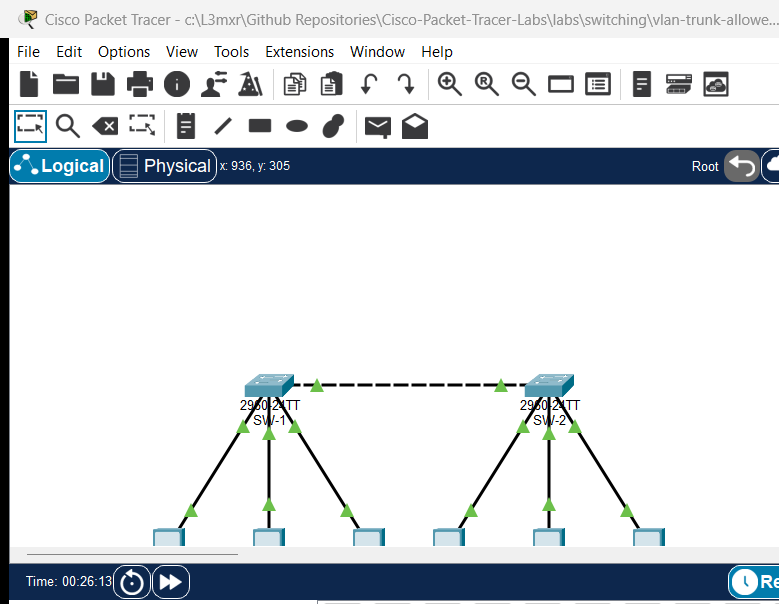
The topology models an enterprise campus distribution layer consisting of two Cisco Catalyst 2960 switches connected via an 802.1Q inter-switch trunk link (GigabitEthernet0/1 <-> GigabitEthernet0/1), serving three distinct departmental VLANs and dedicated end-user workstations:
  +---------------------------------------------------------------------------------+
  |                                  Campus Core                                    |
  +---------------------------------------------------------------------------------+
                                           |
                 Trunk Link: Gi0/1 <===============> Gi0/1 (Cross Cable)
                 - Encapsulation: 802.1Q             - Encapsulation: 802.1Q
                 - Allowed: 10,20,30,99 (Target)     - Allowed: 10,20,30,99 (Target)
                 - Native VLAN: 99 (Target)          - Native VLAN: 99 (Target)
                                           |
                +--------------------------+--------------------------+
                |                                                     |
         [Distribution SW-1]                                   [Distribution SW-2]
           |        |        |                                   |        |        |
        Fa0/10   Fa0/20   Fa0/15                              Fa0/10   Fa0/20   Fa0/15
       (VLAN 10)(VLAN 20)(VLAN 30)                           (VLAN 10)(VLAN 20)(VLAN 30)
           |        |        |                                   |        |        |
           v        v        v                                   v        v        v
      [PC-Eng1] [PC-Mkt1] [PC-Ops1]                         [PC-Eng2] [PC-Mkt2] [PC-Ops2]
      10.10     20.10     30.10                             10.20     20.20     30.20
Addressing Table#
| Device | Interface | IP Address | Subnet Mask | VLAN ID | VLAN Name | Purpose / Connected To |
|---|---|---|---|---|---|---|
| SW-1 | Gi0/1 | N/A | N/A | 10,20,30,99 | Native_Trunk (99) | Inter-Switch Trunk to SW-2 |
| SW-1 | Fa0/10 | N/A | N/A | 10 | Engineering | Access Port to PC-Eng1 |
| SW-1 | Fa0/20 | N/A | N/A | 20 | Marketing | Access Port to PC-Mkt1 |
| SW-1 | Fa0/15 | N/A | N/A | 30 | Operations | Access Port to PC-Ops1 |
| SW-2 | Gi0/1 | N/A | N/A | 10,20,30,99 | Native_Trunk (99) | Inter-Switch Trunk to SW-1 |
| SW-2 | Fa0/10 | N/A | N/A | 10 | Engineering | Access Port to PC-Eng2 |
| SW-2 | Fa0/20 | N/A | N/A | 20 | Marketing | Access Port to PC-Mkt2 |
| SW-2 | Fa0/15 | N/A | N/A | 30 | Operations | Access Port to PC-Ops2 |
| PC-Eng1 | Fa0 | 192.168.10.10 | 255.255.255.0 | 10 | Engineering | Engineering Workstation 1 |
| PC-Eng2 | Fa0 | 192.168.10.20 | 255.255.255.0 | 10 | Engineering | Engineering Workstation 2 |
| PC-Mkt1 | Fa0 | 192.168.20.10 | 255.255.255.0 | 20 | Marketing | Marketing Workstation 1 |
| PC-Mkt2 | Fa0 | 192.168.20.20 | 255.255.255.0 | 20 | Marketing | Marketing Workstation 2 |
| PC-Ops1 | Fa0 | 192.168.30.10 | 255.255.255.0 | 30 | Operations | Operations Workstation 1 |
| PC-Ops2 | Fa0 | 192.168.30.20 | 255.255.255.0 | 30 | Operations | Operations Workstation 2 |
Lab Tasks#
- Verify Baseline Network Connectivity and Isolate the Incident:
- Test connectivity between
PC-Eng1andPC-Eng2(VLAN 10). - Test connectivity between
PC-Mkt1andPC-Mkt2(VLAN 20). - Test connectivity between
PC-Ops1andPC-Ops2(VLAN 30) and confirm the outage.
- Test connectivity between
- Audit Switch Port Roles and Trunk Status:
- Execute
show interfaces trunkonSW-1andSW-2. - Inspect the
Vlans allowed on trunkandVlans allowed and active in management domainoutput sections. - Execute
show interfaces GigabitEthernet0/1 switchportto audit administrative and operational trunking modes.
- Execute
- Diagnose and Remediate Trunk Allowed List Omissions on SW-1:
- Determine which VLANs are missing from SW-1's trunk allowed list on interface
GigabitEthernet0/1. - Apply the correct non-destructive syntax (
switchport trunk allowed vlan add <vlan-id>) to restore VLAN 30 to the trunk. - Do NOT overwrite existing allowed VLANs (VLAN 10, 20, 99).
- Determine which VLANs are missing from SW-1's trunk allowed list on interface
- Diagnose and Resolve Native VLAN Mismatch on SW-2:
- Identify the Native VLAN mismatch between
SW-1(Native VLAN 99) andSW-2(Native VLAN 1). - Reconfigure
SW-2interfaceGigabitEthernet0/1withswitchport trunk native vlan 99.
- Identify the Native VLAN mismatch between
- Verify Comprehensive End-to-End Operation:
- Confirm that
PC-Ops1can successfully pingPC-Ops2across the trunk with 0% loss. - Confirm that VLAN 10 and VLAN 20 retain full reachability across the trunk.
- Confirm Layer 2 isolation: verify that attempts to ping between different VLANs (e.g.,
PC-Eng1toPC-Mkt1) time out as expected. - Save running configurations to NVRAM on both switches.
- Confirm that
Configuration Walkthrough#
Step 1: Baseline Audit and Fault Isolation#
Begin by launching the starter topology (assets/starter.pkt). Open the command prompt on PC-Eng1 and verify baseline connectivity across the inter-switch link to PC-Eng2:
PC-Eng1> ping 192.168.10.20

Pinging 192.168.10.20 with 32 bytes of data:

Reply from 192.168.10.20: bytes=32 time=5ms TTL=128
Reply from 192.168.10.20: bytes=32 time<1ms TTL=128
Reply from 192.168.10.20: bytes=32 time<1ms TTL=128
Reply from 192.168.10.20: bytes=32 time<1ms TTL=128

Ping statistics for 192.168.10.20:
    Packets: Sent = 4, Received = 4, Lost = 0 (0% loss)
Now open the command prompt on PC-Ops1 and ping its counterpart PC-Ops2 in the Operations Department:
PC-Ops1> ping 192.168.30.20

Pinging 192.168.30.20 with 32 bytes of data:

Request timed out.
Request timed out.
Request timed out.
Request timed out.

Ping statistics for 192.168.30.20:
    Packets: Sent = 4, Received = 0, Lost = 4 (100% loss)
The ping fails completely. Because Engineering (VLAN 10) functions properly across the physical cable between SW-1 and SW-2, physical cabling and interface transceiver hardware are operational. The issue is a Layer 2 logical trunk filtering or configuration defect.
Step 2: Inspecting Trunking Configuration on SW-1 and SW-2#
Log in to SW-1 via the CLI console and inspect the active trunk parameters:
SW-1> enable
SW-1# show interfaces trunk
Port        Mode         Encapsulation  Status        Native vlan
Gig0/1      on           802.1q         trunking      99

Port        Vlans allowed on trunk
Gig0/1      10,20,99

Port        Vlans allowed and active in management domain
Gig0/1      10,20,99

Port        Vlans in spanning tree forwarding state and not pruned
Gig0/1      10,20
Notice the critical finding:
- Under
Vlans allowed on trunk, interfaceGig0/1allows only10,20,99. VLAN 30 is missing! - Frames generated by
PC-Ops1on VLAN 30 are dropped bySW-1when attempting to egressGig0/1.
Next, log in to SW-2 and execute show interfaces trunk:
SW-2> enable
SW-2# show interfaces trunk
Port        Mode         Encapsulation  Status        Native vlan
Gig0/1      on           802.1q         trunking      1

Port        Vlans allowed on trunk
Gig0/1      10,20,30,99

Port        Vlans allowed and active in management domain
Gig0/1      10,20,30,99

Port        Vlans in spanning tree forwarding state and not pruned
Gig0/1      10,20,30,99
Analyzing SW-2 reveals two important details:
SW-2permits VLAN 30 on its trunk allowed list (10,20,30,99).SW-2has itsNative vlanset to 1, whereasSW-1has itsNative vlanset to 99. This creates a Native VLAN mismatch condition.
Step 3: Remediating SW-1 Trunk Allowed List#
To restore VLAN 30 across the trunk without knocking out VLANs 10 and 20, enter configuration mode on SW-1.
Warning
Never issue switchport trunk allowed vlan 30 by itself! This command replaces the entire allowed list with only VLAN 30, instantly terminating all traffic for Engineering (VLAN 10) and Marketing (VLAN 20). Always use the add modifier.
SW-1# configure terminal
SW-1(config)# interface GigabitEthernet0/1
SW-1(config-if)# switchport trunk allowed vlan add 30
SW-1(config-if)# exit
SW-1(config)# exit
SW-1# write memory
Step 4: Resolving Native VLAN Mismatch on SW-2#
Enter configuration mode on SW-2 and configure GigabitEthernet0/1 to match the enterprise standard Native VLAN (VLAN 99):
SW-2# configure terminal
SW-2(config)# interface GigabitEthernet0/1
SW-2(config-if)# switchport trunk native vlan 99
SW-2(config-if)# exit
SW-2(config)# exit
SW-2# write memory
Verification#
1. Verify Trunk Operational State on SW-1#
Execute show interfaces trunk on SW-1:
SW-1# show interfaces trunk
Port        Mode         Encapsulation  Status        Native vlan
Gig0/1      on           802.1q         trunking      99

Port        Vlans allowed on trunk
Gig0/1      10,20,30,99

Port        Vlans allowed and active in management domain
Gig0/1      10,20,30,99

Port        Vlans in spanning tree forwarding state and not pruned
Gig0/1      10,20,30,99
VLAN 30 is now allowed, active in the management domain, and in the Spanning Tree forwarding state on SW-1.
2. Verify Trunk Detailed Switchport Characteristics on Both Switches#
Execute show interfaces GigabitEthernet0/1 switchport on both switches to confirm administrative and operational synchronization:
SW-1# show interfaces GigabitEthernet0/1 switchport
Name: Gig0/1
Switchport: Enabled
Administrative Mode: trunk
Operational Mode: trunk
Administrative Trunking Encapsulation: dot1q
Operational Trunking Encapsulation: dot1q
Negotiation of Trunking: Off
Access Mode VLAN: 1 (default)
Trunking Native Mode VLAN: 99 (Native_Trunk)
Trunking VLANs Enabled: 10,20,30,99
Pruning VLANs Enabled: 2-1001
SW-2# show interfaces GigabitEthernet0/1 switchport
Name: Gig0/1
Switchport: Enabled
Administrative Mode: trunk
Operational Mode: trunk
Administrative Trunking Encapsulation: dot1q
Operational Trunking Encapsulation: dot1q
Negotiation of Trunking: Off
Access Mode VLAN: 1 (default)
Trunking Native Mode VLAN: 99 (Native_Trunk)
Trunking VLANs Enabled: 10,20,30,99
Pruning VLANs Enabled: 2-1001
Both switches report Operational Mode: trunk, Trunking Native Mode VLAN: 99, and Trunking VLANs Enabled: 10,20,30,99.
3. Verify End-to-End Intra-VLAN Reachability#
From PC-Ops1, re-test connectivity to PC-Ops2:
PC-Ops1> ping 192.168.30.20

Pinging 192.168.30.20 with 32 bytes of data:

Reply from 192.168.30.20: bytes=32 time<1ms TTL=128
Reply from 192.168.30.20: bytes=32 time<1ms TTL=128
Reply from 192.168.30.20: bytes=32 time<1ms TTL=128
Reply from 192.168.30.20: bytes=32 time<1ms TTL=128

Ping statistics for 192.168.30.20:
    Packets: Sent = 4, Received = 4, Lost = 0 (0% loss)
Operations Department communication is 100% restored across the inter-switch trunk.
Verify that the other departments remain uninterrupted:
- From
PC-Eng1, pingPC-Eng2(192.168.10.20): 4/4 replies received (0% loss). - From
PC-Mkt1, pingPC-Mkt2(192.168.20.20): 4/4 replies received (0% loss).
4. Verify Layer 2 VLAN Segmentation and Isolation#
Test inter-VLAN communication by attempting to ping from PC-Eng1 (VLAN 10) to PC-Mkt1 (VLAN 20, 192.168.20.10):
PC-Eng1> ping 192.168.20.10

Pinging 192.168.20.10 with 32 bytes of data:

Request timed out.
Request timed out.
Request timed out.
Request timed out.

Ping statistics for 192.168.20.10:
    Packets: Sent = 4, Received = 0, Lost = 4 (100% loss)
The ping times out as expected. Without an active Layer 3 router or multilayer switch performing inter-VLAN routing, Layer 2 broadcast domains remain completely isolated.
Troubleshooting#
Systematic Trunk Troubleshooting Flowchart#
[Start: Intra-VLAN Traffic Fails Across Trunk]
  |
  +---> 1. Check Physical Link & Port State:
  |        Execute 'show interfaces status'.
  |        Is the trunk interface 'connected' and up/up?
  |        --> If NO: Check physical cable, transceiver, and 'no shutdown'.
  |
  +---> 2. Verify Trunk Operational Mode:
  |        Execute 'show interfaces trunk'.
  |        Does the port appear under trunking ports?
  |        --> If NO: Execute 'switchport mode trunk' and 'switchport nonegotiate'.
  |
  +---> 3. Check Native VLAN Alignment:
  |        Compare 'Native vlan' field on both trunk endpoints.
  |        Do both switches show the exact same Native VLAN ID?
  |        --> If NO: Align with 'switchport trunk native vlan <id>' on mismatched switch.
  |
  +---> 4. Check Allowed VLAN List:
  |        Inspect 'Vlans allowed on trunk'.
  |        Is the affected VLAN explicitly present in the list?
  |        --> If NO: Execute 'switchport trunk allowed vlan add <vlan-id>'.
  |
  +---> 5. Check VLAN Existence & Active State:
  |        Execute 'show vlan brief'.
  |        Does the VLAN exist in the local VLAN database and state is 'active'?
  |        --> If NO: Create the VLAN with 'vlan <id>' and 'name <name>'.
  |
  +---> 6. Check Spanning Tree State:
           Inspect 'Vlans in spanning tree forwarding state and not pruned'.
           Is the VLAN listed in the STP forwarding section?
           --> If NO: Investigate STP topology, root bridges, or port blocking.
Common Faults and Remediation Matrix#
| Symptom | Probable Cause | Diagnostic Command | Remediation |
|---|---|---|---|
| Single VLAN fails across trunk; other VLANs work | VLAN pruned from trunk allowed list on one or both switches | show interfaces trunk |
Enter interface configuration and issue switchport trunk allowed vlan add <id>. |
| All VLANs dropped when adding a new VLAN | Administrator typed switchport trunk allowed vlan <id> without add keyword |
show interfaces trunk |
Re-enter trunk allowed list with all required VLANs: switchport trunk allowed vlan 10,20,30,99. |
%CDP-4-NATIVE_VLAN_MISMATCH console warning |
Adjacent trunk interfaces have unequal Native VLAN configurations | show interfaces trunk, show cdp neighbors detail |
Match Native VLANs across link using switchport trunk native vlan <id>. |
| Trunk link does not form; remains access port | Dynamic Trunking Protocol (DTP) negotiation mismatch or static mode omitted | show interfaces <int> switchport |
Hardcode trunk mode with switchport mode trunk and disable negotiation with switchport nonegotiate. |
| Intra-switch ping fails within same VLAN | Access port assigned to wrong VLAN or interface shutdown | show vlan brief, show interfaces status |
Verify port VLAN with switchport access vlan <id> and ensure interface is no shutdown. |
Key Takeaways#
- Non-Destructive Syntax Enforcement: Always use
switchport trunk allowed vlan add <vlan>when appending VLANs to an existing trunk allowed list. Omitting theaddkeyword replaces the entire allowed list with only the specified VLAN. - Symmetric Configuration Requirement: Trunk allowed lists and Native VLAN definitions must match on both ends of an inter-switch link. Mismatches create black holes, unidirectional frame drops, and spanning tree topology instability.
- Native VLAN Best Practices: Enterprise security benchmarks recommend setting the Native VLAN to an unused, dedicated non-default VLAN ID (such as VLAN 99) and pruning VLAN 1 to prevent VLAN hopping attacks.
- Multi-Level Verification: Diagnosing trunk issues requires examining both
show interfaces trunk(high-level trunk status and STP forwarding) andshow interfaces switchport(low-level administrative and operational details).
References#
- IEEE Standard for Local and Metropolitan Area Networks: 802.1Q Bridges and Bridged Networks
- Cisco Support Document 17056: Understanding and Configuring VLAN Trunk Protocol (VTP) and 802.1Q Trunking
- Cisco Catalyst 2960 Switch Software Configuration Guide: Configuring VLANs
- Cisco Catalyst 2960 Switch Software Configuration Guide: Configuring VLAN Trunks
Files and Validation Status#
This laboratory provides verified Cisco Packet Tracer files and configuration artifacts:
assets/starter.pkt: Baseline faulted topology with pruned VLAN 30 on SW-1 and Native VLAN mismatch on SW-2 for student troubleshooting.assets/completed.pkt: Fully remediated reference topology with operational 802.1Q trunk, aligned Native VLAN 99, and verified multi-VLAN reachability.assets/topology.png: Visual network topology diagram.configs/SW-1.txt: Full sanitized Cisco IOS running configuration for distribution switchSW-1.configs/SW-2.txt: Full sanitized Cisco IOS running configuration for distribution switchSW-2.metadata.json: Machine-readable catalog metadata and learning objectives.verification.md: Complete positive and negative test acceptance matrix.AI_AGENT_GUIDE/state/PTL-0044-SIMULATOR-RESULTS.md: Live simulator verification evidence recorded in Packet Tracer 9.0.1.