


In a switched local area network (LAN), redundant physical links provide high availability and fault tolerance. However, without a Layer 2 loop prevention protocol, redundant physical connections cause broadcast storms, multiple frame copies, and Content Addressable Memory (CAM) table thrashing that can collapse the network in seconds. The Spanning Tree Protocol (STP) creates a loop-free logical topology by systematically placing redundant switchports into an Alternate Blocking state while maintaining an active forwarding path.
While legacy IEEE 802.1D Spanning Tree requires 30 to 50 seconds to converge (transitioning sequentially through Listening and Learning states before Forwarding), IEEE 802.1w Rapid Spanning Tree Protocol (RSTP, implemented on Cisco devices as Rapid PVST+) achieves convergence in milliseconds through an explicit handshake mechanism (Proposal and Agreement). To optimize end-device connectivity, PortFast transitions edge switchports immediately to the Forwarding state, eliminating DHCP lease timeouts and host boot delays. To safeguard edge security, BPDU Guard monitors PortFast-enabled switchports and immediately disables (err-disabled) any edge port that receives unexpected Bridge Protocol Data Units (BPDUs), preventing rogue switches from disrupting the spanning-tree hierarchy.
In this laboratory exercise, you will deploy Rapid PVST+ across a redundant 3-switch triangle topology, deterministically establish Root and Secondary Root bridges using priority values, enable PortFast and BPDU Guard on host access switchports, and verify rapid failover convergence during a trunk link failure.
Learning Objectives#
- Explain the operation of Spanning Tree Protocol (STP) and how IEEE 802.1w Rapid PVST+ improves convergence speed over legacy 802.1D.
- Configure and verify Rapid PVST+ mode across a redundant triangle topology of Cisco Catalyst 2960 switches.
- Influence the root bridge election deterministically using the
spanning-tree vlan <id> priority <value>command. - Identify spanning-tree port roles (Root, Designated, Alternate) and operational states (Forwarding, Blocking).
- Configure edge access ports with Spanning Tree PortFast to eliminate listening and learning delays for host workstations.
- Implement Spanning Tree BPDU Guard to protect edge switchports from rogue switch attachments and bridge loop injection.
- Verify dynamic failover convergence when a primary trunk link fails and observe rapid port unblocking.
Prerequisites#
- Completion of PTL-0009: VLAN Segmentation and Access Port Configuration.
- Understanding of Layer 2 frame forwarding and MAC learning from PTL-0016: MAC Address Learning and ARP Operation.
- Basic understanding of 802.1Q trunking concepts and native VLANs.
- Familiarity with the diagnostic methodology outlined in the Troubleshooting Guide.
Topology#
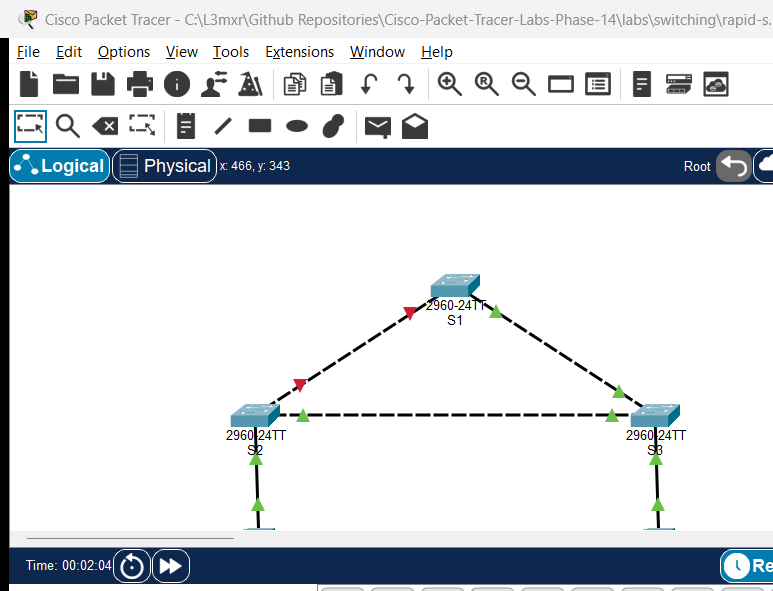
The topology forms a classic 3-switch redundant loop connecting two host workstations:
- Switch
S1: Primary Root Bridge for VLAN 10 (Priority:4096). Both trunk interfaces (Gi0/1andGi0/2) operate as Designated Forwarding ports. - Switch
S2: Secondary Root Bridge for VLAN 10 (Priority:8192).Gi0/1is the Root Port facingS1,Gi0/2is Designated Forwarding facingS3, andFa0/10is an access port forPC1. - Switch
S3: Non-Root Access Switch (Default Priority:32768).Gi0/1is the Root Port facingS1,Gi0/2is the Alternate Blocking (Altn BLK) port facingS2to break the physical loop, andFa0/10is an access port forPC2. - Workstations (
PC1,PC2): End-user PCs in VLAN 10 (192.168.10.0/24) connected to edge access ports configured with PortFast and BPDU Guard.
Addressing Table#
| Device | Interface | IP Address | Subnet Mask | Default Gateway | VLAN / Type | Connected To |
|---|---|---|---|---|---|---|
| S1 | Gi0/1 |
Unassigned | N/A | N/A | 802.1Q Trunk (Designated, FWD) | S2 Gi0/1 |
| S1 | Gi0/2 |
Unassigned | N/A | N/A | 802.1Q Trunk (Designated, FWD) | S3 Gi0/1 |
| S2 | Gi0/1 |
Unassigned | N/A | N/A | 802.1Q Trunk (Root, FWD) | S1 Gi0/1 |
| S2 | Gi0/2 |
Unassigned | N/A | N/A | 802.1Q Trunk (Designated, FWD) | S3 Gi0/2 |
| S2 | Fa0/10 |
Unassigned | N/A | N/A | Access VLAN 10 (PortFast, FWD) | PC1 FastEthernet0 |
| S3 | Gi0/1 |
Unassigned | N/A | N/A | 802.1Q Trunk (Root, FWD) | S1 Gi0/2 |
| S3 | Gi0/2 |
Unassigned | N/A | N/A | 802.1Q Trunk (Alternate, BLK) | S2 Gi0/2 |
| S3 | Fa0/10 |
Unassigned | N/A | N/A | Access VLAN 10 (PortFast, FWD) | PC2 FastEthernet0 |
| PC1 | FastEthernet0 |
192.168.10.10 |
255.255.255.0 |
192.168.10.1 |
Host Workstation (VLAN 10) | S2 Fa0/10 |
| PC2 | FastEthernet0 |
192.168.10.20 |
255.255.255.0 |
192.168.10.1 |
Host Workstation (VLAN 10) | S3 Fa0/10 |
Lab Tasks#
- Inspect Baseline Spanning Tree State: Open
assets/starter.pktand examine the baseline configuration. Verify that VLAN 10 (Staff), 802.1Q trunks, and host access ports are created, and observe default PVST+ behavior with priority32768. - Transition to Rapid PVST+ Mode: On switches
S1,S2, andS3, transition the spanning-tree engine to IEEE 802.1w Rapid Spanning Tree usingspanning-tree mode rapid-pvst. - Configure Deterministic Root Bridge Priorities:
- Configure
S1as the Primary Root Bridge for VLAN 10 with priority4096. - Configure
S2as the Secondary Root Bridge for VLAN 10 with priority8192. - Leave
S3at the default priority32768.
- Configure
- Identify Spanning Tree Port Roles and Blocking State:
- Use
show spanning-tree vlan 10on each switch. - Confirm that
S1is elected Root Bridge (This bridge is the root) and both trunk ports areDesg FWD. - Confirm that
S2hasGi0/1as Root Port (Root FWD) andGi0/2as Designated (Desg FWD). - Confirm that
S3hasGi0/1as Root Port (Root FWD) and placesGi0/2into Alternate Blocking (Altn BLK) to break the triangular loop.
- Use
- Configure PortFast on Host Access Switchports:
- On
S2andS3, enter interfaceFastEthernet0/10and configurespanning-tree portfastto bypass listening/learning delays for end-user workstations.
- On
- Implement BPDU Guard Edge Protection:
- On
S2andS3, enter interfaceFastEthernet0/10and configurespanning-tree bpduguard enableto defend against rogue switch attachment.
- On
- Verify Host Communication:
- Ping from
PC1(192.168.10.10) toPC2(192.168.10.20) and confirm 0% packet loss across the switched fabric.
- Ping from
- Simulate Trunk Link Failure and Rapid Failover:
- Disable the primary trunk link between
S1andS2by shutting downGi0/1onS1. - Observe
S3immediately transitionGi0/2from Alternate Blocking (Altn BLK) to Root Forwarding (Root FWD). - Retest host ping reachability to verify connectivity across the failover path.
- Disable the primary trunk link between
- Restore Primary Trunk Link:
- Re-enable
Gi0/1onS1(no shutdown). - Observe RSTP reconverge deterministically, returning
S3 Gi0/2to the Alternate Blocking state.
- Re-enable
- Test BPDU Guard Violation and Recovery:
- Attach an unauthorized switch emitting BPDUs to edge port
Fa0/10onS2. - Verify that BPDU Guard immediately transitions
Fa0/10into theerr-disabledstate. - Disconnect the rogue device, reconnect
PC1, and recover the port usingshutdownfollowed byno shutdown.
- Attach an unauthorized switch emitting BPDUs to edge port
Configuration Walkthrough#
1. Switch S1 Configuration (Primary Root Bridge)#
S1> enable
S1# configure terminal
S1(config)# hostname S1
S1(config)# spanning-tree mode rapid-pvst
S1(config)# spanning-tree vlan 10 priority 4096
S1(config)# end
S1# copy running-config startup-config
2. Switch S2 Configuration (Secondary Root Bridge & Edge Access Switch)#
S2> enable
S2# configure terminal
S2(config)# hostname S2
S2(config)# spanning-tree mode rapid-pvst
S2(config)# spanning-tree vlan 10 priority 8192
S2(config)# interface FastEthernet0/10
S2(config-if)# switchport mode access
S2(config-if)# switchport access vlan 10
S2(config-if)# spanning-tree portfast
S2(config-if)# spanning-tree bpduguard enable
S2(config-if)# exit
S2(config)# end
S2# copy running-config startup-config
3. Switch S3 Configuration (Non-Root Switch with Alternate Blocking Port)#
S3> enable
S3# configure terminal
S3(config)# hostname S3
S3(config)# spanning-tree mode rapid-pvst
S3(config)# interface FastEthernet0/10
S3(config-if)# switchport mode access
S3(config-if)# switchport access vlan 10
S3(config-if)# spanning-tree portfast
S3(config-if)# spanning-tree bpduguard enable
S3(config-if)# exit
S3(config)# end
S3# copy running-config startup-config
Verification#
Positive Test 1: Rapid PVST+ Mode Verification#
Verify that all switches are operating in Rapid PVST+ mode:
S1# show spanning-tree summary
Switch is in rapid-pvst mode
Root bridge for: default Staff
Extended system ID           is enabled
...
Positive Test 2: S1 Root Bridge Status for VLAN 10#
Verify that S1 is elected the Root Bridge with priority 4096 (+ sys-id-ext 10 = 4106):
S1# show spanning-tree vlan 10
VLAN0010
  Spanning tree enabled protocol rstp
  Root ID    Priority    4106
             Address     0002.4A9E.8A98
             This bridge is the root
             Hello Time  2 sec  Max Age 20 sec  Forward Delay 15 sec

  Bridge ID  Priority    4106  (priority 4096 sys-id-ext 10)
             Address     0002.4A9E.8A98
             Hello Time  2 sec  Max Age 20 sec  Forward Delay 15 sec
             Aging Time  20

Interface        Role Sts Cost      Prio.Nbr Type
---------------- ---- --- --------- -------- --------------------------------
Gi0/1            Desg FWD 4         128.25   P2p
Gi0/2            Desg FWD 4         128.26   P2p
Positive Test 3: S3 Alternate Blocking Port#
Confirm that S3 has selected Gi0/1 as its Root Port (Cost 4 to Root Bridge S1) and places Gi0/2 into Altn BLK (Alternate Blocking) to prevent a Layer 2 loop:
S3# show spanning-tree vlan 10
Interface        Role Sts Cost      Prio.Nbr Type
---------------- ---- --- --------- -------- --------------------------------
Fa0/10           Desg FWD 19        128.10   P2p
Gi0/1            Root FWD 4         128.25   P2p
Gi0/2            Altn BLK 4         128.26   P2p
Inspect port details on S3 to verify the Alternate Blocking state:
S3# show spanning-tree interface GigabitEthernet0/2 detail
Port 26 (GigabitEthernet0/2) of VLAN0010 is alternate blocking
  Port path cost 4, Port priority 128, Port Identifier 128.26
  Designated root has priority 4106, address 0002.4A9E.8A98
  Designated bridge has priority 8202, address 0090.0CA0.3695
  Timers: message age 16, forward delay 0, hold 0
  Number of transitions to forwarding state: 1
  Link type is point-to-point by default
Positive Test 4: Host-to-Host Connectivity#
From PC1, ping PC2 (192.168.10.20):
C:\> ping 192.168.10.20
Pinging 192.168.10.20 with 32 bytes of data:
Reply from 192.168.10.20: bytes=32 time<1ms TTL=128
Reply from 192.168.10.20: bytes=32 time<1ms TTL=128
Reply from 192.168.10.20: bytes=32 time<1ms TTL=128
Reply from 192.168.10.20: bytes=32 time<1ms TTL=128

Ping statistics for 192.168.10.20:
    Packets: Sent = 4, Received = 4, Lost = 0 (0% loss)
Positive Test 5: Dynamic Failover on Primary Trunk Failure#
Simulate a trunk link failure between S1 and S2 by shutting down Gi0/1 on S1:
S1(config)# interface GigabitEthernet0/1
S1(config-if)# shutdown
Rapidly, RSTP detects the topology change and transitions S3 Gi0/2 to Forwarding (Root FWD) via proposal/agreement negotiation, maintaining uninterrupted host communication without the 30-50 second listening/learning delay of legacy 802.1D:
S3# show spanning-tree vlan 10
Interface        Role Sts Cost      Prio.Nbr Type
---------------- ---- --- --------- -------- --------------------------------
Fa0/10           Desg FWD 19        128.10   P2p
Gi0/1            Root FWD 4         128.25   P2p
Gi0/2            Root FWD 4         128.26   P2p
Positive Test 6: Primary Trunk Restoration#
Re-enable Gi0/1 on S1 (no shutdown). S3 immediately returns Gi0/2 to Altn BLK as deterministic root path costs are re-established.
Positive Test 7: Edge PortFast Verification#
Verify PortFast operation on host-facing interface Fa0/10:
S2# show spanning-tree interface FastEthernet0/10 detail
Port 10 (FastEthernet0/10) of VLAN0010 is designated forwarding
  Port path cost 19, Port priority 128, Port Identifier 128.10
  Designated root has priority 4106, address 0002.4A9E.8A98
  The port is in the portfast mode
  Link type is point-to-point by default
Negative Test 1: BPDU Guard Violation and err-disabled Enforcement#
Connect an unauthorized switch to edge port Fa0/10 on S2. As soon as the switch emits a BPDU, BPDU Guard immediately transitions Fa0/10 into err-disabled:
S2# show interfaces FastEthernet0/10 status
Port      Name               Status       Vlan       Duplex  Speed Type
Fa0/10                       err-disabled 10         auto    auto  10/100BaseTX
Note
In Cisco Packet Tracer 9.0.1 on the Catalyst 2960 platform, the port transition to err-disabled is verified via show interfaces <interface> status. The global command show interfaces status err-disabled is unsupported on this virtual hardware platform.
Negative Test 2: Port Recovery Procedure#
Disconnect the unauthorized device, reconnect PC1, and recover the interface:
S2(config)# interface FastEthernet0/10
S2(config-if)# shutdown
S2(config-if)# no shutdown
Verify that the port returns to connected and PC1 ping to PC2 succeeds with 0% loss.
Troubleshooting#
- Slow Convergence (Port Stuck in Listening/Learning for 30–50 Seconds):
- Verify that the switch is operating in Rapid PVST+ mode rather than legacy 802.1D PVST+:
S1# show spanning-tree summary - If the output shows
pvstinstead ofrapid-pvst, enter global configuration and executespanning-tree mode rapid-pvst.
- Verify that the switch is operating in Rapid PVST+ mode rather than legacy 802.1D PVST+:
- Unintentional Root Bridge Election:
- By default, all switches share the default priority
32768. If no priority is tuned, the switch with the lowest MAC address wins the election, which may result in an access switch becoming the root. - Always assign explicit priorities in multiples of
4096:S1(config)# spanning-tree vlan 10 priority 4096 S2(config)# spanning-tree vlan 10 priority 8192
- By default, all switches share the default priority
- PortFast Configured on Trunk Uplinks:
- Never configure
spanning-tree portfaston ports connecting switches, routers, or access points. PortFast bypasses loop detection; enabling it on inter-switch uplinks can cause immediate broadcast storms upon link up.
- Never configure
- Port in
err-disabledState After Rogue Attachment:- BPDU Guard does not automatically recover a port unless
errdisable recovery cause bpduguardis configured. - To manually restore an
err-disabledport, disconnect the rogue BPDU source and toggle the administrative state:S2(config)# interface FastEthernet0/10 S2(config-if)# shutdown S2(config-if)# no shutdown
- BPDU Guard does not automatically recover a port unless
Key Takeaways#
- Loop Prevention Invariant: Layer 2 redundant paths are essential for reliability but catastrophic without STP. STP breaks physical loops logically by maintaining redundant ports in an Alternate Blocking state.
- RSTP Speed: IEEE 802.1w Rapid PVST+ converges in milliseconds through explicit Proposal/Agreement handshakes, bypassing legacy 30–50 second timers.
- Root Bridge Determinism: Configuring explicit bridge priorities (
4096primary,8192secondary) ensures traffic flows predictively through high-capacity distribution switches. - Edge Acceleration: PortFast immediately transitions host ports to Forwarding, preventing DHCP timeouts and client boot delays.
- Edge Perimeter Defense: BPDU Guard disables edge switchports upon detecting rogue BPDUs, protecting the core switching fabric from unauthorized topology changes.
References#
- Cisco Catalyst 2960 Switch Software Configuration Guide — Configuring STP
- RFC 7727 — Spanning Tree Protocol (STP) Application
- IEEE 802.1w — Rapid Reconfiguration of Spanning Tree
- Cisco CCNA 200-301 Official Cert Guide — Spanning Tree Protocol
Files and Validation Status#
- Status:
tested_pass - Simulator Evidence: AI_AGENT_GUIDE/state/PTL-0017-SIMULATOR-RESULTS.md
- Verified Deliverables:
assets/starter.pkt: Baseline redundant triangle topology with default PVST+.assets/completed.pkt: Verified Rapid PVST+, Root priority 4096, PortFast, and BPDU Guard.assets/topology.png: Authentic simulation capture showing Alternate Blocking link indicator.