


In a local Ethernet network, data link communication relies on hardware 48-bit Media Access Control (MAC) addresses, while network layer communication relies on 32-bit Logical IPv4 addresses. For devices to communicate successfully, two fundamental mechanisms operate concurrently:
- Layer 2 MAC Address Learning: Ethernet switches inspect the source MAC address of every incoming frame and record it in a Content Addressable Memory (CAM) or MAC address table alongside the incoming physical port.
- Layer 3 Address Resolution Protocol (ARP): Hosts consult and populate their local ARP cache to map a known target IPv4 address to its corresponding physical MAC address before encapsulation.
In this laboratory exercise, you will investigate how a Cisco Catalyst switch dynamically builds and ages out its MAC address table, how host operating systems send ARP requests and replies, and how Layer 2 frame forwarding transitions from unknown unicast flooding to targeted unicast forwarding.
Learning Objectives#
- Explain how a Cisco Catalyst switch dynamically populates its MAC address table using incoming frame source MAC addresses.
- Contrast unknown unicast flooding with known unicast filtering and forwarding.
- Inspect, interpret, and clear the host ARP cache (
arp -aandarp -d) on end devices. - Trace the step-by-step interaction between host ARP resolution and switch MAC address learning during ping transactions.
- Examine MAC table aging and practice manually clearing dynamic entries using
clear mac address-table dynamic.
Prerequisites#
- Basic familiarity with Cisco IOS command modes from PTL-0008: Cisco IOS Navigation and Initial Device Configuration.
- Understanding of IPv4 address formatting and subnet masks (
255.255.255.0//24). - Familiarity with the diagnostic methodology outlined in the Troubleshooting Guide.
Topology#
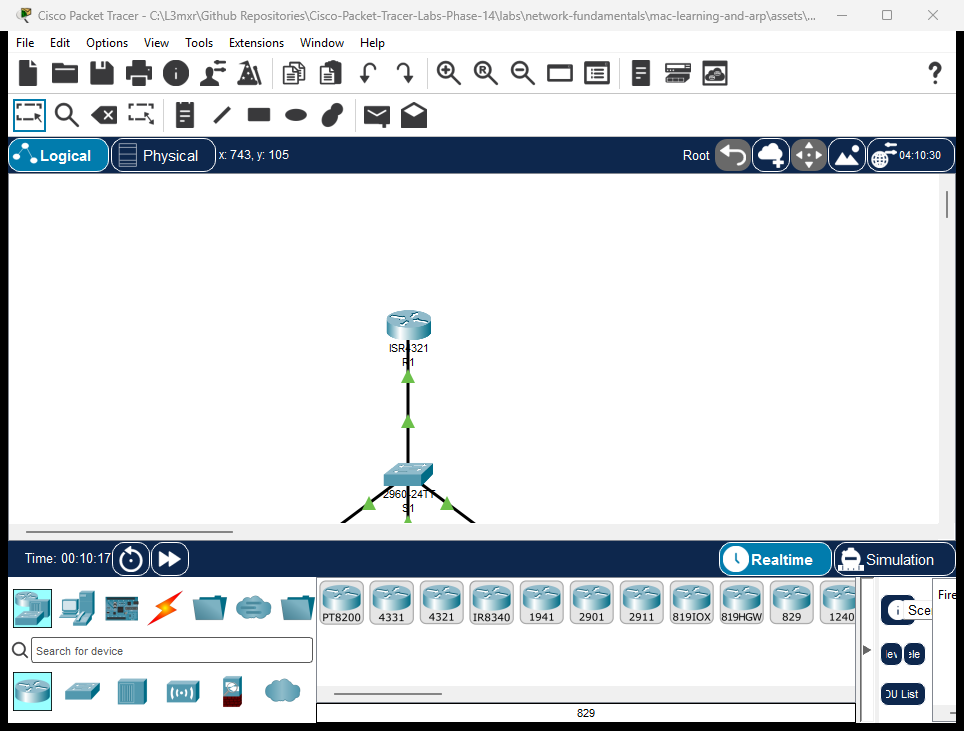
The topology connects three generic host PCs and one Cisco ISR 4321 router gateway through a single Cisco Catalyst 2960-24TT switch in broadcast domain 192.168.1.0/24:
- Switch
S1: Central Layer 2 Catalyst 2960 switch maintaining the MAC address table. - Workstations (
PC-A,PC-B,PC-C): Connected to switch FastEthernet portsFa0/1,Fa0/2, andFa0/3. - Router
R1: Connected via switch portGigabitEthernet0/1to provide gateway connectivity on192.168.1.1.
Addressing Table#
| Device | Interface | IP Address | Subnet Mask | Default Gateway | MAC Address (Sample) | Switch Port |
|---|---|---|---|---|---|---|
| R1 | Gi0/0/0 |
192.168.1.1 |
255.255.255.0 |
N/A | 0001.c7ea.b801 |
S1 Gig0/1 |
| S1 | Vlan1 |
Unconfigured | N/A | N/A | N/A (L2 Switch) | — |
| PC-A | FastEthernet0 |
192.168.1.10 |
255.255.255.0 |
192.168.1.1 |
0001.c955.51bd |
S1 Fa0/1 |
| PC-B | FastEthernet0 |
192.168.1.20 |
255.255.255.0 |
192.168.1.1 |
0001.c97d.8904 |
S1 Fa0/2 |
| PC-C | FastEthernet0 |
192.168.1.30 |
255.255.255.0 |
192.168.1.1 |
00e0.f740.df65 |
S1 Fa0/3 |
Lab Tasks#
- Verify Baseline State: Verify that
S1has an empty dynamic MAC address table and host PCs have empty ARP tables. - Observe ARP Broadcast and Resolution: From
PC-A, pingPC-B(192.168.1.20) and observe ARP resolution inPC-A's ARP table. - Verify S1 Dynamic MAC Learning: Inspect the dynamic MAC address table on
S1to confirm port mappings forPC-A(Fa0/1) andPC-B(Fa0/2). - Resolve Default Gateway: From
PC-A, ping router gatewayR1(192.168.1.1) and observe switch learning on portGig0/1. - Populate Multi-Node CAM Table: Ping
PC-AfromPC-C(192.168.1.30) and verify all connected hosts appear in the switch MAC table. - Investigate Negative Resolution: Ping an unassigned IP (
192.168.1.99) to observe ARP timeout behavior and absent cache entries. - Clear and Re-Learn Entries: Clear dynamic entries on
S1usingclear mac address-table dynamicand verify dynamic re-learning upon subsequent traffic.
Configuration Walkthrough#
1. Router R1 Interface Configuration#
On Router R1, the local gateway interface is configured and enabled:
Router> enable
Router# configure terminal
Router(config)# hostname R1
R1(config)# interface GigabitEthernet0/0/0
R1(config-if)# description Gateway for Local Subnet
R1(config-if)# ip address 192.168.1.1 255.255.255.0
R1(config-if)# no shutdown
R1(config-if)# exit
R1(config)# end
R1# write memory
2. Switch S1 Initial Hostname Configuration#
On Switch S1, set the basic hostname:
Switch> enable
Switch# configure terminal
Switch(config)# hostname S1
S1(config)# end
S1# write memory
3. Workstation IP Configuration#
In the starter topology (assets/starter.pkt), verify or configure host network settings:
- PC-A: IP
192.168.1.10, Subnet Mask255.255.255.0, Gateway192.168.1.1 - PC-B: IP
192.168.1.20, Subnet Mask255.255.255.0, Gateway192.168.1.1 - PC-C: IP
192.168.1.30, Subnet Mask255.255.255.0, Gateway192.168.1.1
Verification#
Positive Test 1: Empty Initial State#
Before traffic is sent, verify that the host ARP cache and switch dynamic MAC table are empty:
PC-A> arp -a
No ARP Entries Found

S1# show mac address-table dynamic
          Mac Address Table
-------------------------------------------

Vlan    Mac Address       Type        Ports
----    -----------       --------    -----
Positive Test 2: Intra-Subnet Ping (PC-A to PC-B)#
Ping PC-B (192.168.1.20) from PC-A:
PC-A> ping 192.168.1.20

Pinging 192.168.1.20 with 32 bytes of data:

Reply from 192.168.1.20: bytes=32 time<1ms TTL=128
Reply from 192.168.1.20: bytes=32 time<1ms TTL=128
Reply from 192.168.1.20: bytes=32 time<1ms TTL=128
Reply from 192.168.1.20: bytes=32 time<1ms TTL=128

Ping statistics for 192.168.1.20:
    Packets: Sent = 4, Received = 4, Lost = 0 (0% loss)
Positive Test 3: Inspect S1 MAC Address Table#
Inspect S1's dynamic table to observe learned MAC addresses:
S1# show mac address-table dynamic
          Mac Address Table
-------------------------------------------

Vlan    Mac Address       Type        Ports
----    -----------       --------    -----
   1    0001.c955.51bd    DYNAMIC     Fa0/1
   1    0001.c97d.8904    DYNAMIC     Fa0/2
Note: S1 learned PC-A's MAC on Fa0/1 from the ARP request frame, and PC-B's MAC on Fa0/2 from the ARP reply frame.
Positive Test 4: Inspect PC-A ARP Table#
PC-A> arp -a
  Internet Address      Physical Address      Type
  192.168.1.20          0001.c97d.8904        dynamic
Positive Test 5: Gateway Reachability and Uplink MAC Learning#
From PC-A, ping R1 gateway (192.168.1.1):
PC-A> ping 192.168.1.1

Pinging 192.168.1.1 with 32 bytes of data:

Reply from 192.168.1.1: bytes=32 time<1ms TTL=255
Reply from 192.168.1.1: bytes=32 time<1ms TTL=255
Reply from 192.168.1.1: bytes=32 time<1ms TTL=255
Reply from 192.168.1.1: bytes=32 time<1ms TTL=255

Ping statistics for 192.168.1.1:
    Packets: Sent = 4, Received = 4, Lost = 0 (0% loss)
Verify S1 now includes R1 on uplink Gig0/1:
S1# show mac address-table dynamic
          Mac Address Table
-------------------------------------------

Vlan    Mac Address       Type        Ports
----    -----------       --------    -----
   1    0001.c7ea.b801    DYNAMIC     Gig0/1
   1    0001.c955.51bd    DYNAMIC     Fa0/1
   1    0001.c97d.8904    DYNAMIC     Fa0/2
Positive Test 6: Complete Multi-Host Population#
From PC-C, ping PC-A (192.168.1.10). Then verify that S1 has learned all four devices:
S1# show mac address-table dynamic
          Mac Address Table
-------------------------------------------

Vlan    Mac Address       Type        Ports
----    -----------       --------    -----
   1    0001.c7ea.b801    DYNAMIC     Gig0/1
   1    0001.c955.51bd    DYNAMIC     Fa0/1
   1    0001.c97d.8904    DYNAMIC     Fa0/2
   1    00e0.f740.df65    DYNAMIC     Fa0/3
Troubleshooting#
| Symptom | Diagnostic Finding | Root Cause | Remediation |
|---|---|---|---|
| Ping to destination IP times out; ARP cache shows no entry | arp -a reports No ARP Entries Found |
Target device is powered off, disconnected, or has an incorrect IP address | Verify physical link LED, verify IP settings on destination host, and retry |
Ping to destination IP fails with Request timed out; ARP cache remains empty |
Target IP 192.168.1.99 does not exist on the LAN |
Host sends ARP broadcast (Who has 192.168.1.99? Tell 192.168.1.10), but no host responds |
Check destination IP address spelling; ensure target host is active on the subnet |
Switch port shows no MAC address in show mac address-table dynamic |
Link is up/up but no frames have originated from the attached device |
Switches only learn MACs from incoming frame source addresses. If a host is idle and silent, the switch cannot learn its MAC | Generate traffic from the host (e.g., ping or DHCP request) to populate the CAM table |
| Switch MAC table contains wrong port for a MAC address | show mac address-table address <mac> shows unexpected port |
Duplicate MAC address or physical cabling swapped without table flush | Execute clear mac address-table dynamic to force immediate re-learning |
Key Takeaways#
- Source MAC Learning: A Layer 2 switch inspects the source MAC address of every incoming frame to learn which device connects to which physical port.
- Destination MAC Forwarding: When forwarding, the switch looks up the destination MAC address:
- If the MAC is found in the CAM table, the frame is forwarded only out that specific port (known unicast filtering/forwarding).
- If the MAC is not found, the switch floods the frame out all ports in the VLAN except the receiving port (unknown unicast flooding).
- ARP Resolution: Layer 3 hosts do not know MAC addresses inherently. Before sending an IPv4 packet, a host broadcasts an ARP Request (
FF:FF:FF:FF:FF:FF). The owner responds with a unicast ARP Reply. - Dynamic Aging: Dynamic MAC table entries age out after an inactivity timeout (default 300 seconds in Cisco IOS) to adapt to topology changes and device reconnections.
- Manual Maintenance: Network administrators can purge stale entries immediately using
clear mac address-table dynamic.
References#
- Cisco Catalyst 2960 Switch Software Configuration Guide: Configuring MAC Address Tables
- RFC 826: An Ethernet Address Resolution Protocol (ARP)
- Repository Troubleshooting Guide
Files and Validation Status#
| Deliverable | Location | Description |
|---|---|---|
| Starter Activity | assets/starter.pkt | Pre-cabled topology with clean initial ARP and MAC states |
| Completed Reference | assets/completed.pkt | Fully operational topology with verified dynamic learning |
| Topology Screenshot | assets/topology.png | Canvas capture from running Packet Tracer 9.0.1 simulator |
| Router Configuration | configs/R1.txt | Cisco IOS configuration for router R1 gateway interface |
| Switch Configuration | configs/S1.txt | Cisco IOS configuration for switch S1 |
| Verification Guide | verification.md | Step-by-step diagnostic verification and test procedures |
| Simulator Evidence | PTL-0016 Simulator Results | Authentic live simulator console traces |