CAPSTONE

Capstone Project: Small Office Multi-VLAN Network Design

Modern small-to-medium business (SMB) networks require high availability, logical departmental isolation, automated IP host addressing, and hardened Layer 2/Layer 3 boundaries. This capstone project challenges students to integrate the modular networking competencies mastered across the library into an end-to-end small office branch network.

Packet Tracer files for Capstone Project: Small Office Multi-VLAN Network Design

FILES Packet Tracer topology

Download starter file

starter.pkt, 64 KB. Open it in Cisco Packet Tracer. Install Packet Tracer.

Solution / reference file

The completed topology with every task configured. Try the lab first and use this to check your work or when you are stuck.

Download solution file

completed.pkt, 69 KB.

File checksums (SHA-256)
starter.pkt
dae44e8670c6f1a7eae06ef0087fd617c9feff9cf3453f4fd636bb67cabc9347
completed.pkt
f7584096ccc462f3c4b87f6a5970b8f27f804151961f281523670313c35b0adb

Labs this project builds on

The project guide links these labs. Complete them first, in this order:

  1. PTL-0009 VLAN Segmentation and Access Port Configuration Beginner, 35 min
  2. PTL-0003 Securing Switch Management with SSH Intermediate, 30 min
  3. PTL-0004 Implementing Switchport Port Security Intermediate, 35 min
  4. PTL-0007 Cisco Switch Security Hardening Best Practices Intermediate, 40 min
  5. PTL-0010 Router-on-a-Stick Inter-VLAN Routing Intermediate, 45 min
  6. PTL-0011 Single-Area OSPFv2 Configuration and Verification Intermediate, 45 min
  7. PTL-0012 Configuring Cisco IOS DHCPv4 Server and Relay Agent Intermediate, 40 min
  8. PTL-0013 Configuring Standard and Extended IPv4 Access Control Lists Intermediate, 45 min

Project Level: Capstone / Comprehensive · Target Audience: BSIT Networking Students & CCNA Candidates · Status: Tested (Cisco Packet Tracer 9.0.1)

1. Executive Summary & Scenario#

Modern small-to-medium business (SMB) networks require high availability, logical departmental isolation, automated IP host addressing, and hardened Layer 2/Layer 3 boundaries. This capstone project challenges students to integrate the modular networking competencies mastered across the library into an end-to-end small office branch network.

The Business Scenario#

Apex Innovations is opening a new branch office housing three operational groups:

  1. Management (VLAN 10): IT administrators and branch managers requiring secure access to network infrastructure and servers.
  2. Staff (VLAN 20): General office workers requiring access to internal file servers and external simulated services.
  3. Guest / Visitors (VLAN 30): Temporary visitors and vendor devices requiring outbound WAN connectivity while being strictly blocked from accessing internal staff and management systems.

The branch utilizes a centralized Cisco ISR 4321 router (R1) and a Cisco Catalyst 2960 access switch (S1), connecting to the corporate headquarters / simulated ISP border router (R2) via a routed WAN link (209.165.200.224/30).


2. Integrated Architecture & Topology#
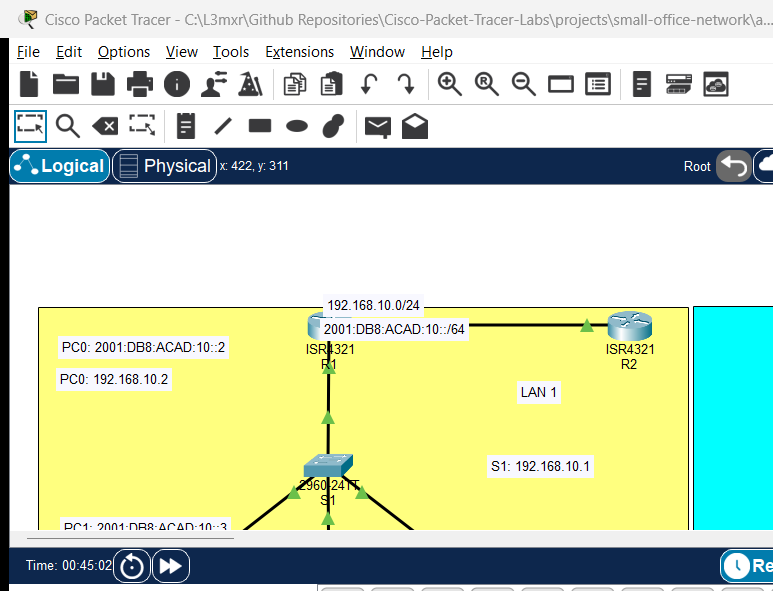
Small Office Multi-VLAN Network Topology
                                  [HQ / ISP Router]
                                         │ (WAN Transit: 209.165.200.224/30)
                                         ▼
                                  [Branch Router R1]
                                         │ Gi0/0/0 (802.1Q Trunk carrying VLANs 10, 20, 30)
                                         ▼
                                  [Branch Switch S1]
       ┌─────────────────────────────────┼─────────────────────────────────┐
       ▼                                 ▼                                 ▼
   [Fa0/1 - 5]                       [Fa0/6 - 15]                     [Fa0/16 - 24]
    VLAN 10                           VLAN 20                           VLAN 30
   Management Staff                  General Staff                      Guest Wi-Fi
 (192.168.10.0/24)                 (192.168.20.0/24)                 (192.168.30.0/24)

3. Addressing & VLAN Allocation Matrix#

VLAN ID Name IPv4 Network Prefix Usable Host Range Default Gateway (R1 Subinterface) IP Assignment Method
VLAN 10 Management 192.168.10.0/24 192.168.10.11 - 192.168.10.254 192.168.10.1 (Gi0/0/0.10) Static Addressing
VLAN 20 Staff_Data 192.168.20.0/24 192.168.20.11 - 192.168.20.254 192.168.20.1 (Gi0/0/0.20) Dynamic (Cisco IOS DHCP)
VLAN 30 Guest_Access 192.168.30.0/24 192.168.30.11 - 192.168.30.254 192.168.30.1 (Gi0/0/0.30) Dynamic (Cisco IOS DHCP)
VLAN 99 Parking_Lot N/A (Unrouted) N/A N/A Unused Ports Quarantined
VLAN 999 Native_Trunk N/A (Unrouted) N/A N/A 802.1Q Native VLAN Tag
WAN Link Point-to-Point 209.165.200.224/30 209.165.200.225 - 226 N/A (Peer: .226) Static Infrastructure IP

4. Technical Specifications & Modular Prerequisite Mapping#

To complete this capstone successfully, review the relevant modular lab guides:

A. Layer 2 Switch Hardening & VLAN Segmentation#

  • VLAN Isolation: Implement distinct departmental VLANs to partition broadcast domains (PTL-0009).
  • Trunking & Native VLAN Security: Configure an 802.1Q trunk between S1 Gi0/1 and R1 Gi0/0/0, disable DTP negotiation with switchport nonegotiate, and set the native VLAN to unused VLAN 999 (PTL-0007).
  • Port Security: Enforce MAC address sticky learning and shutdown violation mode on staff access ports (PTL-0004).
  • STP Edge Protection: Enable Spanning Tree portfast and bpduguard enable on all access interfaces (PTL-0007).

B. Layer 3 Inter-VLAN Routing & WAN Connectivity#

  • Router-on-a-Stick: Divide R1 physical interface Gi0/0/0 into subinterfaces (Gi0/0/0.10, .20, .30) with encapsulation dot1Q (PTL-0010).
  • Dual-Stack WAN Routing: Configure static default route ip route 0.0.0.0 0.0.0.0 209.165.200.226 or dynamic single-area OSPFv2 (PTL-0011).

C. Network Services Automation#

  • Cisco IOS DHCP Server: Configure DHCP pools for Staff (VLAN 20, STAFF_POOL) and Guest (VLAN 30, GUEST_POOL) with network prefixes, default routers (.1), DNS server IP (208.67.222.222), and domain names (apex.local for Staff, guest.apex.local for Guest). Exclude the first 10 addresses of each subnet from dynamic allocation (PTL-0012).

    Note

    The DHCP configuration distributes the DNS server address 208.67.222.222 and appropriate domain suffixes. In this Packet Tracer environment, WAN reachability is validated by ICMP pings to the simulated upstream border router R2 (Loopback0 209.165.201.1); actual live Internet access and live DNS hostname lookups are neither configured nor simulated.

D. Network Security & Traffic Filtering#

  • Administrative SSH Access: Enforce SSHv2 with 2048-bit RSA keys, local authentication, and Telnet disabling on both router and switch (PTL-0003).
  • Traffic Filtering ACL: Implement a named extended ACL on R1 interface Gi0/0/0.30 inbound to allow Guest devices outbound WAN browsing while completely blocking access to internal subnets (192.168.10.0/24 and 192.168.20.0/24) (PTL-0013).

5. Acceptance Testing and Quality Checklist#

Before submitting or documenting your simulation:

  • DHCP Test: Connect test PCs to ports in VLAN 20 and VLAN 30; confirm they automatically lease correct IP addresses, default gateways (192.168.20.1 / 192.168.30.1), DNS server address (208.67.222.222), and domain names (apex.local / guest.apex.local) within 10 seconds.
  • Inter-VLAN Test: Confirm that Staff workstations can ping Management workstations through the router.
  • Guest Isolation Test: Confirm that Guest workstations can ping the WAN gateway (209.165.200.226) and simulated upstream service (209.165.201.1), but are immediately blocked from pinging Staff (192.168.20.10 / .11) and Management (192.168.10.10).
  • Port Security Test: Swap an unauthorized laptop into a port security-enabled access port; verify that the port transitions to err-disabled and generates an alarm.
  • Management Security Test: Attempt an SSH session from Management PC; confirm successful login. Attempt Telnet; confirm connection is rejected.

References#

  • Cisco Systems, Branch Office Network Design Guide: Enterprise Branch Design.
  • IETF RFC 2131 (DHCP), RFC 2328 (OSPFv2), RFC 4253 (SSH), IEEE 802.1Q (VLANs).

Files and Validation Status#

  • Starter Packet Tracer Activity: assets/starter.pkt
  • Completed Packet Tracer Activity: assets/completed.pkt
  • Configuration Scripts: configs/R1.txt, configs/R2.txt, configs/S1.txt
  • Verification Guide: verification.md
  • Design Quality: REVIEWED (Comprehensive multi-tier enterprise branch specification).
  • Packet Tracer Simulator Status: TESTED (PASS) (Assembled, configured, and verified live in Cisco Packet Tracer 9.0.1 via MCP loopback automation; POS-01..07 and NEG-01..04 passed).

Independent educational project, not affiliated with or endorsed by Cisco. Lab credentials (cisco123, adminpass123) are provided for educational simulation purposes only.

Reference configurations

Final device configurations from the solution. Like the solution file, these give the answers away.

R1 R1.txt, 2.5 KB
! ==========================================
! Router R1 (Branch Gateway)
! Capstone Project: Small Office Multi-VLAN Network Design
! ==========================================
enable
configure terminal
hostname R1

! Cryptographic SSH Prerequisites & Domain
ip domain-name apex.local
crypto key generate rsa modulus 2048
ip ssh version 2

! Administrative Security
enable secret cisco123
username admin privilege 15 secret adminpass123
service password-encryption
banner motd # Apex Innovations Branch Gateway - Authorized Admin Access Only #

! DHCP Exclusions
ip dhcp excluded-address 192.168.20.1 192.168.20.10
ip dhcp excluded-address 192.168.30.1 192.168.30.10

! DHCP Pool for Staff (VLAN 20)
ip dhcp pool STAFF_POOL
 network 192.168.20.0 255.255.255.0
 default-router 192.168.20.1
 dns-server 208.67.222.222
 domain-name apex.local
 exit

! DHCP Pool for Guests (VLAN 30)
ip dhcp pool GUEST_POOL
 network 192.168.30.0 255.255.255.0
 default-router 192.168.30.1
 dns-server 208.67.222.222
 domain-name guest.apex.local
 exit

! Physical Trunk Interface to Switch S1
interface GigabitEthernet0/0/0
 description 802.1Q Trunk Link to Switch S1
 no ip address
 no shutdown
 exit

! Subinterface for Management (VLAN 10)
interface GigabitEthernet0/0/0.10
 description Management Gateway
 encapsulation dot1Q 10
 ip address 192.168.10.1 255.255.255.0
 no shutdown
 exit

! Subinterface for Staff (VLAN 20)
interface GigabitEthernet0/0/0.20
 description Staff Data Gateway
 encapsulation dot1Q 20
 ip address 192.168.20.1 255.255.255.0
 no shutdown
 exit

! Subinterface for Guest (VLAN 30) with Inbound Traffic Filter
interface GigabitEthernet0/0/0.30
 description Guest Wi-Fi Gateway
 encapsulation dot1Q 30
 ip address 192.168.30.1 255.255.255.0
 ip access-group GUEST_ISOLATION_ACL in
 no shutdown
 exit

! WAN Transit Interface to HQ / ISP
interface GigabitEthernet0/0/1
 description WAN Transit Link to HQ Router R2
 ip address 209.165.200.225 255.255.255.252
 no shutdown
 exit

! Guest Isolation Extended Access Control List
ip access-list extended GUEST_ISOLATION_ACL
 remark Block guest traffic to internal Management subnet
 deny ip 192.168.30.0 0.0.0.255 192.168.10.0 0.0.0.255
 remark Block guest traffic to internal Staff subnet
 deny ip 192.168.30.0 0.0.0.255 192.168.20.0 0.0.0.255
 remark Allow guest outbound Internet traffic
 permit ip 192.168.30.0 0.0.0.255 any
 exit

! Default Static Route via HQ/ISP Gateway
ip route 0.0.0.0 0.0.0.0 209.165.200.226

! Secure Virtual Terminal Lines
line vty 0 4
 transport input ssh
 login local
 exit

end
copy running-config startup-config

Download R1.txt

R2 R2.txt, 1.0 KB
! ==========================================
! Router R2 (HQ / ISP Gateway)
! Capstone Project: Small Office Multi-VLAN Network Design
! ==========================================
enable
configure terminal
hostname R2

! Cryptographic SSH Prerequisites & Domain
ip domain-name apex.local
crypto key generate rsa modulus 2048
ip ssh version 2
enable secret cisco123
username admin privilege 15 secret adminpass123
service password-encryption

! WAN Transit Interface to Branch R1
interface GigabitEthernet0/0/1
 description WAN Transit Link to Branch R1
 ip address 209.165.200.226 255.255.255.252
 no shutdown
 exit

! Simulated HQ Corporate Cloud / Public Internet Services
interface Loopback0
 description Corporate Cloud & DNS Services
 ip address 209.165.201.1 255.255.255.0
 no shutdown
 exit

! Static Route returning branch network traffic to R1
ip route 192.168.0.0 255.255.0.0 209.165.200.225

! Secure Virtual Terminal Lines
line vty 0 4
 transport input ssh
 login local
 exit

end
copy running-config startup-config

Download R2.txt

S1 S1.txt, 2.3 KB
! ==========================================
! Switch S1 (Branch Access Switch)
! Capstone Project: Small Office Multi-VLAN Network Design
! ==========================================
enable
configure terminal
hostname S1

! Cryptographic SSH Prerequisites & Domain
ip domain-name apex.local
crypto key generate rsa modulus 2048
ip ssh version 2
enable secret cisco123
username admin privilege 15 secret adminpass123
service password-encryption
banner motd # Apex Innovations Branch Access Switch S1 - Authorized Access Only #

! VLAN Infrastructure Creation
vlan 10
 name Management
 exit
vlan 20
 name Staff_Data
 exit
vlan 30
 name Guest_Access
 exit
vlan 99
 name Parking_Lot
 exit
vlan 999
 name Native_Trunk
 exit

! Management SVI
interface vlan 10
 description In-Band Management Interface
 ip address 192.168.10.2 255.255.255.0
 no shutdown
 exit
ip default-gateway 192.168.10.1

! Hardened 802.1Q Trunk Uplink to Router R1
interface GigabitEthernet0/1
 description Uplink 802.1Q Trunk to R1 Gi0/0/0
 switchport mode trunk
 switchport nonegotiate
 switchport trunk native vlan 999
 switchport trunk allowed vlan 10,20,30
 no shutdown
 exit

! Management Access Ports (Fa0/1 - Fa0/5)
interface range FastEthernet0/1 - 5
 description Management Access Ports
 switchport mode access
 switchport access vlan 10
 spanning-tree portfast
 spanning-tree bpduguard enable
 no shutdown
 exit

! Staff Access Ports with Port Security (Fa0/6 - Fa0/15)
interface range FastEthernet0/6 - 15
 description Staff Workstation Access Ports
 switchport mode access
 switchport access vlan 20
 switchport port-security
 switchport port-security maximum 1
 switchport port-security mac-address sticky
 switchport port-security violation shutdown
 spanning-tree portfast
 spanning-tree bpduguard enable
 no shutdown
 exit

! Guest Wi-Fi Access Ports (Fa0/16 - Fa0/24)
interface range FastEthernet0/16 - 24
 description Guest Access Ports
 switchport mode access
 switchport access vlan 30
 spanning-tree portfast
 spanning-tree bpduguard enable
 no shutdown
 exit

! Quarantined Unused Uplink Interface
interface GigabitEthernet0/2
 description Quarantined Unused Port
 switchport mode access
 switchport access vlan 99
 shutdown
 exit

! Secure Virtual Terminal Lines
line vty 0 15
 transport input ssh
 login local
 exit

end
copy running-config startup-config

Download S1.txt

Verification guide

Assembly checklist, expected outputs and negative tests: Verification and Acceptance Matrix — Small Office Capstone.

This page is generated from projects/small-office-network/README.md in the repository. Corrections go there.

Search

Type at least two letters, for example OSPF, DHCP relay or VLAN.