Category: network-security · Difficulty: intermediate · Lab ID: PTL-0007 · Document: reviewed · Simulator: tested_pass
Default Cisco Catalyst switch configurations prioritize "plug-and-play" convenience over security: all ports default to VLAN 1, Dynamic Trunking Protocol (DTP) negotiates trunks automatically, unused ports remain active, and Spanning Tree Protocol (STP) accepts Bridge Protocol Data Units (BPDUs) from any attached device. Attackers exploit these defaults using techniques like VLAN hopping (double tagging and switch spoofing), unauthorized network tapping, and rogue root bridge injection. This lab teaches the foundational hardening controls recommended by Cisco to secure Layer 2 infrastructure.
Learning Objectives#
- Identify common Layer 2 security vulnerabilities associated with default switchport settings.
- Disable dynamic trunk negotiation using
switchport nonegotiateto prevent switch spoofing. - Reassign the 802.1Q Native VLAN away from default VLAN 1 to mitigate double-tagging attacks.
- Create a designated parking-lot (blackhole) VLAN and administratively disable all unused ports.
- Configure Spanning Tree PortFast and BPDU Guard on user access ports to prevent rogue STP topology manipulation.
Prerequisites#
- Understanding of 802.1Q trunking, native VLAN mechanics, and Spanning Tree Protocol fundamentals.
- Basic familiarity with Cisco IOS command syntax.
- Cisco Packet Tracer 8.0 or newer.
Topology#
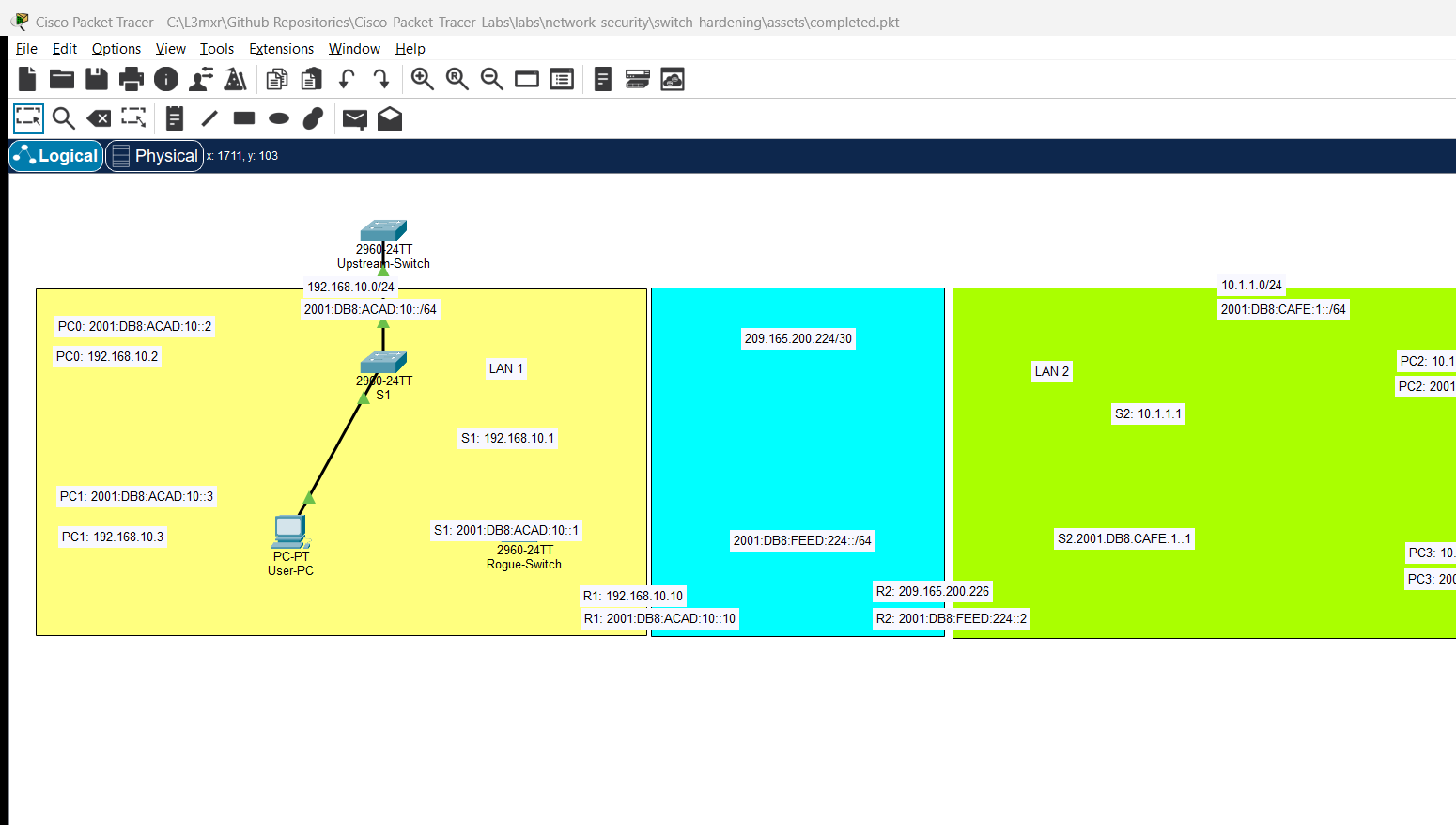
The topology models an enterprise access switch connected to legitimate user hosts, an upstream distribution switch, and unused ports:
[Upstream Switch] ──Gi0/1 ────── Gi0/1── [Hardened Switch S1]
(802.1Q Trunk, Native VLAN 999)                  │
                                                 ├──Fa0/1── [User-PC (VLAN 10)]
                                                 ├──Fa0/2── [Server (VLAN 20)]
                                                 └──Fa0/3 - 24 [Disabled / Blackhole VLAN 99]
| Device Name | Model | Interface | Connected Device | Neighbor Interface | Description |
|---|---|---|---|---|---|
| S1 | Catalyst 2960-24TT | GigabitEthernet0/1 | Upstream Switch | GigabitEthernet0/1 | Hardened Trunk Link |
| S1 | Catalyst 2960-24TT | FastEthernet0/1 | User-PC | FastEthernet0 | Access Port (VLAN 10) |
| S1 | Catalyst 2960-24TT | FastEthernet0/2 - 24 | None (Unused) | N/A | Parking-Lot VLAN 99 |
Addressing Table#
| Device | Interface | IPv4 Address | Subnet Mask | Default Gateway | VLAN ID | Purpose |
|---|---|---|---|---|---|---|
| S1 | VLAN 10 (SVI) | 192.168.10.2 |
255.255.255.0 |
192.168.10.1 |
VLAN 10 | Switch Management |
| User-PC | FastEthernet0 | 192.168.10.50 |
255.255.255.0 |
192.168.10.1 |
VLAN 10 | User Workstation |
Lab Tasks#
- Place a Catalyst 2960 switch in Packet Tracer and assign basic device administration settings.
- Create enterprise data VLANs (
VLAN 10,VLAN 20), a dedicated Blackhole VLAN (VLAN 99), and an unused Native VLAN (VLAN 999). - Configure GigabitEthernet0/1 as an explicit static trunk, change its native VLAN to 999, and disable DTP negotiation (
switchport nonegotiate). - Configure user access port FastEthernet0/1 in VLAN 10, enable Spanning Tree PortFast, and enable BPDU Guard.
- Move all unused physical ports (FastEthernet0/2 through 24 and GigabitEthernet0/2) into Blackhole VLAN 99 and issue
shutdown. - Verify trunking, native VLAN settings, and BPDU Guard operational status using show commands.
Configuration Walkthrough#
1. VLAN Infrastructure Setup#
Switch> enable
Switch# configure terminal
Switch(config)# hostname S1

! Create operational VLANs
S1(config)# vlan 10
S1(config-vlan)# name User_Data
S1(config-vlan)# exit

S1(config)# vlan 20
S1(config-vlan)# name Server_Data
S1(config-vlan)# exit

! Create Parking-Lot / Blackhole VLAN for unused ports
S1(config)# vlan 99
S1(config-vlan)# name Parking_Lot
S1(config-vlan)# exit

! Create Unused Native VLAN for trunk links
S1(config)# vlan 999
S1(config-vlan)# name Native_Blackhole
S1(config-vlan)# exit
2. Hardening Trunk Links (Gi0/1)#
S1(config)# interface GigabitEthernet0/1
S1(config-if)# description Uplink Trunk to Distribution Switch

! Force explicit static trunk mode (prevents DTP negotiation attacks)
S1(config-if)# switchport mode trunk

! Disable DTP frames entirely
S1(config-if)# switchport nonegotiate

! Reassign native VLAN away from VLAN 1 to mitigate double-tagging VLAN hopping
S1(config-if)# switchport trunk native vlan 999

! Explicitly restrict allowed VLANs to needed traffic only
S1(config-if)# switchport trunk allowed vlan 10,20
S1(config-if)# no shutdown
S1(config-if)# exit
3. Hardening Access Ports with PortFast & BPDU Guard (Fa0/1)#
S1(config)# interface FastEthernet0/1
S1(config-if)# description User Access Port
S1(config-if)# switchport mode access
S1(config-if)# switchport access vlan 10

! PortFast skips Listening and Learning states for edge hosts
S1(config-if)# spanning-tree portfast

! BPDU Guard disables the port if an unauthorized switch or BPDU is detected
S1(config-if)# spanning-tree bpduguard enable
S1(config-if)# no shutdown
S1(config-if)# exit
Warning
Why BPDU Guard is Crucial:
PortFast allows a port to immediately transition from blocking to forwarding. If an employee connects an unmanaged hub or rogue switch to a PortFast-enabled port without BPDU Guard, a catastrophic Layer 2 broadcast storm or bridge loop can occur. BPDU Guard protects against this: the instant any BPDU frame is received on an access port, BPDU Guard puts the interface into err-disable state to protect the network.
4. Quarantining Unused Ports (Fa0/2 - 24, Gi0/2)#
S1(config)# interface range FastEthernet0/2 - 24, GigabitEthernet0/2
S1(config-if-range)# description Quarantined Unused Port
S1(config-if-range)# switchport mode access
S1(config-if-range)# switchport access vlan 99
S1(config-if-range)# shutdown
S1(config-if-range)# exit

S1(config)# end
S1# copy running-config startup-config
Verification#
1. Verify Trunk Security and Native VLAN#
S1# show interfaces trunk
(Sample expected output — illustrative):
Port        Mode             Encapsulation  Status        Native vlan
Gi0/1       on               802.1q         trunking      999

Port        Vlans allowed on trunk
Gi0/1       10,20
Verify that:
Modeison(static trunking, DTP disabled).Native vlanis999(not default VLAN 1).Vlans allowedis restricted to operational VLANs10,20.
2. Verify PortFast and BPDU Guard#
S1# show spanning-tree interface FastEthernet0/1 detail
Confirm that The port is in the portfast mode and BPDU guard is enabled.
3. Verify Quarantined Ports#
S1# show vlan brief
Verify that VLAN 99 (Parking_Lot) contains all unused ports (Fa0/2 - 24, Gi0/2) and show ip interface brief confirms they are administratively down.
Troubleshooting#
- Problem: Switch console repeatedly logs
%CDP-4-NATIVE_VLAN_MISMATCH: Native VLAN mismatch discovered on GigabitEthernet0/1 (999), with Switch GigabitEthernet0/1 (1).- Check: 802.1Q Native VLAN settings must match on both ends of a trunk link. Ensure the upstream switch on Gi0/1 also has
switchport trunk native vlan 999configured.
- Check: 802.1Q Native VLAN settings must match on both ends of a trunk link. Ensure the upstream switch on Gi0/1 also has
- Problem: Connecting a PC to Fa0/1 immediately puts the port into
err-disable.- Check: BPDU Guard will disable any port that receives a BPDU frame. Check whether the attached host is running bridging software (such as VMware, VirtualBox, or GNS3) that sends BPDUs.
- Problem:
switchport nonegotiateis rejected by IOS.- Check:
switchport nonegotiatecan only be configured on interfaces with an explicit static mode (switchport mode accessorswitchport mode trunk). It will be rejected if the port is in dynamic mode (dynamic autoordynamic desirable).
- Check:
Key Takeaways#
- Default VLAN 1 should not be used for user traffic, management, or native trunk encapsulation.
- Dynamic Trunking Protocol (DTP) must be disabled (
switchport nonegotiate) on both access and trunk ports to stop switch spoofing attacks. - Setting the native VLAN on trunks to an unused non-routable VLAN (e.g. 999) neutralizes double-tagging VLAN hopping.
- All unused switchports should be assigned to an isolated parking-lot VLAN and administratively shut down.
- Spanning Tree PortFast provides rapid edge connectivity, while BPDU Guard protects the topology against rogue switches.
References#
- Cisco Systems, LAN Switch Security Configuration Guide: Cisco Switch Hardening Reference (Accessed 2026-10-26).
- Cisco Systems, Catalyst 2960 Software Configuration Guide, Rel. 12.2(55)SE: Configuring STP Optional Features (Accessed 2026-10-26).
Files and Validation Status#
- Starter Activity: assets/starter.pkt
- Completed Activity: assets/completed.pkt
- Topology Diagram: assets/topology.png
- Configuration Scripts: configs/S1.txt
- Verification Guide: verification.md
- Documentation Quality: REVIEWED (Meets all 12 rubric standards; verified against Cisco IOS documentation).
- Packet Tracer Simulator Status: TESTED PASS (Verified in Cisco Packet Tracer 9.0.1; see PTL-0007-SIMULATOR-RESULTS.md).
Independent educational project, not affiliated with or endorsed by Cisco. Lab passwords are provided for educational simulation purposes only.