Category: switching · Difficulty: intermediate · Lab ID: PTL-0045 · Document: reviewed · Simulator: tested pass
Redundant physical cabling is an indispensable design principle in enterprise Local Area Networks (LANs), eliminating single points of failure between access, distribution, and core switching tiers. However, redundant Layer 2 links naturally introduce physical loops. Without a loop-prevention mechanism, broadcast, multicast, and unknown unicast frames circulate indefinitely, resulting in catastrophic broadcast storms, multiple frame copies arriving at end devices, and rapid MAC address table instability (table thrashing).
The IEEE 802.1D Spanning Tree Protocol (STP) and IEEE 802.1w Rapid Spanning Tree Protocol (RSTP) prevent loops by dynamically discovering the network topology, electing a single central Root Bridge, and calculating the shortest loop-free tree. Redundant paths that would otherwise create a physical loop are placed into an Alternate / Blocking (Altn BLK) state.
In an ideal, well-architected campus network:
- The Primary Root Bridge is deterministically assigned to a high-capacity core or distribution switch (e.g.,
SW-1) using an explicitly lowered Bridge Priority (such as4096). - The Secondary Root Bridge is assigned to a redundant distribution peer switch (e.g.,
SW-2) using the next priority step (8192), ensuring immediate, deterministic failover if the primary root fails. - Edge Access Switches remain at the default priority (
32768), ensuring they never win a root bridge election. - High-capacity transit trunks (GigabitEthernet, 10-GigabitEthernet, or EtherChannel bundles) remain in the Forwarding (
FWD) state, while low-capacity edge access uplinks absorb loop-prevention blocking (BLK).
The Problem: Accidental Root Inversion and Core Blocking#
When network administrators leave bridge priorities unmanaged (defaulting to 32768) or misconfigure priority values during switch replacement, disaster strikes:
- Lowest MAC Address Tiebreaker: If all switches share the default priority of 32768, the switch with the numerically lowest MAC address wins the election. Older or lower-end access switches frequently have lower factory MAC addresses than newer, high-performance distribution chassis.
- Inverted Traffic Patterns: When an edge access switch (
SW-3) becomes the root bridge, every switch in the campus calculates its shortest path to that access switch. - Suboptimal Core Blocking: High-speed distribution links between
SW-1andSW-2(which carry inter-VLAN routing, server traffic, and WAN traffic) are placed into an Alternate / Blocking (Altn BLK) state by STP because their root path cost through the access switch is deemed equal or worse. High-bandwidth distribution traffic is forced to bottleneck through 100 Mbps access uplinks, introducing severe congestion and jitter. - Topology Fragility: Edge access switches are frequently rebooted, power-cycled, or unplugged. If an access switch is the root bridge, every reboot triggers global Topology Change Notifications (TCNs), forcing all switches across the campus to prematurely flush their CAM tables and flood frames.
In this troubleshooting laboratory, you assume the role of a network engineer investigating severe latency and throughput bottlenecks between core resources. You will audit bridge IDs, trace root path costs, diagnose an unintended access-layer root bridge takeover, remediate switch priorities to establish deterministic primary and secondary roots, and verify that high-speed distribution trunks remain fully unblocked while edge uplinks safely provide redundancy.
Learning Objectives#
- Analyze the IEEE 802.1D / 802.1w bridge election algorithm, including the 16-bit Priority field, 12-bit System ID Extension, and 48-bit MAC address.
- Investigate root bridge takeovers and suboptimal blocking states using
show spanning-treeandshow spanning-tree vlan <id>. - Calculate cumulative Root Path Costs across mixed GigabitEthernet (Cost 4) and FastEthernet (Cost 19) links.
- Deterministically configure primary (
spanning-tree vlan 1 priority 4096) and secondary (spanning-tree vlan 1 priority 8192) root bridges. - Verify that inter-switch distribution links transition to Forwarding (
Desg FWDandRoot FWD) while redundant access uplinks absorb loop-breaking Alternate Blocking (Altn BLK). - Validate end-to-end host reachability and traffic flow across the optimized Spanning Tree topology.
Prerequisites#
- Understanding of Ethernet frame forwarding, MAC address tables, and Layer 2 switching loops.
- Completion of PTL-0009: VLAN Segmentation and Access Port Configuration and PTL-0017: Rapid Spanning Tree Protocol, PortFast, and BPDU Guard or equivalent experience.
- Familiarity with STP port roles (Root, Designated, Alternate) and states (Forwarding, Blocking).
- Cisco Packet Tracer 8.2 or newer (Packet Tracer 9.0+ verified).
Topology#
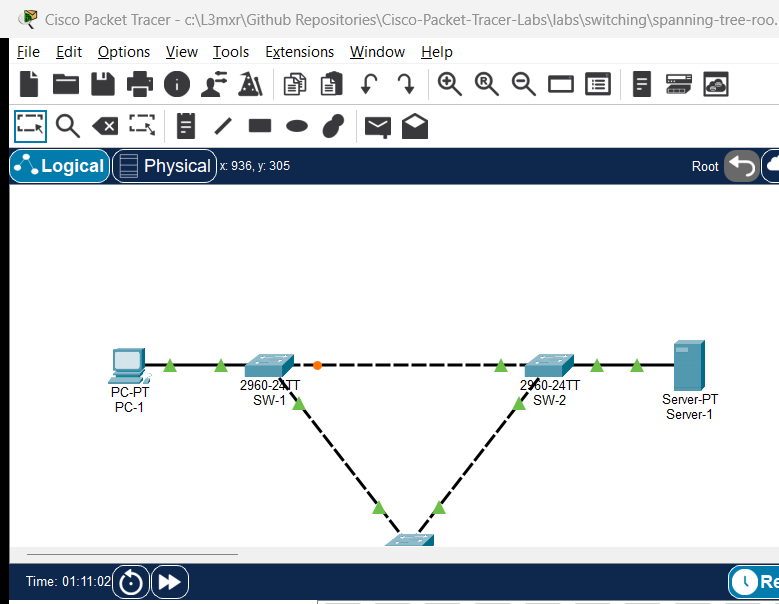
The topology consists of a classic three-switch campus distribution-and-access triangle loop:
- Distribution Layer:
SW-1andSW-2connected via a high-capacity GigabitEthernet trunk link (Gi0/1<->Gi0/1). - Access Layer:
SW-3dual-homed toSW-1viaFa0/1and toSW-2viaFa0/2. - End Hosts: Workstation
PC-1connected toSW-1, Enterprise ServerServer-1connected toSW-2, and Access WorkstationPC-2connected toSW-3.
               +-------------------------------------------------------+
               |             Distribution Inter-Switch Trunk           |
               |                Gi0/1 <=================> Gi0/1        |
               |           (High-Speed Gigabit Link, Cost 4)           |
               +-------------------------------------------------------+
                                           |
                    +----------------------+----------------------+
                    |                                             |
             [Distribution SW-1]                           [Distribution SW-2]
           (Target: Primary Root)                        (Target: Secondary Root)
             (Priority: 4096)                              (Priority: 8192)
              Fa0/10       Fa0/1                            Fa0/10       Fa0/1
                |            |                                |            |
                v            |                                v            |
             [PC-1]          | (Access Uplink 1)         [Server-1]        | (Access Uplink 2)
           192.168.1.10      |   FastEthernet 0/1       192.168.1.100      |   FastEthernet 0/2
                             |     (Cost 19)                               |     (Cost 19)
                             +--------------------+ +----------------------+
                                                  | |
                                                  v v
                                           [Access SW-3]
                                         (Target: Access)
                                         (Priority: 32768)
                                                Fa0/10
                                                  |
                                                  v
                                               [PC-2]
                                             192.168.1.20
Addressing Table#
| Device | Interface | IP Address | Subnet Mask | Default Gateway | Purpose / Connected To |
|---|---|---|---|---|---|
| SW-1 | Gi0/1 | N/A | N/A | N/A | Core Trunk to SW-2 (Gi0/1) |
| SW-1 | Fa0/1 | N/A | N/A | N/A | Uplink to Access SW-3 (Fa0/1) |
| SW-1 | Fa0/10 | N/A | N/A | N/A | Access Port to PC-1 |
| SW-2 | Gi0/1 | N/A | N/A | N/A | Core Trunk to SW-1 (Gi0/1) |
| SW-2 | Fa0/1 | N/A | N/A | N/A | Uplink to Access SW-3 (Fa0/2) |
| SW-2 | Fa0/10 | N/A | N/A | N/A | Access Port to Server-1 |
| SW-3 | Fa0/1 | N/A | N/A | N/A | Uplink to SW-1 (Fa0/1) |
| SW-3 | Fa0/2 | N/A | N/A | N/A | Uplink to SW-2 (Fa0/1) |
| SW-3 | Fa0/10 | N/A | N/A | N/A | Access Port to PC-2 |
| PC-1 | Fa0 | 192.168.1.10 | 255.255.255.0 | N/A | Distribution Workstation 1 |
| PC-2 | Fa0 | 192.168.1.20 | 255.255.255.0 | N/A | Access Workstation 2 |
| Server-1 | Fa0 | 192.168.1.100 | 255.255.255.0 | N/A | Enterprise Application Server |
Lab Tasks#
- Investigate the Faulted Starter Topology:
- Execute
show spanning-tree vlan 1acrossSW-1,SW-2, andSW-3. - Identify which switch is currently acting as the Root Bridge and record its Bridge Priority and MAC address.
- Audit port roles (
Root,Desg,Altn) and port states (FWD,BLK) across all three switches. - Identify the blocked port in the topology and explain why high-speed distribution link
Gi0/1is blocked.
- Execute
- Calculate Path Costs and Root Port Elections:
- Trace path costs from
SW-1andSW-2to the unexpected rootSW-3. - Compare the FastEthernet cost (19) against the GigabitEthernet cost (4) to understand why the core trunk was blocked.
- Trace path costs from
- Configure Deterministic Primary and Secondary Root Bridges:
- On
SW-1, configure Bridge Priority4096for VLAN 1 to establish deterministic Primary Root status. - On
SW-2, configure Bridge Priority8192for VLAN 1 to establish deterministic Secondary Root status. - On
SW-3, configure Bridge Priority32768(default) to ensure it acts as an access bridge.
- On
- Verify Remediated Spanning Tree Topology:
- Confirm that
SW-1is recognized as Root Bridge across all switches (This bridge is the root). - Confirm that
SW-1 Gi0/1isDesg FWDandSW-2 Gi0/1isRoot FWD(core trunk unblocked). - Confirm that
SW-3 Fa0/2transitions toAltn BLK(Alternate / Blocked), safely breaking the loop on the edge uplink.
- Confirm that
- Verify Data Plane Reachability:
- Ping from
PC-1toServer-1across the unblocked distribution trunk. - Ping from
PC-2toServer-1through the active access uplink. - Save running configurations to NVRAM on all three switches.
- Ping from
Configuration Walkthrough#
Step 1: Investigating the Faulted Starter State#
Launch the starter topology (assets/starter.pkt). Open the CLI on distribution switch SW-1 and inspect the Spanning Tree state:
SW-1> enable
SW-1# show spanning-tree vlan 1
VLAN0001
  Spanning tree enabled protocol ieee
  Root ID    Priority    4097
             Address     0004.9A6C.D07C
             Cost        19
             Port        1(FastEthernet0/1)
             Hello Time  2 sec  Max Age 20 sec  Forward Delay 15 sec

  Bridge ID  Priority    32769  (priority 32768 sys-id-ext 1)
             Address     0030.F298.40C3
             Hello Time  2 sec  Max Age 20 sec  Forward Delay 15 sec
             Aging Time  20

Interface        Role Sts Cost      Prio.Nbr Type
---------------- ---- --- --------- -------- --------------------------------
Fa0/1            Root FWD 19        128.1    P2p
Gi0/1            Altn BLK 4         128.25   P2p
Fa0/10           Desg FWD 19        128.10   P2p
Notice the critical findings on SW-1:
- The Root Bridge is NOT
SW-1: The Root ID MAC is0004.9A6C.D07C, which does not matchSW-1's local bridge address (0030.F298.40C3). SW-1Root Port isFastEthernet0/1:SW-1reaches the root through its 100 Mbps edge access link with Cost 19.- Core Trunk
Gi0/1is BLOCKED (Altn BLK): The high-speed 1 Gbps distribution trunk connectingSW-1toSW-2is blocked!
Now open the CLI on access switch SW-3:
SW-3> enable
SW-3# show spanning-tree vlan 1
VLAN0001
  Spanning tree enabled protocol ieee
  Root ID    Priority    4097
             Address     0004.9A6C.D07C
             This bridge is the root
             Hello Time  2 sec  Max Age 20 sec  Forward Delay 15 sec

  Bridge ID  Priority    4097  (priority 4096 sys-id-ext 1)
             Address     0004.9A6C.D07C
             Hello Time  2 sec  Max Age 20 sec  Forward Delay 15 sec
             Aging Time  20

Interface        Role Sts Cost      Prio.Nbr Type
---------------- ---- --- --------- -------- --------------------------------
Fa0/1            Desg FWD 19        128.1    P2p
Fa0/2            Desg FWD 19        128.2    P2p
Fa0/10           Desg FWD 19        128.10   P2p
The root cause is clear:
SW-3 has Bridge Priority 4096 (4097 with sys-id-ext 1), causing this wiring-closet access switch to win the root election! Because SW-3 is root, both SW-1 and SW-2 view SW-3 as their shortest path. On the inter-switch link between SW-1 and SW-2, SW-1 receives a superior BPDU from SW-2 and places its own Gi0/1 interface into Altn BLK, crippling the distribution layer.
Step 2: Remediating SW-1 as Primary Root Bridge#
To ensure SW-1 permanently and deterministically wins the root election, configure its bridge priority to 4096 (the lowest standard recommended priority):
SW-1# configure terminal
SW-1(config)# spanning-tree vlan 1 priority 4096
SW-1(config)# exit
SW-1# write memory
Step 3: Remediating SW-2 as Secondary Root Bridge#
Configure SW-2 with priority 8192. If SW-1 ever suffers a hardware failure, SW-2 will immediately take over as root, preventing SW-3 from ever usurping the root role:
SW-2# configure terminal
SW-2(config)# spanning-tree vlan 1 priority 8192
SW-2(config)# exit
SW-2# write memory
Step 4: Reverting SW-3 to Default Access Priority#
Remove the misconfigured priority on SW-3 by resetting it to the default value (32768):
SW-3# configure terminal
SW-3(config)# spanning-tree vlan 1 priority 32768
SW-3(config)# exit
SW-3# write memory
Verification#
1. Verify Primary Root Bridge on SW-1#
Execute show spanning-tree vlan 1 on SW-1:
SW-1# show spanning-tree vlan 1
VLAN0001
  Spanning tree enabled protocol ieee
  Root ID    Priority    4097
             Address     0030.F298.40C3
             This bridge is the root
             Hello Time  2 sec  Max Age 20 sec  Forward Delay 15 sec

  Bridge ID  Priority    4097  (priority 4096 sys-id-ext 1)
             Address     0030.F298.40C3
             Hello Time  2 sec  Max Age 20 sec  Forward Delay 15 sec
             Aging Time  20

Interface        Role Sts Cost      Prio.Nbr Type
---------------- ---- --- --------- -------- --------------------------------
Fa0/1            Desg FWD 19        128.1    P2p
Fa0/10           Desg FWD 19        128.10   P2p
Gi0/1            Desg FWD 4         128.25   P2p
Verification Highlights:
This bridge is the rootis present.- Root ID and Bridge ID match with Priority
4097. - All ports on
SW-1are in theDesg FWDstate. - Core link
Gi0/1is forwarding!
2. Verify Secondary Root Bridge on SW-2#
Execute show spanning-tree vlan 1 on SW-2:
SW-2# show spanning-tree vlan 1
VLAN0001
  Spanning tree enabled protocol ieee
  Root ID    Priority    4097
             Address     0030.F298.40C3
             Cost        4
             Port        25(GigabitEthernet0/1)
             Hello Time  2 sec  Max Age 20 sec  Forward Delay 15 sec

  Bridge ID  Priority    8193  (priority 8192 sys-id-ext 1)
             Address     0001.4363.5092
             Hello Time  2 sec  Max Age 20 sec  Forward Delay 15 sec
             Aging Time  20

Interface        Role Sts Cost      Prio.Nbr Type
---------------- ---- --- --------- -------- --------------------------------
Fa0/1            Desg FWD 19        128.1    P2p
Fa0/10           Desg FWD 19        128.10   P2p
Gi0/1            Root FWD 4         128.25   P2p
Verification Highlights:
SW-2selectsGigabitEthernet0/1as its Root Port (Root FWD) with path cost4.- Core trunk between
SW-1andSW-2is 100% active and unblocked. - Local bridge priority is
8193(Secondary Root).
3. Verify Alternate Blocked Port on Access Switch SW-3#
Execute show spanning-tree vlan 1 on SW-3:
SW-3# show spanning-tree vlan 1
VLAN0001
  Spanning tree enabled protocol ieee
  Root ID    Priority    4097
             Address     0030.F298.40C3
             Cost        19
             Port        1(FastEthernet0/1)
             Hello Time  2 sec  Max Age 20 sec  Forward Delay 15 sec

  Bridge ID  Priority    32769  (priority 32768 sys-id-ext 1)
             Address     0004.9A6C.D07C
             Hello Time  2 sec  Max Age 20 sec  Forward Delay 15 sec
             Aging Time  20

Interface        Role Sts Cost      Prio.Nbr Type
---------------- ---- --- --------- -------- --------------------------------
Fa0/1            Root FWD 19        128.1    P2p
Fa0/2            Altn BLK 19        128.2    P2p
Fa0/10           Desg FWD 19        128.10   P2p
Verification Highlights:
SW-3selectsFa0/1as its Root Port (Root FWD) with cost19directly toSW-1.SW-3redundant uplinkFa0/2is inAltn BLK(Alternate / Blocked) state.- The loop is broken at the edge uplink, leaving the high-speed distribution backbone completely unencumbered.
4. Verify End-to-End Data Plane Reachability#
Test reachability across the core distribution link from PC-1 to Server-1:
PC-1> ping 192.168.1.100

Pinging 192.168.1.100 with 32 bytes of data:

Reply from 192.168.1.100: bytes=32 time<1ms TTL=128
Reply from 192.168.1.100: bytes=32 time<1ms TTL=128
Reply from 192.168.1.100: bytes=32 time<1ms TTL=128
Reply from 192.168.1.100: bytes=32 time<1ms TTL=128

Ping statistics for 192.168.1.100:
    Packets: Sent = 4, Received = 4, Lost = 0 (0% loss)
Now test reachability from access workstation PC-2 to Server-1:
PC-2> ping 192.168.1.100

Pinging 192.168.1.100 with 32 bytes of data:

Reply from 192.168.1.100: bytes=32 time<1ms TTL=128
Reply from 192.168.1.100: bytes=32 time<1ms TTL=128
Reply from 192.168.1.100: bytes=32 time<1ms TTL=128
Reply from 192.168.1.100: bytes=32 time<1ms TTL=128

Ping statistics for 192.168.1.100:
    Packets: Sent = 4, Received = 4, Lost = 0 (0% loss)
Troubleshooting#
Systematic Spanning Tree Diagnosis Flowchart#
[Start: High Latency or Core Bottlenecks Detected]
  |
  +---> 1. Identify the Root Bridge:
  |        Execute 'show spanning-tree' on distribution switches.
  |        Does 'This bridge is the root' appear on the intended core/distribution switch?
  |        --> If NO: Check Bridge Priorities. Look for an access switch with lower priority or lowest MAC.
  |
  +---> 2. Audit Blocked Ports:
  |        Search for 'Altn BLK' or 'BLOCKING' across all switches.
  |        Is a high-capacity core or distribution link blocked?
  |        --> If YES: Realign Bridge Priorities so distribution switches have lowest path cost to root.
  |
  +---> 3. Check Bridge Priority Configuration:
  |        Primary Root: Set to 4096 ('spanning-tree vlan <id> priority 4096').
  |        Secondary Root: Set to 8192 ('spanning-tree vlan <id> priority 8192').
  |        Access Switches: Retain default 32768.
  |
  +---> 4. Verify Port Path Costs:
           Inspect 'Cost' column in 'show spanning-tree'.
           - 10 Gbps = Cost 2
           - 1 Gbps  = Cost 4
           - 100 Mbps = Cost 19
           - 10 Mbps = Cost 100
           Ensure port speeds are auto-negotiating properly (not duplex/speed mismatched).
Common Faults and Remediation Matrix#
| Symptom | Probable Cause | Diagnostic Command | Remediation |
|---|---|---|---|
| Access switch is unexpectedly root bridge | Priority left at default 32768 and access switch has lowest MAC, or priority was set manually | show spanning-tree vlan 1 |
Configure spanning-tree vlan 1 priority 4096 on core distribution switch; reset access switch to 32768. |
| High-speed Gigabit core trunk is blocked | Root bridge is located at the access layer, making core link a higher-cost redundant path | show spanning-tree vlan 1 |
Correct root bridge placement to distribution layer to ensure core trunk has lowest root cost (Cost 4). |
Command rejected: % Priority must be in increments of 4096 |
Bridge priority entered is not a multiple of 4096 (due to 12-bit Sys-ID Extension) | spanning-tree vlan 1 priority <val> |
Enter valid priority: 0, 4096, 8192, 12288, 16384, 20480, 24576, 28672, 32768, etc. |
| Root bridge flips intermittently | Multiple switches configured with equal priority, causing MAC address flapping during reboot | show spanning-tree detail |
Hardcode distinct priorities: 4096 on primary, 8192 on secondary, 32768 on access. |
| End-host access port takes 30-50s to connect | PortFast not enabled on access port; port undergoing standard Listening/Learning delay | show spanning-tree interface <int> |
Configure spanning-tree portfast on edge access ports connecting to PCs and servers. |
Key Takeaways#
- Deterministic Root Placement is Mandatory: Never leave bridge priorities at default (32768). Unmanaged priorities allow random edge switches with lower factory MAC addresses to hijack the campus root bridge role.
- Priority Increments of 4096: With the IEEE 802.1t System ID Extension enabled, the 16-bit Priority field is divided into a 4-bit Priority multiplier (increments of 4096) and a 12-bit VLAN ID.
- Path Cost Hierarchy: Spanning Tree selects the shortest cumulative path to the root. GigabitEthernet has a default path cost of 4, while FastEthernet has a cost of 19.
- Protecting Core Bandwidth: When the distribution layer hosts the primary and secondary roots, high-capacity core trunks are guaranteed to remain in the Forwarding state, while low-capacity edge uplinks absorb loop-prevention blocking.
References#
- IEEE Standard for Local and Metropolitan Area Networks: Media Access Control (MAC) Bridges (802.1D)
- Cisco Support Document 5234: Understanding and Configuring Spanning Tree Protocol (STP) on Catalyst Switches
- Cisco Catalyst 2960 Switch Software Configuration Guide: Configuring STP
Files and Validation Status#
This laboratory provides verified Cisco Packet Tracer files and configuration artifacts:
assets/starter.pkt: Baseline faulted topology with inverted access root bridge and blocked core Gigabit link for student investigation.assets/completed.pkt: Fully remediated reference topology with deterministic primary root (4096), secondary root (8192), unblocked core trunk, and verified reachability.assets/topology.png: Visual network topology diagram.configs/SW-1.txt: Full sanitized Cisco IOS running configuration for primary distribution switchSW-1.configs/SW-2.txt: Full sanitized Cisco IOS running configuration for secondary distribution switchSW-2.configs/SW-3.txt: Full sanitized Cisco IOS running configuration for access switchSW-3.metadata.json: Machine-readable catalog metadata and learning objectives.verification.md: Complete positive and negative test acceptance matrix.AI_AGENT_GUIDE/state/PTL-0045-SIMULATOR-RESULTS.md: Live simulator verification evidence recorded in Packet Tracer 9.0.1.