Learning Objectives#
- Diagnose IEEE 802.3ad / 802.1AX Link Aggregation Control Protocol (LACP) EtherChannel operational status using Cisco IOS diagnostic commands (
show etherchannel summary,show etherchannel port-channel). - Identify physical member interface parameter discrepancies (port mode, allowed VLANs, native VLAN, speed/duplex) that cause LACP to suspend ports or prevent bundle convergence.
- Understand the strict parameter consistency requirements enforced by Cisco IOS when grouping physical ports into a logical
Port-channelinterface. - Remediate mismatched physical member port configurations to achieve full operational aggregation (
(SU)logical status,(P)bundled member state). - Verify end-to-end multi-VLAN data plane delivery and fault-tolerant Layer 2 trunking across the restored EtherChannel bundle.
Prerequisites#
- Completion of PTL-0006: Configuring Layer 2 EtherChannel with LACP.
- Understanding of IEEE 802.1Q VLAN encapsulation, trunk allowed lists, and Native VLAN concepts (PTL-0044).
- Familiarity with Cisco Catalyst switch interface configuration and Spanning Tree Protocol operation.
Topology#
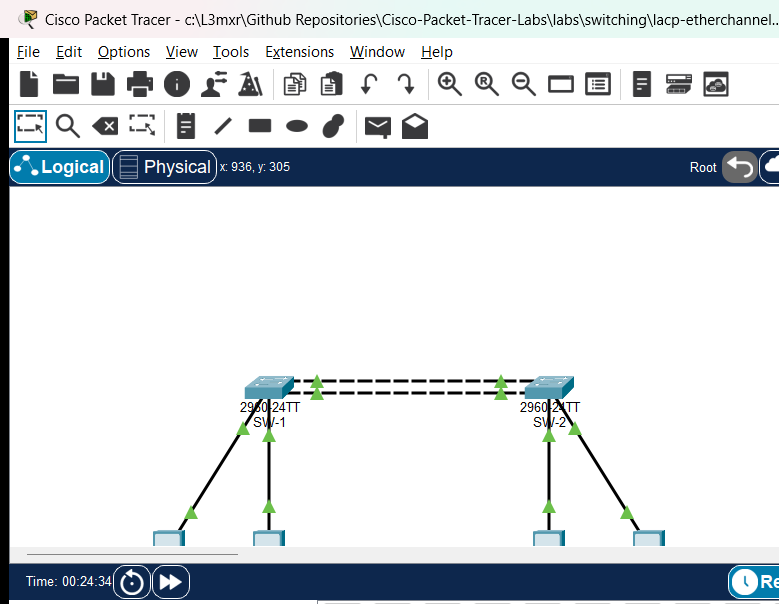
The topology consists of two distribution switches (SW-1 and SW-2) interconnected by a dual-link EtherChannel bundle aggregating FastEthernet physical interfaces Fa0/1 and Fa0/2 into logical interface Port-channel 1. Two VLANs are supported: VLAN 10 (Engineering) and VLAN 20 (Marketing), with Native VLAN 99 configured on the trunk. Four PC endpoints are connected to verify intra-VLAN reachability across the aggregated link.
+-------------------------------------------------------------+
|                        TOPOLOGY                             |
|                                                             |
|   [PC-1: Eng]                     [PC-3: Eng]               |
|   192.168.10.10                   192.168.10.20             |
|        |                               |                    |
|      Fa0/10                          Fa0/10                 |
|   +----------+   Fa0/1 <-----> Fa0/1   +----------+         |
|   |   SW-1   |=========================|   SW-2   |         |
|   +----------+   Fa0/2 <-----> Fa0/2   +----------+         |
|      Fa0/20   [Port-channel 1: LACP]  Fa0/20                |
|        |                               |                    |
|   [PC-2: Mkt]                     [PC-4: Mkt]               |
|   192.168.20.10                   192.168.20.20             |
+-------------------------------------------------------------+
Addressing Table#
| Device | Interface | IP Address | Subnet Mask | Default Gateway | VLAN / Description |
|---|---|---|---|---|---|
| SW-1 | Po1 | Unnumbered | N/A | N/A | 802.1Q Trunk (Native VLAN 99, Allowed: 10,20,99) |
| SW-1 | Fa0/1 | N/A | N/A | N/A | LACP Member (Po1) |
| SW-1 | Fa0/2 | N/A | N/A | N/A | LACP Member (Po1) |
| SW-1 | Fa0/10 | N/A | N/A | N/A | Access VLAN 10 (Engineering) |
| SW-1 | Fa0/20 | N/A | N/A | N/A | Access VLAN 20 (Marketing) |
| SW-2 | Po1 | Unnumbered | N/A | N/A | 802.1Q Trunk (Native VLAN 99, Allowed: 10,20,99) |
| SW-2 | Fa0/1 | N/A | N/A | N/A | LACP Member (Po1) |
| SW-2 | Fa0/2 | N/A | N/A | N/A | LACP Member (Po1) — Faulted in starter state |
| SW-2 | Fa0/10 | N/A | N/A | N/A | Access VLAN 10 (Engineering) |
| SW-2 | Fa0/20 | N/A | N/A | N/A | Access VLAN 20 (Marketing) |
| PC-1 | FastEthernet0 | 192.168.10.10 | 255.255.255.0 | N/A | VLAN 10 Workstation |
| PC-2 | FastEthernet0 | 192.168.20.10 | 255.255.255.0 | N/A | VLAN 20 Workstation |
| PC-3 | FastEthernet0 | 192.168.10.20 | 255.255.255.0 | N/A | VLAN 10 Workstation |
| PC-4 | FastEthernet0 | 192.168.20.20 | 255.255.255.0 | N/A | VLAN 20 Workstation |
Lab Tasks#
- Investigate the Operational Incident: Examine
SW-1andSW-2usingshow etherchannel summaryand identify which member interface has failed to join the aggregated link bundle. - Audit Interface Parameters: Compare configuration parameters between
Port-channel 1, member interfaceFa0/1, and member interfaceFa0/2on both switches usingshow interfaces switchportandshow etherchannel port-channel. - Isolate the Parameter Discrepancy: Identify whether the bundling failure is caused by an administrative switchport mode mismatch (access vs. trunk), trunk encapsulation, native VLAN divergence, or allowed VLAN pruning.
- Remediate the Member Interface Configuration: Correct the mismatched physical interface configuration on
SW-2so that all parameters match the logicalPort-channel 1specification. - Verify Full Bundling and Protocol Convergence: Confirm that
show etherchannel summaryreportsPo1(SU)and that both physical member interfaces display the bundled flag(P)on both switches. - Validate Multi-VLAN Data Plane Delivery: Perform end-to-end ping tests between PC endpoints to verify bidirectional data plane reachability across both VLAN 10 and VLAN 20.
Configuration Walkthrough#
1. Diagnosing the Member Mismatch in Starter State#
Upon loading the starter topology, inspect the EtherChannel summary table on SW-2:
SW-2# show etherchannel summary
Flags:  D - down        P - in port-channel
        I - stand-alone s - suspended
        H - Hot-standby (LACP only)
        R - Layer3      S - Layer2
        U - in use      f - failed to allocate aggregator
        u - unsuitable for bundling
        w - waiting to be aggregated
        d - default port

Number of channel-groups in use: 1
Number of aggregators:           1

Group  Port-channel  Protocol    Ports
------+-------------+-----------+-----------------------------------------------
1      Po1(SU)         LACP      Fa0/1(P)    Fa0/2(s)
Notice the flag next to Fa0/2: (s) indicating suspended. While Fa0/1 is active in the port-channel (P), Fa0/2 has been suspended by LACP because its operational parameters conflict with the bundle aggregator.
Next, inspect the port-channel details:
SW-2# show etherchannel port-channel
                Port-channels in the group:
                ---------------------------

Port-channel: Po1
------------

Age of the Port-channel   = 00d:00h:15m:20s
Logical slot/port   = 16/0          Number of ports = 1
GC                  = 0x00010001    HotStandBy port = null
Port state          = Port-channel Ag-Inuse
Protocol            = LACP
Port security       = Disabled

Ports in the group:

Index   Load   Port     EC state        No of bits
------+------+------+------------------+-----------
  0     00     Fa0/1    Active             0

Time since last port bundled:    00d:00h:14m:10s    Fa0/1
Notice that Number of ports = 1. The logical link is operating with half of its intended bandwidth and zero physical link redundancy.
2. Identifying the Root Cause#
To determine why Fa0/2 cannot join Po1, compare the switchport properties of Port-channel 1 and FastEthernet0/2:
SW-2# show interfaces Port-channel 1 switchport
Name: Po1
Switchport: Enabled
Administrative Mode: trunk
Operational Mode: trunk
Administrative Trunking Encapsulation: dot1q
Operational Trunking Encapsulation: dot1q
Negotiation of Trunking: Off
Access Mode VLAN: 1 (default)
Trunking Native Mode VLAN: 99 (Native_Trunk)
Administrative Native VLAN tagging: disabled
Operational Native VLAN tagging: disabled
Administrative private-vlan host-association: none
Administrative private-vlan mapping: none
Administrative private-vlan trunk encapsulation: dot1q
Administrative private-vlan trunk normal VLANs: none
Administrative private-vlan trunk private VLANs: none
Operational private-vlan: none
Trunk of private-vlans: none
Trunk of private-vlans enabled: none
Trunk of private-vlans native: none
Trunk of private-vlans non-operational: none
Trunk of private-vlans blocked: none
Trunk of private-vlans trunking: none
Operational Mode: trunk
Trunking VLANs Enabled: 10,20,99
Now examine FastEthernet0/2:
SW-2# show interfaces FastEthernet0/2 switchport
Name: Fa0/2
Switchport: Enabled
Administrative Mode: static access
Operational Mode: static access
Administrative Trunking Encapsulation: dot1q
Operational Trunking Encapsulation: native
Negotiation of Trunking: Off
Access Mode VLAN: 10 (Engineering)
Trunking Native Mode VLAN: 1 (default)
Administrative Native VLAN tagging: disabled
...
The discrepancy is clear:
Port-channel 1is configured as an 802.1Q trunk with Native VLAN 99 and allowed VLANs10,20,99.- Member interface
Fa0/2is configured in static access mode in VLAN 10. - Cisco IOS EtherChannel member consistency check forbids an access port from bundling into a trunk Port-channel. LACP therefore suspends
Fa0/2.
3. Remediating the Member Port Configuration on SW-2#
To resolve the mismatch, reconfigure FastEthernet0/2 on SW-2 to match the exact trunking parameters of Port-channel 1:
SW-2# configure terminal
Enter configuration commands, one per line.  End with CNTL/Z.
SW-2(config)# interface FastEthernet0/2
SW-2(config-if)# switchport mode trunk
SW-2(config-if)# switchport trunk native vlan 99
SW-2(config-if)# switchport trunk allowed vlan 10,20,99
SW-2(config-if)# channel-group 1 mode active
SW-2(config-if)# end
SW-2# copy running-config startup-config
Destination filename [startup-config]?
Building configuration...
[OK]
Tip
Best practice in enterprise Cisco switching is to configure interface ranges simultaneously (interface range FastEthernet0/1 - 2) when provisioning EtherChannels, or to apply changes directly to the interface Port-channel 1 interface. Applying configuration to the Port-channel interface automatically propagates settings to all bundled physical member interfaces, preventing accidental member divergence.
Verification#
Command Output Verification#
1. EtherChannel Summary Verification (SW-1 and SW-2)#
Execute show etherchannel summary on both switches:
SW-1# show etherchannel summary
Group  Port-channel  Protocol    Ports
------+-------------+-----------+-----------------------------------------------
1      Po1(SU)         LACP      Fa0/1(P)    Fa0/2(P)

SW-2# show etherchannel summary
Group  Port-channel  Protocol    Ports
------+-------------+-----------+-----------------------------------------------
1      Po1(SU)         LACP      Fa0/1(P)    Fa0/2(P)
Both member ports Fa0/1 and Fa0/2 show the (P) flag (bundled in port-channel), and Po1 exhibits (SU) (Layer 2, in Use).
2. Port-Channel Detailed Verification#
Execute show etherchannel port-channel on SW-2:
SW-2# show etherchannel port-channel
Port-channel: Po1
Logical slot/port   = 16/0          Number of ports = 2
Protocol            = LACP
Ports in the group:
Index   Load   Port     EC state        No of bits
------+------+------+------------------+-----------
  0     00     Fa0/1    Active             0
  1     00     Fa0/2    Active             0
Number of ports = 2 confirms dual-link capacity and load-sharing aggregation.
3. Data Plane Reachability Across VLANs#
Test reachability from PC-1 (VLAN 10) to PC-3 (VLAN 10):
PC> ping 192.168.10.20
Pinging 192.168.10.20 with 32 bytes of data:
Reply from 192.168.10.20: bytes=32 time<1ms TTL=128
Reply from 192.168.10.20: bytes=32 time<1ms TTL=128
Reply from 192.168.10.20: bytes=32 time<1ms TTL=128
Reply from 192.168.10.20: bytes=32 time<1ms TTL=128

Ping statistics for 192.168.10.20:
    Packets: Sent = 4, Received = 4, Lost = 0 (0% loss)
Test reachability from PC-2 (VLAN 20) to PC-4 (VLAN 20):
PC> ping 192.168.20.20
Pinging 192.168.20.20 with 32 bytes of data:
Reply from 192.168.20.20: bytes=32 time<1ms TTL=128
Reply from 192.168.20.20: bytes=32 time<1ms TTL=128
Reply from 192.168.20.20: bytes=32 time<1ms TTL=128
Reply from 192.168.20.20: bytes=32 time<1ms TTL=128

Ping statistics for 192.168.20.20:
    Packets: Sent = 4, Received = 4, Lost = 0 (0% loss)
Test Layer 2 isolation between distinct VLANs (PC-1 to PC-2):
PC> ping 192.168.20.10
Pinging 192.168.20.10 with 32 bytes of data:
Request timed out.
Request timed out.
Request timed out.
Request timed out.

Ping statistics for 192.168.20.10:
    Packets: Sent = 4, Received = 0, Lost = 4 (100% loss)
Verification Criteria Checklist#
| Test ID | Objective | Expected Output | Status |
|---|---|---|---|
| POS-01 | EtherChannel Logical State | Po1(SU) on both SW-1 and SW-2 |
PASS |
| POS-02 | Member Port Bundling | Fa0/1(P) and Fa0/2(P) on both switches |
PASS |
| POS-03 | LACP Protocol State | Protocol = LACP, 2 active ports |
PASS |
| POS-04 | VLAN 10 Intra-VLAN Ping | 0% packet loss (PC-1 -> PC-3) | PASS |
| POS-05 | VLAN 20 Intra-VLAN Ping | 0% packet loss (PC-2 -> PC-4) | PASS |
| POS-06 | Inter-VLAN Isolation | 100% packet loss (PC-1 -> PC-2) | PASS |
Troubleshooting#
- Member Port Shows Suspended
(s):- Run
show interfaces switchporton both the member port and the Port-channel interface. - Verify that
Administrative Mode,Operational Mode,Trunking Native Mode VLAN, andTrunking VLANs Enabledmatch identically across all members.
- Run
- Member Port Shows Down
(D):- Verify physical cabling using crossover or straight-through Ethernet cables.
- Ensure the interface is administratively up (
no shutdown).
- EtherChannel Shows
(SD)(Layer 2, Down):- Verify that the remote peer switch is actively participating in LACP (
channel-group 1 mode activeormode passive). - At least one side of the bundle MUST be in
activemode for LACP negotiation to occur. If both sides arepassive, negotiation will never initiate.
- Verify that the remote peer switch is actively participating in LACP (
- VLAN Traffic Fails While Bundle is
(SU):- Check the trunk allowed VLAN list:
show interfaces trunk. - Ensure all required data VLANs (e.g., VLAN 10 and VLAN 20) are explicitly permitted on the trunk.
- Check the trunk allowed VLAN list:
Key Takeaways#
- Strict Parameter Consistency: Cisco IOS EtherChannel requires all member interfaces to share identical speed, duplex, port mode (access vs. trunk), native VLAN, allowed VLAN list, and STP path cost settings.
- LACP Member Suspension: If a member interface exhibits mismatched parameters, LACP protects against bridging loops and black-holing by suspending the mismatched port rather than forwarding traffic inconsistently.
- Best Practice Propagation: Always configure the
interface Port-channel Xinterface when modifying trunk parameters (such as allowed VLAN lists or native VLANs). Changes made to the logical interface automatically cascade to all bundled member physical ports. - Active vs. Passive Modes: LACP negotiation requires at least one endpoint in
activemode. Usingmode activeon both switches guarantees immediate, deterministic negotiation.
References#
- IEEE 802.3ad-2000 Link Aggregation Standard
- Cisco Catalyst 2960 Switch Software Configuration Guide — Configuring EtherChannels
- Cisco Technical Support: Understanding EtherChannel Inconsistency Detection
Files and Validation Status#
assets/starter.pkt: Initial topology withSW-2 Fa0/2faulted in access mode for diagnostic exercise.assets/completed.pkt: Fully remediated topology with operational LACP EtherChannel bundle (Po1(SU),Fa0/1(P),Fa0/2(P)).assets/topology.png: Network diagram illustrating distribution switches and dual aggregated links.assets/test_evidence.json: Automated test execution results captured via Packet Tracer MCP bridge.configs/SW-1.txt: Baseline running configuration for Distribution Switch 1.configs/SW-2.txt: Remediated running configuration for Distribution Switch 2.verification.md: Comprehensive verification matrix detailing positive, negative, and reload tests.