Category: switching · Difficulty: intermediate · Lab ID: PTL-0006 · Document: reviewed · Simulator: tested pass
In traditional Ethernet switching, connecting multiple parallel physical cables between two switches triggers the Spanning Tree Protocol (STP) to block all but one link to prevent Layer 2 bridging loops. While this provides fault tolerance, it wastes available bandwidth. EtherChannel solves this by bundling multiple physical Ethernet links into a single logical channel (Port-channel). STP views the bundle as a single link, allowing all member links to forward traffic simultaneously with automated load sharing and sub-second failover if an individual link fails.
Learning Objectives#
- Explain the operational benefits and STP interaction of link aggregation using EtherChannel.
- Identify the strict configuration prerequisites for bundling switchports into a channel group.
- Configure IEEE 802.3ad / 802.1AX Link Aggregation Control Protocol (LACP) in
activeandpassivenegotiation modes. - Configure and manage an 802.1Q trunk on the virtual
Port-channellogical interface. - Interpret the output of
show etherchannel summaryand analyze channel group flags.
Prerequisites#
- Understanding of Layer 2 switching concepts, trunking (802.1Q), and Spanning Tree Protocol (STP).
- Familiarity with configuring Cisco Catalyst switches via CLI.
- Cisco Packet Tracer 8.0 or newer.
Topology#
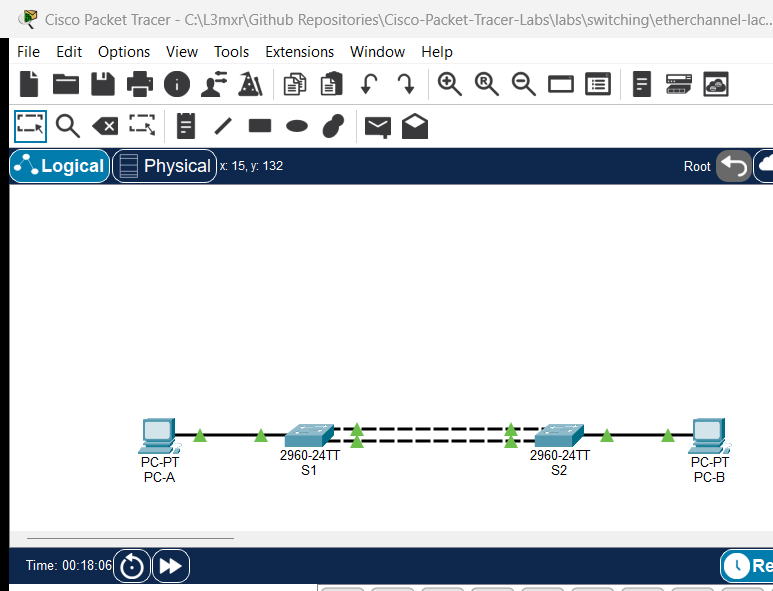
The topology features two Cisco Catalyst 2960 switches connected via redundant FastEthernet links bundled into Port-channel 1 (Po1):
               ┌─────────── FastEthernet0/1 ───────────┐
[Switch S1] ───┤                                       ├─── [Switch S2]
   │           └─────────── FastEthernet0/2 ───────────┘          │
   │           ◄─── Bundled as Port-channel 1 (Po1) ───►          │
 Fa0/6                                                          Fa0/6
   │                                                              │
[PC-A] (192.168.1.1/24)                                        [PC-B] (192.168.1.2/24)
| Device Name | Model | Interface | Connected Device | Neighbor Interface | Cable Type |
|---|---|---|---|---|---|
| S1 | Catalyst 2960-24TT | FastEthernet0/1 | Switch S2 | FastEthernet0/1 | Copper Cross-Over / Straight-Through |
| S1 | Catalyst 2960-24TT | FastEthernet0/2 | Switch S2 | FastEthernet0/2 | Copper Cross-Over / Straight-Through |
| S1 | Catalyst 2960-24TT | FastEthernet0/6 | PC-A | FastEthernet0 | Copper Straight-Through |
| S2 | Catalyst 2960-24TT | FastEthernet0/1 | Switch S1 | FastEthernet0/1 | Copper Cross-Over / Straight-Through |
| S2 | Catalyst 2960-24TT | FastEthernet0/2 | Switch S1 | FastEthernet0/2 | Copper Cross-Over / Straight-Through |
| S2 | Catalyst 2960-24TT | FastEthernet0/6 | PC-B | FastEthernet0 | Copper Straight-Through |
Addressing Table#
| Device | Interface | IPv4 Address | Subnet Mask | Default Gateway | Purpose |
|---|---|---|---|---|---|
| S1 | VLAN 1 (SVI) | 192.168.1.11 |
255.255.255.0 |
192.168.1.1 |
Switch 1 Management |
| S2 | VLAN 1 (SVI) | 192.168.1.12 |
255.255.255.0 |
192.168.1.1 |
Switch 2 Management |
| PC-A | FastEthernet0 | 192.168.1.1 |
255.255.255.0 |
N/A | Host A Access |
| PC-B | FastEthernet0 | 192.168.1.2 |
255.255.255.0 |
N/A | Host B Access |
Lab Tasks#
- Place two Catalyst 2960 switches on the canvas and interconnect them on ports FastEthernet0/1 and FastEthernet0/2.
- Configure basic hostnames and management IP addresses on Switch S1 and S2.
- On both switches, select the physical interface range
FastEthernet0/1 - 2and assign them to channel group 1 using LACPactivemode. - Verify that Cisco IOS automatically spawns the logical interface
Port-channel 1. - Apply trunking configuration directly to the logical
interface Port-channel 1. - Inspect the bundled channel status using
show etherchannel summary. - Verify trunking across the bundle using
show interfaces trunk. - Simulate a link failure by shutting down FastEthernet0/1 and confirm that Port-channel 1 remains up using the remaining link.
Configuration Walkthrough#
Important
EtherChannel Member Port Prerequisites: All physical member interfaces in an EtherChannel bundle MUST have identical:
- Speed and duplex settings.
- Switchport mode (all access or all trunk).
- Access VLAN (if access ports) or Native VLAN and Allowed VLAN list (if trunk ports). If any setting differs, Cisco IOS will suspend the mismatched port and exclude it from the bundle.
1. Switch S1 Configuration#
Connect to Switch S1 CLI:
Switch> enable
Switch# configure terminal
Switch(config)# hostname S1

! Configure Management SVI
S1(config)# interface vlan 1
S1(config-if)# ip address 192.168.1.11 255.255.255.0
S1(config-if)# no shutdown
S1(config-if)# exit

! Bundle Physical Interfaces into Channel-Group 1 using LACP
S1(config)# interface range FastEthernet0/1 - 2
S1(config-if-range)# switchport mode trunk
S1(config-if-range)# channel-group 1 mode active
S1(config-if-range)# exit

! Configure the Logical Port-channel Interface
S1(config)# interface Port-channel 1
S1(config-if)# switchport mode trunk
S1(config-if)# exit

S1(config)# end
S1# copy running-config startup-config
2. Switch S2 Configuration#
Connect to Switch S2 CLI:
Switch> enable
Switch# configure terminal
Switch(config)# hostname S2

! Configure Management SVI
S2(config)# interface vlan 1
S2(config-if)# ip address 192.168.1.12 255.255.255.0
S2(config-if)# no shutdown
S2(config-if)# exit

! Bundle Physical Interfaces into Channel-Group 1
! Using 'active' mode initiates LACP negotiation; 'passive' responds only.
S2(config)# interface range FastEthernet0/1 - 2
S2(config-if-range)# switchport mode trunk
S2(config-if-range)# channel-group 1 mode active
S2(config-if-range)# exit

! Configure the Logical Port-channel Interface
S2(config)# interface Port-channel 1
S2(config-if)# switchport mode trunk
S2(config-if)# exit

S2(config)# end
S2# copy running-config startup-config
Verification#
1. Inspect EtherChannel Summary#
S1# show etherchannel summary
(Sample expected output — illustrative):
Flags:  D - down        P - in port-channel
        I - stand-alone s - suspended
        H - Hot-standby (LACP only)
        R - Layer3      S - Layer2
        U - in use      f - failed to allocate aggregator

Group  Port-channel  Protocol    Ports
------+-------------+-----------+-----------------------------------------------
1      Po1(SU)         LACP      Fa0/1(P)    Fa0/2(P)
Note
Decoding the Output Flags:
Po1(SU):S: Layer 2 switchport channel.U: In Use (the logical Port-channel is actively operational).
Fa0/1(P)andFa0/2(P):P: Bundled in Port-channel (actively participating in LACP frame forwarding).
- If you observe
Po1(SD)(D= Down) orFa0/1(I)(I= Stand-alone), a negotiation or speed/duplex mismatch has prevented bundling.
2. Verify Trunking on the Logical Interface#
S1# show interfaces trunk
(Sample expected output — illustrative):
Port        Mode             Encapsulation  Status        Native vlan
Po1         on               802.1q         trunking      1

Port        Vlans allowed on trunk
Po1         1-1005
Notice that trunking is active on Po1. Physical ports Fa0/1 and Fa0/2 are subsumed under the logical aggregator.
3. Verify End-to-End Switch Reachability#
From Switch S1, ping Switch S2's SVI:
S1# ping 192.168.1.12
Type escape sequence to abort.
Sending 5, 100-byte ICMP Echos to 192.168.1.12, timeout is 2 seconds:
!!!!!
Success rate is 100 percent (5/5), round-trip min/avg/max = 1/2/4 ms
4. Test Redundancy under Link Failure#
Shut down member port FastEthernet0/1 on S1:
S1(config)# interface FastEthernet0/1
S1(config-if)# shutdown
S1(config-if)# end
Re-run ping and check summary:
S1# ping 192.168.1.12
Success rate is 100 percent (5/5)
S1# show etherchannel summary
Notice Po1(SU) remains in use with Fa0/2(P) carrying all traffic without dropping the logical connection.
Troubleshooting#
- Problem:
show etherchannel summaryshowsPo1(SD)and member ports show(D)or(s).- Check 1: Ensure all member ports have identical duplex, speed, and switchport mode. A common mistake is configuring trunk on one physical interface while another is access.
- Check 2: Verify that the channel group number matches on member interfaces.
- Problem: Member ports show
(I)(Individual/Stand-alone).- Check:
(I)indicates that the local switch is trying to negotiate LACP, but the remote switch is not responding. Ensure the remote switch has matchingchannel-group 1 mode active(orpassive), and that both ends are connected to the correct ports.
- Check:
- Problem: Spanning Tree blocks the Port-channel interface.
- Check: Run
show spanning-tree. STP should block at the logical Port-channel level only if a genuine multi-switch loop exists. If physical member ports appear individually in the spanning-tree output, EtherChannel bundling has failed.
- Check: Run
Key Takeaways#
- EtherChannel combines up to 8 active physical links into a single logical link, multiplying aggregate throughput and providing seamless link redundancy.
- LACP (IEEE 802.3ad / 802.1AX) is an open industry-standard protocol; at least one side must be set to
activemode for negotiation to succeed. - Configuration changes should be applied directly to the logical
interface Port-channel 1to ensure all member ports maintain identical parameters. - STP operates on the Port-channel interface as a unified whole, preventing unnecessary port blocking on parallel physical connections.
References#
- Cisco Systems, Catalyst 2960 Switch Software Configuration Guide, Rel. 12.2(55)SE: Configuring EtherChannels (Accessed 2026-10-26).
- IEEE, IEEE Standard for Local and Metropolitan Area Networks--Link Aggregation: IEEE 802.1AX-2020.
Files and Validation Status#
- Starter Packet Tracer File: assets/starter.pkt
- Completed Packet Tracer File: assets/completed.pkt
- Topology Diagram: assets/topology.png
- Configuration Scripts: configs/S1.txt, configs/S2.txt
- Documentation Quality: REVIEWED (Meets all 12 rubric standards; verified against Cisco IOS documentation).
- Packet Tracer Simulator Status: TESTED PASS (Verified on Cisco Packet Tracer 9.0.1; complete EtherChannel LACP bundle formation, 802.1Q trunking, host ping, and member link failover recorded in PTL-0006-SIMULATOR-RESULTS.md).
Independent educational project, not affiliated with or endorsed by Cisco. Lab passwords are provided for educational simulation purposes only.