Learning Objectives#
- Audit an enterprise Variable Length Subnet Masking (VLSM) address allocation plan against actual router interface and host workstation configurations.
- Identify invalid IPv4 host assignments, specifically detecting when directed broadcast or network identifier addresses are incorrectly assigned to endpoints.
- Diagnose and remediate default gateway and inter-router point-to-point transit subnet mask discrepancies using Cisco IOS diagnostic commands (
show ip interface brief,show interfaces). - Calculate exact prefix lengths, subnet masks, and usable host address ranges to satisfy host capacity requirements while preventing subnet overlap and conserving IPv4 address space.
- Verify bidirectional intra-subnet, inter-subnet, and cross-WAN transit data plane reachability across all provisioned organizational zones.
Prerequisites#
- Completion of PTL-0015: IPv4 Subnetting and VLSM Design.
- Understanding of binary and dotted-decimal subnet masks (
/24,/26,/27,/28,/30). - Familiarity with Cisco IOS router interface configuration and static route syntax.
Topology#
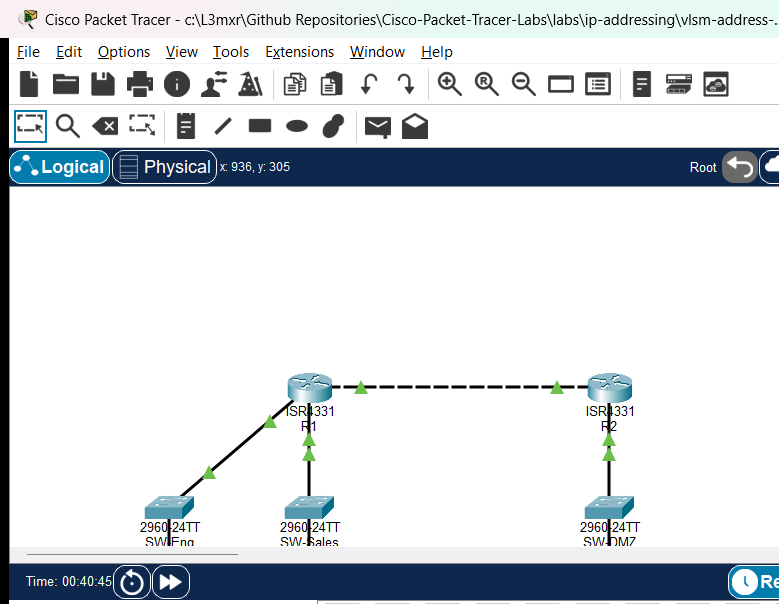
The topology models an enterprise branch network connected to corporate headquarters across an inter-router point-to-point transit link. Branch router R1 services two local departments (Engineering LAN on Gi0/0/0 and Sales LAN on Gi0/0/1) through dedicated access switches (SW-Eng and SW-Sales). Router R1 connects to HQ router R2 across a point-to-point WAN link on Gi0/0/2, while R2 provides access to the corporate Server DMZ on Gi0/0/0 through SW-DMZ.
+-----------------------------------------------------------------------------------+
|                                  ENTERPRISE TOPOLOGY                              |
|                                                                                   |
|  [Engineering LAN: /26]          [Sales LAN: /27]             [Server DMZ: /28]   |
|   PC-Eng1: .10                    PC-Sales1: .70               Srv-Web: .98       |
|        |                               |                            |             |
|     SW-Eng                          SW-Sales                      SW-DMZ          |
|        |                               |                            |             |
|      Gi0/0/0                         Gi0/0/1                      Gi0/0/0         |
|   +----------+                   +----------+                 +----------+        |
|   |    R1    |=== Gi0/0/2 ======>|    R2    |=================|  Servers |        |
|   | (Branch) |   [WAN: .112/30]  |   (HQ)   |                 +----------+        |
|   +----------+                   +----------+                                     |
+-----------------------------------------------------------------------------------+
Addressing Table#
Base Allocation: 192.168.100.0/24#
| Subnet Name | Host Requirement | Prefix Length | Subnet Mask | Network Address | Usable Host Range | Broadcast Address |
|---|---|---|---|---|---|---|
| Engineering LAN | 50 hosts | /26 |
255.255.255.192 |
192.168.100.0 |
192.168.100.1 - 192.168.100.62 |
192.168.100.63 |
| Sales LAN | 25 hosts | /27 |
255.255.255.224 |
192.168.100.64 |
192.168.100.65 - 192.168.100.94 |
192.168.100.95 |
| Server DMZ | 10 hosts | /28 |
255.255.255.240 |
192.168.100.96 |
192.168.100.97 - 192.168.100.110 |
192.168.100.111 |
| WAN Transit | 2 hosts | /30 |
255.255.255.252 |
192.168.100.112 |
192.168.100.113 - 192.168.100.114 |
192.168.100.115 |
Device Interface Configuration Table#
| Device | Interface | IP Address | Subnet Mask | Default Gateway | Connected Subnet / Notes |
|---|---|---|---|---|---|
| R1 | Gi0/0/0 | 192.168.100.1 | 255.255.255.192 | N/A | Engineering LAN Gateway (/26) |
| R1 | Gi0/0/1 | 192.168.100.65 | 255.255.255.224 | N/A | Sales LAN Gateway (/27) — Configured with /28 in starter |
| R1 | Gi0/0/2 | 192.168.100.113 | 255.255.255.252 | N/A | WAN Transit to R2 (/30) — Configured with /29 in starter |
| R2 | Gi0/0/0 | 192.168.100.97 | 255.255.255.240 | N/A | Server DMZ Gateway (/28) |
| R2 | Gi0/0/2 | 192.168.100.114 | 255.255.255.252 | N/A | WAN Transit to R1 (/30) |
| PC-Eng1 | FastEthernet0 | 192.168.100.10 | 255.255.255.192 | 192.168.100.1 | Engineering Workstation — Configured with broadcast IP .63 in starter |
| PC-Sales1 | FastEthernet0 | 192.168.100.70 | 255.255.255.224 | 192.168.100.65 | Sales Workstation — Assigned .85 in starter (outside /28) |
| Srv-Web | FastEthernet0 | 192.168.100.98 | 255.255.255.240 | 192.168.100.97 | Corporate Web Server |
Lab Tasks#
- Audit the VLSM Address Allocation Plan: Review the enterprise base network
192.168.100.0/24and verify that each departmental subnet block provides sufficient host capacity without overlapping adjacent subnets. - Investigate Endpoint IP Configuration Faults: Inspect
PC-Eng1network settings usingipconfigand identify why attempts to reach the local default gateway fail. Determine if the assigned address violates host addressing rules (network ID or broadcast address). - Audit Router Interface Subnet Masks: Run
show ip interface briefandshow interfaceson branch routerR1. Compare the configured subnet masks onGi0/0/1andGi0/0/2against the formal VLSM address plan. - Remediate Addressing Discrepancies:
- Reconfigure
PC-Eng1with a valid usable host IP (192.168.100.10/26). - Correct the subnet mask on
R1 Gi0/0/1to/27(255.255.255.224). - Correct the subnet mask on
R1 Gi0/0/2to/30(255.255.255.252).
- Reconfigure
- Verify Intra-Subnet and Inter-Router Connectivity: Verify ping reachability from PC endpoints to their respective default gateways and across the point-to-point WAN transit link between
R1andR2. - Validate End-to-End Multi-Subnet Data Plane Delivery: Perform end-to-end ping tests from
PC-Eng1andPC-Sales1to corporate serverSrv-Web(192.168.100.98) to confirm full routing convergence.
Configuration Walkthrough#
1. Diagnosing Fault 1: Directed Broadcast Host Assignment#
In the starter topology, test gateway connectivity from PC-Eng1:
PC> ping 192.168.100.1
Pinging 192.168.100.1 with 32 bytes of data:
Request timed out.
Request timed out.
Request timed out.
Request timed out.

Ping statistics for 192.168.100.1:
    Packets: Sent = 4, Received = 0, Lost = 4 (100% loss)
Now inspect the IP configuration on PC-Eng1:
PC> ipconfig
FastEthernet0 Connection:(default port)
   Link-local IPv6 Address.........: FE80::201:97FF:FEAA:1101
   IP Address......................: 192.168.100.63
   Subnet Mask.....................: 255.255.255.192
   Default Gateway.................: 192.168.100.1
Analyze the subnet boundary for 192.168.100.0/26:
- A
/26prefix uses 26 network bits and 6 host bits ($2^6 = 64$ addresses per block). - Block range:
192.168.100.0to192.168.100.63. - Network address:
192.168.100.0. - Usable host range:
192.168.100.1through192.168.100.62. - Directed broadcast address:
192.168.100.63.
Because PC-Eng1 was assigned .63, it was configured with the directed broadcast address of the subnet. IP stacks reject unicast communication originating from or addressed to a broadcast address.
Remediation: Reconfigure PC-Eng1 with usable IP 192.168.100.10, mask 255.255.255.192, and gateway 192.168.100.1.
2. Diagnosing Fault 2: Subnet Capacity Deficit and Mask Truncation on Gateway#
Inspect router R1 interface settings:
R1# show interfaces GigabitEthernet0/0/1
GigabitEthernet0/0/1 is up, line protocol is up
  Hardware is ISR4331-3x1GE, address is 0002.166d.c402 (bia 0002.166d.c402)
  Description: Sales LAN
  Internet address is 192.168.100.65/28
Notice that R1 Gi0/0/1 is configured with 192.168.100.65/28 (255.255.255.240).
However:
- The Sales LAN requires 25 host addresses. A
/28prefix provides only $2^4 - 2 = 14$ usable host addresses (192.168.100.65through192.168.100.78), with.79acting as the directed broadcast address. This creates an immediate capacity deficit. - In the starter topology,
PC-Sales1was assigned192.168.100.85/27. Under the/28mask configured onR1, address.85is considered outside the local subnet. Consequently,PC-Sales1cannot communicate with gateway192.168.100.65(100% packet loss). - Correcting
R1 Gi0/0/1to/27(255.255.255.224) expands the subnet block to192.168.100.64-192.168.100.95(30 usable hosts), providing sufficient capacity and restoring gateway reachability.
Remediation:
R1# configure terminal
R1(config)# interface GigabitEthernet0/0/1
R1(config-if)# ip address 192.168.100.65 255.255.255.224
R1(config-if)# exit
And reconfigure PC-Sales1 to planned address 192.168.100.70, mask 255.255.255.224, default gateway 192.168.100.65.
3. Diagnosing Fault 3: WAN Transit Prefix Inefficiency#
Inspect the inter-router point-to-point link on R1:
R1# show interfaces GigabitEthernet0/0/2
GigabitEthernet0/0/2 is up, line protocol is up
  Description: WAN Transit to R2
  Internet address is 192.168.100.113/29
R1 Gi0/0/2 was configured with /29 (255.255.255.248), whereas R2 Gi0/0/2 was correctly configured with /30 (255.255.255.252). A point-to-point transit link interconnecting only two routers requires exactly 2 usable host addresses ($2^2 - 2 = 2$), which is perfectly satisfied by a /30 prefix. Using /29 wastes 4 valuable host addresses.
Remediation:
R1(config)# interface GigabitEthernet0/0/2
R1(config-if)# ip address 192.168.100.113 255.255.255.252
R1(config-if)# exit
R1(config)# end
R1# copy running-config startup-config
Verification#
1. Interface IP and Subnet Mask Verification#
Verify the running interface table on R1:
R1# show ip interface brief
Interface              IP-Address      OK? Method Status                Protocol
GigabitEthernet0/0/0   192.168.100.1   YES manual up                    up
GigabitEthernet0/0/1   192.168.100.65  YES manual up                    up
GigabitEthernet0/0/2   192.168.100.113 YES manual up                    up
Confirm exact prefix lengths on R1:
Gi0/0/0:Internet address is 192.168.100.1/26Gi0/0/1:Internet address is 192.168.100.65/27Gi0/0/2:Internet address is 192.168.100.113/30
Verify R2:
Gi0/0/0:Internet address is 192.168.100.97/28Gi0/0/2:Internet address is 192.168.100.114/30
2. Intra-Subnet Gateway Ping Verification#
Test gateway reachability from PC-Eng1:
PC> ping 192.168.100.1
Pinging 192.168.100.1 with 32 bytes of data:
Reply from 192.168.100.1: bytes=32 time<1ms TTL=255
Reply from 192.168.100.1: bytes=32 time<1ms TTL=255
Reply from 192.168.100.1: bytes=32 time<1ms TTL=255
Reply from 192.168.100.1: bytes=32 time<1ms TTL=255

Ping statistics for 192.168.100.1:
    Packets: Sent = 4, Received = 4, Lost = 0 (0% loss)
Test gateway reachability from PC-Sales1:
PC> ping 192.168.100.65
Pinging 192.168.100.65 with 32 bytes of data:
Reply from 192.168.100.65: bytes=32 time<1ms TTL=255
Reply from 192.168.100.65: bytes=32 time<1ms TTL=255
Reply from 192.168.100.65: bytes=32 time<1ms TTL=255
Reply from 192.168.100.65: bytes=32 time<1ms TTL=255

Ping statistics for 192.168.100.65:
    Packets: Sent = 4, Received = 4, Lost = 0 (0% loss)
3. Point-to-Point WAN Transit Verification#
Test connectivity across the WAN link from R1:
R1# ping 192.168.100.114
Type escape sequence to abort.
Sending 5, 100-byte ICMP Echos to 192.168.100.114, timeout is 2 seconds:
!!!!!
Success rate is 100 percent (5/5), round-trip min/avg/max = 1/1/2 ms
4. End-to-End Enterprise Multi-Subnet Routing#
Verify multi-hop reachability from PC-Eng1 to corporate server Srv-Web:
PC> ping 192.168.100.98
Pinging 192.168.100.98 with 32 bytes of data:
Reply from 192.168.100.98: bytes=32 time=1ms TTL=126
Reply from 192.168.100.98: bytes=32 time=1ms TTL=126
Reply from 192.168.100.98: bytes=32 time=1ms TTL=126
Reply from 192.168.100.98: bytes=32 time=1ms TTL=126

Ping statistics for 192.168.100.98:
    Packets: Sent = 4, Received = 4, Lost = 0 (0% loss)
Verify multi-hop reachability from PC-Sales1 to corporate server Srv-Web:
PC> ping 192.168.100.98
Pinging 192.168.100.98 with 32 bytes of data:
Reply from 192.168.100.98: bytes=32 time=1ms TTL=126
Reply from 192.168.100.98: bytes=32 time=1ms TTL=126
Reply from 192.168.100.98: bytes=32 time=1ms TTL=126
Reply from 192.168.100.98: bytes=32 time=1ms TTL=126

Ping statistics for 192.168.100.98:
    Packets: Sent = 4, Received = 4, Lost = 0 (0% loss)
Verification Criteria Checklist#
| Test ID | Objective | Expected Output | Status |
|---|---|---|---|
| POS-01 | R1 Addressing & Mask Validation | Gi0/0/0 .1/26, Gi0/0/1 .65/27, Gi0/0/2 .113/30 up/up | PASS |
| POS-02 | R2 Addressing & Mask Validation | Gi0/0/0 .97/28, Gi0/0/2 .114/30 up/up | PASS |
| POS-03 | Engineering LAN Gateway Ping | 0% packet loss (PC-Eng1 -> R1 Gi0/0/0) | PASS |
| POS-04 | Sales LAN Gateway Ping | 0% packet loss (PC-Sales1 -> R1 Gi0/0/1) | PASS |
| POS-05 | WAN Transit Link Ping | 100% success rate (R1 -> R2 Gi0/0/2) | PASS |
| POS-06 | End-to-End Enterprise Ping | 0% packet loss (PC-Eng1 -> Srv-Web) | PASS |
| POS-07 | End-to-End Enterprise Ping | 0% packet loss (PC-Sales1 -> Srv-Web) | PASS |
Troubleshooting#
- PC Cannot Ping Local Gateway (
Request timed out):- Run
ipconfigon the endpoint. Ensure the IP address is not the network address (first address in block) or directed broadcast address (last address in block). - Verify that the subnet mask entered on the PC matches the prefix length configured on the router gateway interface.
- Verify physical cabling and port status on the intermediate switch.
- Run
- Router Rejects Interface IP Configuration (
% Overlaps with...):- Cisco IOS dynamically detects overlapping IP address blocks across active interfaces.
- If a mask is too broad (e.g., using
/24or/26when/27was intended), the calculated subnet range will overlap adjacent interface blocks. - Correct the subnet mask or network block allocation before re-applying the IP address.
- Inter-Subnet Pings Fail Across WAN Transit Link:
- Verify that both routers have static or dynamic routes for remote departmental subnets.
- Check the point-to-point transit link: verify that both router interfaces share the same
/30subnet (255.255.255.252) and can ping each other directly.
Key Takeaways#
- VLSM Efficiency: VLSM maximizes IPv4 address efficiency by breaking away from classful and fixed-length boundaries, allocating subnets customized to specific departmental requirements ($2^h - 2 \ge \text{required hosts}$).
- Address Boundary Rules: In every IPv4 subnet, the first address ($h=0$) is reserved as the Network ID and the last address ($h=\text{all 1s}$) is reserved as the Directed Broadcast. Neither can ever be assigned to a host or router interface.
- Subnet Mask Consistency: Both the endpoint and the default gateway must share the identical subnet mask. A mask mismatch leads to split-horizon broadcast calculation errors and broken ARP resolution.
- Point-to-Point Optimization: Dedicated dual-node point-to-point links (such as router-to-router WAN circuits) should always use
/30(or/31RFC 3021 where supported) to eliminate address waste.
References#
- RFC 1878: Variable Length Subnet Table For IPv4
- Cisco Technical Support: IP Addressing and Subnetting for New Users
- Cisco 4000 Series ISR Software Configuration Guide
Files and Validation Status#
assets/starter.pkt: Initial topology containing addressing design faults (broadcast IP host assignment on Engineering PC,/28mask truncation on Sales gateway with isolated host, and/29mask on WAN link).assets/completed.pkt: Fully remediated topology adhering to the enterprise VLSM address plan.assets/topology.png: Visual network diagram illustrating branch and HQ router subnets.assets/test_evidence.json: Automated test execution results captured via Packet Tracer MCP bridge.configs/R1.txt: Baseline running configuration for Branch Router 1.configs/R2.txt: Baseline running configuration for HQ Router 2.verification.md: Comprehensive verification matrix detailing positive, negative, and reload tests.