Learning Objectives#
- Design and implement static routing in an enterprise hub-and-spoke multi-site WAN architecture.
- Configure default static routes (
0.0.0.0/0) on spoke branch routers to streamline outbound egress to headquarters. - Configure explicit static network routes on the central headquarters router to ensure symmetric return paths to all branch LANs.
- Diagnose and remediate static route next-hop failures caused by off-subnet gateway IP assignment and recursive lookup exhaustion.
- Verify end-to-end data plane reachability across hub and spoke boundaries, including branch-to-hub and spoke-to-spoke transit paths.
Prerequisites#
- Completion of PTL-0001: Dual-Stack IPv4 and IPv6 Static Routing.
- Completion of PTL-0014: Default Gateway Operation and Troubleshooting.
- Completion of PTL-0028: Floating Static Routes and Administrative Distance.
- Solid understanding of point-to-point
/30WAN subnets and routing table lookup mechanics.
Topology#
The enterprise topology connects a central corporate headquarters (R-HQ) to two remote regional branches (R-BR1 in the West and R-BR2 in the East) via dedicated point-to-point Gigabit WAN links. Each site maintains an access switch and local departmental endpoints.
       [Branch 1 Site]                         [HQ Site]                         [Branch 2 Site]
    PC-BR1: 10.20.0.10/24               HQ-Server: 10.10.0.10/24               PC-BR2: 10.30.0.10/24
              |                                     |                                     |
           (Fa0/1)                               (Fa0/1)                               (Fa0/1)
         [SW-BR1]                              [SW-HQ]                               [SW-BR2]
           (Gi0/1)                               (Gi0/1)                               (Gi0/1)
              |                                     |                                     |
           (Gi0/0/0)                             (Gi0/0/0)                             (Gi0/0/0)
          [ R-BR1 ]                             [ R-HQ ]                              [ R-BR2 ]
           (Gi0/0/1)                             (Gi0/0/1)                             (Gi0/0/2)
              |                                     |                                     |
       172.16.12.2/30                        172.16.12.1/30                               |
              +=================== WAN 1 ===========+                                     |
                                                 (Gi0/0/2)                                |
                                              172.16.13.1/30                        172.16.13.2/30
                                                    +============== WAN 2 ================+
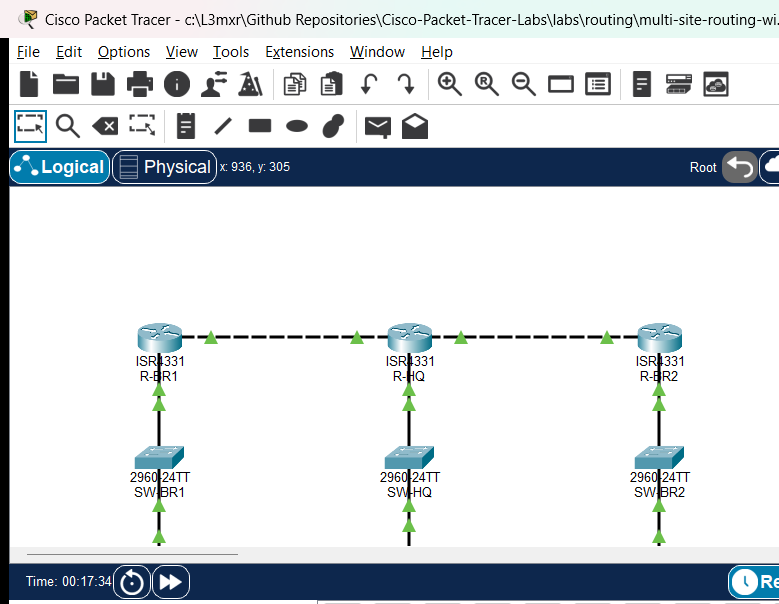
Addressing Table#
| Device | Interface | IP Address | Subnet Mask | Default Gateway | Description |
|---|---|---|---|---|---|
| R-HQ | Gi0/0/0 | 10.10.0.1 | 255.255.255.0 | N/A | Corporate HQ LAN Gateway (10.10.0.0/24) |
| R-HQ | Gi0/0/1 | 172.16.12.1 | 255.255.255.252 | N/A | WAN Link 1 to R-BR1 (172.16.12.0/30) |
| R-HQ | Gi0/0/2 | 172.16.13.1 | 255.255.255.252 | N/A | WAN Link 2 to R-BR2 (172.16.13.0/30) |
| R-BR1 | Gi0/0/0 | 10.20.0.1 | 255.255.255.0 | N/A | Branch 1 LAN Gateway (10.20.0.0/24) |
| R-BR1 | Gi0/0/1 | 172.16.12.2 | 255.255.255.252 | N/A | WAN Link 1 to R-HQ (172.16.12.0/30) |
| R-BR2 | Gi0/0/0 | 10.30.0.1 | 255.255.255.0 | N/A | Branch 2 LAN Gateway (10.30.0.0/24) |
| R-BR2 | Gi0/0/2 | 172.16.13.2 | 255.255.255.252 | N/A | WAN Link 2 to R-HQ (172.16.13.0/30) |
| HQ-Server | FastEthernet0 | 10.10.0.10 | 255.255.255.0 | 10.10.0.1 | Corporate Application Server |
| PC-BR1 | FastEthernet0 | 10.20.0.10 | 255.255.255.0 | 10.20.0.1 | Branch 1 Client Workstation — Faulted in starter |
| PC-BR2 | FastEthernet0 | 10.30.0.10 | 255.255.255.0 | 10.30.0.1 | Branch 2 Client Workstation |
Lab Tasks#
- Audit Branch 1 Local Network Connectivity: Inspect
PC-BR1IP configuration and verify whether the client can communicate with its local branch gateway (10.20.0.1). - Diagnose Spoke Default Route on R-BR1: Inspect the routing table on
R-BR1withshow ip route. Determine why outbound traffic destined for headquarters fails to forward and examine the configured next-hop IP. - Remediate Branch 1 Default Routing: Correct the static default route on
R-BR1to point to the valid upstream next-hop IP onR-HQ(172.16.12.1), and updatePC-BR1default gateway settings. - Audit Headquarters Static Routing Table: Inspect
R-HQrouting table withshow ip route static. Identify missing return routes for remote branch subnets. - Remediate Headquarters Return Routing: Configure the required explicit static route on
R-HQto reach the Branch 2 LAN (10.30.0.0/24) viaR-BR2(172.16.13.2). - Verify End-to-End Multi-Site Connectivity: Validate bidirectional ping reachability from both branch workstations to
HQ-Server(10.10.0.10) and perform inter-branch spoke-to-spoke communication testing (PC-BR1toPC-BR2).
Configuration Walkthrough#
1. Diagnosing Fault 1: PC-BR1 Gateway Misconfiguration#
In the starter state, verify local gateway reachability from PC-BR1:
PC> ping 10.20.0.1
Pinging 10.20.0.1 with 32 bytes of data:
Request timed out.
Request timed out.
Request timed out.
Request timed out.

Ping statistics for 10.20.0.1:
    Packets: Sent = 4, Received = 0, Lost = 4 (100% loss)
Check the IP settings on PC-BR1 using ipconfig:
PC> ipconfig
FastEthernet0 Connection:(default port)
   IP Address......................: 10.20.0.10
   Subnet Mask.....................: 255.255.255.0
   Default Gateway.................: 10.20.0.254
Notice that the default gateway was misconfigured as 10.20.0.254 instead of the actual router interface 10.20.0.1.
Remediation: Reconfigure PC-BR1 with default gateway 10.20.0.1.
2. Diagnosing Fault 2: Invalid Static Route Next-Hop on R-BR1#
After fixing the client gateway, attempt to ping HQ-Server (10.10.0.10) from PC-BR1:
PC> ping 10.10.0.10
Pinging 10.10.0.10 with 32 bytes of data:
Reply from 10.20.0.1: Destination host unreachable.
Inspect the routing table on R-BR1:
R-BR1# show ip route
Gateway of last resort is not set

      10.0.0.0/8 is variably subnetted, 2 subnets, 2 masks
C        10.20.0.0/24 is directly connected, GigabitEthernet0/0/0
L        10.20.0.1/32 is directly connected, GigabitEthernet0/0/0
      172.16.0.0/16 is variably subnetted, 2 subnets, 2 masks
C        172.16.12.0/30 is directly connected, GigabitEthernet0/0/1
L        172.16.12.2/32 is directly connected, GigabitEthernet0/0/1
Notice that Gateway of last resort is not set! Inspect the running configuration:
R-BR1# show running-config | include ip route
ip route 0.0.0.0 0.0.0.0 172.16.12.5
The WAN point-to-point link is 172.16.12.0/30 (usable IPs: 172.16.12.1 and 172.16.12.2). The configured next-hop 172.16.12.5 resides in the separate subnet 172.16.12.4/30. Because 172.16.12.5 cannot be recursively resolved, Cisco IOS refuses to install the static route into the forwarding table.
Remediation:
R-BR1# configure terminal
R-BR1(config)# no ip route 0.0.0.0 0.0.0.0 172.16.12.5
R-BR1(config)# ip route 0.0.0.0 0.0.0.0 172.16.12.1
R-BR1(config)# end
R-BR1# copy running-config startup-config
Verify that the gateway of last resort is now installed:
R-BR1# show ip route static
S*    0.0.0.0/0 [1/0] via 172.16.12.1
3. Diagnosing Fault 3: Missing Return Route on R-HQ#
Test connectivity from PC-BR2 to HQ-Server (10.10.0.10):
PC> ping 10.10.0.10
Pinging 10.10.0.10 with 32 bytes of data:
Request timed out.
Request timed out.
Request timed out.
Request timed out.
PC-BR2 has a valid default gateway (10.30.0.1) and R-BR2 has a working default route to 172.16.13.1. The ICMP request reaches HQ-Server. However, HQ-Server forwards the echo reply to its default gateway R-HQ (10.10.0.1). Inspect R-HQ routing table:
R-HQ# show ip route static
S     10.20.0.0/24 [1/0] via 172.16.12.2
R-HQ possesses a route back to Branch 1 (10.20.0.0/24), but lacks any routing entry for Branch 2 (10.30.0.0/24)! When R-HQ receives the echo reply destined for 10.30.0.10, it drops the packet as unroutable.
Remediation:
R-HQ# configure terminal
R-HQ(config)# ip route 10.30.0.0 255.255.255.0 172.16.13.2
R-HQ(config)# end
R-HQ# copy running-config startup-config
Verify that both branch networks are now reachable from R-HQ:
R-HQ# show ip route static
S     10.20.0.0/24 [1/0] via 172.16.12.2
S     10.30.0.0/24 [1/0] via 172.16.13.2
Verification#
1. Spoke Default Route Audit#
Verify default static routes on both branch spoke routers:
R-BR1# show ip route static
S*    0.0.0.0/0 [1/0] via 172.16.12.1

R-BR2# show ip route static
S*    0.0.0.0/0 [1/0] via 172.16.13.1
2. Hub Explicit Route Audit#
Verify that R-HQ maintains static routes for all spoke branch LANs:
R-HQ# show ip route static
S     10.20.0.0/24 [1/0] via 172.16.12.2
S     10.30.0.0/24 [1/0] via 172.16.13.2
3. Spoke-to-Hub Data Plane Verification#
Test reachability from PC-BR1 to HQ-Server:
PC> ping 10.10.0.10
Pinging 10.10.0.10 with 32 bytes of data:
Reply from 10.10.0.10: bytes=32 time=1ms TTL=126
Reply from 10.10.0.10: bytes=32 time=1ms TTL=126
Reply from 10.10.0.10: bytes=32 time=1ms TTL=126
Reply from 10.10.0.10: bytes=32 time=1ms TTL=126

Ping statistics for 10.10.0.10:
    Packets: Sent = 4, Received = 4, Lost = 0 (0% loss)
Test reachability from PC-BR2 to HQ-Server:
PC> ping 10.10.0.10
Pinging 10.10.0.10 with 32 bytes of data:
Reply from 10.10.0.10: bytes=32 time=1ms TTL=126
Reply from 10.10.0.10: bytes=32 time=1ms TTL=126
Reply from 10.10.0.10: bytes=32 time=1ms TTL=126
Reply from 10.10.0.10: bytes=32 time=1ms TTL=126

Ping statistics for 10.10.0.10:
    Packets: Sent = 4, Received = 4, Lost = 0 (0% loss)
4. Spoke-to-Spoke Transit Verification#
Verify inter-branch routing from PC-BR1 across R-HQ to PC-BR2:
PC> ping 10.30.0.10
Pinging 10.30.0.10 with 32 bytes of data:
Reply from 10.30.0.10: bytes=32 time=2ms TTL=125
Reply from 10.30.0.10: bytes=32 time=2ms TTL=125
Reply from 10.30.0.10: bytes=32 time=2ms TTL=125
Reply from 10.30.0.10: bytes=32 time=2ms TTL=125

Ping statistics for 10.30.0.10:
    Packets: Sent = 4, Received = 4, Lost = 0 (0% loss)
Notice that the Time-To-Live (TTL) is 125 (decremented once by R-BR1, once by R-HQ, and once by R-BR2), confirming three routed hops.
Verification Criteria Checklist#
| Test ID | Objective | Expected Output | Status |
|---|---|---|---|
| POS-01 | R-HQ Routing Table Audit | Both 10.20.0.0/24 and 10.30.0.0/24 present via WAN next-hops |
PASS |
| POS-02 | Spoke Default Route Audit | 0.0.0.0/0 installed on both R-BR1 (via 172.16.12.1) and R-BR2 (via 172.16.13.1) |
PASS |
| POS-03 | Branch 1 Local Gateway Reachability | 0% packet loss (PC-BR1 -> R-BR1 Gi0/0/0) | PASS |
| POS-04 | Branch 2 Local Gateway Reachability | 0% packet loss (PC-BR2 -> R-BR2 Gi0/0/0) | PASS |
| POS-05 | Branch 1 to HQ Server Reachability | 0% packet loss (PC-BR1 -> HQ-Server 10.10.0.10) | PASS |
| POS-06 | Branch 2 to HQ Server Reachability | 0% packet loss (PC-BR2 -> HQ-Server 10.10.0.10) | PASS |
| POS-07 | Inter-Branch Spoke-to-Spoke Reachability | 0% packet loss (PC-BR1 -> PC-BR2 10.30.0.10) | PASS |
Troubleshooting#
- Gateway of Last Resort Not Installed on Spoke Router:
- Verify the static route configuration using
show running-config | include ip route. - Ensure that the specified next-hop address belongs to the subnet of the local outbound interface.
- Check the outbound interface state with
show ip interface brief. If the physical link is down or administratively down, Cisco IOS will automatically suppress the static route from the active routing table.
- Verify the static route configuration using
- Client Receives "Destination Host Unreachable":
- The local router does not have a route to the destination network and lacks a default route.
- Verify that the spoke router has an active default route pointing toward the hub.
- Ping Times Out Despite Correct Spoke Default Route (Asymmetric Routing Failure):
- Check the hub router's routing table (
show ip route). - While outbound packets may successfully reach the destination host, return packets will be discarded if the hub router lacks a reverse route back to the source branch LAN.
- Every remote subnet in a hub-and-spoke topology requires either an explicit static route or a dynamic routing protocol advertisement at the hub.
- Check the hub router's routing table (
- Inter-Branch Traffic Fails While Branch-to-HQ Works:
- Verify that both branch LAN routes exist on the hub router.
- Ensure that the hub router has IP routing enabled (
ip routing).
Key Takeaways#
- Hub-and-Spoke Topology: In a centralized enterprise architecture, branch spoke routers require only a default static route pointing toward the hub, keeping branch routing tables minimal.
- Routing Symmetry: IP routing is stateless and hop-by-hop. The fact that a packet successfully travels from Source to Destination does not guarantee return reachability; the return path must be explicitly provisioned at every intermediate router.
- Next-Hop Validation: Static routes are only installed in the forwarding table if their next-hop IP is directly reachable or can be resolved through an existing routing table entry.
- Point-to-Point WAN Subnets: A
/30prefix provides exactly 2 usable host addresses, ideal for dedicated inter-router point-to-point links.
References#
- Cisco 4000 Series ISR Software Configuration Guide
- RFC 1812: Requirements for IPv4 Routers
- Cisco Technology Support: Configuring a Default Route or Network
Files and Validation Status#
assets/starter.pkt: Initial topology with misconfigured endpoint gateway, invalid next-hop on R-BR1, and missing return route on R-HQ.assets/completed.pkt: Remediated topology featuring full bidirectional static routing across all three enterprise sites.assets/topology.png: Visual network diagram illustrating hub and spoke router connections.assets/test_evidence.json: Automated test execution results captured via Packet Tracer MCP bridge.configs/R-HQ.txt: Baseline running configuration for Corporate Headquarters Hub Router.configs/R-BR1.txt: Baseline running configuration for Branch 1 Spoke Router.configs/R-BR2.txt: Baseline running configuration for Branch 2 Spoke Router.verification.md: Comprehensive verification matrix detailing positive, negative, and reload tests.