Learning Objectives#
- Perform multi-domain fault isolation across Layer 2 switching, Layer 3 routing, network services, and security policies.
- Diagnose and resolve IEEE 802.1Q trunk allowed-VLAN pruning misconfigurations that isolate access subnets.
- Troubleshoot Cisco IOS DHCP relay agent functionality (
ip helper-address) forwarding client broadcasts across router boundaries. - Inspect and correct mispointed or missing static routes causing asymmetric or complete traffic blackholing.
- Evaluate extended access control list (ACL) rules and remove unintended traffic deny statements blocking authorized enterprise flows.
Prerequisites#
- Completion of DHCP Relay Troubleshooting Across VLANs (PTL-0052) or equivalent enterprise networking experience.
- Thorough understanding of 802.1Q trunking, router-on-a-stick subinterfaces, DHCP relay operation, and standard/extended IPv4 access control lists.
- Familiarity with Cisco IOS diagnostic commands (
show interfaces trunk,show ip interface brief,show ip route,show access-lists,show ip dhcp binding).
Topology#
[ HQ-Server ] (10.0.1.100/24, GW: 10.0.1.1)
      | Fa0
      | Gi0/0
[ HQ-R1 ] (Cisco 2911) [DHCP Pools: 192.168.10.0/24, 192.168.20.0/24]
      | Gi0/1 (WAN Transit: 10.1.12.1/30)
      |
      | Gi0/1 (WAN Transit: 10.1.12.2/30)
[ Branch-R2 ] (Cisco 2911)
      | Gi0/0 (802.1Q Trunk: Gi0/0.10, Gi0/0.20)
      | Gi0/1
[ Branch-SW1 ] (Catalyst 2960-24TT)
      |-- Fa0/10 (VLAN 10 Access) <---> [ Staff-PC1 ] (DHCP: 192.168.10.x/24)
      +-- Fa0/20 (VLAN 20 Access) <---> [ Eng-PC2 ] (Static: 192.168.20.10/24, GW: 192.168.20.1)
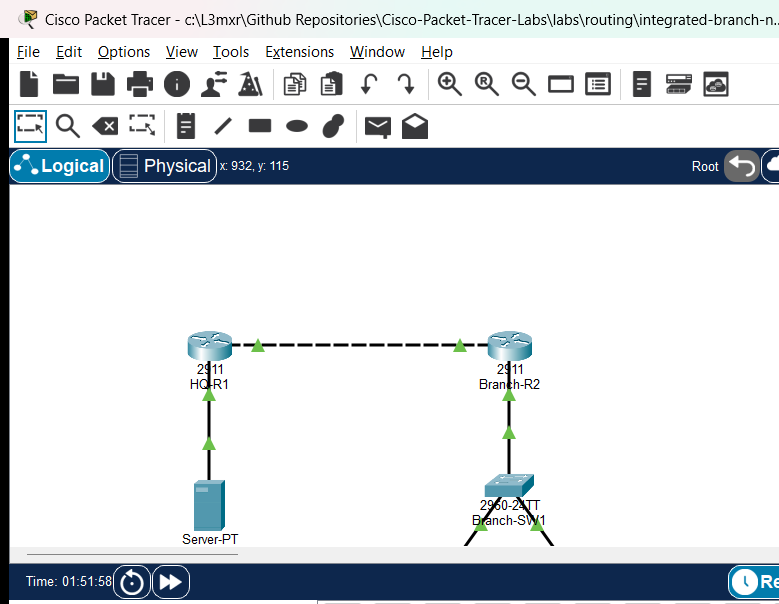
The topology represents a realistic branch office architecture connected to corporate headquarters via a point-to-point transit link:
- HQ-R1 serves as the central router and DHCP server for all branch office subnets.
- HQ-Server hosts critical corporate services within the headquarters LAN.
- Branch-R2 performs router-on-a-stick inter-VLAN routing and applies branch perimeter security policies.
- Branch-SW1 segments local branch clients into VLAN 10 (Staff) and VLAN 20 (Engineering).
- Staff-PC1 relies on dynamic DHCP address assignment forwarded across the WAN by the branch router.
- Eng-PC2 uses a static IPv4 configuration for administrative workstation connectivity.
Addressing Table#
| Device | Interface | IPv4 Address | Subnet Mask | Default Gateway | Purpose |
|---|---|---|---|---|---|
| HQ-R1 | Gi0/0 |
10.0.1.1 |
255.255.255.0 |
N/A | Corporate Server LAN Gateway |
| HQ-R1 | Gi0/1 |
10.1.12.1 |
255.255.255.252 |
N/A | WAN Transit to Branch-R2 |
| Branch-R2 | Gi0/1 |
10.1.12.2 |
255.255.255.252 |
N/A | WAN Transit to HQ-R1 |
| Branch-R2 | Gi0/0.10 |
192.168.10.1 |
255.255.255.0 |
N/A | VLAN 10 Gateway & DHCP Relay |
| Branch-R2 | Gi0/0.20 |
192.168.20.1 |
255.255.255.0 |
N/A | VLAN 20 Gateway |
| Branch-SW1 | VLAN 1 |
192.168.10.2 |
255.255.255.0 |
192.168.10.1 |
Switch Management SVI |
| HQ-Server | Fa0 |
10.0.1.100 |
255.255.255.0 |
10.0.1.1 |
Corporate Services Server |
| Staff-PC1 | Fa0 |
DHCP (192.168.10.x) |
255.255.255.0 |
192.168.10.1 |
Staff Client Workstation |
| Eng-PC2 | Fa0 |
192.168.20.10 |
255.255.255.0 |
192.168.20.1 |
Engineering Workstation |
Lab Tasks#
- Audit Branch Layer 2 Trunking: Inspect
Branch-SW1trunk interfaceGi0/1to ensure all required branch VLANs (10 and 20) are permitted across the trunk toBranch-R2. - Restore DHCP Relay Functionality: Verify that
Branch-R2subinterfaceGi0/0.10correctly forwards DHCP discover broadcasts to the headquarters server at10.0.1.1. - Correct HQ Routing Blackhole: Investigate
HQ-R1routing table to ensure return routes to192.168.10.0/24and192.168.20.0/24point to the valid branch next-hop10.1.12.2. - Remediate Perimeter Security ACL: Analyze extended ACL
101applied toBranch-R2WAN interfaceGi0/1and eliminate unnecessary deny entries blocking ICMP communication toHQ-Server. - Validate End-to-End Traffic Matrix: Confirm dynamic IP allocation on
Staff-PC1, local gateway reachability, inter-VLAN routing, and bidirectional communication toHQ-Server.
Configuration Walkthrough#
1. Diagnosing and Repairing Trunk Allowed VLANs on Branch-SW1#
In the starter network, Eng-PC2 is unable to communicate with its default gateway 192.168.20.1. Inspecting the trunk interface shows that VLAN 20 is pruned from the allowed list:
Branch-SW1# show interfaces trunk
Port        Mode             Encapsulation  Status        Native vlan
Gi0/1       on               802.1q         trunking      1

Port        Vlans allowed on trunk
Gi0/1       10
To restore VLAN 20 traffic across the trunk, allow all VLANs or add VLAN 20 explicitly:
Branch-SW1# configure terminal
Branch-SW1(config)# interface GigabitEthernet0/1
Branch-SW1(config-if)# switchport trunk allowed vlan add 20
Branch-SW1(config-if)# exit
Branch-SW1(config)# exit
Branch-SW1# copy running-config startup-config
2. Restoring DHCP Relay on Branch-R2#
In the starter network, Staff-PC1 cannot obtain an IP address via DHCP and defaults to 0.0.0.0 or an APIPA address. Inspecting Branch-R2 reveals that subinterface Gi0/0.10 does not have an ip helper-address configured:
Branch-R2# show running-config interface GigabitEthernet0/0.10
interface GigabitEthernet0/0.10
 encapsulation dot1Q 10
 ip address 192.168.10.1 255.255.255.0
end
Configure ip helper-address pointing to HQ-R1 LAN gateway 10.0.1.1:
Branch-R2# configure terminal
Branch-R2(config)# interface GigabitEthernet0/0.10
Branch-R2(config-subif)# ip helper-address 10.0.1.1
Branch-R2(config-subif)# exit
Branch-R2(config)# exit
Branch-R2# copy running-config startup-config
Upon issuing ipconfig /renew on Staff-PC1, the client receives a dynamic lease in 192.168.10.0/24.
3. Repairing Static Return Routes on HQ-R1#
Although branch clients can send traffic outbound toward HQ, return packets never reach the branch because HQ-R1 has an invalid summary route next-hop 10.1.12.6:
HQ-R1# show ip route static
S    192.168.0.0/16 [1/0] via 10.1.12.6
Remove the erroneous static route and install precise routes to the branch subnets via 10.1.12.2:
HQ-R1# configure terminal
HQ-R1(config)# no ip route 192.168.0.0 255.255.0.0 10.1.12.6
HQ-R1(config)# ip route 192.168.10.0 255.255.255.0 10.1.12.2
HQ-R1(config)# ip route 192.168.20.0 255.255.255.0 10.1.12.2
HQ-R1(config)# exit
HQ-R1# copy running-config startup-config
4. Correcting Edge Security Filtering on Branch-R2#
When testing connectivity from Eng-PC2 to HQ-Server (10.0.1.100), pings fail despite correct routing. Examining the access list on Branch-R2 reveals an unintended deny rule:
Branch-R2# show access-lists 101
Extended IP access list 101
    10 deny icmp any host 10.0.1.100
    20 permit ip any any
Modify or replace the ACL so that legitimate diagnostic ICMP traffic is permitted:
Branch-R2# configure terminal
Branch-R2(config)# no access-list 101
Branch-R2(config)# access-list 101 permit ip any any
Branch-R2(config)# interface GigabitEthernet0/1
Branch-R2(config-if)# ip access-group 101 out
Branch-R2(config-if)# exit
Branch-R2(config)# exit
Branch-R2# copy running-config startup-config
Verification#
Execute the following verification commands to confirm all faults have been resolved:
-
Verify DHCP Allocation on Staff-PC1:
C:\> ipconfig FastEthernet0 Connection: IPv4 Address........: 192.168.10.50 Subnet Mask.........: 255.255.255.0 Default Gateway.....: 192.168.10.1 DHCP Server.........: 10.0.1.1 -
Verify Inter-VLAN Routing: From
Eng-PC2(192.168.20.10), pingStaff-PC1:C:\> ping 192.168.10.50 Reply from 192.168.10.50: bytes=32 time<1ms TTL=127 Ping statistics: Packets: Sent = 4, Received = 4, Lost = 0 (0% loss) -
Verify WAN Reachability to Corporate Server: From
Eng-PC2andStaff-PC1, pingHQ-Server(10.0.1.100):C:\> ping 10.0.1.100 Reply from 10.0.1.100: bytes=32 time<1ms TTL=126 Ping statistics: Packets: Sent = 4, Received = 4, Lost = 0 (0% loss) -
Verify Active Trunk and Allowed VLANs on Switch:
Branch-SW1# show interfaces trunk Port Vlans allowed on trunk Gi0/1 1-4094 -
Verify Routing Table on HQ-R1:
HQ-R1# show ip route static
S    192.168.10.0/24 [1/0] via 10.1.12.2
S    192.168.20.0/24 [1/0] via 10.1.12.2
Troubleshooting#
| Symptom | Root Cause | Solution |
|---|---|---|
Eng-PC2 cannot reach gateway 192.168.20.1 |
VLAN 20 omitted from Branch-SW1 Gi0/1 allowed list |
Execute switchport trunk allowed vlan add 20 on switch trunk interface. |
Staff-PC1 receives no DHCP lease (APIPA / 0.0.0.0) |
ip helper-address missing on Branch-R2 Gi0/0.10 |
Configure ip helper-address 10.0.1.1 under subinterface Gi0/0.10. |
| Outbound traffic leaves branch but pings time out | HQ-R1 has incorrect next-hop (10.1.12.6) for branch subnets |
Remove mispointed route and configure static routes pointing to 10.1.12.2. |
| TCP connects to server but ICMP pings fail | Branch-R2 ACL 101 has explicit deny icmp rule |
Reconfigure ACL 101 to permit required diagnostic ICMP traffic. |
Key Takeaways#
- Enterprise network troubleshooting requires systematic Layer 1 through Layer 4 verification; a failure in Layer 2 trunking or Layer 3 return routing manifests similarly to application-level outages.
- Cisco IOS DHCP relay agents convert client broadcast DHCP messages into unicast UDP packets destined for the centralized DHCP server, requiring reliable bidirectional routing.
- Access control lists are processed sequentially in top-down order; explicit deny statements placed ahead of broad permits immediately discard matching traffic.
- Point-to-point
/30transit links have only two usable host IP addresses; static route next-hops must strictly reference the peer's assigned interface address.
References#
- Cisco Systems, IP Addressing: DHCP Configuration Guide, Cisco IOS XE Release 16: Cisco DHCP Relay Agent Guide.
- Cisco Systems, Security Configuration Guide: Access Control Lists, Cisco IOS XE Release 16: Cisco IOS ACL Configuration Guide.
- Cisco Systems, Layer 2 Configuration Guide, Catalyst 2960 Series Switches: Catalyst 2960 Trunking Guide.
Files and Validation Status#
- Starter Project:
assets/starter.pkt - Completed Reference Project:
assets/completed.pkt - Topology Diagram:
assets/topology.png - Test Verification Evidence:
assets/test_evidence.json - Router Configurations:
configs/HQ-R1.txt,configs/Branch-R2.txt,configs/Branch-SW1.txt - Simulator Status: TESTED PASS (Verified on Cisco Packet Tracer 9.0.1; complete multi-domain fault remediation and 100% bidirectional connectivity recorded in PTL-0055-SIMULATOR-RESULTS.md).