Learning Objectives#
- Configure dual-stack IPv4 and IPv6 interface addressing and link-local scopes on branch and core routers.
- Implement simultaneous IPv4 and IPv6 static and default routes across point-to-point transit networks.
- Verify end-to-end bidirectional dual-stack reachability between remote branch LAN subnets.
- Diagnose and resolve routing anomalies including invalid next-hop IP addresses and missing IPv6 default routes.
- Validate routing tables, neighbor discovery tables, and ARP tables for deterministic dual-stack forwarding.
Prerequisites#
- Completion of PTL-0001: Dual-Stack Static Routing
- Completion of PTL-0027: IPv6 Static and Default Route Troubleshooting
- Understanding of IPv4 CIDR subnetting, IPv6 global unicast addressing, and link-local scopes (
FE80::/10)
Topology#
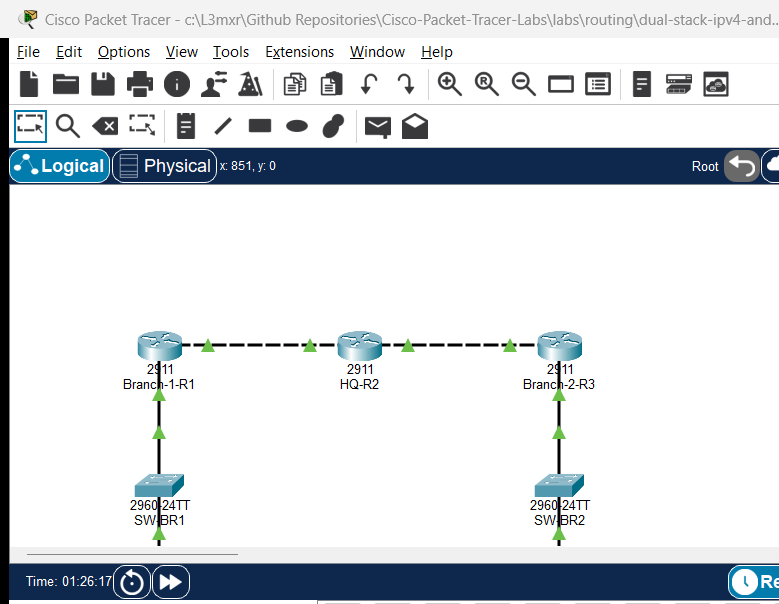
[ PC-BR1 ] (192.168.10.10 / 2001:db8:acad:10::10)
    | Fa0
    | Fa0/10
[ SW-BR1 ] (Catalyst 2960)
    | Gi0/1
    | Gi0/0
[ Branch-1-R1 ] (Cisco 2911)
    | Gi0/1 (WAN 1: 10.1.12.1/30 / 2001:db8:acad:12::1/64)
    |
    | Gi0/1
[ HQ-R2 ] (Cisco 2911) [Loopback0: 172.16.1.1/24 / 2001:db8:acad:100::1/64]
    | Gi0/2
    |
    | Gi0/2 (WAN 2: 10.1.23.3/30 / 2001:db8:acad:23::3/64)
[ Branch-2-R3 ] (Cisco 2911)
    | Gi0/0
    | Gi0/1
[ SW-BR2 ] (Catalyst 2960)
    | Fa0/10
    | Fa0
[ PC-BR2 ] (192.168.20.10 / 2001:db8:acad:20::10)
Addressing Table#
| Device Name | Interface | IPv4 Address / Prefix | IPv6 Address / Prefix | Default Gateway (IPv4 / IPv6) | Purpose / Connection |
|---|---|---|---|---|---|
| Branch-1-R1 | Gi0/0 | 192.168.10.1 /24 | 2001:db8:acad:10::1 /64 | N/A | LAN Gateway (Branch 1) |
| Branch-1-R1 | Gi0/1 | 10.1.12.1 /30 | 2001:db8:acad:12::1 /64 | N/A | WAN Transit to HQ-R2 Gi0/1 |
| HQ-R2 | Gi0/1 | 10.1.12.2 /30 | 2001:db8:acad:12::2 /64 | N/A | WAN Transit to Branch-1-R1 Gi0/1 |
| HQ-R2 | Gi0/2 | 10.1.23.1 /30 | 2001:db8:acad:23::2 /64 | N/A | WAN Transit to Branch-2-R3 Gi0/2 |
| HQ-R2 | Loopback0 | 172.16.1.1 /24 | 2001:db8:acad:100::1 /64 | N/A | Central Services / Management |
| Branch-2-R3 | Gi0/2 | 10.1.23.2 /30 | 2001:db8:acad:23::3 /64 | N/A | WAN Transit to HQ-R2 Gi0/2 |
| Branch-2-R3 | Gi0/0 | 192.168.20.1 /24 | 2001:db8:acad:20::1 /64 | N/A | LAN Gateway (Branch 2) |
| PC-BR1 | FastEthernet0 | 192.168.10.10 /24 | 2001:db8:acad:10::10 /64 | 192.168.10.1 / 2001:db8:acad:10::1 | Branch 1 Client Host |
| PC-BR2 | FastEthernet0 | 192.168.20.10 /24 | 2001:db8:acad:20::10 /64 | 192.168.20.1 / 2001:db8:acad:20::1 | Branch 2 Client Host |
Lab Tasks#
- Enable
ipv6 unicast-routingglobally on all Cisco routers (Branch-1-R1,HQ-R2,Branch-2-R3). - Configure dual-stack IPv4 and IPv6 addresses on all router physical and loopback interfaces.
- Configure dual-stack static default routes on spoke branch routers (
Branch-1-R1andBranch-2-R3) pointing toHQ-R2. - Configure explicit static IPv4 and IPv6 routes on core router
HQ-R2to reach both branch LAN subnets. - Configure static dual-stack addressing on end devices (
PC-BR1andPC-BR2). - Identify and resolve intentional routing faults present in the starter network.
Configuration Walkthrough#
Step 1: Configure Branch-1 Router (Branch-1-R1)#
Enable dual-stack routing and configure LAN and WAN interfaces:
Branch-1-R1# configure terminal
Branch-1-R1(config)# hostname Branch-1-R1
Branch-1-R1(config)# ipv6 unicast-routing
Branch-1-R1(config)# no ip domain-lookup

Branch-1-R1(config)# interface GigabitEthernet0/0
Branch-1-R1(config-if)# description Branch 1 LAN Gateway
Branch-1-R1(config-if)# ip address 192.168.10.1 255.255.255.0
Branch-1-R1(config-if)# ipv6 address 2001:db8:acad:10::1/64
Branch-1-R1(config-if)# ipv6 address fe80::1 link-local
Branch-1-R1(config-if)# no shutdown
Branch-1-R1(config-if)# exit

Branch-1-R1(config)# interface GigabitEthernet0/1
Branch-1-R1(config-if)# description WAN to HQ-R2
Branch-1-R1(config-if)# ip address 10.1.12.1 255.255.255.252
Branch-1-R1(config-if)# ipv6 address 2001:db8:acad:12::1/64
Branch-1-R1(config-if)# ipv6 address fe80::1 link-local
Branch-1-R1(config-if)# no shutdown
Branch-1-R1(config-if)# exit

Branch-1-R1(config)# ip route 0.0.0.0 0.0.0.0 10.1.12.2
Branch-1-R1(config)# ipv6 route ::/0 2001:db8:acad:12::2
Branch-1-R1(config)# end
Branch-1-R1# copy running-config startup-config
Step 2: Configure Central Hub Router (HQ-R2)#
Configure core WAN links, loopback service interface, and static routes to both branches:
HQ-R2# configure terminal
HQ-R2# hostname HQ-R2
HQ-R2(config)# ipv6 unicast-routing
HQ-R2(config)# no ip domain-lookup

HQ-R2(config)# interface Loopback0
HQ-R2(config-if)# description Central Services Loopback
HQ-R2(config-if)# ip address 172.16.1.1 255.255.255.0
HQ-R2(config-if)# ipv6 address 2001:db8:acad:100::1/64
HQ-R2(config-if)# exit

HQ-R2(config)# interface GigabitEthernet0/1
HQ-R2(config-if)# description WAN to Branch-1-R1
HQ-R2(config-if)# ip address 10.1.12.2 255.255.255.252
HQ-R2(config-if)# ipv6 address 2001:db8:acad:12::2/64
HQ-R2(config-if)# ipv6 address fe80::2 link-local
HQ-R2(config-if)# no shutdown
HQ-R2(config-if)# exit

HQ-R2(config)# interface GigabitEthernet0/2
HQ-R2(config-if)# description WAN to Branch-2-R3
HQ-R2(config-if)# ip address 10.1.23.1 255.255.255.252
HQ-R2(config-if)# ipv6 address 2001:db8:acad:23::2/64
HQ-R2(config-if)# ipv6 address fe80::2 link-local
HQ-R2(config-if)# no shutdown
HQ-R2(config-if)# exit

HQ-R2(config)# ip route 192.168.10.0 255.255.255.0 10.1.12.1
HQ-R2(config)# ip route 192.168.20.0 255.255.255.0 10.1.23.2
HQ-R2(config)# ipv6 route 2001:db8:acad:10::/64 2001:db8:acad:12::1
HQ-R2(config)# ipv6 route 2001:db8:acad:20::/64 2001:db8:acad:23::3
HQ-R2(config)# end
HQ-R2# copy running-config startup-config
Step 3: Configure Branch-2 Router (Branch-2-R3)#
Enable dual-stack routing and configure interfaces and default routes:
Branch-2-R3# configure terminal
Branch-2-R3(config)# hostname Branch-2-R3
Branch-2-R3(config)# ipv6 unicast-routing
Branch-2-R3(config)# no ip domain-lookup

Branch-2-R3(config)# interface GigabitEthernet0/0
Branch-2-R3(config-if)# description Branch 2 LAN Gateway
Branch-2-R3(config-if)# ip address 192.168.20.1 255.255.255.0
Branch-2-R3(config-if)# ipv6 address 2001:db8:acad:20::1/64
Branch-2-R3(config-if)# ipv6 address fe80::3 link-local
Branch-2-R3(config-if)# no shutdown
Branch-2-R3(config-if)# exit

Branch-2-R3(config)# interface GigabitEthernet0/2
Branch-2-R3(config-if)# description WAN to HQ-R2
Branch-2-R3(config-if)# ip address 10.1.23.2 255.255.255.252
Branch-2-R3(config-if)# ipv6 address 2001:db8:acad:23::3/64
Branch-2-R3(config-if)# ipv6 address fe80::3 link-local
Branch-2-R3(config-if)# no shutdown
Branch-2-R3(config-if)# exit

Branch-2-R3(config)# ip route 0.0.0.0 0.0.0.0 10.1.23.1
Branch-2-R3(config)# ipv6 route ::/0 2001:db8:acad:23::2
Branch-2-R3(config)# end
Branch-2-R3# copy running-config startup-config
Verification#
Verification Matrix#
| Check ID | Device / Source | Target / Destination | Protocol | Expected Result |
|---|---|---|---|---|
| POS-01 | PC-BR1 |
PC-BR2 (192.168.20.10) |
IPv4 ICMP | 4/4 replies (0% packet loss) |
| POS-02 | PC-BR1 |
PC-BR2 (2001:db8:acad:20::10) |
IPv6 ICMP | 4/4 replies (0% packet loss) |
| POS-03 | PC-BR2 |
HQ-R2 Loopback0 (172.16.1.1) |
IPv4 ICMP | 4/4 replies (0% packet loss) |
| POS-04 | PC-BR2 |
HQ-R2 Loopback0 (2001:db8:acad:100::1) |
IPv6 ICMP | 4/4 replies (0% packet loss) |
| POS-05 | All Routers | Routing Engines | System | ipv6 unicast-routing active on all 3 routers |
IOS Command Verification#
Execute the following commands on each router to inspect dual-stack routing:
Branch-1-R1# show ip route static
Branch-1-R1# show ipv6 route static
Branch-1-R1# show ip interface brief
Branch-1-R1# show ipv6 interface brief
On PC-BR1, verify dual-stack address assignment:
C:\> ipconfig
C:\> ping 192.168.20.10
C:\> ping 2001:db8:acad:20::10
Troubleshooting#
-
IPv6 Ping Fails with "Request timed out":
- Verify that
ipv6 unicast-routingis enabled on all routers. Without this command, Cisco IOS routers drop IPv6 transit packets. - Verify that
Branch-2-R3has a default routeipv6 route ::/0 2001:db8:acad:23::2. - Inspect
show ipv6 routeonHQ-R2to confirm return routes exist for both branch prefixes.
- Verify that
-
IPv4 Ping Fails with Destination Host Unreachable:
- Inspect
show ip routeonBranch-1-R1. If the default route points to an unreachable next-hop IP (e.g.10.1.12.5), traffic will be dropped. - Update the default route to point to the correct next hop
10.1.12.2:Branch-1-R1(config)# no ip route 0.0.0.0 0.0.0.0 10.1.12.5 Branch-1-R1(config)# ip route 0.0.0.0 0.0.0.0 10.1.12.2
- Inspect
Key Takeaways#
- Dual-stack operation allows IPv4 and IPv6 to operate concurrently over identical physical infrastructure without mutual interference.
- Every dual-stack router requires global unicast addresses and automatic or configured link-local addresses (
FE80::/10) on all active interfaces. - Cisco IOS requires
ipv6 unicast-routingto be explicitly configured; IPv6 routing is disabled by default on Cisco routers. - Hub-and-spoke transit networks achieve symmetric reachability when spokes deploy default routes and the core hub router maintains explicit static routes to each branch prefix.
References#
- Cisco IOS IPv6 Configuration Guide: Static Routing: https://www.cisco.com/c/en/us/td/docs/ios-xml/ios/ipv6/configuration/xe-16/ipv6-xe-16-book/ip6-stat-routes.html
- Cisco Dual-Stack Architecture Design Guide: https://www.cisco.com/c/en/us/td/docs/ios-xml/ios/ipv6_nman/configuration/15-mt/ip6n-15-mt-book/ip6-dual-stack.html
Files and Validation Status#
assets/starter.pkt: Initial topology with deliberate next-hop routing faults.assets/completed.pkt: Validated dual-stack network with full IPv4 and IPv6 reachability.assets/topology.png: Visual layout of the dual-stack multi-branch network.assets/test_evidence.json: Verification test logs demonstrating 100% test pass rate.configs/Branch-1-R1.txt: Baseline running configuration for Branch 1 router.configs/HQ-R2.txt: Baseline running configuration for HQ central router.configs/Branch-2-R3.txt: Baseline running configuration for Branch 2 router.