Learning Objectives#
- Explain the key architectural differences between OSPFv2 (IPv4) and OSPFv3 (IPv6), including link-local next-hop addressing and interface-level activation.
- Configure 32-bit dotted-decimal OSPFv3 Router IDs on Cisco IOS routers.
- Activate OSPFv3 Area 0 directly on physical transit, LAN, and loopback interfaces.
- Configure point-to-point OSPFv3 network types on inter-router links to optimize adjacency formation and eliminate DR/BDR election overhead.
- Apply passive-interface directives to customer-facing LAN segments to suppress unnecessary multicast traffic.
- Inspect OSPFv3 neighbor adjacencies, Link-State database (LSAs), and learned IPv6 routing tables using Cisco IOS verification commands.
- Verify bidirectional end-to-end IPv6 packet forwarding across multi-hop OSPFv3 routing domains.
Prerequisites#
- Completion of IPv6 Static and Default Routing labs (
PTL-0027) or equivalent understanding of IPv6 global unicast addressing and link-local scope. - Familiarity with OSPFv2 fundamentals (Areas, Router IDs, Hello/Dead timers, LSAs, SPF algorithm) from
PTL-0011. - Basic understanding of Cisco IOS interface configuration and privileged EXEC commands.
Topology#
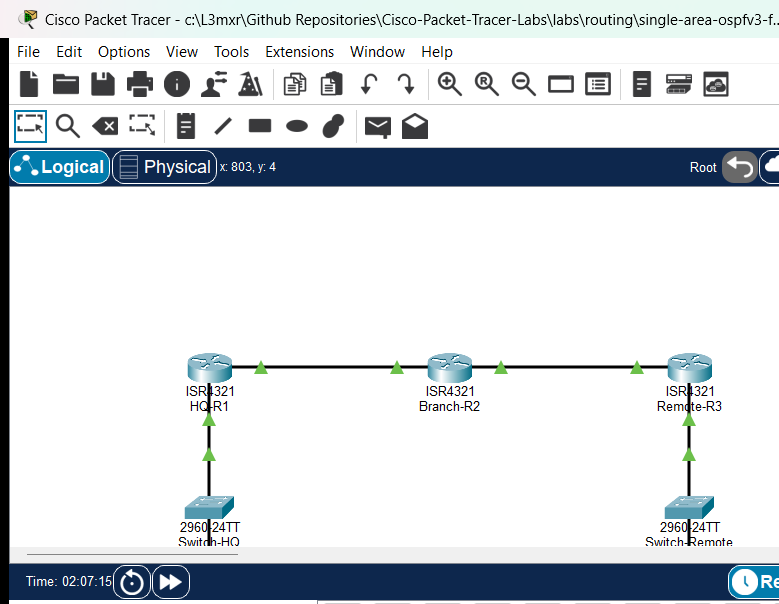
The topology models an enterprise IPv6 wide area network consisting of three Cisco 4321 Integrated Services Routers:
HQ-R1serves as the Headquarters Border Gateway, connecting to the HQ enterprise LAN (2001:DB8:ACAD:1::/64) and an internal management loopback (2001:DB8:ACAD:101::1/64).Branch-R2serves as the central Core / Distribution Gateway, providing transit betweenHQ-R1across WAN link2001:DB8:ACAD:12::/64andRemote-R3across WAN link2001:DB8:ACAD:23::/64.Remote-R3serves as the Remote Branch Gateway, connecting the remote enterprise server LAN (2001:DB8:ACAD:3::/64) and a branch management loopback (2001:DB8:ACAD:103::1/64).- Access switches
Switch-HQandSwitch-Remoteaggregate end-host traffic on LAN segments.
Addressing Table#
| Device | Interface | IPv6 Address / Prefix | IPv6 Link-Local Address | Default Gateway | Purpose |
|---|---|---|---|---|---|
HQ-R1 |
Loopback0 | 2001:DB8:ACAD:101::1/64 |
Auto | N/A | HQ Management Loopback |
HQ-R1 |
Gi0/0/0 | 2001:DB8:ACAD:12::1/64 |
FE80::1 |
N/A | WAN Transit to Branch-R2 |
HQ-R1 |
Gi0/0/1 | 2001:DB8:ACAD:1::1/64 |
FE80::1 |
N/A | HQ LAN Default Gateway |
Branch-R2 |
Loopback0 | 2001:DB8:ACAD:102::1/64 |
Auto | N/A | Branch Management Loopback |
Branch-R2 |
Gi0/0/0 | 2001:DB8:ACAD:12::2/64 |
FE80::2 |
N/A | WAN Transit to HQ-R1 |
Branch-R2 |
Gi0/0/1 | 2001:DB8:ACAD:23::2/64 |
FE80::2 |
N/A | WAN Transit to Remote-R3 |
Remote-R3 |
Loopback0 | 2001:DB8:ACAD:103::1/64 |
Auto | N/A | Remote Management Loopback |
Remote-R3 |
Gi0/0/0 | 2001:DB8:ACAD:23::3/64 |
FE80::3 |
N/A | WAN Transit to Branch-R2 |
Remote-R3 |
Gi0/0/1 | 2001:DB8:ACAD:3::1/64 |
FE80::3 |
N/A | Remote LAN Default Gateway |
Switch-HQ |
VLAN 1 | Unassigned (L2 Access) | N/A | N/A | HQ LAN Access Layer |
Switch-Remote |
VLAN 1 | Unassigned (L2 Access) | N/A | N/A | Remote LAN Access Layer |
PC-HQ |
FastEthernet0 | 2001:DB8:ACAD:1::10/64 |
Auto | 2001:DB8:ACAD:1::1 |
HQ Client Workstation |
Server-Remote |
FastEthernet0 | 2001:DB8:ACAD:3::100/64 |
Auto | 2001:DB8:ACAD:3::1 |
Remote Enterprise Server |
Lab Tasks#
- Verify starter configuration: interfaces addressed and enabled, but dynamic routing unconfigured (
NEG-01andNEG-02). - Enable OSPFv3 routing globally on each router with explicit 32-bit Router IDs:
HQ-R1:router-id 1.1.1.1Branch-R2:router-id 2.2.2.2Remote-R3:router-id 3.3.3.3
- Activate OSPFv3 Area 0 directly under physical and loopback interfaces.
- Configure point-to-point OSPF network mode on WAN transit interfaces (
HQ-R1Gi0/0/0,Branch-R2Gi0/0/0 and Gi0/0/1,Remote-R3Gi0/0/0). - Suppress OSPFv3 multicast advertisements toward end hosts by configuring passive interfaces on LAN interfaces (
HQ-R1Gi0/0/1 andRemote-R3Gi0/0/1). - Verify OSPFv3 neighbor adjacencies and Area 0 interface roles (
POS-01andPOS-02). - Verify dynamic IPv6 routing tables on edge routers (
POS-03andPOS-04). - Test end-to-end bidirectional ICMPv6 packet transport between
PC-HQandServer-Remote(POS-05andPOS-06). - Perform a fault injection test by changing the OSPFv3 area ID on one interface to observe adjacency disruption and subsequent restoration (
POS-07).
Configuration Walkthrough#
1. Configure OSPFv3 on HQ-R1#
Enable the OSPFv3 routing process, assign a 32-bit Router ID, suppress Hellos toward the local LAN, and bind Area 0 to interfaces:
HQ-R1# configure terminal
HQ-R1(config)# ipv6 unicast-routing
HQ-R1(config)# ipv6 router ospf 1
HQ-R1(config-rtr)# router-id 1.1.1.1
HQ-R1(config-rtr)# passive-interface GigabitEthernet0/0/1
HQ-R1(config-rtr)# exit

HQ-R1(config)# interface Loopback0
HQ-R1(config-if)# ipv6 ospf 1 area 0
HQ-R1(config-if)# exit

HQ-R1(config)# interface GigabitEthernet0/0/0
HQ-R1(config-if)# ipv6 ospf network point-to-point
HQ-R1(config-if)# ipv6 ospf 1 area 0
HQ-R1(config-if)# exit

HQ-R1(config)# interface GigabitEthernet0/0/1
HQ-R1(config-if)# ipv6 ospf 1 area 0
HQ-R1(config-if)# end
HQ-R1# copy running-config startup-config
2. Configure OSPFv3 on Branch-R2#
Configure Branch-R2 with Router ID 2.2.2.2 and point-to-point transit links toward both neighbors:
Branch-R2# configure terminal
Branch-R2(config)# ipv6 unicast-routing
Branch-R2(config)# ipv6 router ospf 1
Branch-R2(config-rtr)# router-id 2.2.2.2
Branch-R2(config-rtr)# exit

Branch-R2(config)# interface Loopback0
Branch-R2(config-if)# ipv6 ospf 1 area 0
Branch-R2(config-if)# exit

Branch-R2(config)# interface GigabitEthernet0/0/0
Branch-R2(config-if)# ipv6 ospf network point-to-point
Branch-R2(config-if)# ipv6 ospf 1 area 0
Branch-R2(config-if)# exit

Branch-R2(config)# interface GigabitEthernet0/0/1
Branch-R2(config-if)# ipv6 ospf network point-to-point
Branch-R2(config-if)# ipv6 ospf 1 area 0
Branch-R2(config-if)# end
Branch-R2# copy running-config startup-config
3. Configure OSPFv3 on Remote-R3#
Configure Remote-R3 with Router ID 3.3.3.3, passive LAN interface, and point-to-point transit:
Remote-R3# configure terminal
Remote-R3(config)# ipv6 unicast-routing
Remote-R3(config)# ipv6 router ospf 1
Remote-R3(config-rtr)# router-id 3.3.3.3
Remote-R3(config-rtr)# passive-interface GigabitEthernet0/0/1
Remote-R3(config-rtr)# exit

Remote-R3(config)# interface Loopback0
Remote-R3(config-if)# ipv6 ospf 1 area 0
Remote-R3(config-if)# exit

Remote-R3(config)# interface GigabitEthernet0/0/0
Remote-R3(config-if)# ipv6 ospf network point-to-point
Remote-R3(config-if)# ipv6 ospf 1 area 0
Remote-R3(config-if)# exit

Remote-R3(config)# interface GigabitEthernet0/0/1
Remote-R3(config-if)# ipv6 ospf 1 area 0
Remote-R3(config-if)# end
Remote-R3# copy running-config startup-config
Tip
In OSPFv3, unlike OSPFv2, there is no network statement under the router configuration mode. OSPFv3 is enabled directly at the interface level using ipv6 ospf <process-id> area <area-id>.
Verification#
Confirm the routing state across the OSPFv3 domain using the following checks:
-
Verify Neighbor Adjacencies on Branch-R2:
Branch-R2# show ipv6 ospf neighbor Neighbor ID Pri State Dead Time Interface ID Interface 3.3.3.3 0 FULL/ - 00:00:32 0 GigabitEthernet0/0/1 1.1.1.1 0 FULL/ - 00:00:37 0 GigabitEthernet0/0/0 -
Verify OSPFv3 Routes on HQ-R1:
HQ-R1# show ipv6 route ospf O 2001:DB8:ACAD:3::/64 [110/3] via FE80::2, GigabitEthernet0/0/0 O 2001:DB8:ACAD:23::/64 [110/2] via FE80::2, GigabitEthernet0/0/0 -
Verify End-to-End Ping from PC-HQ to Server-Remote:
C:\> ping 2001:DB8:ACAD:3::100

Pinging 2001:DB8:ACAD:3::100 with 32 bytes of data:
Reply from 2001:DB8:ACAD:3::100: bytes=32 time<1ms TTL=125
Reply from 2001:DB8:ACAD:3::100: bytes=32 time=2ms TTL=125
Reply from 2001:DB8:ACAD:3::100: bytes=32 time<1ms TTL=125
Reply from 2001:DB8:ACAD:3::100: bytes=32 time<1ms TTL=125

Ping statistics for 2001:DB8:ACAD:3::100:
    Packets: Sent = 4, Received = 4, Lost = 0 (0% loss)
For detailed test logs, see verification.md.
Troubleshooting#
- No Neighbor Adjacency Formed: Check that
ipv6 unicast-routingis enabled globally on both routers. Ensure that both ends of the transit link are assigned to Area 0. - Link-Local Address Conflict: In OSPFv3, all neighbor communication and next-hop lookups utilize IPv6 link-local addresses (
FE80::). Ensure each router on a transit link uses a unique link-local address (e.g.,FE80::1vsFE80::2). - Missing OSPFv3 Routes Despite FULL Adjacency: Ensure that
ipv6 ospf network point-to-pointis configured on both sides of direct router-to-router links. In point-to-point mode, OSPFv3 builds direct next-hop associations from Type-8 Link LSAs without relying on multi-access DR/BDR election states. - Router ID Warning: If
ipv6 router ospfdisplays a message indicating that the router-id cannot be determined, configure an explicit 32-bit dotted-decimal router-id (e.g.,router-id 1.1.1.1).
Key Takeaways#
- OSPFv3 is completely decoupled from IPv4 addressing for routing calculations, but it retains the 32-bit dotted-decimal notation for Router IDs and Area IDs.
- OSPFv3 uses Link-Local addresses (
FE80::) as the next-hop address for all routing table entries, conserving Global Unicast addresses. - OSPFv3 introduces new LSA types: Type 8 (Link LSA, link-local scope) advertises a router's link-local address and prefixes on a specific link; Type 9 (Intra-Area-Prefix LSA) carries IPv6 prefix information associated with a router or transit network.
References#
- Cisco IOS IPv6 Configuration Guide: Implementing OSPF for IPv6
- RFC 5340: OSPF for IPv6
- Cisco CCNA Exam Topics (Topic 3.2: Configure and verify single area OSPFv2 / OSPFv3)
Files and Validation Status#
- Starter Topology: assets/starter.pkt
- Completed Topology: assets/completed.pkt
- Topology Diagram: assets/topology.png
- HQ-R1 Running Config: configs/HQ-R1.txt
- Branch-R2 Running Config: configs/Branch-R2.txt
- Remote-R3 Running Config: configs/Remote-R3.txt
- Switch-HQ Running Config: configs/Switch-HQ.txt
- Switch-Remote Running Config: configs/Switch-Remote.txt
- Simulator Results Evidence: PTL-0034-SIMULATOR-RESULTS.md
- Validation Status: Simulator tested and verified in Packet Tracer 9.0.1. All positive and negative test cases passing.