Learning Objectives#
- Explain the security risks and resource inefficiencies of sending OSPFv2 Hello packets to edge LAN segments.
- Configure individual interface suppression using the
passive-interfacecommand under the OSPF router configuration mode. - Implement an enterprise security hardening best practice using
passive-interface defaultfollowed by targetedno passive-interfaceexclusions. - Verify that passive interfaces suppress Hello packet transmission while continuing to advertise connected subnets into the Link-State Database (LSDB).
- Verify that transit router neighbor adjacencies remain in the
FULLstate across active point-to-point links. - Verify end-to-end data plane reachability across interconnected multi-hop OSPF networks.
- Analyze the operational impact of inadvertently making a transit link passive through negative failure injection.
Prerequisites#
- Understanding of OSPFv2 single-area fundamentals, Hello packet exchanges, and neighbor state machine progression (
DOWNtoFULL). - Familiarity with Cisco IOS interface configuration and OSPF routing process commands.
- Experience reading IPv4 routing tables (
show ip route ospf) and OSPF interface statistics.
Topology#
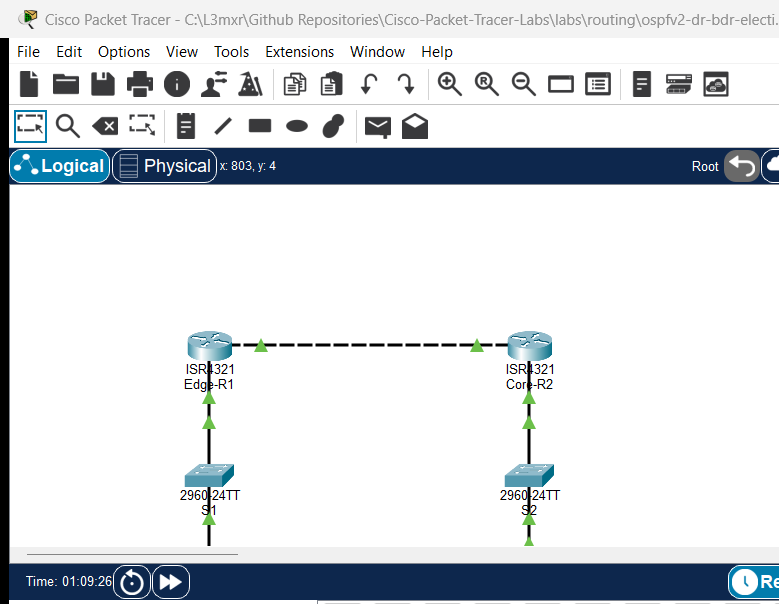
The topology models an enterprise branch connection linking an edge router (Edge-R1) to a core distribution router (Core-R2) across a point-to-point transit link (10.0.0.0/30). Each router provides Layer 3 gateway services to an access LAN containing end devices and management switches (S1 and S2).
    [ PC-1 ]
  192.168.10.10
        | Fa0
        |
        | Fa0/2
     +--+---+                                              +------+
     |  S1  |                                              |  S2  |
     +--+---+                                              +---+--+
        | Fa0/1                                                | Fa0/1
        |                                                      |
 Gi0/0/0| 192.168.10.1                          192.168.20.1   |Gi0/0/0
+-------+-------+     Gi0/0/1              Gi0/0/1     +-------+-------+
|    Edge-R1    |======================================|    Core-R2    |
| (Passive Gi0) |  10.0.0.1/30            10.0.0.2/30  |(Pass-Def Gi0) |
+---------------+                                      +-------+-------+
                                                               | Fa0/2
                                                               |
                                                               | Fa0
                                                          [ Server-1 ]
                                                          192.168.20.10
Addressing Table#
| Device | Interface | IP Address | Subnet Mask | Default Gateway | OSPF Passive Status | Purpose |
|---|---|---|---|---|---|---|
| Edge-R1 | Gi0/0/0 | 192.168.10.1 | 255.255.255.0 | N/A | Passive (passive-interface) |
Edge Access LAN Gateway |
| Edge-R1 | Gi0/0/1 | 10.0.0.1 | 255.255.255.252 | N/A | Active (Sends/Receives Hellos) | Transit WAN Link to Core-R2 |
| Core-R2 | Gi0/0/0 | 192.168.20.1 | 255.255.255.0 | N/A | Passive (default passive) |
Core Access LAN Gateway |
| Core-R2 | Gi0/0/1 | 10.0.0.2 | 255.255.255.252 | N/A | Active (no passive-interface) |
Transit WAN Link to Edge-R1 |
| S1 | VLAN 1 | 192.168.10.254 | 255.255.255.0 | 192.168.10.1 | N/A | Edge Access Switch Management |
| S2 | VLAN 1 | 192.168.20.254 | 255.255.255.0 | 192.168.20.1 | N/A | Core Access Switch Management |
| PC-1 | Fa0 | 192.168.10.10 | 255.255.255.0 | 192.168.10.1 | N/A | Edge Branch Client Workstation |
| Server-1 | Fa0 | 192.168.20.10 | 255.255.255.0 | 192.168.20.1 | N/A | Core Enterprise Application Server |
Lab Tasks#
- Inspect Starter OSPF State:
- Verify initial transit link connectivity between
Edge-R1(10.0.0.1) andCore-R2(10.0.0.2). - Examine
show ip ospf interface GigabitEthernet0/0/0and observe that Hello packets are being actively transmitted onto LAN segments.
- Verify initial transit link connectivity between
- Configure Explicit Passive Interface on Edge-R1:
- Under
router ospf 1, configurepassive-interface GigabitEthernet0/0/0. - Verify that Hello transmissions are suppressed while the
192.168.10.0/24network remains advertised.
- Under
- Configure Default Passive Interface Hardening on Core-R2:
- Under
router ospf 1, configurepassive-interface defaultto enforce a secure-by-default posture. - Configure
no passive-interface GigabitEthernet0/0/1to selectively enable OSPF on the transit WAN circuit.
- Under
- Verify OSPF Adjacency and Interface States:
- Verify
show ip ospf neighborshows the transit link remains inFULL/DRorFULL/BDRstate. - Verify
show ip ospf interfaceconfirmsNo Hellos (Passive interface)on access ports.
- Verify
- Verify Data Plane Routing and Reachability:
- Confirm routing tables on
Edge-R1andCore-R2contain mutual OSPF inter-LAN routes. - Perform an end-to-end ping and traceroute from
PC-1(192.168.10.10) toServer-1(192.168.20.10).
- Confirm routing tables on
- Execute Failure Injection and Recovery Verification:
- Make the transit link
GigabitEthernet0/0/1passive and observe immediate adjacency teardown and route withdrawal. - Restore active status on the transit link and confirm automatic adjacency re-establishment.
- Make the transit link
Configuration Walkthrough#
Step 1: Configure Explicit Passive Interface on Edge-R1#
To prevent OSPF Hello packet generation on the edge LAN segment:
Edge-R1(config)# router ospf 1
Edge-R1(config-router)# passive-interface GigabitEthernet0/0/0
Edge-R1(config-router)# exit
Step 2: Configure Passive-Interface Default on Core-R2#
In larger enterprise networks, configuring all interfaces as passive by default prevents accidental OSPF neighbor formation when new interfaces are provisioned:
Core-R2(config)# router ospf 1
Core-R2(config-router)# passive-interface default
Core-R2(config-router)# no passive-interface GigabitEthernet0/0/1
Core-R2(config-router)# exit
Verification#
1. Passive Interface Suppression on Access Ports#
Verify that GigabitEthernet0/0/0 on both routers indicates that Hello transmissions have ceased:
Edge-R1# show ip ospf interface GigabitEthernet0/0/0
GigabitEthernet0/0/0 is up, line protocol is up
  Internet address is 192.168.10.1/24, Area 0
  Process ID 1, Router ID 1.1.1.1, Network Type BROADCAST, Cost: 1
  Transmit Delay is 1 sec, State DR, Priority 1
  Designated Router (ID) 1.1.1.1, Interface address 192.168.10.1
  No backup designated router on this network
  Timer intervals configured, Hello 10, Dead 40, Wait 40, Retransmit 5
    No Hellos (Passive interface)
Core-R2# show ip ospf interface GigabitEthernet0/0/0
GigabitEthernet0/0/0 is up, line protocol is up
  Internet address is 192.168.20.1/24, Area 0
  Process ID 1, Router ID 2.2.2.2, Network Type BROADCAST, Cost: 1
  Transmit Delay is 1 sec, State DR, Priority 1
  Designated Router (ID) 2.2.2.2, Interface address 192.168.20.1
  No backup designated router on this network
  Timer intervals configured, Hello 10, Dead 40, Wait 40, Retransmit 5
    No Hellos (Passive interface)
2. Active Neighbor Adjacency on Transit Link#
Verify that the transit neighbor relationship across GigabitEthernet0/0/1 remains intact:
Edge-R1# show ip ospf neighbor

Neighbor ID     Pri   State           Dead Time   Address         Interface
2.2.2.2           1   FULL/BDR        00:00:35    10.0.0.2        GigabitEthernet0/0/1
3. Continued Route Propagation#
Verify that the passive subnets continue to be advertised across the OSPF domain:
Edge-R1# show ip route ospf
O    192.168.20.0 [110/2] via 10.0.0.2, 00:08:35, GigabitEthernet0/0/1

Core-R2# show ip route ospf
O    192.168.10.0 [110/2] via 10.0.0.1, 00:04:34, GigabitEthernet0/0/1
4. End-to-End Data Plane Verification#
From PC-1, test bidirectional IP connectivity to Server-1:
C:\> ping 192.168.20.10

Pinging 192.168.20.10 with 32 bytes of data:

Reply from 192.168.20.10: bytes=32 time<1ms TTL=126
Reply from 192.168.20.10: bytes=32 time<1ms TTL=126
Reply from 192.168.20.10: bytes=32 time<1ms TTL=126
Reply from 192.168.20.10: bytes=32 time<1ms TTL=126

Ping statistics for 192.168.20.10:
    Packets: Sent = 4, Received = 4, Lost = 0 (0% loss)
C:\> tracert 192.168.20.10

Tracing route to 192.168.20.10 over a maximum of 30 hops:

  1   0 ms      1 ms      0 ms      192.168.10.1
  2   0 ms      0 ms      0 ms      10.0.0.2
  3   0 ms      0 ms      0 ms      192.168.20.10

Trace complete.
Troubleshooting#
- Symptom: OSPF neighbor adjacency drops immediately after configuration.
- Cause: The
passive-interfacecommand was mistakenly applied to the transit link (GigabitEthernet0/0/1) rather than the edge LAN interface (GigabitEthernet0/0/0). - Resolution: Remove the passive directive using
no passive-interface GigabitEthernet0/0/1underrouter ospf 1.
- Cause: The
- Symptom: When using
passive-interface default, no neighbors form at all.- Cause:
passive-interface defaultsuppresses Hellos on all active interfaces. Transit interfaces must be explicitly re-enabled withno passive-interface <interface>.
- Cause:
- Symptom: Passive LAN subnet is missing from the remote routing table.
- Cause: The subnet was omitted from the OSPF process. Verify that an appropriate
networkstatement (e.g.,network 192.168.10.0 0.0.0.255 area 0) or interface-levelip ospf 1 area 0configuration exists. Thepassive-interfacecommand only controls Hello transmission; the interface must still be associated with an OSPF area.
- Cause: The subnet was omitted from the OSPF process. Verify that an appropriate
Key Takeaways#
- Security Hardening: Transmitting OSPF Hello packets onto user-facing segments allows unauthorized devices running routing daemons to inject malicious routing information or trigger denial-of-service conditions.
- Bandwidth and CPU Preservation: Suppressing periodic multicast Hello packets (every 10 seconds by default) reduces CPU processing on access switches and conserves endpoint bandwidth.
- Stub Network Advertisement: A passive interface does not stop advertising its network. The connected prefix is still included in the router's Type-1 Router LSA as a stub network.
- Two Configuration Approaches:
- Selective Suppression:
passive-interface <interface>is useful in small networks with few LAN interfaces. - Selective Enablement:
passive-interface defaultfollowed byno passive-interface <transit-interface>is the recommended enterprise security best practice.
- Selective Suppression:
References#
- Cisco Systems: OSPF Passive Interface Feature Guide (cisco.com)
- Cisco IOS IP Routing: OSPF Configuration Guide, Cisco IOS Release 15M&T (cisco.com)
- Cisco CCNA 200-301 Official Cert Guide: Configuring OSPFv2 Passive Interfaces
Files and Validation Status#
| File | Purpose | Verification Status |
|---|---|---|
assets/starter.pkt |
Starter lab topology with unhardened OSPF interfaces | Validated (Packet Tracer 9.0+) |
assets/completed.pkt |
Completed topology with verified passive interface hardening | Validated (Packet Tracer 9.0+) |
assets/topology.png |
Network topology canvas capture | Generated and verified |
configs/Edge-R1.txt |
Clean Cisco IOS running configuration for Edge-R1 | Verified against live device |
configs/Core-R2.txt |
Clean Cisco IOS running configuration for Core-R2 | Verified against live device |
configs/S1.txt |
Clean Cisco IOS running configuration for S1 | Verified against live device |
configs/S2.txt |
Clean Cisco IOS running configuration for S2 | Verified against live device |
metadata.json |
Catalog metadata and learning outcomes | Compliant with schema |
verification.md |
Detailed test matrix and execution evidence | Verified against simulator output |