Learning Objectives#
- Identify the mandatory operational parameters that must match for two OSPFv2 routers to achieve
FULLadjacency. - Diagnose Hello and Dead interval timer mismatches using
show ip ospf interfaceand verification commands. - Troubleshoot OSPF Area ID mismatches between transit router interfaces across a point-to-point link.
- Identify missing network statements that prevent LAN prefixes from being injected into the OSPF Link-State Database (LSDB).
- Configure appropriate passive interfaces to protect access subnets while maintaining WAN neighbor adjacencies.
- Verify complete SPF route convergence and end-to-end data plane reachability across a multi-router topology.
Prerequisites#
- Thorough understanding of RFC 2328 OSPFv2 adjacency mechanics, neighbor states (
DOWN,INIT,2-WAY,EXSTART,EXCHANGE,LOADING,FULL), and Link-State Advertisements. - Proficiency with Cisco IOS CLI diagnostic commands (
show ip ospf neighbor,show ip ospf interface,show ip route ospf). - Understanding of IPv4 point-to-point transit circuits and CIDR subnetting (
/30and/24).
Topology#
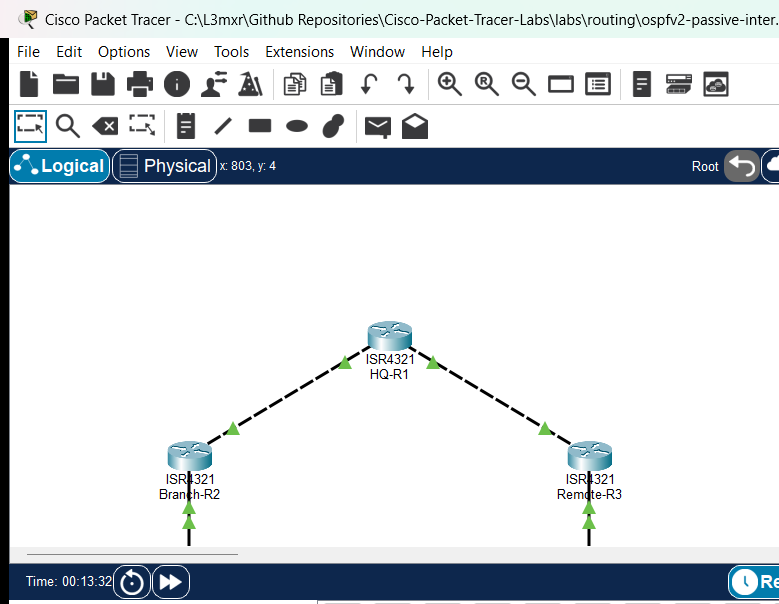
The topology models an enterprise hub-and-spoke WAN architecture connecting a corporate headquarters router (HQ-R1) to two remote facilities: Branch-R2 and Remote-R3. Both remote sites support local access LANs connected through Catalyst 2960 switches (S1 and S2) servicing end stations (PC-Branch and Server-Remote).
                    +--------------------+
                    |       HQ-R1        |
                    | Loopback:          |
                    | 192.168.1.1/24     |
                    +---------+----------+
            Gi0/0/0           |          Gi0/0/1
          10.1.12.1/30        |          10.1.13.1/30
                              |
               Link 1         |         Link 2
           (Timer Fault)      |       (Area Fault)
                              |
          10.1.12.2/30        |          10.1.13.2/30
            Gi0/0/0           |          Gi0/0/0
     +--------------------+   |   +--------------------+
     |     Branch-R2      |   |   |     Remote-R3      |
     +---------+----------+   |   +---------+----------+
        Gi0/0/1| 192.168.2.1  |      Gi0/0/1| 192.168.3.1
               |              |             |
          Fa0/1|              |        Fa0/1|
            +--+---+          |          +--+---+
            |  S1  |          |          |  S2  |
            +--+---+          |          +--+---+
          Fa0/2|              |        Fa0/2|
               |              |             |
           Fa0|               |          Fa0|
       [ PC-Branch ]          |     [ Server-Remote ]
       192.168.2.10           |       192.168.3.10
Addressing Table#
| Device | Interface | IP Address | Subnet Mask | Default Gateway | OSPF Area | Problem State (Starter) |
|---|---|---|---|---|---|---|
| HQ-R1 | Gi0/0/0 | 10.1.12.1 | 255.255.255.252 | N/A | Area 0 | Normal (Hello 10, Dead 40) |
| HQ-R1 | Gi0/0/1 | 10.1.13.1 | 255.255.255.252 | N/A | Area 0 | Normal (Hello 10, Dead 40) |
| HQ-R1 | Loopback0 | 192.168.1.1 | 255.255.255.0 | N/A | Area 0 | HQ Core Services Subnet |
| Branch-R2 | Gi0/0/0 | 10.1.12.2 | 255.255.255.252 | N/A | Area 0 | Fault 1: Timers set to Hello 5 / Dead 20 |
| Branch-R2 | Gi0/0/1 | 192.168.2.1 | 255.255.255.0 | N/A | Area 0 | Normal Branch LAN Gateway |
| Remote-R3 | Gi0/0/0 | 10.1.13.2 | 255.255.255.252 | N/A | Area 1 | Fault 2: Assigned to Area 1 instead of Area 0 |
| Remote-R3 | Gi0/0/1 | 192.168.3.1 | 255.255.255.0 | N/A | Missing | Fault 3: Missing network statement for LAN |
| S1 | VLAN 1 | 192.168.2.254 | 255.255.255.0 | 192.168.2.1 | N/A | Branch Access Switch Management |
| S2 | VLAN 1 | 192.168.3.254 | 255.255.255.0 | 192.168.3.1 | N/A | Remote Access Switch Management |
| PC-Branch | Fa0 | 192.168.2.10 | 255.255.255.0 | 192.168.2.1 | N/A | Branch Test Host |
| Server-Remote | Fa0 | 192.168.3.10 | 255.255.255.0 | 192.168.3.1 | N/A | Remote Application Server |
Lab Tasks#
- Verify Baseline Layer 3 Point-to-Point Connectivity:
- Confirm ICMP echo reachability across transit circuits
10.1.12.0/30and10.1.13.0/30. - Confirm local gateway reachability from
PC-Branch(192.168.2.1) andServer-Remote(192.168.3.1).
- Confirm ICMP echo reachability across transit circuits
- Diagnose OSPF Neighbor Failure on Link 1 (HQ-R1 to Branch-R2):
- Run
show ip ospf neighboronHQ-R1and observe that no neighbor is formed onGigabitEthernet0/0/0. - Compare
show ip ospf interface GigabitEthernet0/0/0acrossHQ-R1andBranch-R2. - Identify that
Branch-R2has modified timers (Hello 5, Dead 20) differing fromHQ-R1(Hello 10, Dead 40).
- Run
- Remediate Fault 1 on Branch-R2:
- Restore default timers (
ip ospf hello-interval 10,ip ospf dead-interval 40) onBranch-R2GigabitEthernet0/0/0. - Verify that the neighbor adjacency transitions immediately to
FULL.
- Restore default timers (
- Diagnose OSPF Neighbor Failure on Link 2 (HQ-R1 to Remote-R3):
- Observe that
HQ-R1has no neighbor onGigabitEthernet0/0/1. - Inspect
show ip ospf interface GigabitEthernet0/0/0onRemote-R3and discover it is running inArea 1whileHQ-R1is inArea 0.
- Observe that
- Remediate Fault 2 & Fault 3 on Remote-R3:
- Remove
network 10.1.13.0 0.0.0.3 area 1and addnetwork 10.1.13.0 0.0.0.3 area 0underrouter ospf 1. - Add the missing LAN statement:
network 192.168.3.0 0.0.0.255 area 0. - Configure
passive-interface GigabitEthernet0/0/1to protect the remote LAN.
- Remove
- Verify Complete Topology Convergence:
- Confirm
HQ-R1neighbor table shows both2.2.2.2and3.3.3.3in theFULLstate. - Confirm all routers have learned the remote subnets in
show ip route ospf. - Verify end-to-end communication from
PC-Branch(192.168.2.10) toServer-Remote(192.168.3.10) andHQ-R1(192.168.1.1).
- Confirm
Configuration Walkthrough#
Step 1: Repair Timer Mismatch on Branch-R2#
Synchronize OSPF Hello and Dead timers on Branch-R2 GigabitEthernet0/0/0:
Branch-R2(config)# interface GigabitEthernet0/0/0
Branch-R2(config-if)# ip ospf hello-interval 10
Branch-R2(config-if)# ip ospf dead-interval 40
Branch-R2(config-if)# exit
Branch-R2(config)# router ospf 1
Branch-R2(config-router)# passive-interface GigabitEthernet0/0/1
Branch-R2(config-router)# exit
Step 2: Repair Area Mismatch and Missing Network on Remote-R3#
Move transit circuit to Area 0 and advertise local LAN:
Remote-R3(config)# router ospf 1
Remote-R3(config-router)# no network 10.1.13.0 0.0.0.3 area 1
Remote-R3(config-router)# network 10.1.13.0 0.0.0.3 area 0
Remote-R3(config-router)# network 192.168.3.0 0.0.0.255 area 0
Remote-R3(config-router)# passive-interface GigabitEthernet0/0/1
Remote-R3(config-router)# exit
Step 3: Harden HQ-R1 Management Loopback#
HQ-R1(config)# router ospf 1
HQ-R1(config-router)# passive-interface Loopback0
HQ-R1(config-router)# exit
Verification#
1. Neighbor Adjacencies on HQ-R1#
Verify that HQ-R1 establishes full adjacencies with both spoke routers:
HQ-R1# show ip ospf neighbor

Neighbor ID     Pri   State           Dead Time   Address         Interface
3.3.3.3           1   FULL/DR         00:00:38    10.1.13.2       GigabitEthernet0/0/1
2.2.2.2           1   FULL/DR         00:00:39    10.1.12.2       GigabitEthernet0/0/0
2. Synchronized Timer Verification#
Verify that interface timer intervals match across links:
Branch-R2# show ip ospf interface GigabitEthernet0/0/0
GigabitEthernet0/0/0 is up, line protocol is up
  Internet address is 10.1.12.2/30, Area 0
  Process ID 1, Router ID 2.2.2.2, Network Type BROADCAST, Cost: 1
  Timer intervals configured, Hello 10, Dead 40, Wait 40, Retransmit 5
Remote-R3# show ip ospf interface GigabitEthernet0/0/0
GigabitEthernet0/0/0 is up, line protocol is up
  Internet address is 10.1.13.2/30, Area 0
  Process ID 1, Router ID 3.3.3.3, Network Type BROADCAST, Cost: 1
  Timer intervals configured, Hello 10, Dead 40, Wait 40, Retransmit 5
3. Complete Routing Table Convergence#
Verify that HQ-R1 learns both remote branch and remote server subnets:
HQ-R1# show ip route ospf
O    192.168.2.0 [110/2] via 10.1.12.2, 00:05:56, GigabitEthernet0/0/0
O    192.168.3.0 [110/2] via 10.1.13.2, 00:05:33, GigabitEthernet0/0/1
Verify that Branch-R2 has routes to HQ loopback and the remote server LAN:
Branch-R2# show ip route ospf
     10.0.0.0/8 is variably subnetted, 3 subnets, 2 masks
O       10.1.13.0 [110/2] via 10.1.12.1, 00:05:30, GigabitEthernet0/0/0
     192.168.1.0/32 is subnetted, 1 subnets
O       192.168.1.1 [110/2] via 10.1.12.1, 00:05:59, GigabitEthernet0/0/0
O    192.168.3.0 [110/3] via 10.1.12.1, 00:05:30, GigabitEthernet0/0/0
4. End-to-End Inter-Spoke Host Reachability#
From PC-Branch, verify connectivity across the hub to Server-Remote:
C:\> ping 192.168.3.10

Pinging 192.168.3.10 with 32 bytes of data:

Reply from 192.168.3.10: bytes=32 time<1ms TTL=125
Reply from 192.168.3.10: bytes=32 time<1ms TTL=125
Reply from 192.168.3.10: bytes=32 time<1ms TTL=125
Reply from 192.168.3.10: bytes=32 time<1ms TTL=125

Ping statistics for 192.168.3.10:
    Packets: Sent = 4, Received = 4, Lost = 0 (0% loss)
C:\> tracert 192.168.3.10

Tracing route to 192.168.3.10 over a maximum of 30 hops:

  1   0 ms      0 ms      0 ms      192.168.2.1
  2   0 ms      0 ms      0 ms      10.1.12.1
  3   0 ms      0 ms      0 ms      10.1.13.2
  4   0 ms      0 ms      0 ms      192.168.3.10

Trace complete.
Troubleshooting#
- Symptom: OSPF neighbor stuck in
INITstate.- Cause: The local router received a Hello packet from the remote router, but the remote router did not see the local router's Router ID in its own received Hello. This commonly indicates an asymmetric layer 1/2 issue, an access list filtering inbound multicast, or a unicast issue.
- Symptom: OSPF neighbor stuck in
2-WAYstate.- Cause: On broadcast multi-access networks, two
DROTHERrouters normally stay in2-WAYstate with each other. If this occurs on a point-to-point link, verify network type and priority settings.
- Cause: On broadcast multi-access networks, two
- Symptom: OSPF neighbor stuck in
EXSTARTorEXCHANGEstate.- Cause: Usually caused by an MTU mismatch between connected interfaces. In Cisco IOS, OSPF includes the interface MTU in Database Description (DBD) packets; mismatched MTUs prevent completion of the exchange.
- Symptom: Neighbors form
FULLadjacency but remote routes are missing.- Cause: The interface is participating in OSPF, but the remote router's LAN interfaces have not been advertised under the OSPF process using a
networkstatement orip ospf <proc> area <area>interface command.
- Cause: The interface is participating in OSPF, but the remote router's LAN interfaces have not been advertised under the OSPF process using a
Key Takeaways#
- Mandatory Adjacency Criteria: For two OSPF routers to form a neighbor relationship, the following must match:
- Area ID and Area Type (e.g., standard, stub, NSSA).
- Hello and Dead intervals.
- Primary subnet IP and subnet mask on broadcast interfaces.
- Authentication type and key (if configured).
- Unique Router IDs (routers cannot have duplicate RIDs).
- Hello/Dead Ratio: Cisco IOS defaults to Dead interval = 4 $\times$ Hello interval (e.g., 10s Hello / 40s Dead). Manually changing one interval requires adjusting the corresponding peer interface.
- Systematic Isolation: When troubleshooting OSPF:
- Verify Layer 1/2 line protocols and Layer 3 ping.
- Inspect neighbor table (
show ip ospf neighbor). - Compare interface settings (
show ip ospf interface). - Verify routing table (
show ip route ospf).
References#
- Cisco Systems: Troubleshooting Common OSPF Neighbor Issues (cisco.com)
- Cisco IOS IP Routing: OSPF Configuration Guide, Cisco IOS Release 15M&T (cisco.com)
- Cisco CCNA 200-301 Official Cert Guide: OSPF Neighbor Troubleshooting
Files and Validation Status#
| File | Purpose | Verification Status |
|---|---|---|
assets/starter.pkt |
Starter lab topology with deliberate timer and area faults | Validated (Packet Tracer 9.0+) |
assets/completed.pkt |
Completed topology with resolved adjacencies and full routing | Validated (Packet Tracer 9.0+) |
assets/topology.png |
Network topology canvas capture | Generated and verified |
configs/HQ-R1.txt |
Clean Cisco IOS running configuration for HQ-R1 | Verified against live device |
configs/Branch-R2.txt |
Clean Cisco IOS running configuration for Branch-R2 | Verified against live device |
configs/Remote-R3.txt |
Clean Cisco IOS running configuration for Remote-R3 | Verified against live device |
configs/S1.txt |
Clean Cisco IOS running configuration for S1 | Verified against live device |
configs/S2.txt |
Clean Cisco IOS running configuration for S2 | Verified against live device |
metadata.json |
Catalog metadata and learning outcomes | Compliant with schema |
verification.md |
Detailed test matrix and execution evidence | Verified against simulator output |