Learning Objectives#
- Explain the necessity and operational role of DR (Designated Router) and BDR (Backup Designated Router) on multi-access broadcast OSPF networks.
- Examine default OSPF election criteria based on priority, manual router ID, and highest active interface IP address.
- Configure custom OSPF interface priorities using the
ip ospf priorityinterface command to deterministically designate DR and BDR routers. - Prevent a multi-access router from ever participating in elections by configuring priority 0 (
DROTHERstate). - Verify OSPF adjacency states (
FULL/DR,FULL/BDR,FULL/DROTHER) and timer intervals across multi-access broadcast segments. - Demonstrate deterministic DR failover when the primary DR becomes unavailable.
- Verify the non-preemptive nature of OSPF elections when higher priority routers rejoin an established network.
Prerequisites#
- Thorough understanding of IPv4 subnetting and CIDR notation (
/24). - Familiarity with basic OSPF single-area operations, Link-State Advertisements (LSAs), and shortest-path-first (SPF) tree calculations.
- Experience navigating Cisco IOS CLI privileged EXEC and global configuration modes.
Topology#
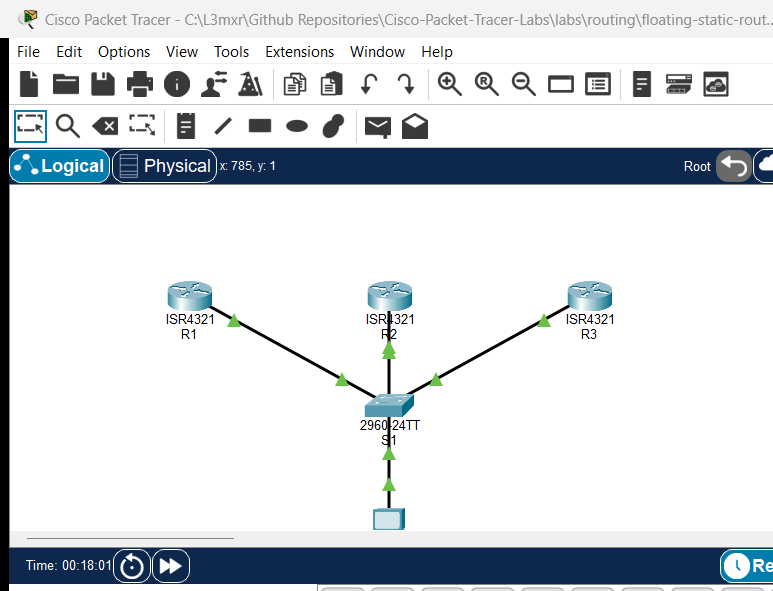
The topology models an enterprise distribution segment connected through a central Catalyst 2960 switch (S1). Three Cisco 4321 routers (R1, R2, R3) connect their GigabitEthernet0/0/0 interfaces to S1 on the 192.168.1.0/24 multi-access broadcast subnet. An endpoint test station (PC-1) is connected to S1 on port FastEthernet0/4 to verify end-to-end data plane reachability across all advertised loopback subnets.
                  +-------------------+
                  |   Catalyst 2960   |
                  |     Switch S1     |
                  +---------+---------+
         Fa0/1         Fa0/2|          |Fa0/3        Fa0/4
           |                |          |               |
           |                |          |               |
     Gi0/0/0|          Gi0/0/0|     Gi0/0/0|            Fa0|
     +-----+----+     +-----+----+   +-----+----+   +------+------+
     |    R1    |     |    R2    |   |    R3    |   |    PC-1     |
     | DR (255) |     | BDR(100) |   |DROTHER(0)|   |192.168.1.50 |
     +----------+     +----------+   +----------+   +-------------+
       Lo0: 10.1.1.1    Lo0: 10.2.2.1  Lo0: 10.3.3.1
Addressing Table#
| Device | Interface | IP Address | Subnet Mask | Default Gateway | OSPF Priority | Intended Role |
|---|---|---|---|---|---|---|
| R1 | Gi0/0/0 | 192.168.1.1 | 255.255.255.0 | N/A | 255 | Primary DR |
| R1 | Loopback0 | 10.1.1.1 | 255.255.255.0 | N/A | N/A | Advertised Subnet |
| R2 | Gi0/0/0 | 192.168.1.2 | 255.255.255.0 | N/A | 100 | Backup DR (BDR) |
| R2 | Loopback0 | 10.2.2.1 | 255.255.255.0 | N/A | N/A | Advertised Subnet |
| R3 | Gi0/0/0 | 192.168.1.3 | 255.255.255.0 | N/A | 0 | Non-participating (DROTHER) |
| R3 | Loopback0 | 10.3.3.1 | 255.255.255.0 | N/A | N/A | Advertised Subnet |
| S1 | VLAN 1 | Unconfigured | Unconfigured | N/A | N/A | L2 Transparent Switch |
| PC-1 | FastEthernet0 | 192.168.1.50 | 255.255.255.0 | 192.168.1.1 | N/A | Test Host |
Lab Tasks#
- Verify Baseline Multi-Access Layer 2 & 3 Connectivity:
- Confirm all router interfaces on
192.168.1.0/24are operational and pingable. - Confirm PC-1 can ping its default gateway
192.168.1.1.
- Confirm all router interfaces on
- Inspect Default OSPF Neighbors and DR/BDR Adjacencies:
- Review initial OSPF neighbor tables and observe election outcomes before manual priority tuning.
- Configure Deterministic OSPF Interface Priorities:
- Configure
ip ospf priority 255on R1'sGigabitEthernet0/0/0interface to enforce DR status. - Configure
ip ospf priority 100on R2'sGigabitEthernet0/0/0interface to enforce BDR status. - Configure
ip ospf priority 0on R3'sGigabitEthernet0/0/0interface to disqualify it from DR/BDR elections.
- Configure
- Trigger OSPF Election Convergence:
- Reset the OSPF process across routers using
clear ip ospf processto force immediate re-election based on updated priorities.
- Reset the OSPF process across routers using
- Verify Multi-Access OSPF Neighbors and Roles:
- Verify
show ip ospf neighborandshow ip ospf interfaceoutput across all routers. - Confirm R1 is DR, R2 is BDR, and R3 is DROTHER.
- Verify
- Verify OSPF Route Propagation and End-to-End Connectivity:
- Confirm R1, R2, and R3 advertise their respective loopback networks (
10.1.1.0/24,10.2.2.0/24,10.3.3.0/24) into Area 0. - Verify PC-1 can reach all router loopback IPs.
- Confirm R1, R2, and R3 advertise their respective loopback networks (
- Conduct DR Failover and Non-Preemption Negative Tests:
- Administratively shut down R1's multi-access interface and verify that R2 promotes to DR while R3 remains DROTHER.
- Re-enable R1's interface and verify that non-preemption prevents R1 from usurping the DR role until the next election event.
Configuration Walkthrough#
Step 1: Configure R1 Interface Priority and OSPF Settings#
R1(config)# interface GigabitEthernet0/0/0
R1(config-if)# ip ospf priority 255
R1(config-if)# exit
Step 2: Configure R2 Interface Priority and OSPF Settings#
R2(config)# interface GigabitEthernet0/0/0
R2(config-if)# ip ospf priority 100
R2(config-if)# exit
Step 3: Configure R3 Interface Priority to Disqualify from Election#
R3(config)# interface GigabitEthernet0/0/0
R3(config-if)# ip ospf priority 0
R3(config-if)# exit
Step 4: Reset OSPF Process to Force Re-Election#
Because OSPF elections are non-preemptive, priority changes do not immediately replace the active DR or BDR. Clear the OSPF process on all participating routers to force a new election:
R1# clear ip ospf process
Reset ALL OSPF processes? [no]: yes

R2# clear ip ospf process
Reset ALL OSPF processes? [no]: yes

R3# clear ip ospf process
Reset ALL OSPF processes? [no]: yes
Verification#
1. Multi-Access Neighbor Adjacencies on R1#
Verify that R1 has established full adjacencies with R2 (BDR) and R3 (DROTHER):
R1# show ip ospf neighbor

Neighbor ID     Pri   State           Dead Time   Address         Interface
3.3.3.3           0   FULL/DROTHER    00:00:36    192.168.1.3     GigabitEthernet0/0/0
2.2.2.2         100   FULL/BDR        00:00:30    192.168.1.2     GigabitEthernet0/0/0
2. Interface OSPF Roles and Priorities#
Verify the assigned interface roles on each router:
R1# show ip ospf interface GigabitEthernet0/0/0
GigabitEthernet0/0/0 is up, line protocol is up
  Internet address is 192.168.1.1/24, Area 0
  Process ID 1, Router ID 1.1.1.1, Network Type BROADCAST, Cost: 1
  Transmit Delay is 1 sec, State DR, Priority 255
  Designated Router (ID) 1.1.1.1, Interface address 192.168.1.1
  Backup Designated Router (ID) 2.2.2.2, Interface address 192.168.1.2

R2# show ip ospf interface GigabitEthernet0/0/0
GigabitEthernet0/0/0 is up, line protocol is up
  Internet address is 192.168.1.2/24, Area 0
  Process ID 1, Router ID 2.2.2.2, Network Type BROADCAST, Cost: 1
  Transmit Delay is 1 sec, State BDR, Priority 100
  Designated Router (ID) 1.1.1.1, Interface address 192.168.1.1
  Backup Designated Router (ID) 2.2.2.2, Interface address 192.168.1.2

R3# show ip ospf interface GigabitEthernet0/0/0
GigabitEthernet0/0/0 is up, line protocol is up
  Internet address is 192.168.1.3/24, Area 0
  Process ID 1, Router ID 3.3.3.3, Network Type BROADCAST, Cost: 1
  Transmit Delay is 1 sec, State DROTHER, Priority 0
  Designated Router (ID) 1.1.1.1, Interface address 192.168.1.1
  Backup Designated Router (ID) 2.2.2.2, Interface address 192.168.1.2
3. Loopback Route Propagation#
Verify that R3 learns the loopback networks of R1 and R2 via OSPF:
R3# show ip route ospf
     10.0.0.0/8 is variably subnetted, 4 subnets, 2 masks
O       10.1.1.1 [110/2] via 192.168.1.1, 00:05:12, GigabitEthernet0/0/0
O       10.2.2.1 [110/2] via 192.168.1.2, 00:05:12, GigabitEthernet0/0/0
4. End-to-End Host Reachability#
From PC-1, verify ICMP reachability to all router loopback interfaces:
C:\> ping 10.1.1.1
Reply from 10.1.1.1: bytes=32 time=16ms TTL=255

C:\> ping 10.2.2.1
Reply from 10.2.2.1: bytes=32 time=1ms TTL=255

C:\> ping 10.3.3.1
Reply from 10.3.3.1: bytes=32 time=1ms TTL=255
Troubleshooting#
- Symptom: OSPF Neighbor stuck in 2-WAY/DROTHER state.
- Cause: On a multi-access broadcast network, DROTHER routers form full adjacencies only with the DR and BDR. Adjacencies between two DROTHER routers remain permanently in
2-WAY/DROTHER. This is expected OSPF design behavior to prevent $N \times (N-1) / 2$ adjacency explosion.
- Cause: On a multi-access broadcast network, DROTHER routers form full adjacencies only with the DR and BDR. Adjacencies between two DROTHER routers remain permanently in
- Symptom: Changed
ip ospf prioritybut router is not elected DR.- Cause: OSPF elections are non-preemptive. If a DR and BDR already exist when a router boots or priority is raised, the incumbent DR remains active. Clear the OSPF process (
clear ip ospf process) on all segment routers to force a new election.
- Cause: OSPF elections are non-preemptive. If a DR and BDR already exist when a router boots or priority is raised, the incumbent DR remains active. Clear the OSPF process (
- Symptom: Router with priority 0 was elected BDR.
- Cause: Interface priority
0definitively disables DR/BDR eligibility. Verifyshow ip ospf interface <int>to ensurePriority 0is applied to the correct interface and area.
- Cause: Interface priority
Key Takeaways#
- DR/BDR Scalability: On multi-access networks (Ethernet), DR and BDR act as central points of contact for LSA flooding. Routers send LSAs to
224.0.0.6(AllDRouters); the DR floods updates to224.0.0.5(AllSPFRouters). - Interface Priority: The
ip ospf priority <0-255>command controls election preference (default is 1). Highest priority wins; priority 0 excludes a router completely from becoming DR or BDR. - Tie-Breaking Mechanism: When interface priorities are equal, the router with the highest Router ID (configured RID, highest loopback IP, or highest physical IP) wins.
- Non-Preemptive Elections: Once elected, a DR or BDR remains in that role until it fails or its OSPF process restarts, ensuring network stability.
References#
- Cisco Systems: OSPF Neighbor States and DR/BDR Election Overview (cisco.com)
- Cisco IOS IP Routing: OSPF Configuration Guide, Cisco IOS Release 15M&T (cisco.com)
- Cisco CCNA 200-301 Official Cert Guide: OSPFv2 Concepts and Implementation
Files and Validation Status#
| File | Purpose | Verification Status |
|---|---|---|
assets/starter.pkt |
Starter lab topology with default priorities | Validated (Packet Tracer 9.0+) |
assets/completed.pkt |
Completed topology with verified DR/BDR election hierarchy | Validated (Packet Tracer 9.0+) |
assets/topology.png |
Network topology canvas capture | Generated and verified |
configs/R1.txt |
Clean Cisco IOS running configuration for R1 (DR) | Verified against live device |
configs/R2.txt |
Clean Cisco IOS running configuration for R2 (BDR) | Verified against live device |
configs/R3.txt |
Clean Cisco IOS running configuration for R3 (DROTHER) | Verified against live device |
configs/S1.txt |
Clean Cisco IOS running configuration for S1 | Verified against live device |
metadata.json |
Catalog metadata and learning outcomes | Compliant with schema |
verification.md |
Detailed test matrix and execution evidence | Verified against simulator output |