Category: routing · Difficulty: intermediate · Lab ID: PTL-0001 · Document: reviewed · Simulator: tested pass
This lab guides learners through the end-to-end design, configuration, and verification of a dual-stack network combining IPv4 and IPv6 routing. Learners connect client workstations to local Layer 2 Catalyst switches, configure dual-stack addressing on Cisco ISR 4331 routers, enable global IPv6 routing, and establish static routes across a point-to-point transit network.
Learning Objectives#
- Configure dual-stack IPv4 and IPv6 addresses on Cisco router and switch management interfaces.
- Enable global IPv6 packet forwarding on Cisco routers using the
ipv6 unicast-routingcommand. - Configure IPv4 and IPv6 next-hop static routes on multi-router topologies.
- Explain the role of Layer 2 switches in forwarding IPv6 Ethernet frames without requiring switch SVI IPv6 configuration.
- Verify end-to-end Layer 3 reachability across intermediate networks using ICMP echo requests for both protocols.
Prerequisites#
- Basic familiarity with Cisco IOS command modes (User EXEC, Privileged EXEC, Global Configuration).
- Understanding of IPv4 dotted-decimal subnetting (/24 and /30) and IPv6 hex-colon global unicast notation (/64).
- Cisco Packet Tracer 8.0 or newer installed on Windows, Linux, or macOS.
Topology#
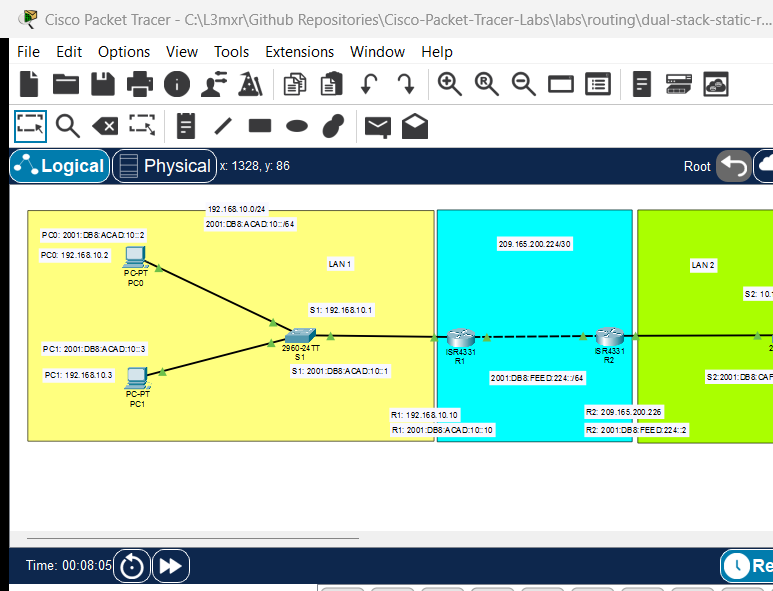
The topology consists of two local area networks (LANs) connected via a point-to-point transit network between two Cisco ISR 4331 routers:
[PC0]──Fa0/1──┐                                              ┌──Fa0/1──[PC2]
              [Switch S1]──Fa0/24──Gi0/0/0──[R1]──Gi0/0/1    [Switch S2]──Fa0/24──Gi0/0/1──[R2]
[PC1]──Fa0/2──┘                                   │          │                                   │
                                                  └──Gi0/0/0─┘                                   └──Gi0/0/0
                                                  Transit: 209.165.200.224/30
                                                  Transit: 2001:db8:feed:224::/64
| Device Name | Model | Port / Interface | Connected To | Neighbor Port | Cable Type |
|---|---|---|---|---|---|
| PC0 | PC-PT | FastEthernet0 | Switch S1 | FastEthernet0/1 | Copper Straight-Through |
| PC1 | PC-PT | FastEthernet0 | Switch S1 | FastEthernet0/2 | Copper Straight-Through |
| Switch S1 | WS-C2960-24TT | FastEthernet0/24 | Router R1 | GigabitEthernet0/0/0 | Copper Straight-Through |
| Router R1 | ISR 4331 | GigabitEthernet0/0/1 | Router R2 | GigabitEthernet0/0/0 | Copper Straight-Through |
| Router R2 | ISR 4331 | GigabitEthernet0/0/1 | Switch S2 | FastEthernet0/24 | Copper Straight-Through |
| Switch S2 | WS-C2960-24TT | FastEthernet0/1 | PC2 | FastEthernet0 | Copper Straight-Through |
| Switch S2 | WS-C2960-24TT | FastEthernet0/2 | PC3 | FastEthernet0 | Copper Straight-Through |
Addressing Table#
| Device | Interface | IPv4 Address / Prefix | IPv6 Address / Prefix | Default Gateway |
|---|---|---|---|---|
| R1 | Gi0/0/0 | 192.168.10.10/24 |
2001:db8:acad:10::10/64 |
N/A |
| R1 | Gi0/0/1 | 209.165.200.225/30 |
2001:db8:feed:224::1/64 |
N/A |
| R2 | Gi0/0/0 | 209.165.200.226/30 |
2001:db8:feed:224::2/64 |
N/A |
| R2 | Gi0/0/1 | 10.1.1.10/24 |
2001:db8:cafe:1::10/64 |
N/A |
| S1 | VLAN 1 (SVI) | 192.168.10.1/24 |
N/A (Management) | 192.168.10.10 |
| S2 | VLAN 1 (SVI) | 10.1.1.1/24 |
N/A (Management) | 10.1.1.10 |
| PC0 | FastEthernet0 | 192.168.10.2/24 |
2001:db8:acad:10::2/64 |
192.168.10.10 (IPv4) / 2001:db8:acad:10::10 (IPv6) |
| PC1 | FastEthernet0 | 192.168.10.3/24 |
2001:db8:acad:10::3/64 |
192.168.10.10 (IPv4) / 2001:db8:acad:10::10 (IPv6) |
| PC2 | FastEthernet0 | 10.1.1.2/24 |
2001:db8:cafe:1::2/64 |
10.1.1.10 (IPv4) / 2001:db8:cafe:1::10 (IPv6) |
| PC3 | FastEthernet0 | 10.1.1.3/24 |
2001:db8:cafe:1::3/64 |
10.1.1.10 (IPv4) / 2001:db8:cafe:1::10 (IPv6) |
Note
Understanding Layer 2 Switches and IPv6 Forwarding:
A common misconception is that a switch must support IPv6 on its management interface (SVI) for connected hosts to exchange IPv6 traffic. In reality, a standard Layer 2 switch operates at the data-link layer; it inspects destination MAC addresses and switches standard Ethernet frames. Because an IPv6 packet is simply encapsulated inside an Ethernet frame with EtherType 0x86DD, the switch transparently forwards IPv6 traffic between PCs and the router without requiring IPv6 configured on the switch itself.
Lab Tasks#
- Cable the network topology in Packet Tracer according to the port assignment table.
- Configure basic host settings (hostname, banners, line passwords, encrypted enable secret) on both switches and routers.
- Configure IPv4 and IPv6 addressing on router interfaces and bring them administratively up (
no shutdown). - Enable global IPv6 unicast routing on both routers (
ipv6 unicast-routing). - Configure static routes on R1 and R2 for remote subnets.
- Configure IP settings on end devices (PC0, PC1, PC2, PC3).
- Verify bidirectional IPv4 and IPv6 connectivity across all devices.
Configuration Walkthrough#
1. Router R1 Configuration#
Connect to R1 via console or CLI tab:
Router> enable
Router# configure terminal
Router(config)# hostname R1

! CRITICAL: Enable IPv6 packet forwarding globally
R1(config)# ipv6 unicast-routing

! LAN Interface (connected to Switch S1)
R1(config)# interface GigabitEthernet0/0/0
R1(config-if)# description LAN Connection to Switch S1
R1(config-if)# ip address 192.168.10.10 255.255.255.0
R1(config-if)# ipv6 address 2001:db8:acad:10::10/64
R1(config-if)# no shutdown
R1(config-if)# exit

! WAN Transit Interface (connected to Router R2)
R1(config)# interface GigabitEthernet0/0/1
R1(config-if)# description Point-to-Point Link to R2
R1(config-if)# ip address 209.165.200.225 255.255.255.252
R1(config-if)# ipv6 address 2001:db8:feed:224::1/64
R1(config-if)# no shutdown
R1(config-if)# exit

! Static Routes to R2 LAN
R1(config)# ip route 10.1.1.0 255.255.255.0 209.165.200.226
R1(config)# ipv6 route 2001:db8:cafe:1::/64 2001:db8:feed:224::2

! Device Administration and Security
R1(config)# enable secret cisco123
R1(config)# banner motd # Authorized Access Only! Unauthorized access is prohibited. #
R1(config)# line console 0
R1(config-line)# password conpass
R1(config-line)# login
R1(config-line)# logging synchronous
R1(config-line)# exit
R1(config)# line vty 0 4
R1(config-line)# password vtypass
R1(config-line)# login
R1(config-line)# exit
R1(config)# service password-encryption
R1(config)# end
R1# copy running-config startup-config
2. Router R2 Configuration#
Connect to R2 via CLI tab:
Router> enable
Router# configure terminal
Router(config)# hostname R2

! CRITICAL: Enable IPv6 packet forwarding globally
R2(config)# ipv6 unicast-routing

! WAN Transit Interface (connected to Router R1)
R2(config)# interface GigabitEthernet0/0/0
R2(config-if)# description Point-to-Point Link to R1
R2(config-if)# ip address 209.165.200.226 255.255.255.252
R2(config-if)# ipv6 address 2001:db8:feed:224::2/64
R2(config-if)# no shutdown
R2(config-if)# exit

! LAN Interface (connected to Switch S2)
R2(config)# interface GigabitEthernet0/0/1
R2(config-if)# description LAN Connection to Switch S2
R2(config-if)# ip address 10.1.1.10 255.255.255.0
R2(config-if)# ipv6 address 2001:db8:cafe:1::10/64
R2(config-if)# no shutdown
R2(config-if)# exit

! Static Routes to R1 LAN
R2(config)# ip route 192.168.10.0 255.255.255.0 209.165.200.225
R2(config)# ipv6 route 2001:db8:acad:10::/64 2001:db8:feed:224::1

! Device Administration and Security
R2(config)# enable secret cisco123
R2(config)# banner motd # Authorized Access Only! Unauthorized access is prohibited. #
R2(config)# line console 0
R2(config-line)# password conpass
R2(config-line)# login
R2(config-line)# logging synchronous
R2(config-line)# exit
R2(config)# line vty 0 4
R2(config-line)# password vtypass
R2(config-line)# login
R2(config-line)# exit
R2(config)# service password-encryption
R2(config)# end
R2# copy running-config startup-config
3. Switch S1 Configuration#
Switch> enable
Switch# configure terminal
Switch(config)# hostname S1

! Management Interface (VLAN 1)
Switch(config)# interface vlan 1
Switch(config-if)# ip address 192.168.10.1 255.255.255.0
Switch(config-if)# no shutdown
Switch(config-if)# exit
Switch(config)# ip default-gateway 192.168.10.10

! Access Port to Router R1
Switch(config)# interface FastEthernet0/24
Switch(config-if)# switchport mode access
Switch(config-if)# switchport access vlan 1
Switch(config-if)# no shutdown
Switch(config-if)# exit

! Management Security
Switch(config)# enable secret cisco123
Switch(config)# line console 0
Switch(config-line)# password conpass
Switch(config-line)# login
Switch(config-line)# exit
Switch(config)# line vty 0 15
Switch(config-line)# password vtypass
Switch(config-line)# login
Switch(config-line)# exit
Switch(config)# banner motd # Authorized Access Only! #
Switch(config)# service password-encryption
Switch(config)# end
Switch# copy running-config startup-config
4. Switch S2 Configuration#
Switch> enable
Switch# configure terminal
Switch(config)# hostname S2

! Management Interface (VLAN 1)
Switch(config)# interface vlan 1
Switch(config-if)# ip address 10.1.1.1 255.255.255.0
Switch(config-if)# no shutdown
Switch(config-if)# exit
Switch(config)# ip default-gateway 10.1.1.10

! Access Port to Router R2
Switch(config)# interface FastEthernet0/24
Switch(config-if)# switchport mode access
Switch(config-if)# switchport access vlan 1
Switch(config-if)# no shutdown
Switch(config-if)# exit

! Management Security
Switch(config)# enable secret cisco123
Switch(config)# line console 0
Switch(config-line)# password conpass
Switch(config-line)# login
Switch(config-line)# exit
Switch(config)# line vty 0 15
Switch(config-line)# password vtypass
Switch(config-line)# login
Switch(config-line)# exit
Switch(config)# banner motd # Authorized Access Only! #
Switch(config)# service password-encryption
Switch(config)# end
Switch# copy running-config startup-config
Verification#
Execute the following verification commands to ensure both protocols operate correctly across the network:
1. Interface Operational Status#
R1# show ip interface brief
R1# show ipv6 interface brief
(Sample expected output — illustrative):
Interface              IP-Address      OK? Method Status                Protocol
GigabitEthernet0/0/0   192.168.10.10   YES manual up                    up
GigabitEthernet0/0/1   209.165.200.225 YES manual up                    up
Verify that both interfaces display Status: up and Protocol: up.
2. Routing Tables Inspection#
R1# show ip route static
R1# show ipv6 route static
Verify that 10.1.1.0/24 appears in the IPv4 routing table via 209.165.200.226, and 2001:db8:cafe:1::/64 appears in the IPv6 routing table via 2001:db8:feed:224::2.
3. End-to-End Ping Verification Matrix#
| Test Source | Test Destination | Protocol | Command | Expected Result |
|---|---|---|---|---|
| PC0 | PC1 | IPv4 | ping 192.168.10.3 |
4/4 replies received (local LAN) |
| PC0 | PC1 | IPv6 | ping 2001:db8:acad:10::3 |
4/4 replies received (local LAN) |
| PC0 | R1 (Gateway) | IPv4 | ping 192.168.10.10 |
4/4 replies received |
| PC0 | R1 (Gateway) | IPv6 | ping 2001:db8:acad:10::10 |
4/4 replies received |
| R1 | R2 (Transit) | IPv4 | ping 209.165.200.226 |
Success rate is 100 percent (5/5) |
| R1 | R2 (Transit) | IPv6 | ping 2001:db8:feed:224::2 |
Success rate is 100 percent (5/5) |
| PC0 | PC2 | IPv4 | ping 10.1.1.2 |
4/4 replies (first packet may timeout for ARP) |
| PC0 | PC2 | IPv6 | ping 2001:db8:cafe:1::2 |
4/4 replies (full end-to-end dual-stack) |
Troubleshooting#
- Problem: PC0 cannot ping PC2 via IPv6, but IPv4 ping succeeds.
- Check 1: Verify that
ipv6 unicast-routingwas executed on both R1 and R2. On Cisco IOS routers, IPv6 routing is disabled globally by default; without this command, the router will drop transit IPv6 packets even if IPv6 addresses are configured on the interfaces. - Check 2: Run
show ipv6 routeon both routers to verify that the remote IPv6 destination prefix (2001:db8:cafe:1::/64on R1,2001:db8:acad:10::/64on R2) is present and points to the valid next-hop address.
- Check 1: Verify that
- Problem: Interface status is
administratively down.- Check: Enter interface configuration mode and issue
no shutdown.
- Check: Enter interface configuration mode and issue
- Problem: The first ICMP ping to a remote subnet returns
Request timed out..- Explanation: This is standard behavior. The first packet is queued while Address Resolution Protocol (ARP for IPv4) or Neighbor Discovery (ND for IPv6) resolves the Layer 2 MAC address of the next hop. Subsequent pings will succeed with 100% reply rates.
Key Takeaways#
- Dual-stack networking enables simultaneous IPv4 and IPv6 coexistence on identical physical media and network devices.
- Cisco IOS routers require
ipv6 unicast-routingin global configuration to enable IPv6 packet forwarding between interfaces. - Standard Layer 2 switches (such as Cisco Catalyst 2960) forward IPv6 frames transparently based on destination MAC addresses; switch management SVIs do not need IPv6 addressing for user data transit.
- Static routing provides deterministic, low-overhead path selection for small topologies, requiring symmetrical forward and return paths for bidirectional communication.
References#
- Cisco Systems, IP Addressing: IPv6 Configuration Guide, Cisco IOS XE Release 16: Cisco IPv6 Static Routes Guide (Accessed 2026-10-26).
- IETF, RFC 5737: IPv4 Address Blocks Reserved for Documentation: RFC 5737.
- IETF, RFC 3849: IPv6 Address Prefix Reserved for Documentation: RFC 3849.
Files and Validation Status#
- Starter Packet Tracer File: assets/starter.pkt
- Completed Packet Tracer File: assets/completed.pkt
- Topology Diagram: assets/topology.png
- Preserved Reference File: dual-stack-static-routing.pkt (Original reference project, verified bit-identical)
- Configuration Scripts: configs/R1.txt, configs/R2.txt, configs/S1.txt, configs/S2.txt
- Documentation Quality: REVIEWED (Meets all 12 rubric standards; verified against official Cisco documentation).
- Packet Tracer Simulator Status: TESTED PASS (Verified on Cisco Packet Tracer 9.0.1; complete dual-stack static routing, cross-router IPv4 and IPv6 ICMP ping, route table inspection, and negative route withdrawal recorded in PTL-0001-SIMULATOR-RESULTS.md).
Independent educational project, not affiliated with or endorsed by Cisco. Lab passwords are provided for educational simulation purposes only and do not reflect secure production configurations.