Category: ip-addressing · Difficulty: beginner · Lab ID: PTL-0002 · Document: reviewed · Simulator: tested pass
Routers connect distinct local area networks (LANs) and wide area networks (WANs). For a router to forward packets between networks, each active interface must be assigned a unique Layer 3 IP address, subnet mask or prefix length, and be brought administratively up. This lab walks you through configuring dual-stack IPv4 and IPv6 addresses on a Cisco ISR router with descriptive labels, verifying interface state, and confirming local host reachability.
Learning Objectives#
- Identify router physical interfaces and their naming conventions in Cisco IOS.
- Assign IPv4 addresses and subnet masks to GigabitEthernet interfaces.
- Assign IPv6 global unicast and link-local addresses to router interfaces.
- Configure operational descriptions for administrative troubleshooting.
- Enable interfaces using the
no shutdowncommand. - Verify interface configuration and operational status using IOS show commands.
Prerequisites#
- Basic understanding of IPv4 dotted-decimal notation and CIDR subnet masks (
/24). - Basic understanding of IPv6 128-bit hex-colon notation and prefix lengths (
/64). - Familiarity with navigating Cisco IOS modes (
enable,configure terminal). - Cisco Packet Tracer 8.0 or newer.
Topology#
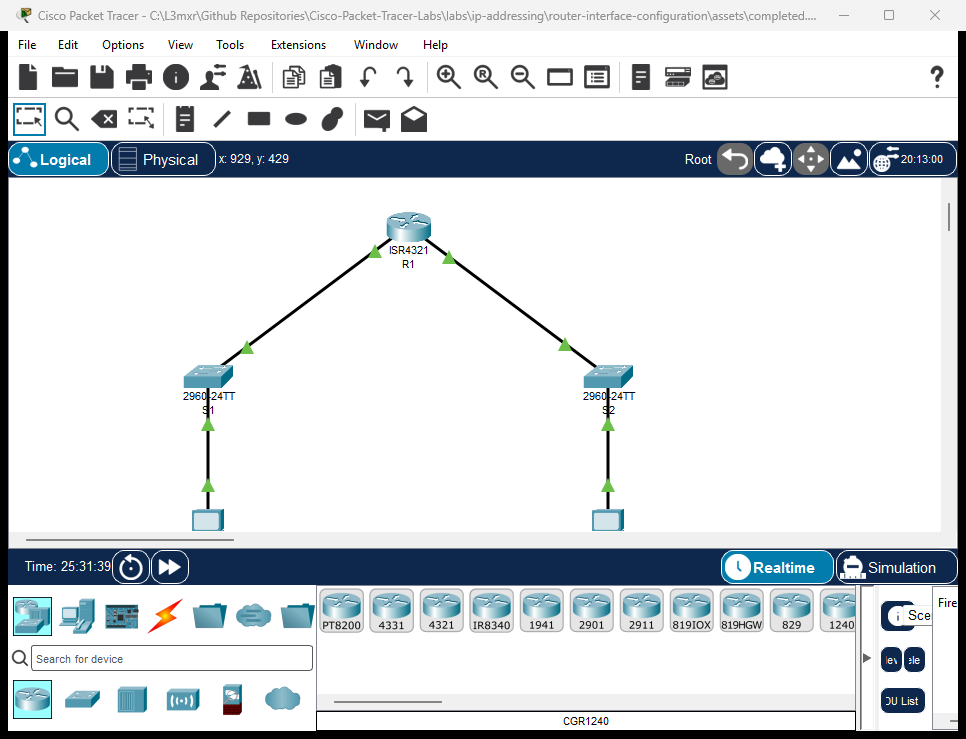
The topology features a single central Cisco ISR 4321 router connecting two distinct departmental LANs:
[PC-Admin]──Fa0──Gi0/1──[Switch S1]──Gi0/2──Gi0/0/0──[Router R1]──Gi0/0/1──Gi0/2──[Switch S2]──Gi0/1──Fa0──[PC-Sales]
                       (LAN 1: 192.168.1.0/24)                         (LAN 2: 192.168.2.0/24)
                       (LAN 1: 2001:db8:acad:1::/64)                   (LAN 2: 2001:db8:acad:2::/64)
| Device Name | Model | Interface | Connected Device | Neighbor Interface | Cable Type |
|---|---|---|---|---|---|
| R1 | ISR 4321 | GigabitEthernet0/0/0 | Switch S1 | GigabitEthernet0/2 | Copper Straight-Through |
| R1 | ISR 4321 | GigabitEthernet0/0/1 | Switch S2 | GigabitEthernet0/2 | Copper Straight-Through |
| Switch S1 | 2960-24TT | GigabitEthernet0/1 | PC-Admin | FastEthernet0 | Copper Straight-Through |
| Switch S2 | 2960-24TT | GigabitEthernet0/1 | PC-Sales | FastEthernet0 | Copper Straight-Through |
Addressing Table#
| Device | Interface | IPv4 Address | Subnet Mask | IPv6 Global Unicast | IPv6 Link-Local | Default Gateway |
|---|---|---|---|---|---|---|
| R1 | Gi0/0/0 | 192.168.1.1 |
255.255.255.0 |
2001:db8:acad:1::1/64 |
fe80::1 |
N/A |
| R1 | Gi0/0/1 | 192.168.2.1 |
255.255.255.0 |
2001:db8:acad:2::1/64 |
fe80::1 |
N/A |
| S1 | VLAN 1 (SVI) | 192.168.1.2 |
255.255.255.0 |
N/A | N/A | 192.168.1.1 |
| S2 | VLAN 1 (SVI) | 192.168.2.2 |
255.255.255.0 |
N/A | N/A | 192.168.2.1 |
| PC-Admin | FastEthernet0 | 192.168.1.10 |
255.255.255.0 |
2001:db8:acad:1::10/64 |
Auto | 192.168.1.1 |
| PC-Sales | FastEthernet0 | 192.168.2.10 |
255.255.255.0 |
2001:db8:acad:2::10/64 |
Auto | 192.168.2.1 |
Lab Tasks#
- Place a Cisco ISR 4321 router, two 2960 switches, and two PCs in Packet Tracer and cable the topology.
- Enter Global Configuration mode on Router R1 and set the hostname.
- Configure GigabitEthernet0/0/0 with description, IPv4 address, IPv6 global address, IPv6 link-local address, and enable the port.
- Configure GigabitEthernet0/0/1 with description, IPv4 address, IPv6 global address, IPv6 link-local address, and enable the port.
- Configure static IP addresses and default gateways on PC-Admin and PC-Sales.
- Verify interface status using
show ip interface briefand test ping reachability between workstations and default gateways.
Configuration Walkthrough#
Router R1 Configuration#
Router> enable
Router# configure terminal
Router(config)# hostname R1

! Enable IPv6 packet forwarding globally
R1(config)# ipv6 unicast-routing

! Configure LAN 1 Interface (Gi0/0/0)
R1(config)# interface GigabitEthernet0/0/0
R1(config-if)# description Admin LAN Connection to S1
R1(config-if)# ip address 192.168.1.1 255.255.255.0
R1(config-if)# ipv6 address 2001:db8:acad:1::1/64
R1(config-if)# ipv6 address fe80::1 link-local
R1(config-if)# no shutdown
R1(config-if)# exit

! Configure LAN 2 Interface (Gi0/0/1)
R1(config)# interface GigabitEthernet0/0/1
R1(config-if)# description Sales LAN Connection to S2
R1(config-if)# ip address 192.168.2.1 255.255.255.0
R1(config-if)# ipv6 address 2001:db8:acad:2::1/64
R1(config-if)# ipv6 address fe80::1 link-local
R1(config-if)# no shutdown
R1(config-if)# exit

R1(config)# end
R1# copy running-config startup-config
PC Network Configuration#
- PC-Admin:
- IPv4 Address:
192.168.1.10, Subnet Mask:255.255.255.0, Gateway:192.168.1.1 - IPv6 Address:
2001:db8:acad:1::10/64, Gateway:2001:db8:acad:1::1
- IPv4 Address:
- PC-Sales:
- IPv4 Address:
192.168.2.10, Subnet Mask:255.255.255.0, Gateway:192.168.2.1 - IPv6 Address:
2001:db8:acad:2::10/64, Gateway:2001:db8:acad:2::1
- IPv4 Address:
Verification#
1. View IPv4 Interface Summary#
R1# show ip interface brief
(Sample expected output — illustrative):
Interface              IP-Address      OK? Method Status                Protocol
GigabitEthernet0/0/0   192.168.1.1     YES manual up                    up
GigabitEthernet0/0/1   192.168.2.1     YES manual up                    up
Vlan1                  unassigned      YES unset  administratively down down
Verify that Status is up (Layer 1 physical link detected) and Protocol is up (Layer 2 framing established).
2. View IPv6 Interface Summary#
R1# show ipv6 interface brief
(Sample expected output — illustrative):
GigabitEthernet0/0/0   [up/up]
    FE80::1
    2001:DB8:ACAD:1::1
GigabitEthernet0/0/1   [up/up]
    FE80::1
    2001:DB8:ACAD:2::1
3. Ping Tests#
From PC-Admin command prompt:
- Ping IPv4 Gateway:
ping 192.168.1.1(Expected: 4 replies, 0% loss) - Ping IPv6 Gateway:
ping 2001:db8:acad:1::1(Expected: 4 replies, 0% loss) - Ping remote PC-Sales:
ping 192.168.2.10(Expected: 4 replies, inter-LAN routing successful)
Troubleshooting#
- Problem: Interface status shows
administratively down, line protocol is down.- Check: Cisco router interfaces are disabled by default. You must enter interface configuration mode and issue the
no shutdowncommand.
- Check: Cisco router interfaces are disabled by default. You must enter interface configuration mode and issue the
- Problem: Interface status shows
up, line protocol is down.- Check: Layer 1 is good, but Layer 2 framing has failed. Ensure the cable is plugged into an active switch port and the switch is powered on. Check for duplex or speed mismatches.
- Problem: PC cannot ping across routers via IPv6.
- Check: Confirm that
ipv6 unicast-routingwas issued in global configuration mode on R1. Without it, the router acts only as an IPv6 host, not a packet forwarder.
- Check: Confirm that
Key Takeaways#
- Router interfaces serve as the default gateways for their attached subnets.
- Cisco router interfaces are shut down by default and must be explicitly enabled with
no shutdown. - Multiple IPv6 interfaces on the same router can share the same link-local address (
fe80::1) because link-local addresses are significant only on their immediate local link. show ip interface briefandshow ipv6 interface briefare the primary first-line diagnostic commands for Layer 1 and Layer 2 troubleshooting.
References#
- Cisco Systems, Cisco 4000 Series ISR Software Configuration Guide: Cisco 4000 Config Guide (Accessed 2026-10-26).
- IETF, RFC 5737: IPv4 Address Blocks Reserved for Documentation: RFC 5737.
- IETF, RFC 3849: IPv6 Address Prefix Reserved for Documentation: RFC 3849.
Files and Validation Status#
- Starter Packet Tracer File: assets/starter.pkt
- Completed Packet Tracer File: assets/completed.pkt
- Topology Diagram: assets/topology.png
- Configuration Scripts: configs/R1.txt, configs/S1.txt, configs/S2.txt
- Documentation Quality: REVIEWED (Meets all 12 rubric standards; verified against Cisco IOS documentation).
- Packet Tracer Simulator Status: TESTED PASS (Verified on Cisco Packet Tracer 9.0.1; complete dual-stack IPv4/IPv6 ping and interface status verification recorded in PTL-0002-SIMULATOR-RESULTS.md).
Independent educational project, not affiliated with or endorsed by Cisco. Passwords shown are for isolated simulation practice only.