Learning Objectives#
- Contrast Layer 2 switches with multilayer Layer 3 switches and explain hardware-accelerated Cisco Express Forwarding (CEF).
- Create and activate Switched Virtual Interfaces (SVIs) as default gateways for multiple VLAN broadcast domains.
- Enable global IPv4 routing on a multilayer switch using the
ip routingcommand. - Convert a physical switchport into a Layer 3 routed port using
no switchportand assign an IPv4 subnet. - Configure a default static route to connect a multilayer switch to an upstream router and verify symmetrical return routing.
- Compare multilayer switching performance, scalability, and latency against legacy Router-on-a-Stick architectures.
- Diagnose and troubleshoot SVI operational states, routing table convergence, and asymmetric return routing issues.
Prerequisites#
- Completion of PTL-0009: VLAN Segmentation and Access Ports and PTL-0010: Router-on-a-Stick Inter-VLAN Routing.
- Understanding of IEEE 802.1Q trunking, IP subnetting, and default gateway concepts.
- Familiarity with Cisco IOS privileged EXEC and global configuration modes.
Topology#
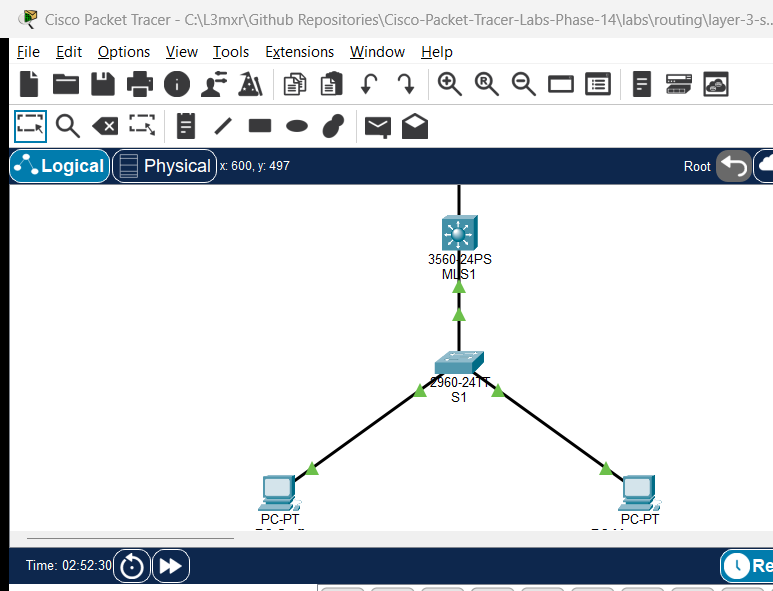
The topology models an enterprise campus network utilizing a collapsed-core/distribution multilayer switch (MLS1) connected downstream to a Layer 2 access switch (S1) and upstream to an edge router (R1):
- Upstream Routed Link:
R1(Gi0/0) connects toMLS1(Gi0/1) across point-to-point network10.0.0.0/30. - Downstream 802.1Q Trunk:
MLS1(Gi0/2) connects toS1(Gi0/1) carrying VLANs 10 and 20. - Access End-Devices: Workstation
PC-Staffconnects toS1(Fa0/10) in VLAN 10;PC-Managementconnects toS1(Fa0/20) in VLAN 20. - Simulated External Network:
R1hosts a simulated external loopback destination at203.0.113.1/32.
               +----------------------------------+
               |        R1 (Edge Router)          |
               |  Loopback0: 203.0.113.1/32       |
               +-----------------+----------------+
                                 | Gi0/0 (10.0.0.2/30)
                                 |
                                 | Point-to-Point Routed Link (10.0.0.0/30)
                                 |
                                 | Gi0/1 (10.0.0.1/30) [no switchport]
               +-----------------+----------------+
               |    MLS1 (Catalyst 3560-24PS)     |
               |   SVI Vlan10: 192.168.10.1/24    |
               |   SVI Vlan20: 192.168.20.1/24    |
               +-----------------+----------------+
                                 | Gi0/2 (Trunk)
                                 |
                                 | IEEE 802.1Q Trunk
                                 |
                                 | Gi0/1 (Trunk)
               +-----------------+----------------+
               |     S1 (Catalyst 2960-24TT)      |
               +--------+----------------+--------+
      Fa0/10 (VLAN 10)  |                |  Fa0/20 (VLAN 20)
                        |                |
    +-------------------+--+          +--+-------------------+
    |       PC-Staff       |          |    PC-Management     |
    |   192.168.10.10/24   |          |   192.168.20.10/24   |
    |   GW: 192.168.10.1   |          |   GW: 192.168.20.1   |
    +----------------------+          +----------------------+
Addressing Table#
| Device | Interface | IP Address | Subnet Mask | Default Gateway | Purpose / Notes |
|---|---|---|---|---|---|
| R1 | Gi0/0 | 10.0.0.2 | 255.255.255.252 | N/A | Uplink to MLS1 routed port |
| R1 | Loopback0 | 203.0.113.1 | 255.255.255.255 | N/A | Simulated external destination |
| MLS1 | Gi0/1 | 10.0.0.1 | 255.255.255.252 | N/A | Routed port (no switchport) to R1 |
| MLS1 | Gi0/2 | Unnumbered | N/A | N/A | 802.1Q trunk link to S1 |
| MLS1 | Vlan10 | 192.168.10.1 | 255.255.255.0 | N/A | SVI Gateway for Staff VLAN |
| MLS1 | Vlan20 | 192.168.20.1 | 255.255.255.0 | N/A | SVI Gateway for Management VLAN |
| S1 | Gi0/1 | Unnumbered | N/A | N/A | 802.1Q trunk link to MLS1 |
| S1 | Fa0/10 | Unnumbered | N/A | N/A | Access switchport (VLAN 10) |
| S1 | Fa0/20 | Unnumbered | N/A | N/A | Access switchport (VLAN 20) |
| PC-Staff | FastEthernet0 | 192.168.10.10 | 255.255.255.0 | 192.168.10.1 | Staff department host |
| PC-Management | FastEthernet0 | 192.168.20.10 | 255.255.255.0 | 192.168.20.1 | Management department host |
Lab Tasks#
- Verify Layer 2 Baseline & Inter-Switch Trunk:
- Inspect VLAN definitions (VLAN 10 and VLAN 20) on both
MLS1andS1. - Confirm that the
Gi0/2(MLS1) toGi0/1(S1) link operates as an 802.1Q trunk withswitchport trunk encapsulation dot1qandswitchport mode trunk.
- Inspect VLAN definitions (VLAN 10 and VLAN 20) on both
- Configure Switched Virtual Interfaces (SVIs) on MLS1:
- Create
interface Vlan10with IP address192.168.10.1/24and issueno shutdown. - Create
interface Vlan20with IP address192.168.20.1/24and issueno shutdown. - Confirm that both SVIs enter
up/upoperational status because the trunk link to S1 actively forwards those VLANs.
- Create
- Enable Global IPv4 Routing on MLS1:
- Enable hardware-accelerated routing with the global configuration command
ip routing. - Inspect
show ip routeto confirm that direct connected routes for192.168.10.0/24and192.168.20.0/24appear in the routing table.
- Enable hardware-accelerated routing with the global configuration command
- Convert Physical Interface to Layer 3 Routed Port:
- Convert
GigabitEthernet0/1from Layer 2 switchport mode to Layer 3 routed mode usingno switchport. - Assign IP address
10.0.0.1 255.255.255.252toGi0/1and enable the interface. - Verify with
show interfaces GigabitEthernet0/1 switchportthatSwitchport: Disabledis reported.
- Convert
- Configure Default and Return Static Routing:
- Add a default static route on
MLS1pointing toR1:ip route 0.0.0.0 0.0.0.0 10.0.0.2. - Verify that
R1has return routes to both VLAN networks:192.168.10.0/24and192.168.20.0/24via10.0.0.1.
- Add a default static route on
- Validate Connectivity and Fault Injection Scenarios:
- Verify local gateway pings, inter-VLAN pings, and external loopback pings (
POS-01toPOS-10). - Execute negative fault injection tests (
NEG-01toNEG-05) to observe behavioral impacts whenip routing, an SVI, or static routes are missing.
- Verify local gateway pings, inter-VLAN pings, and external loopback pings (
Configuration Walkthrough#
Step 1: Access Switch S1 VLAN and Port Configuration#
Configure access ports and trunk uplink on Catalyst 2960 switch S1:
S1# configure terminal
S1(config)# hostname S1
S1(config)# no ip domain-lookup
S1(config)# vlan 10
S1(config-vlan)# name Staff
S1(config-vlan)# vlan 20
S1(config-vlan)# name Management
S1(config-vlan)# exit

S1(config)# interface FastEthernet0/10
S1(config-if)# description Staff Host Access Port
S1(config-if)# switchport mode access
S1(config-if)# switchport access vlan 10
S1(config-if)# no shutdown

S1(config)# interface FastEthernet0/20
S1(config-if)# description Management Host Access Port
S1(config-if)# switchport mode access
S1(config-if)# switchport access vlan 20
S1(config-if)# no shutdown

S1(config)# interface GigabitEthernet0/1
S1(config-if)# description 802.1Q Trunk Link to MLS1
S1(config-if)# switchport mode trunk
S1(config-if)# no shutdown
S1(config-if)# end
S1# copy running-config startup-config
Step 2: Configure Multilayer Switch MLS1 SVIs and Global Routing#
On Catalyst 3560 switch MLS1, create the VLAN database, configure the trunk link, configure SVIs, and enable ip routing:
MLS1# configure terminal
MLS1(config)# hostname MLS1
MLS1(config)# no ip domain-lookup
MLS1(config)# vlan 10
MLS1(config-vlan)# name Staff
MLS1(config-vlan)# vlan 20
MLS1(config-vlan)# name Management
MLS1(config-vlan)# exit

MLS1(config)# interface GigabitEthernet0/2
MLS1(config-if)# description 802.1Q Trunk Link to S1
MLS1(config-if)# switchport trunk encapsulation dot1q
MLS1(config-if)# switchport mode trunk
MLS1(config-if)# no shutdown
MLS1(config-if)# exit

MLS1(config)# interface Vlan10
MLS1(config-if)# description SVI Gateway for Staff
MLS1(config-if)# ip address 192.168.10.1 255.255.255.0
MLS1(config-if)# no shutdown
MLS1(config-if)# exit

MLS1(config)# interface Vlan20
MLS1(config-if)# description SVI Gateway for Management
MLS1(config-if)# ip address 192.168.20.1 255.255.255.0
MLS1(config-if)# no shutdown
MLS1(config-if)# exit

MLS1(config)# ip routing
Step 3: Configure Routed Uplink and Default Route on MLS1#
Disable switchport functionality on Gi0/1 and add the default route toward R1:
MLS1(config)# interface GigabitEthernet0/1
MLS1(config-if)# description Routed Point-to-Point Uplink to R1
MLS1(config-if)# no switchport
MLS1(config-if)# ip address 10.0.0.1 255.255.255.252
MLS1(config-if)# no shutdown
MLS1(config-if)# exit

MLS1(config)# ip route 0.0.0.0 0.0.0.0 10.0.0.2
MLS1(config)# end
MLS1# copy running-config startup-config
Step 4: Configure Upstream Router R1#
Configure the point-to-point interface, loopback, and static return routes on R1:
R1# configure terminal
R1(config)# hostname R1
R1(config)# no ip domain-lookup
R1(config)# interface GigabitEthernet0/0
R1(config-if)# description Point-to-Point Routed Link to MLS1
R1(config-if)# ip address 10.0.0.2 255.255.255.252
R1(config-if)# no shutdown
R1(config-if)# exit

R1(config)# interface Loopback0
R1(config-if)# description Simulated External Destination
R1(config-if)# ip address 203.0.113.1 255.255.255.255
R1(config-if)# no shutdown
R1(config-if)# exit

R1(config)# ip route 192.168.10.0 255.255.255.0 10.0.0.1
R1(config)# ip route 192.168.20.0 255.255.255.0 10.0.0.1
R1(config)# end
R1# copy running-config startup-config
Verification#
1. Verify SVI Status and IP Addressing#
Confirm that SVIs and the routed uplink are in the up/up operational state:
MLS1# show ip interface brief
Interface              IP-Address      OK? Method Status                Protocol
GigabitEthernet0/1     10.0.0.1        YES manual up                    up
GigabitEthernet0/2     unassigned      YES unset  up                    up
Vlan10                 192.168.10.1    YES manual up                    up
Vlan20                 192.168.20.1    YES manual up                    up
2. Verify Routing Table on MLS1#
Confirm that direct connected routes for both VLANs and the routed uplink exist, along with the candidate default static route:
MLS1# show ip route
Gateway of last resort is 10.0.0.2 to network 0.0.0.0

     10.0.0.0/30 is subnetted, 1 subnets
C       10.0.0.0 is directly connected, GigabitEthernet0/1
C    192.168.10.0/24 is directly connected, Vlan10
C    192.168.20.0/24 is directly connected, Vlan20
S*   0.0.0.0/0 [1/0] via 10.0.0.2
3. Verify Routed Port Operation#
Confirm that Gi0/1 operates as a Layer 3 interface with switchport features disabled:
MLS1# show interfaces GigabitEthernet0/1 switchport
Name: Gig0/1
Switchport: Disabled
4. Verify Workstation Connectivity#
From PC-Staff (192.168.10.10):
- Local Gateway:
ping 192.168.10.1-> 100% success (4/4 received). - Inter-VLAN Host:
ping 192.168.20.10-> 100% success (4/4 received, TTL=127 confirming single hop through MLS1). - External Loopback:
ping 203.0.113.1-> 100% success (4/4 received, TTL=254 confirming two hops: MLS1 -> R1).
Troubleshooting#
Scenario 1: ip routing Is Disabled#
- Symptom: Workstations can ping their own default gateway (192.168.10.1), but pings between
PC-StaffandPC-Managementtime out.show ip routereturns empty or displays a warning that routing is not enabled. - Root Cause: Cisco switches default to Layer 2 bridging. Without the global command
ip routing, the switch will respond to packets destined for its own local IP addresses but will not forward packets across different subnets. - Resolution: Enter global configuration mode on
MLS1and issueip routing.
Scenario 2: SVI Interface Is Down / Down (SVI Autostate Failure)#
- Symptom:
interface Vlan10showsStatus: up, Protocol: downordown/down.192.168.10.0/24does not appear inshow ip route. - Root Cause: By default, Cisco SVI autostate logic requires at least one Layer 2 physical port (access port or trunk) in that VLAN to be in the
up/upand spanning-tree forwarding state. If the trunk to S1 fails, or if VLAN 10 is not allowed on the trunk, the SVI goes down automatically. - Resolution: Verify trunk operational state using
show interfaces trunkand ensure the VLAN exists in the switch database usingshow vlan brief.
Scenario 3: Destination Host Unreachable on External Ping#
- Symptom: When pinging
203.0.113.1, the workstation receivesReply from 192.168.10.1: Destination host unreachable. - Root Cause:
MLS1has no route for203.0.113.1and no gateway of last resort is set. - Resolution: Add default static route
ip route 0.0.0.0 0.0.0.0 10.0.0.2onMLS1.
Scenario 4: Asymmetric Routing / Missing Return Route on Upstream Router#
- Symptom: Workstations can ping their gateway and each other, but pings to
203.0.113.1time out (100% packet loss) without receiving an unreachable error. - Root Cause: The forward packet successfully reaches
R1, butR1has no routing table entry for the source subnet (192.168.10.0/24), resulting in silent packet drop on the return path. - Resolution: Configure static return route on
R1:ip route 192.168.10.0 255.255.255.0 10.0.0.1.
Key Takeaways#
Layer 2 vs. Layer 3 Multilayer Switches#
- Layer 2 Switches (e.g., Catalyst 2960): Operate exclusively at OSI Layer 2 using MAC address tables (
CAMtable). They can have a single management IP address on an SVI (e.g.,interface Vlan1), but cannot forward packets between different VLANs. - Multilayer Switches (e.g., Catalyst 3560/3650): Possess dedicated Application-Specific Integrated Circuits (ASICs) and Ternary Content-Addressable Memory (TCAM). They perform Layer 2 frame switching and Layer 3 IP packet forwarding at wire-speed using Cisco Express Forwarding (CEF).
Switched Virtual Interfaces (SVIs) vs. Routed Ports#
- SVI (
interface Vlan <id>): A virtual Layer 3 interface mapped to an internal VLAN broadcast domain. Allows multiple physical switchports (in that VLAN) to share a common default gateway IP address. - Routed Port (
no switchport): A physical switch interface converted to act identically to a router interface. It does not participate in STP, has no VLAN tag associations, and receives an individual IP address and subnet mask.
Comparison: Router-on-a-Stick (PTL-0010) vs. Multilayer Switching (PTL-0019)#
| Feature | Router-on-a-Stick (ROAS) | Multilayer Switch (MLS) |
|---|---|---|
| Routing Entity | External router (e.g., Cisco 2911 / 4321) | Multilayer switch internal ASICs (e.g., Catalyst 3560) |
| Interface Architecture | Logical subinterfaces on a single physical link | Switched Virtual Interfaces (SVIs) inside switch fabric |
| Link Bandwidth | Shared trunk link bottleneck (traffic traverses trunk twice) | High-speed internal switch backplane (Gbps/Tbps capacity) |
| Forwarding Engine | Software / CPU-assisted route lookup | Hardware-based Cisco Express Forwarding (CEF / TCAM) |
| Latency | Higher (serialization delay across router link) | Ultra-low (hardware wire-speed switching) |
| Uplink to WAN/Edge | Router handles WAN natively | Requires routed port (no switchport) or L3 uplink to router |
| Cost & Scalability | Low equipment cost for small networks; poor scalability | Industry standard for campus core and distribution layers |
References#
- Cisco Systems. (2016). Catalyst 3560 Switch Software Configuration Guide, Release 12.2(55)SE - Configuring IP Unicast Routing.
- Cisco Systems. (2020). CCNA 200-301 Official Cert Guide, Volume 1: Inter-VLAN Routing. Cisco Press.
- Cisco TAC. (2021). How to Configure InterVLAN Routing on Catalyst 3550/3560/3750 Series Switches. Document ID: 41860.
- RFC 1812. (1995). Requirements for IP Version 4 Routers. Internet Engineering Task Force.
Files and Validation Status#
- Starter Topology: assets/starter.pkt
- Completed Topology: assets/completed.pkt
- Multilayer Switch MLS1 Configuration: configs/MLS1.txt
- Access Switch S1 Configuration: configs/S1.txt
- Upstream Router R1 Configuration: configs/R1.txt
- Verification Protocol & Test Results: verification.md
- Authentic Simulator Test Capture: AI_AGENT_GUIDE/state/PTL-0019-SIMULATOR-RESULTS.md
| Metric | Status |
|---|---|
| Documentation Review | reviewed |
| Packet Tracer Validation | tested_pass (Cisco Packet Tracer 9.0.1 IPC Bridge) |
| Checksum Verification | Confirmed (Starter: 31feb931..., Completed: 074e5a39...) |