Learning Objectives#
- Diagnose and resolve DHCP relay failures across multiple 802.1Q VLANs using standard Cisco IOS verification commands.
- Understand how
ip helper-addressconverts broadcast DHCP Discover messages into unicast packets routed to a centralized DHCP server. - Identify and correct helper-address misconfigurations on subinterfaces, including invalid helper destinations and missing relay directives.
- Identify and resolve DHCP pool scope mismatches where the central server's network configuration does not match the incoming relay agent
giaddrsubnet. - Validate dynamic IP lease acquisition, default gateway assignment, and end-to-end inter-VLAN routing across client endpoints.
Prerequisites#
- Completion of PTL-0012: Configuring Cisco IOS DHCPv4 Server and Relay Agent
- Working knowledge of IEEE 802.1Q trunking and Router-on-a-Stick subinterface routing
- Familiarity with the 4-step DHCPv4 DORA process (Discover, Offer, Request, Acknowledge)
Topology#
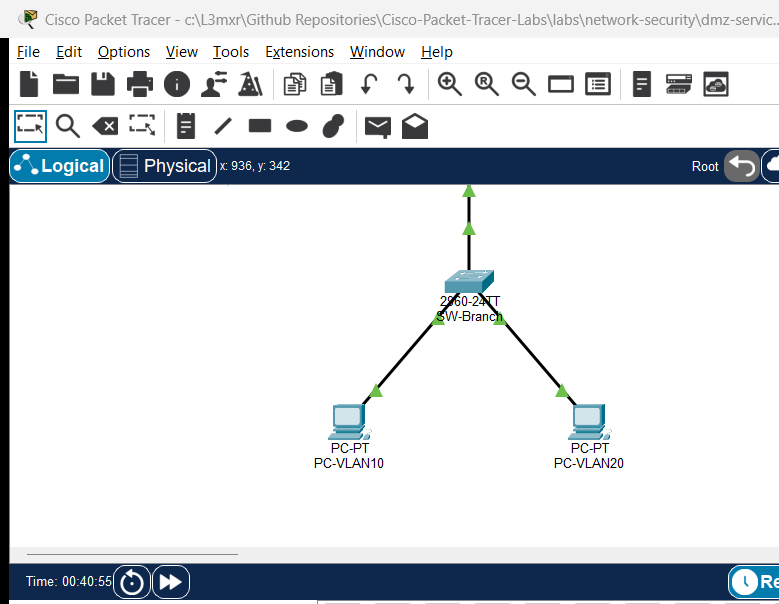
                   [ R1-HQ: DHCP Server ]
                    (Cisco 2911 Router)
                         Gi0/0 (10.0.0.1/30)
                                 |
                                 | WAN Link: 10.0.0.0/30
                                 |
                         Gi0/0 (10.0.0.2/30)
                   [ R2-Branch: Relay Agent ]
                    (Cisco 2911 Router)
                         Gi0/1 (Trunk 802.1Q)
                                 |
                                 | 802.1Q Trunk (VLANs 10, 20)
                                 |
                         Gi0/1 (Trunk 802.1Q)
                   [ SW-Branch: Access Switch ]
                    (Catalyst 2960-24TT)
                        /              \
                Fa0/10 /                \ Fa0/20
           (Access VLAN 10)         (Access VLAN 20)
                     /                    \
              [ PC-VLAN10 ]          [ PC-VLAN20 ]
             DHCP Client 10         DHCP Client 20
            192.168.10.0/24         192.168.20.0/24
Addressing Table#
| Device Name | Interface | IP Address | Subnet Mask | Default Gateway | Function / Connected To |
|---|---|---|---|---|---|
| R1-HQ | Gi0/0 | 10.0.0.1 | 255.255.255.252 | N/A | Central DHCP Server / WAN Link to R2-Branch |
| R2-Branch | Gi0/0 | 10.0.0.2 | 255.255.255.252 | N/A | WAN Link to R1-HQ |
| R2-Branch | Gi0/1 | Unnumbered | Unnumbered | N/A | 802.1Q Physical Trunk to SW-Branch Gi0/1 |
| R2-Branch | Gi0/1.10 | 192.168.10.1 | 255.255.255.0 | N/A | VLAN 10 Gateway (Encapsulation dot1Q 10) |
| R2-Branch | Gi0/1.20 | 192.168.20.1 | 255.255.255.0 | N/A | VLAN 20 Gateway (Encapsulation dot1Q 20) |
| SW-Branch | Gi0/1 | Trunk | N/A | N/A | Trunk to R2-Branch Gi0/1 |
| SW-Branch | Fa0/10 | Access (VLAN 10) | N/A | N/A | Access Port for PC-VLAN10 |
| SW-Branch | Fa0/20 | Access (VLAN 20) | N/A | N/A | Access Port for PC-VLAN20 |
| PC-VLAN10 | FastEthernet0 | DHCP Assigned | 255.255.255.0 | 192.168.10.1 | Client in VLAN 10 (Expected: 192.168.10.11+) |
| PC-VLAN20 | FastEthernet0 | DHCP Assigned | 255.255.255.0 | 192.168.20.1 | Client in VLAN 20 (Expected: 192.168.20.11+) |
Lab Tasks#
- Analyze Initial Symptoms: Inspect IP configuration on client endpoints
PC-VLAN10andPC-VLAN20to verify lack of dynamic IP lease acquisition. - Troubleshoot VLAN 10 Relay Agent: Inspect
R2-BranchsubinterfaceGigabitEthernet0/1.10, identify the erroneousip helper-address 10.0.0.5, and reconfigure it to point to central DHCP server10.0.0.1. - Troubleshoot VLAN 20 Central DHCP Pool Scope: Inspect
R1-HQDHCP pool configurations, identify the scope mismatch inPOOL_VLAN20(configured with192.168.200.0/24instead of192.168.20.0/24), and correct the network and default gateway definitions. - Trigger Client Lease Renewals: Issue
ipconfig /renewon both client machines and verify successful receipt of IP address, subnet mask, default gateway, and DNS server parameters. - Verify End-to-End Connectivity: Verify inter-VLAN routing between
PC-VLAN10andPC-VLAN20, and test reachability to the central headquarters router (10.0.0.1).
Configuration Walkthrough#
Task 1: Identify Fault Symptoms#
On PC-VLAN10 and PC-VLAN20, verify the current IP status:
ipconfig
Both clients show 0.0.0.0 or APIPA 169.254.x.x addresses because neither host receives a DHCP Offer.
Task 2: Remediate VLAN 10 Relay Helper Address#
On R2-Branch, examine the subinterface running configuration:
R2-Branch# show running-config interface GigabitEthernet0/1.10
Building configuration...

Current configuration : 138 bytes
!
interface GigabitEthernet0/1.10
 encapsulation dot1Q 10
 ip address 192.168.10.1 255.255.255.0
 ip helper-address 10.0.0.5
end
Notice that the helper address points to 10.0.0.5, which does not exist in the routing topology. Reconfigure GigabitEthernet0/1.10 to point to 10.0.0.1:
R2-Branch# configure terminal
R2-Branch(config)# interface GigabitEthernet0/1.10
R2-Branch(config-subif)# no ip helper-address 10.0.0.5
R2-Branch(config-subif)# ip helper-address 10.0.0.1
R2-Branch(config-subif)# end
R2-Branch# copy running-config startup-config
Task 3: Remediate VLAN 20 Central DHCP Pool Scope#
On R1-HQ, examine the configured DHCP pools:
R1-HQ# show run | section dhcp
ip dhcp excluded-address 10.0.0.1 10.0.0.10
ip dhcp excluded-address 192.168.10.1 192.168.10.10
ip dhcp excluded-address 192.168.20.1 192.168.20.10
ip dhcp pool POOL_VLAN10
 network 192.168.10.0 255.255.255.0
 default-router 192.168.10.1
 dns-server 10.0.0.1
 domain-name enterprise.local
ip dhcp pool POOL_VLAN20
 network 192.168.200.0 255.255.255.0
 default-router 192.168.200.1
 dns-server 10.0.0.1
 domain-name enterprise.local
When R2-Branch forwards a DHCP Discover for VLAN 20, it inserts giaddr = 192.168.20.1. R1-HQ searches for a pool covering 192.168.20.1, finds no matching network, and discards the request.
Correct the pool definition on R1-HQ:
R1-HQ# configure terminal
R1-HQ(config)# no ip dhcp pool POOL_VLAN20
R1-HQ(config)# ip dhcp pool POOL_VLAN20
R1-HQ(config-dhcp)# network 192.168.20.0 255.255.255.0
R1-HQ(config-dhcp)# default-router 192.168.20.1
R1-HQ(config-dhcp)# dns-server 10.0.0.1
R1-HQ(config-dhcp)# domain-name enterprise.local
R1-HQ(config-dhcp)# end
R1-HQ# copy running-config startup-config
Task 4: Renew Client Leases#
On PC-VLAN10:
ipconfig /renew
On PC-VLAN20:
ipconfig /renew
Verification#
1. Client IP Configuration#
Check PC-VLAN10:
C:\> ipconfig

FastEthernet0 Connection:(default port)

   Connection-specific DNS Suffix..: enterprise.local
   Link-local IPv6 Address.........: FE80::...
   IPv4 Address....................: 192.168.10.11
   Subnet Mask.....................: 255.255.255.0
   Default Gateway.................: 192.168.10.1
Check PC-VLAN20:
C:\> ipconfig

FastEthernet0 Connection:(default port)

   Connection-specific DNS Suffix..: enterprise.local
   Link-local IPv6 Address.........: FE80::...
   IPv4 Address....................: 192.168.20.11
   Subnet Mask.....................: 255.255.255.0
   Default Gateway.................: 192.168.20.1
2. Central DHCP Server Bindings#
On R1-HQ:
R1-HQ# show ip dhcp binding
Bindings from all pools :
IP address      Client-ID/              Lease expiration        Type
                Hardware address/
                User name
192.168.10.11   0001.42A3.B810          --                      Automatic
192.168.20.11   00D0.FF41.562A          --                      Automatic
3. End-to-End ICMP Reachability#
From PC-VLAN10, ping the local gateway, the remote VLAN host, and the headquarters router:
ping 192.168.10.1
ping 192.168.20.11
ping 10.0.0.1
All ping operations should complete with a 0% packet loss rate.
Troubleshooting#
| Symptom | Probable Cause | Diagnostic Command | Remediation |
|---|---|---|---|
Client receives no lease; gets 0.0.0.0 or APIPA 169.254.x.x |
Helper address points to wrong IP | show running-config interface Gi0/1.x on relay router |
Configure ip helper-address <DHCP-Server-IP> under the subinterface |
| Relay router forwards request, but server issues no Offer | DHCP pool network statement does not match subinterface giaddr subnet |
show running-config | section dhcp and show ip dhcp pool on server |
Ensure network in DHCP pool matches the subinterface IP subnet |
| Server shows pool exhausted | Excluded address range covers whole subnet or pool is depleted | show ip dhcp pool <name> |
Verify ip dhcp excluded-address range only reserves gateways/servers |
| Client cannot ping default gateway after lease | 802.1Q encapsulation mismatch or missing VLAN on trunk | show interface trunk on switch, show ip interface brief on router |
Ensure trunk allows the VLAN and subinterface encapsulation matches |
Key Takeaways#
- Broadcast DHCP Discover messages do not traverse router boundaries unless converted by an active DHCP relay agent (
ip helper-address). - The
ip helper-addressdirective must be applied to the specific inbound router interface or subinterface that receives the client broadcast. - The relay router stamps its incoming subinterface IP in the
giaddr(Gateway IP Address) field of the DHCP payload, which the central server uses to select the correct DHCP pool. - A mismatch between the subinterface
giaddrsubnet and the server's poolnetworkdeclaration results in silent discards of relay packets.
References#
- IETF RFC 2131: Dynamic Host Configuration Protocol
- Cisco IOS IP Addressing Services: Configuring DHCP Server and Relay Agent
Files and Validation Status#
- Starter Packet Tracer File:
assets/starter.pkt - Completed Reference Solution:
assets/completed.pkt - Topology Diagram:
assets/topology.png - Device Configurations:
- Central DHCP Server:
configs/R1-HQ.txt - Relay Agent & Branch Router:
configs/R2-Branch.txt - Branch Access Switch:
configs/SW-Branch.txt
- Central DHCP Server:
- Simulator Evidence:
AI_AGENT_GUIDE/state/PTL-0052-SIMULATOR-RESULTS.md