Learning Objectives#
- Deploy and configure an autonomous 802.11 wireless access point (
AccessPoint-PT) integrated with switched Ethernet infrastructure. - Secure the wireless local area network using WPA2-Personal (Pre-Shared Key) and Advanced Encryption Standard (AES) cipher suites.
- Implement Cisco IOS DHCP address pool services on an upstream default gateway router to lease IPv4 parameters to wireless stations.
- Equip and configure portable client hosts with 802.11 wireless network interface modules (
PT-LAPTOP-NM-1W). - Verify successful 802.11 association, dynamic IP acquisition, and end-to-end IP reachability from wireless stations to wired intranet servers.
- Test and document negative authentication scenarios demonstrating that incorrect Pre-Shared Keys are blocked from network association.
Prerequisites#
- Familiarity with basic IPv4 addressing, subnet masking, and default gateway concepts from
PTL-0014andPTL-0015. - Understanding of Layer 2 Ethernet switching and PortFast concepts from
PTL-0009andPTL-0017. - Basic understanding of Cisco IOS DHCP server configuration from
PTL-0012.
Topology#
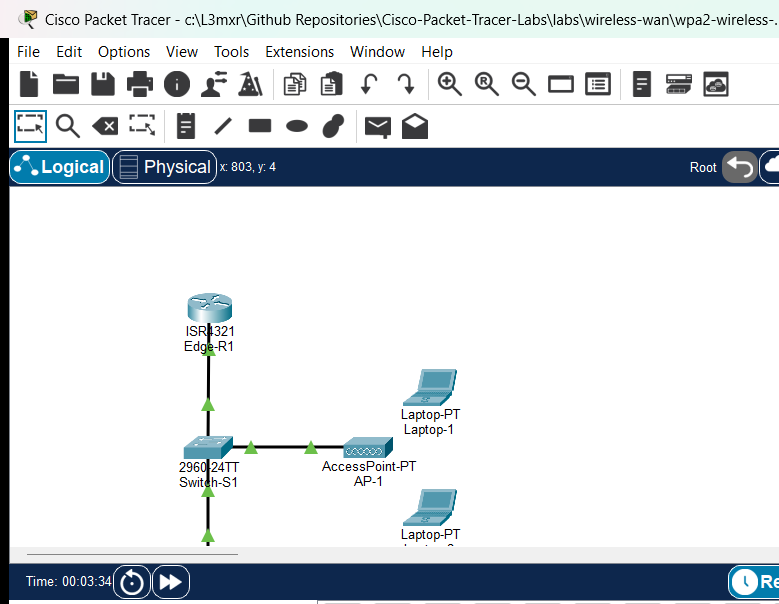
The topology models a small enterprise wireless local area network integrated with a switched corporate campus:
Edge-R1(Cisco ISR 4321) serves as the default gateway router for the LAN (192.168.10.1/24) and provides centralized Cisco IOS DHCP services via address poolWLAN-POOL.Switch-S1(Cisco Catalyst 2960-24TT) provides access layer Ethernet switching, with ports configured withspanning-tree portfastto accelerate wireless host association and eliminate STP forward delays.AP-1(AccessPoint-PT) is a standalone autonomous access point bridging 802.11 wireless frames onto the wired Ethernet infrastructure.Wired-Server(Server-PT) represents a corporate intranet file and web server (192.168.10.100/24).Laptop-1is an authorized mobile workstation equipped with a wireless NIC and configured with the valid WPA2-PSK key.Laptop-2is an unauthorized host configured with an invalid pre-shared key to test security boundary enforcement.
Addressing Table#
| Device | Interface | IP Address | Subnet Mask | Default Gateway | Function / Description |
|---|---|---|---|---|---|
Edge-R1 |
Gi0/0/0 | 192.168.10.1 |
255.255.255.0 |
N/A | LAN Default Gateway & DHCP Server |
Switch-S1 |
VLAN 1 (SVI) | 192.168.10.2 |
255.255.255.0 |
192.168.10.1 |
Management Switch Virtual Interface |
Wired-Server |
FastEthernet0 | 192.168.10.100 |
255.255.255.0 |
192.168.10.1 |
Corporate Web and File Server |
AP-1 |
Port 0 | N/A | N/A | N/A | 10/100 Ethernet Uplink to Switch Fa0/2 |
AP-1 |
Port 1 | N/A | N/A | N/A | 802.11b/g 2.4 GHz Radio Interface (Ch 6) |
Laptop-1 |
Wireless0 | DHCP (192.168.10.11+) |
255.255.255.0 |
192.168.10.1 |
Authorized Corporate Wireless Station |
Laptop-2 |
Wireless0 | DHCP (Lease Blocked) | 255.255.255.0 |
192.168.10.1 |
Unauthorized Client (Authentication Failure) |
Lab Tasks#
- Verify starter topology infrastructure:
Edge-R1andSwitch-S1addressed and active, andWired-Serverreachable via ping. - Install 2.4 GHz 802.11 wireless modules (
PT-LAPTOP-NM-1W) intoLaptop-1andLaptop-2. - Configure WPA2-Personal security with AES encryption on
AP-1using pre-shared keyCiscoLabKey2026!. - Configure
Laptop-1with valid WPA2-PSK credentials and dynamic DHCP addressing. - Configure
Laptop-2with invalid WPA2 credentials (InvalidPass999!) to verify authentication rejection. - Verify 802.11 association, DHCP address leasing, and end-to-end ping reachability to gateway and wired server.
Configuration Walkthrough#
1. Configure Edge-R1 DHCP Services#
On Edge-R1, configure the interface uplink and create the dynamic address pool:
Edge-R1# configure terminal
Edge-R1(config)# interface GigabitEthernet0/0/0
Edge-R1(config-if)# description Uplink to Switch-S1 Fa0/1
Edge-R1(config-if)# ip address 192.168.10.1 255.255.255.0
Edge-R1(config-if)# no shutdown
Edge-R1(config-if)# exit
Edge-R1(config)# ip dhcp excluded-address 192.168.10.1 192.168.10.10
Edge-R1(config)# ip dhcp excluded-address 192.168.10.100
Edge-R1(config)# ip dhcp pool WLAN-POOL
Edge-R1(dhcp-config)# network 192.168.10.0 255.255.255.0
Edge-R1(dhcp-config)# default-router 192.168.10.1
Edge-R1(dhcp-config)# dns-server 192.168.10.1
Edge-R1(dhcp-config)# domain-name ciscolab.local
Edge-R1(dhcp-config)# end
Edge-R1# copy running-config startup-config
2. Configure Switch-S1 with PortFast#
On Switch-S1, configure access ports with spanning-tree portfast to eliminate 30-second STP forward delays when wireless stations associate:
Switch-S1# configure terminal
Switch-S1(config)# interface FastEthernet0/1
Switch-S1(config-if)# description Uplink to Edge-R1 Gi0/0/0
Switch-S1(config-if)# switchport mode access
Switch-S1(config-if)# spanning-tree portfast
Switch-S1(config-if)# no shutdown
Switch-S1(config-if)# exit
Switch-S1(config)# interface FastEthernet0/2
Switch-S1(config-if)# description Access Point AP-1 Port 0
Switch-S1(config-if)# switchport mode access
Switch-S1(config-if)# spanning-tree portfast
Switch-S1(config-if)# no shutdown
Switch-S1(config-if)# exit
Switch-S1(config)# interface FastEthernet0/3
Switch-S1(config-if)# description Wired Server FastEthernet0
Switch-S1(config-if)# switchport mode access
Switch-S1(config-if)# spanning-tree portfast
Switch-S1(config-if)# no shutdown
Switch-S1(config-if)# exit
Switch-S1(config)# interface vlan 1
Switch-S1(config-if)# ip address 192.168.10.2 255.255.255.0
Switch-S1(config-if)# no shutdown
Switch-S1(config-if)# exit
Switch-S1(config)# ip default-gateway 192.168.10.1
Switch-S1(config)# end
Switch-S1# copy running-config startup-config
3. Configure AP-1 Wireless Security#
On AP-1, navigate to Port 1 (2.4 GHz radio) and apply WPA2-Personal settings:
- Port Status: On
- Channel: 6 (2.437 GHz)
- Authentication: WPA2-PSK
- Encryption: AES
- PSK Pass Phrase:
CiscoLabKey2026!
4. Configure Client Laptops#
- On
Laptop-1, power off the device, insertPT-LAPTOP-NM-1W, and power it on. Configure Wireless0 for WPA2-PSK AES with keyCiscoLabKey2026!, and enable DHCP. - On
Laptop-2, power off the device, insertPT-LAPTOP-NM-1W, and power it on. Configure Wireless0 for WPA2-PSK AES with invalid keyInvalidPass999!, and enable DHCP.
Verification#
1. Verify Edge-R1 DHCP Address Leases#
Inspect active client address bindings on Edge-R1 to confirm dynamic address issuance:
Edge-R1# show ip dhcp binding
IP address       Client-ID/              Lease expiration        Type
                 Hardware address
192.168.10.11    0060.2f18.364c          --                      Automatic
2. Verify Laptop-1 IP Configuration and Gateway Reachability#
On Laptop-1, open the Command Prompt and verify the dynamically acquired IP parameters:
C:\> ipconfig

Wireless0 Connection:
   Connection-specific DNS Suffix..: ciscolab.local
   Link-local IPv6 Address.........: FE80::2E0:F9FF:FE49:5BCE
   IPv4 Address....................: 192.168.10.11
   Subnet Mask.....................: 255.255.255.0
   Default Gateway.................: 192.168.10.1
Verify reachability to the default router:
C:\> ping 192.168.10.1

Pinging 192.168.10.1 with 32 bytes of data:

Reply from 192.168.10.1: bytes=32 time=10ms TTL=255
Reply from 192.168.10.1: bytes=32 time=13ms TTL=255
Reply from 192.168.10.1: bytes=32 time=10ms TTL=255
Reply from 192.168.10.1: bytes=32 time=7ms TTL=255

Ping statistics for 192.168.10.1:
    Packets: Sent = 4, Received = 4, Lost = 0 (0% loss)
3. Verify End-to-End Wireless-to-Wired Access#
Ping Wired-Server (192.168.10.100) from Laptop-1 across the access point and switched boundary:
C:\> ping 192.168.10.100

Pinging 192.168.10.100 with 32 bytes of data:

Reply from 192.168.10.100: bytes=32 time=11ms TTL=128
Reply from 192.168.10.100: bytes=32 time=10ms TTL=128
Reply from 192.168.10.100: bytes=32 time=7ms TTL=128
Reply from 192.168.10.100: bytes=32 time=12ms TTL=128

Ping statistics for 192.168.10.100:
    Packets: Sent = 4, Received = 4, Lost = 0 (0% loss)
4. Verify Unauthorized Client Rejection (Negative Testing)#
On Laptop-2, verify that the station fails 802.11 4-way handshake authentication and cannot acquire an address or transmit traffic:
C:\> ipconfig

Wireless0 Connection:
   Autoconfiguration IPv4 Address..: 169.254.4.160
   Subnet Mask.....................: 255.255.0.0
   Default Gateway.................: 0.0.0.0

C:\> ping 192.168.10.100

Pinging 192.168.10.100 with 32 bytes of data:

Request timed out.
Request timed out.
Request timed out.
Request timed out.

Ping statistics for 192.168.10.100:
    Packets: Sent = 4, Received = 0, Lost = 4 (100% loss)
For complete automated test evidence, see verification.md.
Troubleshooting#
- Wireless station receives 169.254.x.x (APIPA): WPA2 passphrase mismatch or switch port STP delay. Verify WPA2-PSK key spelling on client matches AP exactly. Check
Switch-S1port Fa0/2: ensurespanning-tree portfastis enabled so DHCP requests are not dropped during STP Listening/Learning. - No RF waves appear between AP and Laptop: Physical module unpowered or coverage distance exceeded. Verify laptop power switch is ON.
AccessPoint-PTcoverage radius is 140 pixels in Packet Tracer; ensure station is placed within RF range of the AP. - Client associates but cannot ping Wired-Server: Server gateway misconfiguration or switch VLAN isolation. Check
Wired-Serverdefault gateway is set to192.168.10.1. Ensure switchports Fa0/2 and Fa0/3 are in the same access VLAN (VLAN 1). - Client pings gateway but fails DNS resolution: DHCP pool missing DNS option. Inspect
show run | section dhcponEdge-R1; verifydns-server 192.168.10.1is configured in poolWLAN-POOL.
Key Takeaways#
- Autonomous vs Lightweight Architecture: Standalone access points (
AccessPoint-PT) manage RF configuration, SSID broadcasting, and encryption locally on the device without requiring a Wireless LAN Controller (WLC). - WPA2-Personal (PSK): Uses a shared secret passphrase combined with the SSID to derive Pairwise Master Keys (PMK) and Pairwise Transient Keys (PTK) via the 802.11 4-way handshake.
- AES vs TKIP: AES (Counter Mode CBC-MAC Protocol / CCMP) provides robust cryptographic integrity and confidentiality, replacing deprecated WEP and WPA-TKIP cipher suites.
- Switch PortFast Necessity: Connecting access points to switch ports configured with
spanning-tree portfastprevents 30-second STP forward delays when stations associate or when AP links flap, ensuring rapid DHCP address negotiation.
Command Reference#
| Command | Execution Context | Purpose |
|---|---|---|
ip dhcp pool <name> |
Global Configuration | Creates or enters a DHCP pool definition |
network <network-id> <subnet-mask> |
DHCP Configuration | Specifies the subnet address range for dynamic leases |
default-router <ip-address> |
DHCP Configuration | Configures the default gateway option handed to DHCP clients |
ip dhcp excluded-address <low> [high] |
Global Configuration | Reserves static IP addresses from being leased dynamically |
show ip dhcp binding |
Privileged EXEC | Displays active IP-to-MAC/DUID DHCP lease bindings |
show ip dhcp pool |
Privileged EXEC | Displays DHCP pool statistics and utilization |
spanning-tree portfast |
Interface Configuration | Bypasses STP Listening and Learning states for edge host/AP ports |
ipconfig / ipconfig /renew |
Windows/PC Command Line | Inspects or requests renewal of dynamic IP interface parameters |
References#
- Cisco Aironet Access Point WPA2 Configuration Guide
- Cisco Catalyst 2960 Switch PortFast Configuration Guide
- Cisco CCNA Exam Topics (Topic 2.6: Configure and verify wireless LAN using WPA2 PSK GUI)
Files and Validation Status#
- Starter Topology: assets/starter.pkt
- Completed Topology: assets/completed.pkt
- Topology Diagram: assets/topology.png
- Edge-R1 Running Config: configs/Edge-R1.txt
- Switch-S1 Running Config: configs/Switch-S1.txt
- Simulator Results Evidence: PTL-0035-SIMULATOR-RESULTS.md
- Validation Status: Simulator tested and verified in Packet Tracer 9.0.1. All positive and negative test cases passing.