Learning Objectives#
- Design and deploy isolated VLANs for corporate staff (VLAN 10) and guest wireless users (VLAN 20) on a Catalyst multilayer switch.
- Configure Switched Virtual Interfaces (SVIs) on the multilayer switch to serve as default gateways and enable inter-VLAN routing.
- Provision multi-pool Cisco IOS DHCP services on SVIs to dynamically allocate network parameters to corporate and guest clients.
- Integrate an autonomous 802.11 access point onto the designated guest access switchport to broadcast secure guest Wi-Fi.
- Construct and apply an Extended Access Control List (ACL) to restrict guest stations from accessing corporate staff hosts while preserving DMZ Internet access.
- Verify end-to-end positive connectivity for staff hosts and validate negative security controls blocking guest-to-corporate penetration.
Prerequisites#
- Completion of
PTL-0035(WPA2 Wireless LAN Fundamentals). - Solid foundation in VLAN concepts, 802.1Q trunking, and access port assignment (
PTL-0009throughPTL-0011). - Understanding of Inter-VLAN Routing using Switched Virtual Interfaces (SVIs) and multilayer switching concepts (
PTL-0018). - Familiarity with Cisco IOS Extended Access Control List syntax and packet filtering logic (
PTL-0026).
Topology#
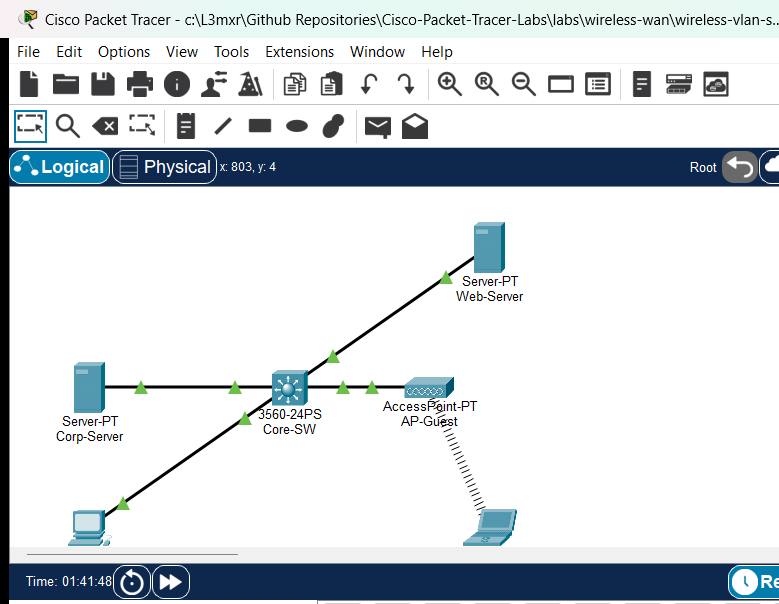
The enterprise network topology demonstrates secure wireless guest segmentation:
Core-SW(Cisco Catalyst 3560-24PS) acts as the Layer 3 core/distribution multilayer switch, routing traffic between VLANs and out to the DMZ via routed interface GigabitEthernet0/1 (192.168.30.1/24). It also provides centralized Cisco IOS DHCP services for both VLANs and enforces security filtering using an Extended ACL on the guest interface.Corp-Server(Server-PT) represents an internal corporate intranet repository (192.168.10.100/24) attached to Fa0/3 in Corporate VLAN 10.Staff-PC(PC-PT) is a corporate staff workstation attached to Fa0/2 in Corporate VLAN 10, receiving a dynamic IP via DHCP from poolCORP-POOL.AP-Guest(AccessPoint-PT) is an autonomous 802.11 access point connected to switchport Fa0/1 in Guest VLAN 20, broadcasting the guest wireless cell secured with WPA2-Personal (AES).Guest-Laptop(Laptop-PT) is a visitor station equipped with a wireless NIC (PT-LAPTOP-NM-1W), dynamically leasing an IP in Guest VLAN 20 from poolGUEST-POOL.Web-Server(Server-PT) represents a public DMZ web and DNS server (192.168.30.100/24) connected to routed port GigabitEthernet0/1.
Addressing Table#
| Device | Interface | IP Address | Subnet Mask | Default Gateway | Function / Description |
|---|---|---|---|---|---|
Core-SW |
Vlan10 (SVI) | 192.168.10.1 |
255.255.255.0 |
N/A | Corporate VLAN Default Gateway |
Core-SW |
Vlan20 (SVI) | 192.168.20.1 |
255.255.255.0 |
N/A | Guest VLAN Default Gateway & ACL Filter |
Core-SW |
Gi0/1 (Routed) | 192.168.30.1 |
255.255.255.0 |
N/A | Uplink to DMZ Public Web Server |
Corp-Server |
FastEthernet0 | 192.168.10.100 |
255.255.255.0 |
192.168.10.1 |
Corporate Intranet & File Server |
Web-Server |
FastEthernet0 | 192.168.30.100 |
255.255.255.0 |
192.168.30.1 |
DMZ Public Web & DNS Server |
Staff-PC |
FastEthernet0 | DHCP (192.168.10.11+) |
255.255.255.0 |
192.168.10.1 |
Corporate Staff Workstation (VLAN 10) |
AP-Guest |
Port 0 | N/A | N/A | N/A | FastEthernet Uplink to Core-SW Fa0/1 |
AP-Guest |
Port 1 | N/A | N/A | N/A | 802.11 2.4 GHz Radio (Guest Cell) |
Guest-Laptop |
Wireless0 | DHCP (192.168.20.11+) |
255.255.255.0 |
192.168.20.1 |
Visitor Wireless Station (VLAN 20) |
Lab Tasks#
- Verify starter configuration on
Core-SW: SVIsVlan10andVlan20, routed interfaceGi0/1, and switchport VLAN access assignments. - Enable Cisco IOS DHCP server services and configure distinct address pools for
CORP-POOLandGUEST-POOLwith appropriate gateway, DNS, and exclusion ranges. - Configure WPA2-Personal security with AES encryption on
AP-Guestwith passphraseGuestWifiPass2026!. - Equip
Guest-Laptopwith wireless modulePT-LAPTOP-NM-1W, configure WPA2-PSK credentials, and verify dynamic IP acquisition. - Create and apply Extended Access Control List
GUEST-RESTRICTIONinbound oninterface Vlan20to block guest traffic from reaching Corporate VLAN 10 while permitting DMZ access. - Verify staff full reachability to internal and DMZ assets, and verify guest access restrictions against corporate servers and workstations.
Configuration Walkthrough#
1. Multilayer Switch Baseline and SVI Routing#
On Core-SW, enable IP routing, define the VLAN database, configure access ports, and provision SVIs:
Core-SW# configure terminal
Core-SW(config)# hostname Core-SW
Core-SW(config)# ip routing
Core-SW(config)# vlan 10
Core-SW(config-vlan)# name Corporate-VLAN
Core-SW(config-vlan)# vlan 20
Core-SW(config-vlan)# name Guest-VLAN
Core-SW(config-vlan)# exit

Core-SW(config)# interface FastEthernet0/1
Core-SW(config-if)# description AP-Guest Access Port (VLAN 20)
Core-SW(config-if)# switchport mode access
Core-SW(config-if)# switchport access vlan 20
Core-SW(config-if)# spanning-tree portfast
Core-SW(config-if)# no shutdown

Core-SW(config)# interface FastEthernet0/2
Core-SW(config-if)# description Staff-PC Access Port (VLAN 10)
Core-SW(config-if)# switchport mode access
Core-SW(config-if)# switchport access vlan 10
Core-SW(config-if)# spanning-tree portfast
Core-SW(config-if)# no shutdown

Core-SW(config)# interface FastEthernet0/3
Core-SW(config-if)# description Corp-Server Access Port (VLAN 10)
Core-SW(config-if)# switchport mode access
Core-SW(config-if)# switchport access vlan 10
Core-SW(config-if)# spanning-tree portfast
Core-SW(config-if)# no shutdown

Core-SW(config)# interface Vlan10
Core-SW(config-if)# description Corporate Default Gateway
Core-SW(config-if)# ip address 192.168.10.1 255.255.255.0
Core-SW(config-if)# no shutdown

Core-SW(config)# interface Vlan20
Core-SW(config-if)# description Guest Default Gateway
Core-SW(config-if)# ip address 192.168.20.1 255.255.255.0
Core-SW(config-if)# no shutdown

Core-SW(config)# interface GigabitEthernet0/1
Core-SW(config-if)# description Routed Port to Web-Server (DMZ)
Core-SW(config-if)# no switchport
Core-SW(config-if)# ip address 192.168.30.1 255.255.255.0
Core-SW(config-if)# no shutdown
Core-SW(config-if)# exit
2. Multi-Pool Cisco IOS DHCP Provisioning#
Configure address pools for corporate staff and guest wireless clients:
Core-SW(config)# service dhcp
Core-SW(config)# ip dhcp excluded-address 192.168.10.1 192.168.10.10
Core-SW(config)# ip dhcp excluded-address 192.168.10.100
Core-SW(config)# ip dhcp excluded-address 192.168.20.1 192.168.20.10

Core-SW(config)# ip dhcp pool CORP-POOL
Core-SW(dhcp-config)# network 192.168.10.0 255.255.255.0
Core-SW(dhcp-config)# default-router 192.168.10.1
Core-SW(dhcp-config)# dns-server 192.168.30.100
Core-SW(dhcp-config)# domain-name corpwifi.local
Core-SW(dhcp-config)# exit

Core-SW(config)# ip dhcp pool GUEST-POOL
Core-SW(dhcp-config)# network 192.168.20.0 255.255.255.0
Core-SW(dhcp-config)# default-router 192.168.20.1
Core-SW(dhcp-config)# dns-server 192.168.30.100
Core-SW(dhcp-config)# domain-name guestwifi.local
Core-SW(dhcp-config)# exit
3. Extended Access Control List Policy#
Implement security boundaries preventing guests from reaching corporate assets while permitting DHCP, DNS, Web, and diagnostic ICMP to the DMZ:
Core-SW(config)# ip access-list extended GUEST-RESTRICTION
Core-SW(config-ext-nacl)# remark Permit DHCP requests from guests to local gateway
Core-SW(config-ext-nacl)# permit udp any any eq bootps
Core-SW(config-ext-nacl)# remark Permit DNS queries to DMZ server
Core-SW(config-ext-nacl)# permit udp any host 192.168.30.100 eq domain
Core-SW(config-ext-nacl)# remark Permit Web traffic to DMZ server
Core-SW(config-ext-nacl)# permit tcp any host 192.168.30.100 eq www
Core-SW(config-ext-nacl)# permit tcp any host 192.168.30.100 eq 443
Core-SW(config-ext-nacl)# remark Permit ICMP diagnostics to DMZ server
Core-SW(config-ext-nacl)# permit icmp any host 192.168.30.100
Core-SW(config-ext-nacl)# remark Explicitly deny guest access to Corporate Staff VLAN 10
Core-SW(config-ext-nacl)# deny ip 192.168.20.0 0.0.0.255 192.168.10.0 0.0.0.255
Core-SW(config-ext-nacl)# remark Permit guest access to any other external networks
Core-SW(config-ext-nacl)# permit ip 192.168.20.0 0.0.0.255 any
Core-SW(config-ext-nacl)# exit

Core-SW(config)# interface Vlan20
Core-SW(config-if)# ip access-group GUEST-RESTRICTION in
Core-SW(config-if)# end
Core-SW# write memory
4. Wireless Access Point and Client Security#
Configure AP-Guest Port 1 radio with WPA2-PSK (AES) and associate Guest-Laptop:
- On
AP-Guest, select Config > Port 1:- Set Authentication to
WPA2-PSK. - Set Encryption Type to
AES. - Set PSK Pass Phrase to
GuestWifiPass2026!.
- Set Authentication to
- On
Guest-Laptop, install thePT-LAPTOP-NM-1Wmodule, enable DHCP, and configure matching WPA2-PSK credentials.
Verification#
Confirm all positive and negative security criteria:
- Inspect Multilayer Switch Gateways and DHCP Status:
Core-SW# show ip interface brief | exclude Fast Core-SW# show ip dhcp pool - Verify Corporate Staff Connectivity:
On
Staff-PC, executeipconfigto verify lease192.168.10.11, then ping internal server192.168.10.100and external web server192.168.30.100(both succeed with 0% loss). - Verify Guest Wireless Connectivity:
On
Guest-Laptop, executeipconfigto verify lease192.168.20.11, then ping DMZ web server192.168.30.100(succeeds with 0% loss). - Validate Security Isolation:
From
Guest-Laptop, attempt to ping internalCorp-Server(192.168.10.100) andStaff-PC(192.168.10.11). Both attempts must returnDestination host unreachable(100% loss) from gateway192.168.20.1.
For complete test execution logs and POS/NEG test matrices, see verification.md.
Troubleshooting#
- Guest Station Receives 169.254.x.x (APIPA): Ensure switchport
FastEthernet0/1is assigned toVlan 20, spanning-tree PortFast is active, and theGUEST-POOLnetwork range is configured correctly onCore-SW. Verify the ACL permitsbootps(permit udp any any eq bootps) so DHCP discover frames reach the router process. - Guest Station Can Reach Corporate Intranet: Verify that
ip access-group GUEST-RESTRICTION inis applied tointerface Vlan20(not Vlan10 or outbound). Extended ACLs applied inbound inspect source IP headers before routing logic forwards packets. - Wireless Authentication Fails: Ensure both
AP-GuestandGuest-Laptopuse matching encryption algorithms (AES) and identical pre-shared keys (GuestWifiPass2026!).
Key Takeaways#
- Guest wireless isolation requires a defense-in-depth approach combining Layer 2 VLAN segmentation and Layer 3 Access Control List packet filtering.
- Autonomous access points can be directly mapped to dedicated guest access switchports, eliminating the need to expose internal 802.1Q trunking to unmanaged wireless cells.
- Applying Extended ACLs as close to the source as possible (inbound on the Guest SVI) minimizes unnecessary routing overhead and blocks malicious internal probing at the gateway boundary.
Command Reference#
| Command | Mode | Purpose |
|---|---|---|
ip routing |
Global Config | Enables Layer 3 IP routing on Catalyst multilayer switches |
interface Vlan <id> |
Global Config | Creates and enters Switched Virtual Interface configuration mode |
no switchport |
Interface Config | Converts a Layer 2 switchport into a routed Layer 3 port |
service dhcp |
Global Config | Activates the Cisco IOS DHCP server process |
ip dhcp pool <name> |
Global Config | Configures a dynamic DHCP addressing pool |
ip access-list extended <name> |
Global Config | Defines a named Extended Access Control List |
ip access-group <name> in |
Interface Config | Activates the ACL filter inbound on the interface |
References#
- Cisco Catalyst 3560 Switch Software Configuration Guide - VLANs
- Cisco IOS Extended Access Lists Configuration Guide
- Cisco CCNA 200-301 Official Cert Guide - Wireless Architectures and Security
Files and Validation Status#
| File | Description | Status |
|---|---|---|
assets/starter.pkt |
Baseline topology with SVIs and VLAN assignments; ready for DHCP and ACL configuration | Validated |
assets/completed.pkt |
Fully configured topology with DHCP pools, WPA2-PSK security, and ACL filtering | Validated |
assets/topology.png |
Visual network diagram captured from Packet Tracer canvas | Validated |
configs/Core-SW.txt |
Complete running configuration for Catalyst 3560 Core Switch | Validated |
metadata.json |
Structured metadata adhering to repository standards | Validated |
verification.md |
Detailed positive and negative verification evidence | Validated |