Category: network-services · Difficulty: intermediate · Lab ID: PTL-0043 · Document: reviewed · Simulator: tested pass
Network Address Translation (NAT) and Port Address Translation (PAT / NAT Overload) are foundational edge routing technologies that conserve global public IPv4 addresses and secure internal network boundaries. In an enterprise environment, an edge router translates private RFC 1918 IPv4 addresses into a single or pooled public IPv4 address, multiplexing thousands of concurrent connections using Layer 4 transport port numbers (TCP and UDP) and ICMP query identifiers.
When NAT or PAT fails, internal users experience complete loss of Internet access, inability to reach cloud services, or intermittent service degradation. Because NAT operates silently at the interface boundary between inside private networks and outside public transit links, identifying root causes requires a systematic, structured troubleshooting methodology.
Common NAT and PAT implementation errors encountered in enterprise networks include:
- Interface NAT Boundary Misconfigurations: Cisco IOS requires that each participating interface be explicitly designated as either
ip nat insideorip nat outside. If an internal interface lacks theip nat insidecommand, outbound traffic arriving on that interface is routed without translation. Conversely, if an external WAN interface is mistakenly configured withip nat insideor omitsip nat outside, the router never triggers the inside-to-outside translation engine, leaking untranslated private packets to upstream Internet Service Providers (ISPs) where they are promptly discarded. - Translation ACL Filtering and Subnet Mismatches: Dynamic NAT and PAT rely on standard or extended Access Control Lists (ACLs) to classify which internal private source addresses are eligible for address translation. Common errors include typos in the network ID (e.g., configuring
192.168.1.0/24instead of192.168.10.0/24), omitting newly added department subnets (such as guest or IoT VLANs), or confusing wildcard masks with subnet masks. Packets that fail to match the translation ACL bypass NAT and are transmitted with private source addresses. - NAT Overload Syntax and Parameter Omissions: Omitting the
overloadkeyword from theip nat inside source list <acl> interface <interface> overloadcommand restricts the router to one-to-one dynamic NAT. In this failure mode, the very first internal host exhausts the single public IP address, and all subsequent internal hosts are denied connectivity until the translation timer expires. - Routing and Upstream Provider Asymmetry: NAT operates in tandem with routing tables. If the default route (
ip route 0.0.0.0 0.0.0.0 <next-hop>) is missing or pointing to an invalid next hop, translated packets cannot depart the autonomous system. Furthermore, upstream provider routers do not route private RFC 1918 address space; any packet leaving the edge router without translation cannot receive return traffic.
In this troubleshooting challenge, you will assume the role of an enterprise network engineer responding to a high-priority ticket: users in both the Staff Department and the Guest Wireless network report total loss of external Internet and web connectivity. You will inspect operational state tables, audit access lists and interface boundaries, diagnose multiple compounding configuration errors on edge router Edge-R1, implement remediation steps, and verify full two-way communication using live packet probes and translation tables.
Learning Objectives#
- Apply structured troubleshooting methodologies to diagnose NAT and PAT failures in a multi-subnet enterprise branch topology.
- Inspect and interpret the Cisco IOS NAT translation table using
show ip nat translations. - Analyze operational translation counters, pool utilization, and interface assignments using
show ip nat statistics. - Identify and correct interface NAT domain errors (
ip nat insideandip nat outside). - Diagnose standard Access Control List (ACL) errors that prevent private subnets from matching dynamic PAT rules.
- Remediate and verify dynamic Port Address Translation (NAT Overload) sharing a single public WAN interface address (
203.0.113.1/30). - Validate end-to-end transport layer communication for ICMP echo and TCP web traffic (HTTP port 80).
Prerequisites#
- Thorough understanding of IPv4 addressing, RFC 1918 private address ranges, and default gateway routing concepts.
- Completion of PTL-0020: IPv4 Dynamic PAT at the Edge or equivalent hands-on experience with Cisco IOS NAT/PAT configuration.
- Familiarity with standard Access Control Lists (ACLs) and wildcard mask calculation.
- Cisco Packet Tracer 8.2 or newer (Packet Tracer 9.0+ verified).
Topology#
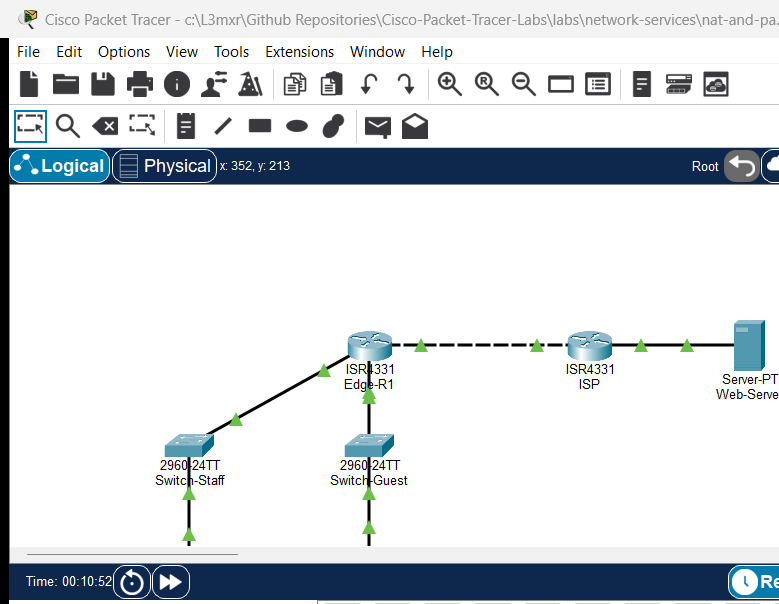
The topology models an enterprise branch network connected across an ISP transit link to a public internet web server:
[PC-Staff] ── Fa0 ──── Fa0/1 ── [Switch-Staff] ── Gi0/1 ──── Gi0/0/0 ──┐
(192.168.10.10)                 (Staff Access)                         │
                                                                       ▼
                                                                  [Edge-R1] (PAT Gateway)
                                                                       ▲  Gi0/0/2 (203.0.113.1/30)
                                                                       │  (WAN Transit Link)
[Laptop-Guest] ─ Fa0 ── Fa0/1 ─ [Switch-Guest] ── Gi0/1 ──── Gi0/0/1 ──┘  │ (Copper Cross)
(192.168.20.10)                 (Guest Access)                           ▼  Gi0/0/0 (203.0.113.2/30)
                                                                       [ISP Router]
                                                                          │ Gi0/0/1 (198.51.100.1/24)
                                                                          │ (Public Server LAN)
                                                                          ▼
                                                                    [Web-Server]
                                                                    (198.51.100.10)
| Device Name | Model | Interface | Connected Device | Neighbor Interface | Network Role |
|---|---|---|---|---|---|
| Edge-R1 | Cisco ISR 4331 | Gi0/0/0 |
Switch-Staff | Gi0/1 |
Staff LAN Gateway (192.168.10.1/24, NAT Inside) |
| Edge-R1 | Cisco ISR 4331 | Gi0/0/1 |
Switch-Guest | Gi0/1 |
Guest LAN Gateway (192.168.20.1/24, NAT Inside) |
| Edge-R1 | Cisco ISR 4331 | Gi0/0/2 |
ISP | Gi0/0/0 |
WAN Transit Link (203.0.113.1/30, NAT Outside) |
| ISP | Cisco ISR 4331 | Gi0/0/0 |
Edge-R1 | Gi0/0/2 |
ISP WAN Gateway (203.0.113.2/30) |
| ISP | Cisco ISR 4331 | Gi0/0/1 |
Web-Server | Fa0 |
Simulated Internet LAN (198.51.100.1/24) |
| Switch-Staff | Catalyst 2960-24TT | Fa0/1 |
PC-Staff | Fa0 |
Staff LAN Access Port (VLAN 1) |
| Switch-Staff | Catalyst 2960-24TT | Gi0/1 |
Edge-R1 | Gi0/0/0 |
Uplink to Edge Router |
| Switch-Guest | Catalyst 2960-24TT | Fa0/1 |
Laptop-Guest | Fa0 |
Guest LAN Access Port (VLAN 1) |
| Switch-Guest | Catalyst 2960-24TT | Gi0/1 |
Edge-R1 | Gi0/0/1 |
Uplink to Edge Router |
| PC-Staff | PC-PT | Fa0 |
Switch-Staff | Fa0/1 |
Corporate Workstation (192.168.10.10/24) |
| Laptop-Guest | Laptop-PT | Fa0 |
Switch-Guest | Fa0/1 |
Visitor Laptop (192.168.20.10/24) |
| Web-Server | Server-PT | Fa0 |
ISP | Gi0/0/1 |
Public Web Server (198.51.100.10/24, HTTP port 80) |
Addressing Table#
| Device | Interface | IPv4 Address | Subnet Mask | Default Gateway | NAT Role |
|---|---|---|---|---|---|
| Edge-R1 | Gi0/0/0 |
192.168.10.1 |
255.255.255.0 |
N/A | Inside (ip nat inside) |
| Edge-R1 | Gi0/0/1 |
192.168.20.1 |
255.255.255.0 |
N/A | Inside (ip nat inside) |
| Edge-R1 | Gi0/0/2 |
203.0.113.1 |
255.255.255.252 |
N/A | Outside (ip nat outside) |
| ISP | Gi0/0/0 |
203.0.113.2 |
255.255.255.252 |
N/A | Upstream Provider WAN |
| ISP | Gi0/0/1 |
198.51.100.1 |
255.255.255.0 |
N/A | Public Server Gateway |
| Switch-Staff | Vlan1 |
192.168.10.2 |
255.255.255.0 |
192.168.10.1 |
Inside Management |
| Switch-Guest | Vlan1 |
192.168.20.2 |
255.255.255.0 |
192.168.20.1 |
Inside Management |
| PC-Staff | FastEthernet0 |
192.168.10.10 |
255.255.255.0 |
192.168.10.1 |
Inside Local Host |
| Laptop-Guest | FastEthernet0 |
192.168.20.10 |
255.255.255.0 |
192.168.20.1 |
Inside Local Host |
| Web-Server | FastEthernet0 |
198.51.100.10 |
255.255.255.0 |
198.51.100.1 |
Outside Global Destination |
Lab Tasks#
- Verify Baseline Local Connectivity: Open
assets/starter.pktand confirm thatPC-Staffcan reach its default gateway (192.168.10.1) andLaptop-Guestcan reach its default gateway (192.168.20.1). - Reproduce the Outage: Attempt to ping the public server (
198.51.100.10) from bothPC-StaffandLaptop-Guest. Record the failure symptoms and observe that external traffic is dropped. - Audit NAT Interface Roles: On
Edge-R1, inspect interface NAT boundaries usingshow ip nat statisticsandshow running-config interface. Identify which interfaces have missing or incorrectip nat insideandip nat outsidedesignations. - Audit Translation Access List: Inspect standard ACL
1usingshow access-lists 1. Identify subnet mismatches, typos, and missing network statements that prevent internal hosts from being translated. - Remediate NAT Interface Boundaries: Reconfigure
Edge-R1interfaces so that both internal LAN gateways (Gi0/0/0andGi0/0/1) are designated as inside NAT interfaces and WAN interfaceGi0/0/2is designated as the outside NAT interface. - Remediate the Translation ACL: Replace ACL
1with statements that permit outbound traffic from both the Staff subnet (192.168.10.0/24) and the Guest subnet (192.168.20.0/24). - Verify Dynamic PAT Configuration: Confirm that dynamic PAT overload is active on
Edge-R1referencing ACL1and interfaceGigabitEthernet0/0/2. - Verify Outbound Traffic & Translations: Execute pings and HTTP connections from both internal workstations to
Web-Server(198.51.100.10). - Analyze Real-Time NAT State Tables: Inspect
show ip nat translationsandshow ip nat statisticsto verify concurrent multiplexing across port numbers and confirm that hit counters increment. - Persist the Remediated Configuration: Save running configurations to NVRAM on
Edge-R1and verify reboot persistence.
Configuration Walkthrough#
1. Reproducing the Outbound Failure in Starter State#
Begin by loading assets/starter.pkt. Verify that internal hosts can communicate with their local default gateways:
PC-Staff> ping 192.168.10.1

Pinging 192.168.10.1 with 32 bytes of data:

Reply from 192.168.10.1: bytes=32 time<1ms TTL=255
Reply from 192.168.10.1: bytes=32 time<1ms TTL=255
Reply from 192.168.10.1: bytes=32 time<1ms TTL=255
Reply from 192.168.10.1: bytes=32 time<1ms TTL=255

Ping statistics for 192.168.10.1:
    Packets: Sent = 4, Received = 4, Lost = 0 (0% loss)
Now attempt to reach the external web server at 198.51.100.10:
PC-Staff> ping 198.51.100.10

Pinging 198.51.100.10 with 32 bytes of data:

Request timed out.
Request timed out.
Request timed out.
Request timed out.

Ping statistics for 198.51.100.10:
    Packets: Sent = 4, Received = 0, Lost = 4 (100% loss)
The ping fails completely. Similarly, tests from Laptop-Guest to 198.51.100.10 result in 100% loss.
2. Investigating NAT Operational State on Edge-R1#
Log into Edge-R1 and inspect the active NAT translation table:
Edge-R1> enable
Edge-R1# show ip nat translations
The command returns completely blank. No translations exist in the table. Next, inspect the NAT statistics:
Edge-R1# show ip nat statistics
Total translations: 0 (0 static, 0 dynamic, 0 extended)
Outside Interfaces:
Inside Interfaces: GigabitEthernet0/0/0 , GigabitEthernet0/0/2
Hits: 0  Misses: 0
Expired translations: 0
Dynamic mappings:
-- Inside Source
access-list 1 pool GigabitEthernet0/0/2 refcount 0
Notice the critical anomalies:
- Outside Interfaces is completely empty.
GigabitEthernet0/0/2(the WAN uplink) is listed under Inside Interfaces!GigabitEthernet0/0/1(the Guest LAN) is not listed anywhere!
Because Edge-R1 has no outside interface, traffic exiting Gi0/0/2 never traverses an inside-to-outside boundary. The NAT translation engine never triggers. Furthermore, packets arriving from the Guest LAN on Gi0/0/1 are not marked as inside traffic.
3. Auditing the Translation Access List#
Now inspect standard Access Control List 1:
Edge-R1# show access-lists 1
Standard IP access list 1
    permit 192.168.1.0 0.0.0.255
Notice the second critical flaw:
- ACL
1permits192.168.1.0/24. However, the Staff LAN uses192.168.10.0/24, and the Guest LAN uses192.168.20.0/24. - There is a typo in the third octet (
1instead of10), and the Guest subnet is completely absent. - Even if the interface roles were corrected, internal packets would fail to match ACL
1and would be denied translation by the implicit deny at the end of the access list.
4. Remediating Interface NAT Roles#
Enter interface configuration mode to repair the interface NAT designations:
Edge-R1# configure terminal
Enter configuration commands, one per line.  End with CNTL/Z.

! Remove the incorrect inside designation from WAN interface Gi0/0/2 and assign outside
Edge-R1(config)# interface GigabitEthernet0/0/2
Edge-R1(config-if)# no ip nat inside
Edge-R1(config-if)# ip nat outside
Edge-R1(config-if)# exit

! Assign the inside NAT role to Guest LAN interface Gi0/0/1
Edge-R1(config)# interface GigabitEthernet0/0/1
Edge-R1(config-if)# ip nat inside
Edge-R1(config-if)# exit

! Verify Gi0/0/0 is also designated inside
Edge-R1(config)# interface GigabitEthernet0/0/0
Edge-R1(config-if)# ip nat inside
Edge-R1(config-if)# exit
5. Remediating Translation Access List 1#
Remove the erroneous ACL 1 statement and configure explicit permit entries for both internal subnets:
Edge-R1(config)# no access-list 1
Edge-R1(config)# access-list 1 permit 192.168.10.0 0.0.0.255
Edge-R1(config)# access-list 1 permit 192.168.20.0 0.0.0.255
6. Ensuring Dynamic PAT Overload Statement#
Verify that the dynamic overload statement is properly bound:
Edge-R1(config)# ip nat inside source list 1 interface GigabitEthernet0/0/2 overload
Edge-R1(config)# end
Edge-R1#
7. Saving Configuration to NVRAM#
Save the verified configuration to NVRAM so it persists across reboots:
Edge-R1# write memory
Building configuration...
[OK]
Verification#
1. Confirming Remediated NAT Interface Roles & ACL#
Execute show ip nat statistics on Edge-R1 to confirm that all three interfaces are correctly bound:
Edge-R1# show ip nat statistics
Total translations: 0 (0 static, 0 dynamic, 0 extended)
Outside Interfaces: GigabitEthernet0/0/2
Inside Interfaces: GigabitEthernet0/0/0 , GigabitEthernet0/0/1
Hits: 0  Misses: 0
Expired translations: 0
Dynamic mappings:
-- Inside Source
access-list 1 pool GigabitEthernet0/0/2 refcount 0
Verify that ACL 1 contains both subnets:
Edge-R1# show access-lists 1
Standard IP access list 1
    permit 192.168.10.0 0.0.0.255
    permit 192.168.20.0 0.0.0.255
2. Testing Outbound ICMP Traffic from Both LANs#
From PC-Staff (192.168.10.10), ping public server 198.51.100.10:
PC-Staff> ping 198.51.100.10

Pinging 198.51.100.10 with 32 bytes of data:

Reply from 198.51.100.10: bytes=32 time<1ms TTL=126
Reply from 198.51.100.10: bytes=32 time<1ms TTL=126
Reply from 198.51.100.10: bytes=32 time<1ms TTL=126
Reply from 198.51.100.10: bytes=32 time<1ms TTL=126

Ping statistics for 198.51.100.10:
    Packets: Sent = 4, Received = 4, Lost = 0 (0% loss),
Approximate round trip times in milli-seconds:
    Minimum = 0ms, Maximum = 0ms, Average = 0ms
From Laptop-Guest (192.168.20.10), ping public server 198.51.100.10:
Laptop-Guest> ping 198.51.100.10

Pinging 198.51.100.10 with 32 bytes of data:

Reply from 198.51.100.10: bytes=32 time<1ms TTL=126
Reply from 198.51.100.10: bytes=32 time<1ms TTL=126
Reply from 198.51.100.10: bytes=32 time<1ms TTL=126
Reply from 198.51.100.10: bytes=32 time<1ms TTL=126

Ping statistics for 198.51.100.10:
    Packets: Sent = 4, Received = 4, Lost = 0 (0% loss),
Approximate round trip times in milli-seconds:
    Minimum = 0ms, Maximum = 0ms, Average = 0ms
3. Testing Outbound TCP/HTTP Web Services#
From PC-Staff, test Layer 4 TCP port translation by initiating a telnet probe to port 80 of Web-Server:
PC-Staff> telnet 198.51.100.10 80
Trying 198.51.100.10 ...Open
The Open prompt confirms that the TCP three-way handshake completed successfully across the PAT gateway.
4. Inspecting the Active NAT Translation Table#
Return to Edge-R1 and execute show ip nat translations:
Edge-R1# show ip nat translations
Pro  Inside global     Inside local       Outside local      Outside global
icmp 203.0.113.1:1024  192.168.20.10:5    198.51.100.10:5    198.51.100.10:1024
icmp 203.0.113.1:1025  192.168.20.10:6    198.51.100.10:6    198.51.100.10:1025
icmp 203.0.113.1:1026  192.168.10.10:7    198.51.100.10:7    198.51.100.10:1026
icmp 203.0.113.1:1027  192.168.10.10:8    198.51.100.10:8    198.51.100.10:1027
tcp 203.0.113.1:1025   192.168.10.10:1025 198.51.100.10:80   198.51.100.10:80
Notice how both private hosts (192.168.10.10 and 192.168.20.10) share the identical Inside Global address (203.0.113.1), with unique Layer 4 port numbers allocated to each session.
5. Inspecting NAT Hit Counters and ACL Matches#
Verify that NAT hit counters and ACL match counts increment:
Edge-R1# show access-lists 1
Standard IP access list 1
    permit 192.168.10.0 0.0.0.255 (8 match(es))
    permit 192.168.20.0 0.0.0.255 (8 match(es))

Edge-R1# show ip nat statistics
Total translations: 5 (0 static, 5 dynamic, 5 extended)
Outside Interfaces: GigabitEthernet0/0/2
Inside Interfaces: GigabitEthernet0/0/0 , GigabitEthernet0/0/1
Hits: 20  Misses: 17
Expired translations: 0
Dynamic mappings:
-- Inside Source
access-list 1 pool GigabitEthernet0/0/2 refcount 5
Troubleshooting#
Diagnostic Decision Flowchart#
Outbound NAT/PAT Translation Fails?
  |
  +---> 1. Check Interface NAT Boundaries:
  |        Execute 'show ip nat statistics'.
  |        Are inside LAN interfaces listed under 'Inside Interfaces'?
  |        Is the WAN interface listed under 'Outside Interfaces'?
  |        --> FIX: Enter interface configuration mode and assign 'ip nat inside'
  |                 to private LAN gateways and 'ip nat outside' to the WAN transit port.
  |
  +---> 2. Check Translation ACL:
  |        Execute 'show access-lists'.
  |        Does the ACL include permits for ALL internal subnets?
  |        Are there typos in the network address or wildcard mask?
  |        --> FIX: Update standard ACL with 'permit <subnet> <wildcard>' for each LAN.
  |
  +---> 3. Check Dynamic NAT Overload Statement:
  |        Execute 'show running-config | include ip nat inside source'.
  |        Does it include the 'overload' keyword?
  |        --> FIX: Configure 'ip nat inside source list <acl> interface <wan> overload'.
  |
  +---> 4. Verify Edge Default Route:
           Execute 'show ip route static'.
           Does a default route '0.0.0.0/0' exist pointing to the ISP next-hop?
           --> FIX: Configure 'ip route 0.0.0.0 0.0.0.0 <isp-next-hop>'.
Common Faults and Solutions#
| Symptom | Probable Cause | Diagnostic Command | Remediation |
|---|---|---|---|
| No translations in table, 0 outside interfaces | WAN interface missing ip nat outside or configured as inside |
show ip nat statistics |
Configure no ip nat inside and ip nat outside on WAN interface. |
| One subnet works, another subnet fails | LAN interface missing ip nat inside or subnet absent from ACL |
show access-lists 1, show ip nat statistics |
Add ip nat inside to interface; append subnet permit to standard ACL. |
| Single host works, all subsequent hosts fail | Omitted overload keyword in NAT statement |
`show running-config | include ip nat` |
| Pings fail, translations exist in table | Missing return routing on upstream provider or server gateway | show ip nat translations, ping tests |
Ensure default gateway on endpoints and server point to their respective routers. |
Key Takeaways#
- Explicit Boundary Enforcement: Cisco IOS requires deliberate designation of both inside (
ip nat inside) and outside (ip nat outside) interfaces; the translation engine will never trigger without crossing these boundaries. - Access List Classification Accuracy: The translation ACL acts as the interesting traffic filter. Any packet failing to match an explicit permit statement will hit the implicit deny and bypass the NAT engine untranslated.
- Port Multiplexing via Overload: The
overloadkeyword enables Port Address Translation (PAT), allowing thousands of concurrent private connections to share a single public IPv4 address by tracking unique Layer 4 transport port numbers. - Diagnostic Command Synergy: Effective NAT troubleshooting relies on three core commands:
show ip nat translations(active state table),show ip nat statistics(operational counters and interface roles), andshow access-lists(packet match counts).
References#
- IETF RFC 3022 — Traditional IP Network Address Translator (Traditional NAT)
- IETF RFC 1918 — Address Allocation for Private Internets
- Cisco IOS IP Addressing Services Configuration Guide: Configuring NAT
- Cisco Support Document 13772: Verifying and Troubleshooting NAT Operation
- Cisco Support Document 26704: Cisco Network Address Translation FAQ
Files and Validation Status#
This laboratory provides verified Cisco Packet Tracer files and configuration artifacts:
assets/starter.pkt: Baseline faulted topology with misconfigured NAT boundaries and ACL subnet typos for student troubleshooting.assets/completed.pkt: Fully remediated reference topology with operational dynamic PAT and verified translation table state.assets/topology.png: Visual network topology diagram.configs/Edge-R1.txt: Full sanitized Cisco IOS running configuration for routerEdge-R1.configs/ISP.txt: Full sanitized Cisco IOS running configuration for upstream routerISP.metadata.json: Machine-readable catalog metadata and learning objectives.verification.md: Complete positive and negative test acceptance matrix.AI_AGENT_GUIDE/state/PTL-0043-SIMULATOR-RESULTS.md: Live simulator verification evidence recorded in Packet Tracer 9.0.1.