Learning Objectives#
- Architect and enforce a dedicated out-of-band management network design separating management and user data planes.
- Configure isolated Switched Virtual Interfaces (SVIs) on dedicated Management VLAN 99 with default gateway reachability.
- Enforce cryptographic SSHv2 device management and disable plaintext Telnet on all router and switch VTY lines.
- Implement standard and extended access control lists restricting administrative access to authorized management stations.
- Diagnose and remediate management plane vulnerabilities including default VLAN 1 exposure and missing VTY access-class filters.
Prerequisites#
- Completion of PTL-0003: Securing Switch Management with SSH
- Completion of PTL-0009: VLAN Segmentation and Access Ports
- Familiarity with Cisco IOS Router-on-a-Stick 802.1Q subinterfaces and Access Control Lists
Topology#
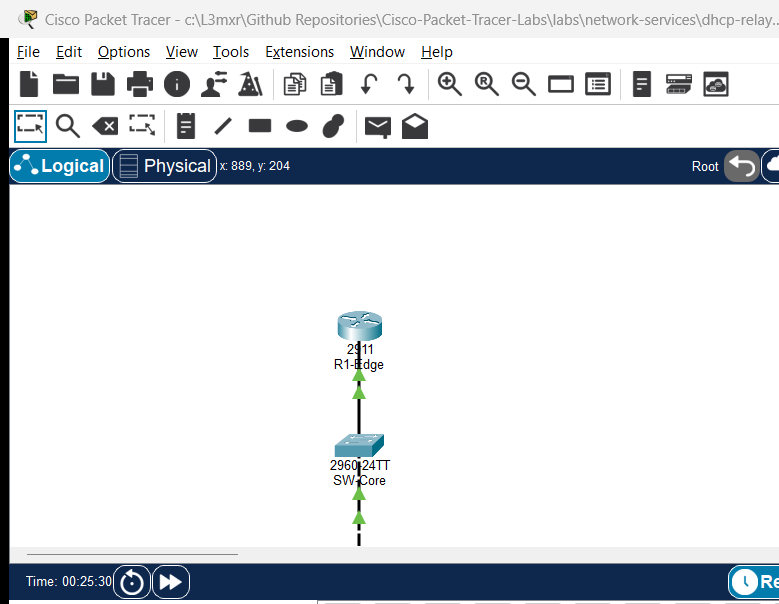
                           [ R1-Edge ]
                       (Cisco 2911 Router)
                         Gi0/0 (802.1Q Trunk)
                                 |
                                 | Trunk (VLANs 10, 99)
                                 |
                         Gi0/1 (802.1Q Trunk)
                           [ SW-Core ]
                      (Catalyst 2960-24TT)
                      SVI VLAN 99: 192.168.99.2
                                 |
                         Gi0/2 (802.1Q Trunk)
                                 |
                         Gi0/1 (802.1Q Trunk)
                          [ SW-Access ]
                      (Catalyst 2960-24TT)
                      SVI VLAN 99: 192.168.99.3
                        /              \
                Fa0/10 /                \ Fa0/24
         (Access VLAN 10)            (Access VLAN 99)
                     /                    \
              [ User-PC ]            [ Admin-PC ]
            Standard Client        Authorized Admin
            192.168.10.10/24       192.168.99.10/24
Addressing Table#
| Device Name | Interface | IP Address | Subnet Mask | Default Gateway | Function / Connected To |
|---|---|---|---|---|---|
| R1-Edge | Gi0/0 | Unnumbered | Unnumbered | N/A | Trunk to SW-Core Gi0/1 |
| R1-Edge | Gi0/0.10 | 192.168.10.1 | 255.255.255.0 | N/A | Gateway for User Data Subnet (VLAN 10) |
| R1-Edge | Gi0/0.99 | 192.168.99.1 | 255.255.255.0 | N/A | Gateway for Management Subnet (VLAN 99) |
| SW-Core | Gi0/1 | Trunk | N/A | N/A | Trunk to R1-Edge Gi0/0 |
| SW-Core | Gi0/2 | Trunk | N/A | N/A | Trunk to SW-Access Gi0/1 |
| SW-Core | VLAN 99 | 192.168.99.2 | 255.255.255.0 | 192.168.99.1 | Core Switch Management SVI |
| SW-Access | Gi0/1 | Trunk | N/A | N/A | Trunk to SW-Core Gi0/2 |
| SW-Access | Fa0/10 | Access (VLAN 10) | N/A | N/A | Access Port for User-PC |
| SW-Access | Fa0/24 | Access (VLAN 99) | N/A | N/A | Access Port for Admin-PC |
| SW-Access | VLAN 99 | 192.168.99.3 | 255.255.255.0 | 192.168.99.1 | Access Switch Management SVI |
| User-PC | FastEthernet0 | 192.168.10.10 | 255.255.255.0 | 192.168.10.1 | Standard User Workstation |
| Admin-PC | FastEthernet0 | 192.168.99.10 | 255.255.255.0 | 192.168.99.1 | Authorized Administrator Station |
Lab Tasks#
- Analyze Baseline Vulnerabilities: Investigate the initial topology to verify default VLAN 1 management exposure, enabled Telnet services, and unrestricted inter-VLAN reachability from user hosts.
- Implement Dedicated Management VLAN: Create VLAN 99 across
SW-CoreandSW-Access, assign management SVIs, configure the default gateway, and placeAdmin-PCinto VLAN 99. - Hardening Device Cryptography and Transport: Configure RSA keys (1024 bits), set domain names, configure local administrative credentials (
admin/Cisco12345!), enableip ssh version 2, and enforcetransport input sshon all VTY lines. - Deploy VTY Access-Class Filtering: Construct standard ACL 99 on each network infrastructure device permitting only
Admin-PC(192.168.99.10) to initiate management sessions. - Apply Router Data-Plane Filter: Apply extended ACL
USER_FILTERonR1-EdgesubinterfaceGigabitEthernet0/0.10blocking all user traffic destined for192.168.99.0/24. - Verify Security Enforcement: Confirm that
Admin-PCestablishes SSH sessions to all devices whileUser-PCcannot ping or reach management interfaces, and verify Telnet connections are rejected.
Configuration Walkthrough#
Task 1: Migrate Switch Management to Dedicated VLAN 99#
On SW-Core:
SW-Core# configure terminal
SW-Core(config)# vlan 10
SW-Core(config-vlan)# name User_Data
SW-Core(config-vlan)# vlan 99
SW-Core(config-vlan)# name Management
SW-Core(config-vlan)# exit
SW-Core(config)# interface vlan 1
SW-Core(config-if)# no ip address
SW-Core(config-if)# shutdown
SW-Core(config-if)# exit
SW-Core(config)# interface vlan 99
SW-Core(config-if)# ip address 192.168.99.2 255.255.255.0
SW-Core(config-if)# no shutdown
SW-Core(config-if)# exit
SW-Core(config)# ip default-gateway 192.168.99.1
On SW-Access:
SW-Access# configure terminal
SW-Access(config)# vlan 10
SW-Access(config-vlan)# name User_Data
SW-Access(config-vlan)# vlan 99
SW-Access(config-vlan)# name Management
SW-Access(config-vlan)# exit
SW-Access(config)# interface vlan 1
SW-Access(config-if)# no ip address
SW-Access(config-if)# shutdown
SW-Access(config-if)# exit
SW-Access(config)# interface vlan 99
SW-Access(config-if)# ip address 192.168.99.3 255.255.255.0
SW-Access(config-if)# no shutdown
SW-Access(config-if)# exit
SW-Access(config)# ip default-gateway 192.168.99.1
SW-Access(config)# interface FastEthernet0/24
SW-Access(config-if)# switchport mode access
SW-Access(config-if)# switchport access vlan 99
SW-Access(config-if)# spanning-tree portfast
Task 2: Configure SSHv2 and Cryptographic Hardening#
On R1-Edge, SW-Core, and SW-Access:
hostname <Device-Name>
ip domain-name enterprise.local
crypto key generate rsa modulus 1024
ip ssh version 2
username admin secret Cisco12345!
enable secret Class12345!

access-list 99 remark Permit Only Authorized Admin Station
access-list 99 permit host 192.168.99.10
access-list 99 deny any

line vty 0 4
 login local
 transport input ssh
 access-class 99 in
Task 3: Enforce Perimeter Filtering on Router#
On R1-Edge:
R1-Edge# configure terminal
R1-Edge(config)# ip access-list extended USER_FILTER
R1-Edge(config-ext-nacl)# remark Deny User Subnet from Accessing Management Plane
R1-Edge(config-ext-nacl)# deny ip 192.168.10.0 0.0.0.255 192.168.99.0 0.0.0.255
R1-Edge(config-ext-nacl)# remark Permit All Other User Traffic
R1-Edge(config-ext-nacl)# permit ip 192.168.10.0 0.0.0.255 any
R1-Edge(config-ext-nacl)# exit
R1-Edge(config)# interface GigabitEthernet0/0.10
R1-Edge(config-subif)# ip access-group USER_FILTER in
R1-Edge(config-subif)# end
R1-Edge# copy running-config startup-config
Verification#
1. Management Subnet Reachability#
From Admin-PC, verify full management plane reachability:
ping 192.168.99.1
ping 192.168.99.2
ping 192.168.99.3
All ping commands should complete with 0% packet loss.
2. Cryptographic SSH Access#
From Admin-PC, connect to router and switches using SSH:
ssh -l admin 192.168.99.1
ssh -l admin 192.168.99.2
ssh -l admin 192.168.99.3
Enter password Cisco12345! when prompted. Each connection must establish successfully.
3. User Subnet Isolation Verification#
From User-PC, verify gateway reachability on the data plane:
ping 192.168.10.1
Result: 0% packet loss.
From User-PC, attempt to probe or reach the management subnet:
ping 192.168.99.1
ping 192.168.99.2
ping 192.168.99.3
Result: Request timed out (100% loss) due to USER_FILTER on R1-Edge.
4. Telnet Rejection#
From Admin-PC, attempt to connect using plaintext Telnet:
telnet 192.168.99.1
telnet 192.168.99.2
Result: Connection refused / closed immediately because transport input ssh disables port 23.
Troubleshooting#
| Symptom | Probable Cause | Diagnostic Command | Remediation |
|---|---|---|---|
Admin-PC cannot ping switch management IP |
Switch missing default gateway or VLAN 99 not active | show ip default-gateway and show vlan brief on switch |
Configure ip default-gateway 192.168.99.1 and verify VLAN 99 in database |
SSH connection fails: Connection refused |
RSA keys not generated or transport input ssh missing |
show ip ssh and show run | section line vty |
Generate 1024-bit RSA key and set transport input ssh |
Admin-PC SSH connection immediately closes |
access-class 99 in blocks Admin-PC IP |
show access-lists 99 |
Verify Admin-PC IP (192.168.99.10) is permitted in ACL 99 |
User-PC can still ping management IPs |
USER_FILTER not bound to subinterface |
show ip interface Gi0/0.10 | include access list |
Apply ip access-group USER_FILTER in under Gi0/0.10 |
Key Takeaways#
- Out-of-band or segregated management networks are essential to prevent data plane users from eavesdropping, attacking, or exhausting management interfaces.
- Management SVIs should never reside on default VLAN 1; a dedicated non-default VLAN (such as VLAN 99) should be provisioned across all switches.
- Cryptographic protocols (SSHv2) with strong RSA keys (at least 1024 bits) must replace legacy plaintext protocols (Telnet).
- Dual-layer protection—VTY access-class filtering on devices and edge ACLs at router subinterfaces—provides defense-in-depth against unauthorized access attempts.
References#
- NIST SP 800-123: Guide to General Server Security
- Cisco Guide to Harden Cisco IOS Devices: Management Plane Hardening
Files and Validation Status#
- Starter Packet Tracer File:
assets/starter.pkt - Completed Reference Solution:
assets/completed.pkt - Topology Diagram:
assets/topology.png - Device Configurations:
- Edge Gateway Router:
configs/R1-Edge.txt - Core Management Switch:
configs/SW-Core.txt - Access Switch:
configs/SW-Access.txt
- Edge Gateway Router:
- Simulator Evidence:
AI_AGENT_GUIDE/state/PTL-0053-SIMULATOR-RESULTS.md