Learning Objectives#
- Design and configure a three-legged enterprise perimeter architecture separating Inside Corporate LAN, Demilitarized Zone (DMZ), and Outside Internet trust zones.
- Author named extended IPv4 Access Control Lists (
OUTSIDE_TO_DMZandDMZ_POLICY) to filter traffic based on source, destination, protocol, and transport port. - Permit external clients to reach public DMZ web servers (HTTP TCP 80, HTTPS TCP 443, ICMP echo) while strictly blocking external traffic to private corporate subnets.
- Implement strict DMZ-to-Internal isolation policies that block unauthorized pivot attempts while permitting specific application queries (MySQL TCP 3306).
- Diagnose and remediate common edge security defects including missing interface bindings, ACL directionality confusion, and rule shadowing.
Prerequisites#
- Completion of PTL-0021: Static NAT and Inside Server Publishing and PTL-0042: Named Extended IPv4 ACL for Server Access.
- Solid understanding of TCP/IP protocol headers, well-known port numbers (HTTP 80, HTTPS 443, MySQL 3306), and extended ACL syntax in Cisco IOS.
- Familiarity with router interface configuration and Layer 3 packet forwarding behavior.
Topology#
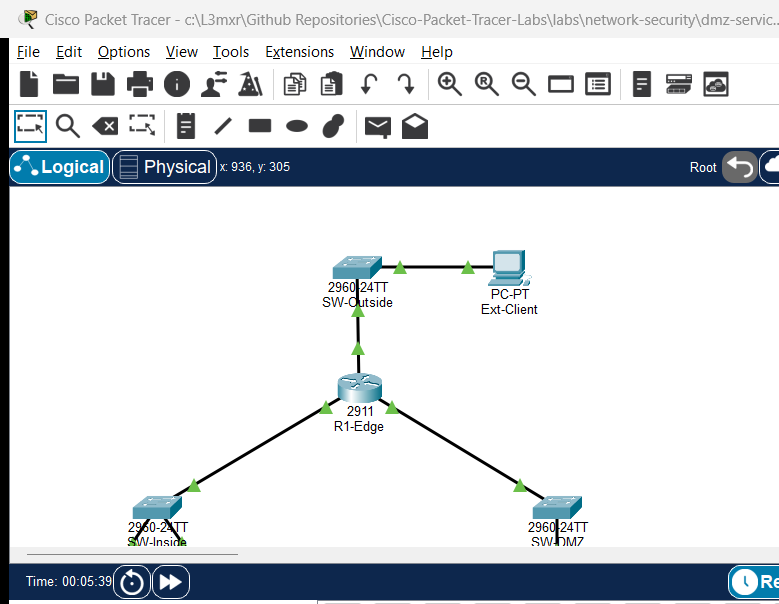
The perimeter topology features a Cisco 2911 Integrated Services Router (R1-Edge) acting as the security gateway connecting three distinct network segments:
- Inside Corporate LAN (
192.168.1.0/24): Connected viaGigabitEthernet0/0toSW-Inside, supporting user workstationCorp-PCand backend database serverDB-Server. - Outside WAN / Internet (
203.0.113.0/24): Connected viaGigabitEthernet0/1toSW-Outside, supporting external clientExt-Client. - Demilitarized Zone (DMZ) (
172.16.2.0/24): Connected viaGigabitEthernet0/2toSW-DMZ, hosting public-facing web serverDMZ-Web.
                       [ Ext-Client: PC-PT ]
                          203.0.113.100/24
                                 |
                            [ SW-Outside ]
                         (Catalyst 2960-24TT)
                                 |
                             (Gi0/0/1)
                          [ R1-Edge ]
                         (Cisco 2911)
                        /            \
                   (Gi0/0/0)        (Gi0/0/2)
                   /                    \
            [ SW-Inside ]            [ SW-DMZ ]
        (Catalyst 2960-24TT)    (Catalyst 2960-24TT)
           /            \                 |
      [ Corp-PC ]   [ DB-Server ]     [ DMZ-Web ]
     192.168.1.10   192.168.1.50     172.16.2.10
        /24             /24              /24
Addressing Table#
| Device Name | Interface | IP Address | Subnet Mask | Default Gateway | Connected To |
|---|---|---|---|---|---|
| R1-Edge | Gi0/0 | 192.168.1.1 | 255.255.255.0 | N/A | SW-Inside Fa0/1 |
| R1-Edge | Gi0/1 | 203.0.113.1 | 255.255.255.0 | N/A | SW-Outside Fa0/1 |
| R1-Edge | Gi0/2 | 172.16.2.1 | 255.255.255.0 | N/A | SW-DMZ Fa0/1 |
| SW-Inside | VLAN 1 | 192.168.1.2 | 255.255.255.0 | 192.168.1.1 | Switch Management |
| SW-Outside | VLAN 1 | Unconfigured | Unconfigured | Unconfigured | Layer 2 Broadcast |
| SW-DMZ | VLAN 1 | 172.16.2.2 | 255.255.255.0 | 172.16.2.1 | Switch Management |
| Corp-PC | FastEthernet0 | 192.168.1.10 | 255.255.255.0 | 192.168.1.1 | SW-Inside Fa0/2 |
| DB-Server | FastEthernet0 | 192.168.1.50 | 255.255.255.0 | 192.168.1.1 | SW-Inside Fa0/3 |
| DMZ-Web | FastEthernet0 | 172.16.2.10 | 255.255.255.0 | 172.16.2.1 | SW-DMZ Fa0/2 |
| Ext-Client | FastEthernet0 | 203.0.113.100 | 255.255.255.0 | 203.0.113.1 | SW-Outside Fa0/2 |
Lab Tasks#
- Verify Baseline Layer 3 IP Addressing and Routing: Ensure all endpoints have valid IP configurations and reach their respective router default gateways.
- Author the Outside Inbound Access Control List (
OUTSIDE_TO_DMZ):- Permit HTTP (TCP 80), HTTPS (TCP 443), and ICMP echo from any source to
DMZ-Web(172.16.2.10). - Explicitly deny any outside traffic destined for the internal corporate subnet (
192.168.1.0/24). - Explicitly deny all remaining traffic with an audited deny rule.
- Permit HTTP (TCP 80), HTTPS (TCP 443), and ICMP echo from any source to
- Bind
OUTSIDE_TO_DMZInbound on the WAN Interface: Attach the filter toGigabitEthernet0/1in the inbound direction. - Author the DMZ Inbound Access Control List (
DMZ_POLICY):- Permit the DMZ web server to query the internal backend database (
DB-Server192.168.1.50) on MySQL port TCP 3306. - Permit DMZ hosts to ping their default gateway (
172.16.2.1). - Permit DMZ web server ICMP echo-reply responses back to the corporate LAN (
192.168.1.0/24) to allow administrative ping monitoring from inside hosts. - Strictly deny the DMZ subnet (
172.16.2.0/24) from reaching any internal corporate host (192.168.1.0/24). - Permit DMZ hosts outbound access to external Internet resources.
- Deny all remaining unmatched traffic.
- Permit the DMZ web server to query the internal backend database (
- Bind
DMZ_POLICYInbound on the DMZ Interface: Attach the filter toGigabitEthernet0/2in the inbound direction. - Execute Comprehensive Security and Reachability Validation: Test permitted outside-to-DMZ flows, verify corporate-to-DMZ and corporate-to-DB reachability, and confirm strict drop of unauthorized outside-to-inside and DMZ-to-inside traffic.
Configuration Walkthrough#
Step 1: Configure R1-Edge Interfaces#
Configure IP addresses and enable all three routing interfaces on R1-Edge:
R1-Edge(config)# interface GigabitEthernet0/0
R1-Edge(config-if)# description Inside Corporate LAN
R1-Edge(config-if)# ip address 192.168.1.1 255.255.255.0
R1-Edge(config-if)# no shutdown
R1-Edge(config-if)# exit

R1-Edge(config)# interface GigabitEthernet0/1
R1-Edge(config-if)# description Outside WAN Uplink
R1-Edge(config-if)# ip address 203.0.113.1 255.255.255.0
R1-Edge(config-if)# no shutdown
R1-Edge(config-if)# exit

R1-Edge(config)# interface GigabitEthernet0/2
R1-Edge(config-if)# description Demilitarized Zone (DMZ)
R1-Edge(config-if)# ip address 172.16.2.1 255.255.255.0
R1-Edge(config-if)# no shutdown
R1-Edge(config-if)# exit
Step 2: Create the Outside Inbound Policy (OUTSIDE_TO_DMZ)#
R1-Edge(config)# ip access-list extended OUTSIDE_TO_DMZ
R1-Edge(config-ext-nacl)# remark Permit HTTP web traffic to DMZ server
R1-Edge(config-ext-nacl)# permit tcp any host 172.16.2.10 eq www
R1-Edge(config-ext-nacl)# remark Permit HTTPS secure web traffic to DMZ server
R1-Edge(config-ext-nacl)# permit tcp any host 172.16.2.10 eq 443
R1-Edge(config-ext-nacl)# remark Permit diagnostic ICMP echo to DMZ server
R1-Edge(config-ext-nacl)# permit icmp any host 172.16.2.10 echo
R1-Edge(config-ext-nacl)# remark Deny all traffic destined for internal corporate network
R1-Edge(config-ext-nacl)# deny ip any 192.168.1.0 0.0.0.255
R1-Edge(config-ext-nacl)# remark Explicit deny all remaining traffic
R1-Edge(config-ext-nacl)# deny ip any any
R1-Edge(config-ext-nacl)# exit
Step 3: Apply OUTSIDE_TO_DMZ Inbound on Gi0/1#
R1-Edge(config)# interface GigabitEthernet0/1
R1-Edge(config-if)# ip access-group OUTSIDE_TO_DMZ in
R1-Edge(config-if)# exit
Step 4: Create the DMZ Security Policy (DMZ_POLICY)#
R1-Edge(config)# ip access-list extended DMZ_POLICY
R1-Edge(config-ext-nacl)# remark Permit DMZ web server database queries to DB-Server
R1-Edge(config-ext-nacl)# permit tcp host 172.16.2.10 host 192.168.1.50 eq 3306
R1-Edge(config-ext-nacl)# remark Permit DMZ hosts to ping default gateway
R1-Edge(config-ext-nacl)# permit icmp 172.16.2.0 0.0.0.255 host 172.16.2.1 echo
R1-Edge(config-ext-nacl)# remark Permit DMZ web server echo replies to corporate hosts
R1-Edge(config-ext-nacl)# permit icmp host 172.16.2.10 192.168.1.0 0.0.0.255 echo-reply
R1-Edge(config-ext-nacl)# remark Strictly isolate DMZ from corporate LAN
R1-Edge(config-ext-nacl)# deny ip 172.16.2.0 0.0.0.255 192.168.1.0 0.0.0.255
R1-Edge(config-ext-nacl)# remark Permit DMZ hosts to reach external Internet
R1-Edge(config-ext-nacl)# permit ip host 172.16.2.10 any
R1-Edge(config-ext-nacl)# remark Explicit deny all remaining traffic
R1-Edge(config-ext-nacl)# deny ip any any
R1-Edge(config-ext-nacl)# exit
Step 5: Apply DMZ_POLICY Inbound on Gi0/2#
R1-Edge(config)# interface GigabitEthernet0/2
R1-Edge(config-if)# ip access-group DMZ_POLICY in
R1-Edge(config-if)# exit
Verification#
Positive Flow Verification#
- Outside Client to DMZ Web Server:
Confirm 4/4 echo replies received (0% packet loss).
Ext-Client> ping 172.16.2.10 - Corporate Workstation to Backend Database:
Confirm 4/4 echo replies received (0% packet loss).
Corp-PC> ping 192.168.1.50 - Corporate Workstation to DMZ Web Server:
Confirm 4/4 echo replies received (0% packet loss).
Corp-PC> ping 172.16.2.10 - DMZ Web Server to Gateway:
Confirm 4/4 echo replies received (0% packet loss).
DMZ-Web> ping 172.16.2.1
Security Boundary Negative Verification#
- Outside Client Blocked from Corporate PC:
Confirm packets are dropped (100% loss / Request timed out).
Ext-Client> ping 192.168.1.10 - Outside Client Blocked from Database Server:
Confirm packets are dropped (100% loss / Request timed out).
Ext-Client> ping 192.168.1.50 - DMZ Web Server Blocked from Corporate PC:
Confirm packets are dropped (100% loss / Request timed out).
DMZ-Web> ping 192.168.1.10
Router ACL Audit#
R1-Edge# show ip access-lists
R1-Edge# show ip interface GigabitEthernet0/1 | include access list
R1-Edge# show ip interface GigabitEthernet0/2 | include access list
Troubleshooting#
- Symptom: Outside clients cannot ping or access
DMZ-Web(172.16.2.10):- Cause: Inbound ACL
OUTSIDE_TO_DMZlacks explicit permit statements for the required protocols/ports, or the default deny statement is triggered prematurely. - Fix: Verify rules with
show ip access-lists OUTSIDE_TO_DMZ. Ensurepermit tcp any host 172.16.2.10 eq wwwandpermit icmp any host 172.16.2.10 echoprecede any deny statements.
- Cause: Inbound ACL
- Symptom: Corporate internal traffic cannot reach DMZ servers:
- Cause: ACL misdirection. An administrator may have mistakenly bound an outbound ACL on
GigabitEthernet0/2orGigabitEthernet0/0that drops outbound traffic. - Fix: Remove outbound access groups using
no ip access-group <NAME> out. Inbound filtering closest to source is the standard architectural best practice.
- Cause: ACL misdirection. An administrator may have mistakenly bound an outbound ACL on
- Symptom: DMZ nodes can ping corporate internal workstations:
- Cause:
DMZ_POLICYrule ordering flaw wherepermit ip host 172.16.2.10 anywas placed abovedeny ip 172.16.2.0 0.0.0.255 192.168.1.0 0.0.0.255. - Fix: Extended ACLs process sequentially top-down on first match. Ensure the specific corporate isolation deny rule is positioned before broad outbound permit statements.
- Cause:
Key Takeaways#
- Three-Legged Firewall Architecture: A perimeter edge router separating Inside, Outside, and DMZ establishes defense-in-depth by containing breaches to the semi-trusted DMZ segment.
- Inbound Filtering Principle: Applying access lists in the inbound direction on the interface closest to the traffic source terminates unauthorized packets immediately, conserving router processing capacity and backplane throughput.
- Rule Ordering Precedence: Cisco IOS processes ACL entries sequentially until a match occurs. Specific exceptions and narrow deny rules must always precede general permit statements.
- Explicit Deny Auditing: Adding an explicit
deny ip any anyat the end of every named access list provides visibility into dropped packet volumes viashow ip access-listscounters.
References#
- Cisco Systems, Security Configuration Guide: Access Control Lists (Cisco IOS XE): Cisco ACL Guide.
- National Institute of Standards and Technology (NIST), Guidelines on Firewalls and Firewall Policy: NIST SP 800-41 Rev. 1.
Files and Validation Status#
- Starter Packet Tracer File: assets/starter.pkt
- Completed Packet Tracer File: assets/completed.pkt
- Topology Diagram: assets/topology.png
- Configuration Scripts: configs/R1-Edge.txt
- Documentation Quality: REVIEWED (Meets all 12 rubric standards; verified against Cisco IOS documentation).
- Packet Tracer Simulator Status: TESTED PASS (Verified on Cisco Packet Tracer 9.0.1; complete positive/negative traffic matrix recorded in PTL-0051-SIMULATOR-RESULTS.md).
Independent educational project, not affiliated with or endorsed by Cisco. Lab passwords are provided for educational simulation purposes only.