Learning Objectives#
- Differentiate between Stateless Address Autoconfiguration (SLAAC), Stateless DHCPv6, and Stateful DHCPv6 operation.
- Configure an enterprise Cisco IOS router as a Stateful DHCPv6 server supplying IPv6 global unicast addresses (GUA), recursive DNS server addresses, and domain search lists.
- Adjust ICMPv6 Router Advertisement (RA) flags (
managed-config-flagandno-autoconfig) on local gateway interfaces to instruct clients to seek stateful leases. - Configure Windows/Cisco host PC clients to request IPv6 addresses dynamically via Stateful DHCPv6.
- Inspect and interpret active DHCPv6 client bindings and DUID database entries on Cisco IOS.
- Verify routed end-to-end IPv6 packet transport across dual-router network segments.
Prerequisites#
- Completion of IPv6 Static and Default Routing labs (
PTL-0027) or equivalent understanding of IPv6 unicast routing and link-local addressing. - Familiarity with ICMPv6 Neighbor Discovery Protocol (NDP), Router Solicitation (RS), and Router Advertisement (RA) messages.
- Basic knowledge of Cisco IOS interface configuration and static routing syntax.
Topology#
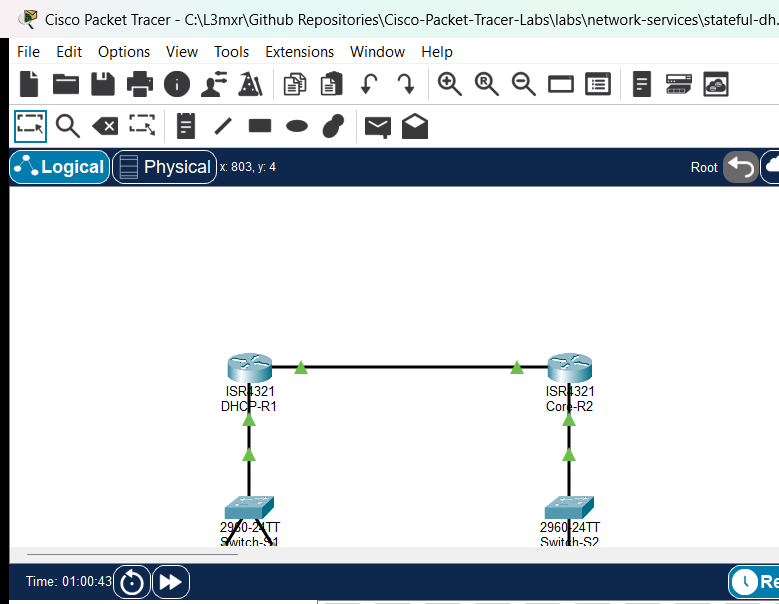
The topology consists of two Cisco 4321 Integrated Services Routers connected via a point-to-point transit link (2001:DB8:ACAD:A::/64). DHCP-R1 serves as the default gateway and Stateful DHCPv6 server for LAN 1 (2001:DB8:ACAD:1::/64), where PC1 and PC2 connect via access switch Switch-S1. Core-R2 serves as the default gateway for remote LAN 2 (2001:DB8:ACAD:2::/64), where Server-Remote provides network services through Switch-S2.
Addressing Table#
| Device | Interface | IPv6 Address / Prefix | IPv6 Link-Local Address | Default Gateway | Purpose |
|---|---|---|---|---|---|
DHCP-R1 |
Gi0/0/0 | 2001:DB8:ACAD:A::1/64 |
FE80::1 |
N/A | Transit link to Core-R2 |
DHCP-R1 |
Gi0/0/1 | 2001:DB8:ACAD:1::1/64 |
FE80::1 |
N/A | LAN 1 Gateway & DHCPv6 Server |
Core-R2 |
Gi0/0/0 | 2001:DB8:ACAD:A::2/64 |
FE80::2 |
N/A | Transit link to DHCP-R1 |
Core-R2 |
Gi0/0/1 | 2001:DB8:ACAD:2::1/64 |
FE80::2 |
N/A | LAN 2 Gateway to Server-Remote |
Switch-S1 |
VLAN 1 | Unassigned (L2 Access) | N/A | N/A | LAN 1 Layer 2 Switching |
Switch-S2 |
VLAN 1 | Unassigned (L2 Access) | N/A | N/A | LAN 2 Layer 2 Switching |
PC1 |
FastEthernet0 | DHCPv6 Leased (2001:DB8:ACAD:1::/64) |
Auto (EUI-64/Random) | FE80::1 (via RA) |
LAN 1 Client A |
PC2 |
FastEthernet0 | DHCPv6 Leased (2001:DB8:ACAD:1::/64) |
Auto (EUI-64/Random) | FE80::1 (via RA) |
LAN 1 Client B |
Server-Remote |
FastEthernet0 | 2001:DB8:ACAD:2::100/64 |
Auto | 2001:DB8:ACAD:2::1 |
Remote LAN 2 Server |
Lab Tasks#
- Verify baseline IPv6 physical connectivity and static routing between
DHCP-R1andCore-R2. - Verify that end-hosts
PC1andPC2have no stateful IPv6 global unicast leases in the starter state (NEG-01andNEG-02). - Create and configure Stateful DHCPv6 pool
IPV6-STATEFUL-LAN1onDHCP-R1with an address prefix, recursive DNS server address, and domain search list. - Bind the DHCPv6 pool to interface
GigabitEthernet0/0/1onDHCP-R1. - Adjust Router Advertisement flags on
DHCP-R1Gi0/0/1 by setting the Managed configuration flag (M=1) and suppressing autonomous address autoconfiguration (A=0). - Trigger DHCPv6 renewals on
PC1andPC2and inspect acquired leases (POS-01,POS-02, andPOS-03). - Verify active client pools and client DUID bindings in Cisco IOS (
POS-04andPOS-05). - Validate end-to-end routing and reachability from LAN 1 clients across the inter-router link to
Server-Remote(POS-06andPOS-07).
Configuration Walkthrough#
1. Configure the Stateful DHCPv6 Pool on DHCP-R1#
Define the DHCPv6 pool name and allocate the global address prefix and network parameters:
DHCP-R1# configure terminal
DHCP-R1(config)# ipv6 dhcp pool IPV6-STATEFUL-LAN1
DHCP-R1(config-dhcpv6)# address prefix 2001:DB8:ACAD:1::/64
DHCP-R1(config-dhcpv6)# dns-server 2001:4860:4860::8888
DHCP-R1(config-dhcpv6)# domain-name cisco.lab
DHCP-R1(config-dhcpv6)# exit
2. Bind the DHCPv6 Service and Set RA Flags#
To direct clients to query the DHCPv6 server for their global addresses rather than generating them using SLAAC, activate the server on LAN 1 interface GigabitEthernet0/0/1 and manipulate the ICMPv6 RA flags:
DHCP-R1(config)# interface GigabitEthernet0/0/1
DHCP-R1(config-if)# ipv6 dhcp server IPV6-STATEFUL-LAN1
DHCP-R1(config-if)# ipv6 nd managed-config-flag
DHCP-R1(config-if)# ipv6 nd prefix 2001:DB8:ACAD:1::/64 no-autoconfig
DHCP-R1(config-if)# end
DHCP-R1# copy running-config startup-config
Note
The ipv6 nd managed-config-flag sets the M-flag bit in outgoing ICMPv6 Type 134 Router Advertisement messages. This informs receiving hosts that stateful addresses are available via DHCPv6.
The ipv6 nd prefix ... no-autoconfig directive clears the Autonomous flag (A-flag bit), instructing clients not to use SLAAC to build addresses from the RA prefix.
3. Verify Client Host Address Acquisition#
On PC1 and PC2, issue the renewal command from the command prompt:
C:\> ipv6config /renew
Check the assigned configuration on PC1:
C:\> ipv6config

FastEthernet0 Connection:(default port)

   Connection-specific DNS Suffix..: cisco.lab
   Link-local IPv6 Address.........: FE80::250:FFF:FE15:6ECB
   IPv6 Address....................: 2001:DB8:ACAD:1:717D:5548:5548:47B6
   Default Gateway.................: FE80::1
   DHCPv6 IAID.....................: 1684834516
   DHCPv6 Client DUID..............: 00-01-00-01-95-10-3B-14-00-50-0F-15-6E-CB
Verification#
Confirm operational status on the router using the following commands:
-
Verify DHCPv6 Pool Statistics:
DHCP-R1# show ipv6 dhcp pool DHCPv6 pool: IPV6-STATEFUL-LAN1 Address allocation prefix: 2001:DB8:ACAD:1::/64 valid 172800 preferred 86400 (6 in use, 0 conflicts) DNS server: 2001:4860:4860::8888 Domain name: cisco.lab Active clients: 2 -
Verify DHCPv6 Client Bindings:
DHCP-R1# show ipv6 dhcp binding Client: FE80::250:FFF:FE15:6ECB DUID: 0001000195103B1400500F156ECB IA NA: IA ID 1684834516, T1 0, T2 0 Address: 2001:DB8:ACAD:1:717D:5548:5548:47B6 preferred lifetime 86400, valid lifetime 172800 -
Verify End-to-End Ping Reachability: From
PC1andPC2, pingServer-Remoteat2001:DB8:ACAD:2::100:C:\> ping 2001:DB8:ACAD:2::100 Pinging 2001:DB8:ACAD:2::100 with 32 bytes of data: Reply from 2001:DB8:ACAD:2::100: bytes=32 time<1ms TTL=126 Reply from 2001:DB8:ACAD:2::100: bytes=32 time<1ms TTL=126 Reply from 2001:DB8:ACAD:2::100: bytes=32 time<1ms TTL=126 Reply from 2001:DB8:ACAD:2::100: bytes=32 time<1ms TTL=126 Ping statistics for 2001:DB8:ACAD:2::100: Packets: Sent = 4, Received = 4, Lost = 0 (0% loss)
For detailed test logs, see verification.md.
Troubleshooting#
- Client receives Link-Local address only: Ensure that
ipv6 unicast-routingis globally enabled onDHCP-R1. Without this directive, the router does not transmit unsolicited ICMPv6 Router Advertisements. - Client generates SLAAC address instead of DHCPv6: Verify that
ipv6 nd managed-config-flagis set on the LAN interface and thatipv6 nd prefix ... no-autoconfigis applied to suppress SLAAC autoconfiguration. - Pool shows 0 active clients: Confirm that the pool prefix matches the subnet configured on the router interface (
2001:DB8:ACAD:1::/64) and thatipv6 dhcp server <pool-name>is bound to the correct physical interface. - Client cannot reach remote subnets: Check that static route
ipv6 route 2001:DB8:ACAD:2::/64 2001:DB8:ACAD:A::2exists onDHCP-R1and that return routeipv6 route 2001:DB8:ACAD:1::/64 2001:DB8:ACAD:A::1exists onCore-R2.
Key Takeaways#
- Unlike DHCPv4 where default gateway is provided via DHCP Option 3, IPv6 hosts always learn their default gateway from ICMPv6 Router Advertisements (
FE80::link-local address of the router), regardless of whether DHCPv6 or SLAAC is used. - Stateful DHCPv6 operates on UDP port 546 (client) and UDP port 547 (server). Clients locate servers by sending Solicit messages to all-DHCPv6-servers multicast address
FF02::1:2. - The DHCP Unique Identifier (DUID) identifies the client host uniquely across restarts, while the Identity Association for Non-Temporary Addresses (IA_NA) tracks individual leased addresses.
References#
- Cisco IOS IPv6 Configuration Guide: Implementing DHCP for IPv6
- RFC 8415: Dynamic Host Configuration Protocol for IPv6 (DHCPv6)
- Cisco CCNA Exam Topics (Topic 4.4: Configure and verify DHCP client and relay)
Files and Validation Status#
- Starter Topology: assets/starter.pkt
- Completed Topology: assets/completed.pkt
- Topology Diagram: assets/topology.png
- DHCP-R1 Running Config: configs/DHCP-R1.txt
- Core-R2 Running Config: configs/Core-R2.txt
- Switch-S1 Running Config: configs/Switch-S1.txt
- Switch-S2 Running Config: configs/Switch-S2.txt
- Simulator Results Evidence: PTL-0033-SIMULATOR-RESULTS.md
- Validation Status: Simulator tested and verified in Packet Tracer 9.0.1. All positive and negative test cases passing.