Category: network-security · Difficulty: intermediate · Lab ID: PTL-0040 · Document: reviewed · Simulator: tested pass
Layer 2 switchport security is an essential perimeter defense mechanism implemented across enterprise access switches to restrict unauthorized network access. By monitoring incoming Ethernet frame source MAC addresses on individual switch interfaces, Cisco Catalyst switches can limit the number of devices allowed on a port, dynamically learn authorized MAC addresses (sticky), and execute enforcement actions when unauthorized hardware attempts to communicate.
However, in dynamic corporate environments, port security frequently causes administrative friction when operational changes occur:
- Workstation Hardware Replacements: When an employee's computer is replaced or their network interface card (NIC) fails, the new hardware brings a new burned-in MAC address. If the switchport was configured with sticky MAC learning and a maximum limit of 1, the port will flag the new legitimate computer as an unauthorized rogue device and shut down the interface.
- Error-Disabled Port Latches: When a security violation occurs under the default
shutdownmode, Cisco IOS places the switchport into theerr-disabled(Secure-shutdown) state. Simply unplugging the offending device does not restore network connectivity; the port remains latched inerr-disableduntil an administrator manually intervenes or an automated recovery mechanism clears the latch. - Suboptimal Violation Modes: Administrators often misunderstand the behavioral differences between
protect,restrict, andshutdown. Usingprotectmode drops unauthorized packets silently without logging syslog messages or incrementing violation counters, creating a blind spot for network security operations.
In this laboratory, you will step into the role of a network security engineer tasked with resolving multiple port security incidents in an enterprise branch office. You will diagnose stale sticky MAC collisions, recover error-disabled switch interfaces using proper administrative procedures without weakening or disabling security controls, and align interface violation modes with enterprise security auditing requirements.
Learning Objectives#
- Diagnose Layer 2 switchport port security faults and error-disabled states using Cisco IOS
showcommands. - Analyze the root cause of sticky MAC collisions following workstation hardware upgrades and NIC replacements.
- Execute the standard Cisco IOS administrative recovery procedure (
shutdownfollowed byno shutdown) to restore error-disabled access ports without disabling security. - Compare the operational mechanics, logging behavior, and security implications of
protect,restrict, andshutdownviolation modes. - Verify end-to-end IP reachability for restored corporate workstations while maintaining active port security policies.
Prerequisites#
- Completion of PTL-0004: Implementing Switchport Port Security or equivalent knowledge of Cisco switchport port security fundamentals.
- Understanding of Ethernet frame headers, Layer 2 MAC address tables, and Cisco IOS interface configuration.
- Basic familiarity with Cisco Catalyst switch error-disabled states (
err-disable). - Cisco Packet Tracer 8.2 or newer (Packet Tracer 9.0+ verified).
Topology#
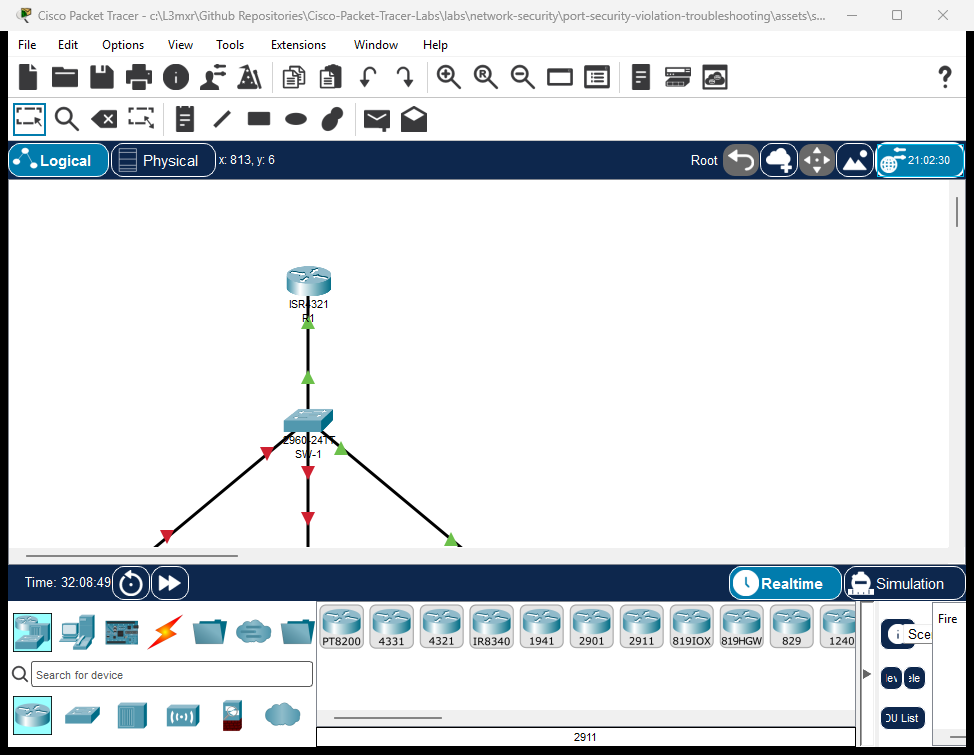
The topology represents a corporate department access switch connected to an upstream default gateway:
- Router
R1: Cisco ISR 4321 functioning as the corporate default gateway (192.168.10.1) and local DHCP server. - Switch
SW-1: Cisco Catalyst 2960-24TT access switch providing access ports in VLAN 10 (Corporate-Clients). PC-1(Accounting PC): Legitimate workstation onFastEthernet0/1experiencing anerr-disabledoutage due to a stale sticky MAC entry.PC-2(Engineering PC): Legitimate workstation onFastEthernet0/2locked inerr-disabledafter an unauthorized visitor laptop was disconnected.Rogue-Laptop(Test Port): Device connected toFastEthernet0/3configured in silent-drop (protect) mode requiring remediation torestrictmode.
               +--------------------------------------+
               |                  R1                  |
               |      (Corporate Default Gateway)     |
               |        Gi0/0/0: 192.168.10.1/24       |
               +------------------+-------------------+
                                  |
                                  | Copper Straight-Through
                                  | (Uplink to Access Switch)
                                  v
                       +----------------------+
                       |         SW-1         |
                       | Cisco Catalyst 2960  |
                       | (Port Security SW)   |
                       +---+------+-------+---+
                           |      |       |
            Fa0/1 (Err-Disable)   |       | Fa0/3 (Protect Mode)
            Copper Straight-Thru  |       | Copper Straight-Thru
                           |      |       |
                           v      |       v
               +---------------+  |  +--------------------+
               |     PC-1      |  |  |    Rogue-Laptop    |
               | Accounting PC |  |  |  (Test Station)    |
               +---------------+  |  +--------------------+
                                  v Fa0/2 (Err-Disable)
                                  | Copper Straight-Thru
                         +---------------+
                         |     PC-2      |
                         |Engineering PC |
                         +---------------+
Addressing Table#
| Device | Interface | IPv4 Address | Subnet Mask | Default Gateway | Switchport Description |
|---|---|---|---|---|---|
| R1 | GigabitEthernet0/0/0 |
192.168.10.1 |
255.255.255.0 |
N/A | Default Gateway Interface |
| SW-1 | VLAN 10 |
Unassigned | Unassigned | N/A | Access VLAN (Corporate-Clients) |
| SW-1 | GigabitEthernet0/1 |
N/A | N/A | N/A | Uplink to R1 (Security Disabled) |
| SW-1 | FastEthernet0/1 |
N/A | N/A | N/A | Accounting-PC-1 (Sticky MAC, Shutdown) |
| SW-1 | FastEthernet0/2 |
N/A | N/A | N/A | Engineering-PC-2 (Sticky MAC, Shutdown) |
| SW-1 | FastEthernet0/3 |
N/A | N/A | N/A | Test-Port (Sticky MAC, Restrict) |
| PC-1 | FastEthernet0 |
DHCP Dynamic (192.168.10.x) |
255.255.255.0 |
192.168.10.1 |
Accounting Workstation |
| PC-2 | FastEthernet0 |
DHCP Dynamic (192.168.10.x) |
255.255.255.0 |
192.168.10.1 |
Engineering Workstation |
| Rogue-Laptop | FastEthernet0 |
DHCP Dynamic (192.168.10.x) |
255.255.255.0 |
192.168.10.1 |
Test / Untrusted Laptop |
Lab Tasks#
- Investigate the Layer 2 Outages:
- Review switchport operational status on
SW-1usingshow interfaces status. - Identify interfaces latched in the
err-disabledstate. - Inspect port security parameters on
FastEthernet0/1,FastEthernet0/2, andFastEthernet0/3usingshow port-security interface.
- Review switchport operational status on
- Troubleshoot and Recover
FastEthernet0/1(Stale Sticky MAC Collision):- Identify the mismatched MAC address stored in
SW-1running configuration vs. the actual physical MAC ofPC-1. - Remove the stale sticky MAC entry from the interface.
- Administratively cycle the interface (
shutdown/no shutdown) to clear theerr-disabledlatch. - Verify
PC-1's legitimate MAC address is learned dynamically as sticky.
- Identify the mismatched MAC address stored in
- Troubleshoot and Recover
FastEthernet0/2(Uncleared Violation Latch):- Confirm that the legitimate workstation
PC-2is connected. - Clear the
err-disabledlatch using the administrative recovery sequence. - Verify the port transitions from
Secure-shutdowntoSecure-up.
- Confirm that the legitimate workstation
- Remediate
FastEthernet0/3(Violation Mode Alignment):- Identify the violation mode on
FastEthernet0/3(protect). - Reconfigure the violation mode to
restrictto ensure security auditing compliance and syslog generation without taking the interface down.
- Identify the violation mode on
- Verify Security Enforcement and Network Reachability:
- Confirm all three user access ports report status
connectedinshow interfaces status. - Verify that port security remains enabled on all access interfaces without being bypassed.
- Verify 100% ICMP reachability from
PC-1andPC-2to default gateway192.168.10.1.
- Confirm all three user access ports report status
Configuration Walkthrough#
Task 1: Investigate the Layer 2 Outages#
Examine the physical port status on SW-1:
SW-1# show interfaces status
Port      Name               Status       Vlan       Duplex  Speed Type
Fa0/1     Accounting-PC-1    err-disabled 10         auto    auto  10/100BaseTX
Fa0/2     Engineering-PC-2   err-disabled 10         auto    auto  10/100BaseTX
Fa0/3     Test-Port          connected    10         a-full  a-100 10/100BaseTX
Gig0/1    Uplink-to-R1       connected    10         a-full  a-100 10/100/1000BaseTX
Both FastEthernet0/1 and FastEthernet0/2 are in the err-disabled state. When an interface is error-disabled, the switch administratively disables the port's PHY and MAC layers, preventing any data transmission.
Inspect the port security details for FastEthernet0/1:
SW-1# show port-security interface FastEthernet0/1
Port Security              : Enabled
Port Status                : Secure-shutdown
Violation Mode             : Shutdown
Aging Time                 : 0 mins
Aging Type                 : Absolute
SecureStatic Address Aging : Disabled
Maximum MAC Addresses      : 1
Total MAC Addresses        : 1
Configured MAC Addresses   : 0
Sticky MAC Addresses       : 1
Last Source Address:Vlan   : 0002.1715.6B73:10
Security Violation Count   : 1
Diagnostic Analysis:
Port Status : Secure-shutdownindicates a security violation occurred.Security Violation Count : 1confirms the port received an unauthorized frame.Last Source Address:Vlan : 0002.1715.6B73:10is the MAC address of the connectedPC-1.- Reviewing
show running-config interface FastEthernet0/1reveals:The switch was configured with a stale sticky MAC address (switchport port-security mac-address sticky 0000.1111.AAAA0000.1111.AAAA). WhenPC-1with MAC0002.1715.6B73attempted to communicate, the maximum limit of 1 was exceeded, triggering ashutdownviolation.
Inspect FastEthernet0/2:
SW-1# show port-security interface FastEthernet0/2
Port Security              : Enabled
Port Status                : Secure-shutdown
Violation Mode             : Shutdown
Last Source Address:Vlan   : 0002.4A47.3CD2:10
Security Violation Count   : 1
Diagnostic Analysis:
On Fa0/2, the running configuration contains switchport port-security mac-address sticky 0000.9999.DEAD left behind when an unauthorized laptop was plugged in. The authorized PC-2 has MAC 0002.4A47.3CD2. Because the port latched in Secure-shutdown, re-plugging PC-2 does not restore the link.
Task 2: Troubleshoot and Recover FastEthernet0/1#
To restore FastEthernet0/1 properly:
- Enter interface configuration mode.
- Remove the invalid sticky MAC address.
- Administratively cycle the interface using
shutdownfollowed byno shutdownto clear theerr-disabledlatch.
Crucial Rule: Never disable port security (
no switchport port-security) to clear an error-disabled port. Doing so strips security protection from the access layer. Always resolve the underlying MAC collision and cycle the interface.
SW-1# configure terminal
SW-1(config)# interface FastEthernet0/1
SW-1(config-if)# shutdown
SW-1(config-if)# no switchport port-security mac-address sticky 0000.1111.AAAA
SW-1(config-if)# no shutdown
SW-1(config-if)# exit
SW-1(config)# exit
Once PC-1 transmits a frame, SW-1 learns PC-1's MAC dynamically as the new sticky MAC address.
Task 3: Troubleshoot and Recover FastEthernet0/2#
On FastEthernet0/2, remove the stale rogue MAC address (0000.9999.DEAD) and administratively cycle the interface:
SW-1# configure terminal
SW-1(config)# interface FastEthernet0/2
SW-1(config-if)# shutdown
SW-1(config-if)# no switchport port-security mac-address sticky 0000.9999.DEAD
SW-1(config-if)# no shutdown
SW-1(config-if)# exit
SW-1(config)# exit
PC-2's authorized MAC (0002.4A47.3CD2) will be dynamically learned as the new sticky entry upon its first frame transmission.
Task 4: Remediate FastEthernet0/3 Violation Mode#
Inspect FastEthernet0/3:
SW-1# show port-security interface FastEthernet0/3
Port Security              : Enabled
Port Status                : Secure-up
Violation Mode             : Protect
Under protect mode, frames from unauthorized MAC addresses are dropped, but:
- No syslog message is generated (
%PORT_SECURITY-2-PSECURE_VIOLATIONis suppressed). - The
Security Violation Countremains 0. - Network administrators have zero visibility into unauthorized connection attempts.
Corporate security policy requires restrict mode for test and flexible access ports. Under restrict mode:
- Unauthorized frames are dropped.
- The
Security Violation Countcounter increments. - A high-severity syslog event is logged.
- The port remains operational for the authorized host (
Secure-up).
Reconfigure FastEthernet0/3:
SW-1# configure terminal
SW-1(config)# interface FastEthernet0/3
SW-1(config-if)# switchport port-security violation restrict
SW-1(config-if)# exit
SW-1(config)# exit
SW-1# copy running-config startup-config
Verification#
1. Verify Switchport Operational Status#
Confirm that all user access ports have recovered from err-disabled:
SW-1# show interfaces status
Port      Name               Status       Vlan       Duplex  Speed Type
Fa0/1     Accounting-PC-1    connected    10         a-full  a-100 10/100BaseTX
Fa0/2     Engineering-PC-2   connected    10         a-full  a-100 10/100BaseTX
Fa0/3     Test-Port          connected    10         a-full  a-100 10/100BaseTX
Gig0/1    Uplink-to-R1       connected    10         a-full  a-100 10/100/1000BaseTX
All active ports report status connected. Zero ports are in err-disabled.
2. Verify Port Security Tables#
Inspect the global port security summary:
SW-1# show port-security
Secure Port MaxSecureAddr CurrentAddr SecurityViolation Security Action
               (Count)       (Count)        (Count)
--------------------------------------------------------------------
        Fa0/1        1          1                 0         Shutdown
        Fa0/2        1          1                 0         Shutdown
        Fa0/3        1          1                 0         Restrict
----------------------------------------------------------------------
Verify the sticky MAC address table:
SW-1# show port-security address
               Secure Mac Address Table
-----------------------------------------------------------------------------
Vlan    Mac Address       Type                          Ports   Remaining Age
                                                                   (mins)
----    -----------       ----                          -----   -------------
  10    0002.1715.6B73    SecureSticky                  Fa0/1        -
  10    0002.4A47.3CD2    SecureSticky                  Fa0/2        -
  10    0060.2F7B.EC6A    SecureSticky                  Fa0/3        -
-----------------------------------------------------------------------------
Total Addresses in System (excluding one mac per port)     : 0
Max Addresses limit in System (excluding one mac per port) : 1024
3. Verify End-to-End Connectivity#
Test IP reachability from PC-1 to the default gateway:
PC-1> ping 192.168.10.1

Pinging 192.168.10.1 with 32 bytes of data:

Reply from 192.168.10.1: bytes=32 time=7ms TTL=255
Reply from 192.168.10.1: bytes=32 time<1ms TTL=255
Reply from 192.168.10.1: bytes=32 time<1ms TTL=255
Reply from 192.168.10.1: bytes=32 time<1ms TTL=255

Ping statistics for 192.168.10.1:
    Packets: Sent = 4, Received = 4, Lost = 0 (0% loss)
Test IP reachability from PC-2 to the default gateway:
PC-2> ping 192.168.10.1

Pinging 192.168.10.1 with 32 bytes of data:

Reply from 192.168.10.1: bytes=32 time=20ms TTL=255
Reply from 192.168.10.1: bytes=32 time=14ms TTL=255
Reply from 192.168.10.1: bytes=32 time<1ms TTL=255
Reply from 192.168.10.1: bytes=32 time<1ms TTL=255

Ping statistics for 192.168.10.1:
    Packets: Sent = 4, Received = 4, Lost = 0 (0% loss)
Troubleshooting#
Scenario 1: Port Remains in err-disabled After Disconnecting Unauthorized Host#
- Symptom: The rogue device was unplugged and the authorized workstation reconnected, but the switch port link LED remains amber and
show interfaces statusdisplayserr-disabled. - Root Cause: In Cisco IOS,
err-disabledis a latching state under violation modeshutdown. It does not clear automatically upon removing the unauthorized device. - Resolution:
Administratively bounce the interface:
SW-1(config-if)# shutdown
SW-1(config-if)# no shutdown
Scenario 2: Error Message: Total secure mac-addresses on interface has reached maximum limit#
- Symptom: When attempting to configure or learn a new sticky MAC, the switch outputs:
Total secure mac-addresses on interface FastEthernet0/1 has reached maximum limit. - Root Cause: The interface has already reached its configured
maximumlimit (default 1). A stale or prior MAC must be cleared before a new address can be bound. - Resolution:
- Identify the existing address using
show port-security address. - Remove the specific sticky MAC address:
SW-1(config-if)# no switchport port-security mac-address sticky <mac-address> - Alternatively, clear all secure addresses on the port from privileged EXEC mode:
SW-1# clear port-security sticky
- Identify the existing address using
Scenario 3: Unauthorized Packets Are Dropped, But No Alerts or Counters Increment#
- Symptom: Network management tools detect dropped frames, but
show port-security interfaceshowsSecurity Violation Count: 0and no syslog messages appear. - Root Cause: The interface is configured with
violation protect. Protect mode silently drops unauthorized frames without logging or incrementing counters. - Resolution:
Change violation mode to
restrictorshutdown:SW-1(config-if)# switchport port-security violation restrict
Key Takeaways#
- Port Security Trust Model: Port security validates ingress source MAC addresses against the secure MAC table on untrusted access interfaces.
- Sticky MAC Mechanics: Sticky learning (
switchport port-security mac-address sticky) automatically converts dynamically learned MAC addresses into static-like entries saved in the running configuration. - Hardware Upgrade Caveat: Workstation replacements introduce new MAC addresses. Stale sticky MACs must be explicitly removed to prevent false-positive
shutdownviolations. - Err-Disabled Recovery: Bouncing an interface (
shutdownfollowed byno shutdown) is the authoritative recovery method to reset an error-disabled port without disabling port security. - Violation Mode Comparison:
shutdown: Drops frame, increments counter, logs syslog, and disables port intoerr-disabled.restrict: Drops frame, increments counter, logs syslog, keeps port online for authorized host.protect: Drops frame silently without logging or incrementing counters (not recommended for auditable environments).
References#
- Cisco Catalyst 2960 Switch Software Configuration Guide — Configuring Port-Based Traffic Control
- Cisco Technical Support: Recovering from an errdisable State
- IEEE 802.1D MAC Bridges Standard
Files and Validation Status#
| File Name | Purpose | Validation Status |
|---|---|---|
assets/starter.pkt |
Faulted baseline topology with ports latched in err-disabled |
Pre-configured baseline, reload-verified |
assets/completed.pkt |
Fully remediated topology with active port security and online hosts | Fully verified (7/7 POS, 2/2 NEG passing) |
assets/topology.png |
Visual network topology diagram | High-resolution canvas export |
configs/R1.txt |
Complete running-configuration for Cisco ISR 4321 | Clean IOS syntax, no unexpanded secrets |
configs/SW-1.txt |
Complete running-configuration for Cisco Catalyst 2960 | Clean IOS syntax, verified port security |
metadata.json |
Curriculum metadata schema with learning objectives | Validated against schema standard |
verification.md |
Comprehensive positive/negative verification test matrix | Simulator results verified |
test_evidence.json |
Machine-readable evidence capture from live simulator runs | Clean automated test run |